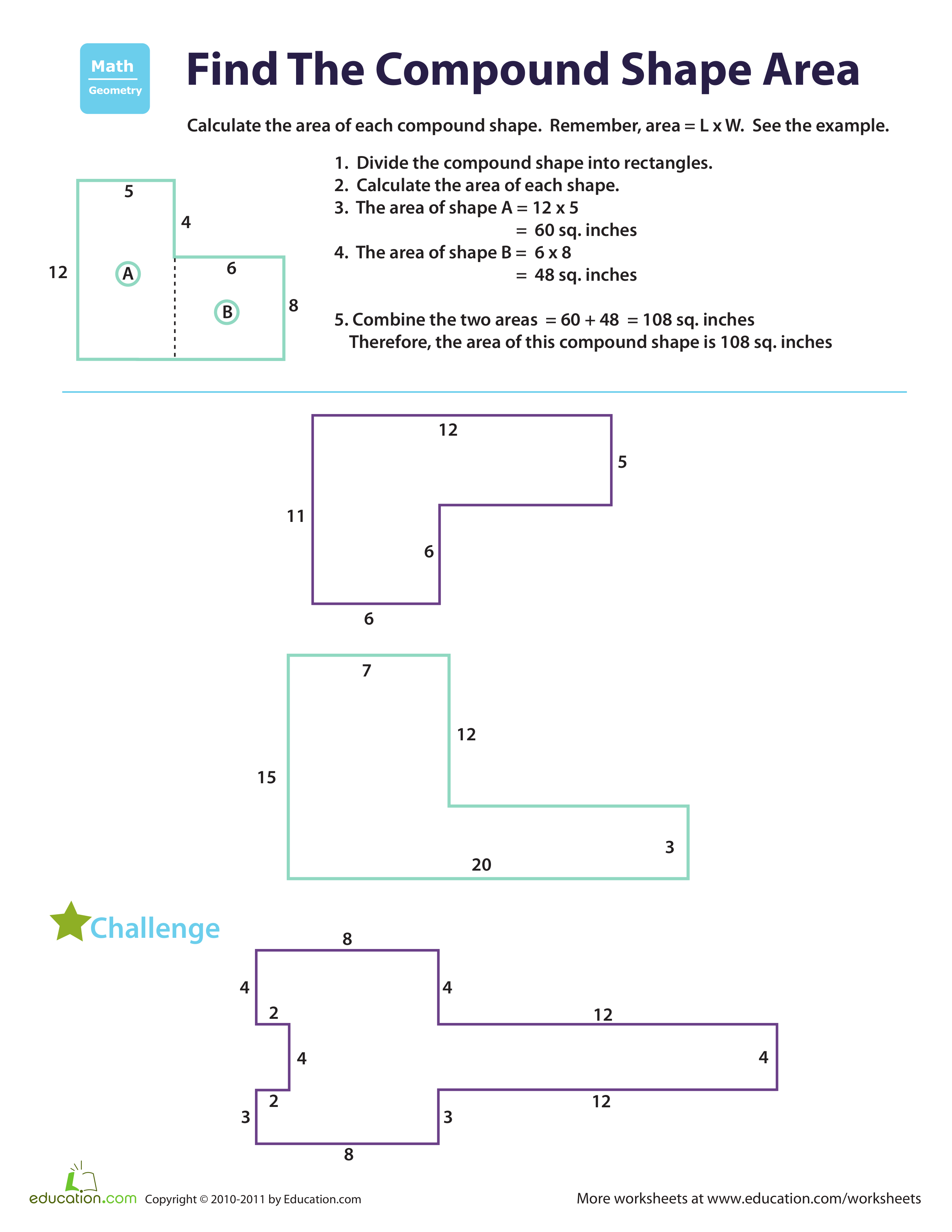
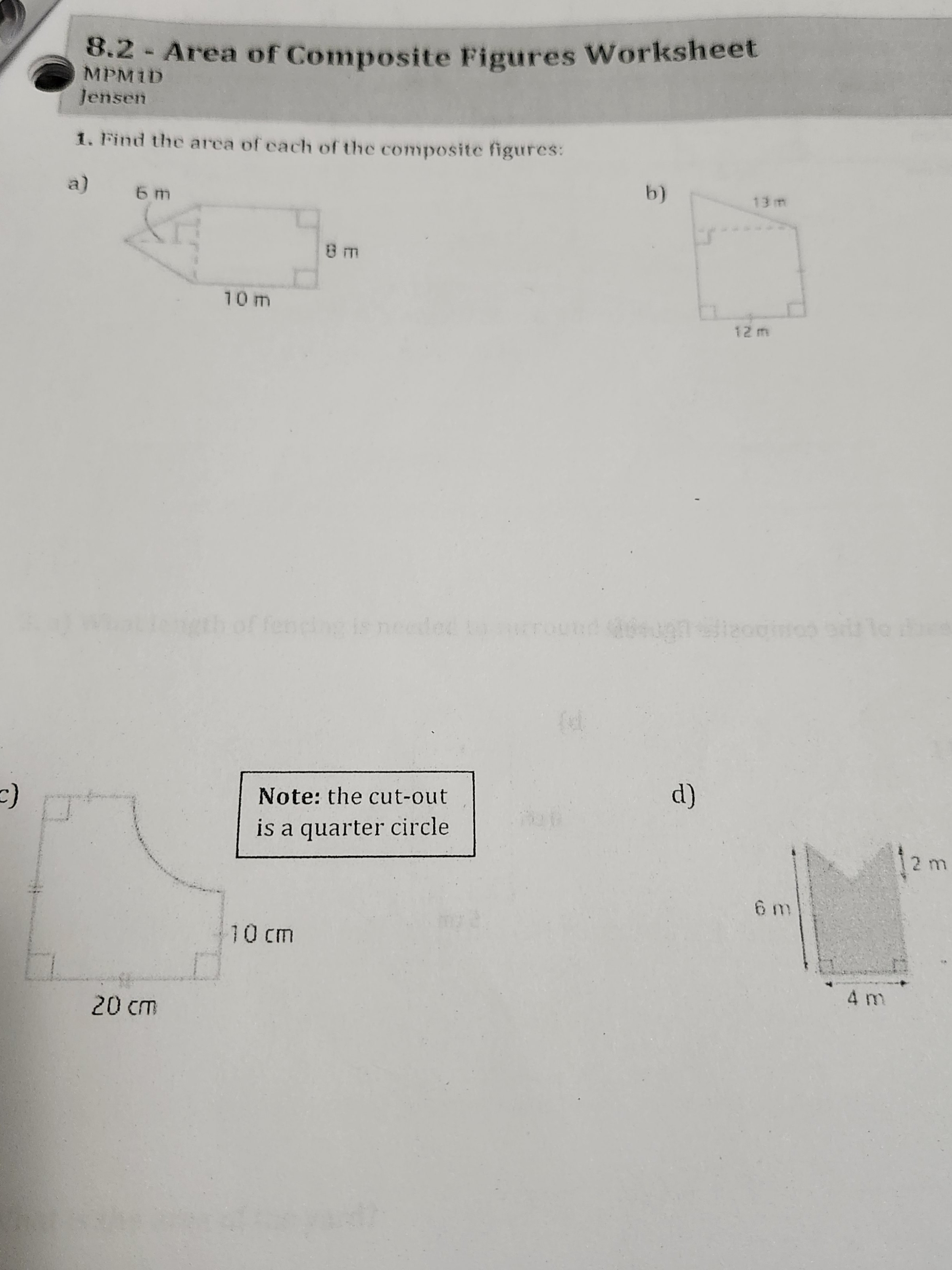
Calculating the area of a composite shape—a geometric figure formed by combining two or more simple shapes like rectangles, triangles, or circles—is a fundamental skill in geometry. To solve these problems, you must decompose the complex polygon into individual, manageable segments, calculate the area of each part using standard formulas, and then sum or subtract the results to find the total area of the figure.
Understanding Composite Geometry
A composite shape, often referred to as a complex or compound shape, does not have a single, universal formula for its area. Unlike a simple rectangle (length × width) or a circle (π × radius²), a composite shape requires a multi-step analytical approach. Mastering this skill bridges the gap between basic plane geometry and more advanced spatial reasoning required in architecture, engineering, and construction planning.
When you encounter an area of composite shapes worksheet, you are essentially practicing the process of geometric dissection. Whether the shape is additive—where smaller shapes are joined together—or subtractive—where a shape has a hole or a portion missing—the objective remains the same: identify the underlying "primitive" shapes that constitute the whole.
Essential Prerequisites for Success
Before attempting complex worksheet problems, ensure you have a firm grasp of the fundamental area formulas. Without fluency in these, you will struggle to calculate the components of a composite figure. You should be able to recall and apply the following:
- Rectangle/Square: $Area = \text{base} \times \text{height}$
- Triangle: $Area = \frac{1}{2} \times \text{base} \times \text{height}$
- Circle: $Area = \pi \times r^2$
- Trapezoid: $Area = \frac{a+b}{2} \times h$
- Parallelogram: $Area = \text{base} \times \text{height}$
Beyond memorizing these, you must understand the concept of decomposition. This involves drawing auxiliary lines on a diagram to split the complex shape into familiar polygons. Often, a single shape can be decomposed in multiple ways; recognizing that different approaches (e.g., vertical cuts versus horizontal cuts) should yield the same result is a key marker of mathematical proficiency.
Systematic Steps to Solve Any Composite Area Problem
To solve a problem from an area of composite shapes worksheet effectively, follow this standardized methodology:
- Analyze the Perimeter: Examine the dimensions provided. Often, a diagram will provide total lengths but leave specific segments undefined. You may need to use addition or subtraction to determine the missing side lengths before calculating the area.
- Decompose the Shape: Draw lines on the diagram to divide the complex shape into non-overlapping, simple shapes. If you are dealing with a subtractive shape (like a rectangle with a circular hole), identify the "bounding box" as the primary shape and the hole as the secondary shape to be subtracted.
- Label Each Segment: Assign a label to each sub-shape (e.g., Shape A, Shape B). This prevents confusion when you move to the calculation phase.
- Calculate Individual Areas: Apply the appropriate formula to each segment. Be consistent with your units of measurement (e.g., ensuring everything is in centimeters or inches before you start).
- Aggregate the Results: If the shapes are joined, add the areas together. If you are solving for a hollow shape, subtract the area of the "cutout" from the area of the larger, solid container.
- Verify and Review: Always re-read the prompt. Did the question ask for the area in a specific unit? Did you miss any hidden "cutouts" that represent empty space?
Comparing Approaches to Composite Shapes
The following table highlights the two primary strategies used when navigating an area of composite shapes worksheet.
| Feature | Additive Decomposition | Subtractive Decomposition |
|---|---|---|
| Primary Logic | Summing smaller parts | Removing a void from a whole |
| Best Used For | L-shaped or irregular polygons | Shapes with holes or cut corners |
| Formula | $Total = A1 + A2 + A3$ | $Total = A(\text{Outer}) - A(\text{Inner})$ |
| Complexity | Higher risk of missing a segment | Requires accurate outer-dimensioning |
Common Challenges and Troubleshooting
Students and professionals alike often encounter specific roadblocks when calculating composite areas. By anticipating these, you can correct your work before finalizing an answer.
Missing Dimensions
The most frequent issue is the "mystery side." If you have an L-shaped room, you might know the full length of one side but not the length of the shorter, internal segments. Use the surrounding parallel sides to calculate the difference. If the total width is 10 meters and one segment of that width is 4 meters, the remaining segment must be 6 meters.
Incorrect Formula Application
Students often confuse perimeter and area. Always remember that area is two-dimensional. If you find yourself multiplying three numbers together, you are likely calculating volume, not area. Double-check your formulas for triangles—a common mistake is forgetting the "half" ($\frac{1}{2}$) in the base-height formula.
Scaling and Units
Worksheets in 2026 often feature mixed units to test precision. If the width is given in meters but the length is in centimeters, you must convert all values to the same unit before performing any multiplication. Failing to standardize units is the most common cause of incorrect results.
Real-World Applications of Composite Area Calculations
The ability to calculate composite areas extends far beyond the classroom. It is a vital skill in several professional fields:
- Construction and Flooring: When installing hardwood or tile, you must calculate the exact floor space. Rooms are rarely perfect rectangles; they feature nooks, alcoves, and fireplaces, all of which represent composite shapes.
- Landscaping: Gardeners use these calculations to determine the amount of mulch or sod required for irregular lawn layouts.
- Manufacturing: Designing parts for machinery often involves complex shapes where the total surface area determines the amount of material needed for coating or finishing.
- Architecture: Estimating wall surface area for paint or insulation involves subtracting the area of doors and windows from the area of the wall sections.
Frequently Asked Questions
1. How do I know where to draw the lines to split a shape? Draw lines where you see corners or where the shape naturally changes direction. The goal is to create shapes that you can name and measure easily, such as standard rectangles or right-angled triangles.
2. Can I use subtraction if the shape is additive? Yes. You can imagine a larger rectangle that encompasses the entire object, then subtract the empty space that is not part of the shape. This is sometimes easier than calculating several small additive sections.
3. Does the order of operations change with composite shapes? Not inherently, but you must ensure that all individual areas are calculated fully before you perform the final addition or subtraction. Always perform your multiplication first to find the area of each part, then sum them up at the end.
4. Why is my answer different from the answer key? Check for rounding errors. If your worksheet requires the use of $\pi$, check if the instructions ask for a specific decimal approximation (like 3.14) or if you should use the full $\pi$ button on your calculator. Using 3.14 instead of 3.14159 can lead to small discrepancies in the final result.
5. What should I do if a shape has rounded edges? If a shape has curved edges, treat the circular or semi-circular portions as separate entities. If you have a square with a semi-circle on top, calculate the square's area and add half the area of a circle.
Final Guidance for Success
When working through your worksheet, maintain a clean workspace. Draw each decomposed shape separately on your scratch paper to visualize the dimensions clearly. Label each sub-shape with its calculated area before combining them. By maintaining this methodical, visual approach, you will minimize errors and build the confidence necessary to tackle increasingly complex geometric figures. If you find yourself stuck, return to the simplest components of the shape and re-verify your measurements for each individual part.