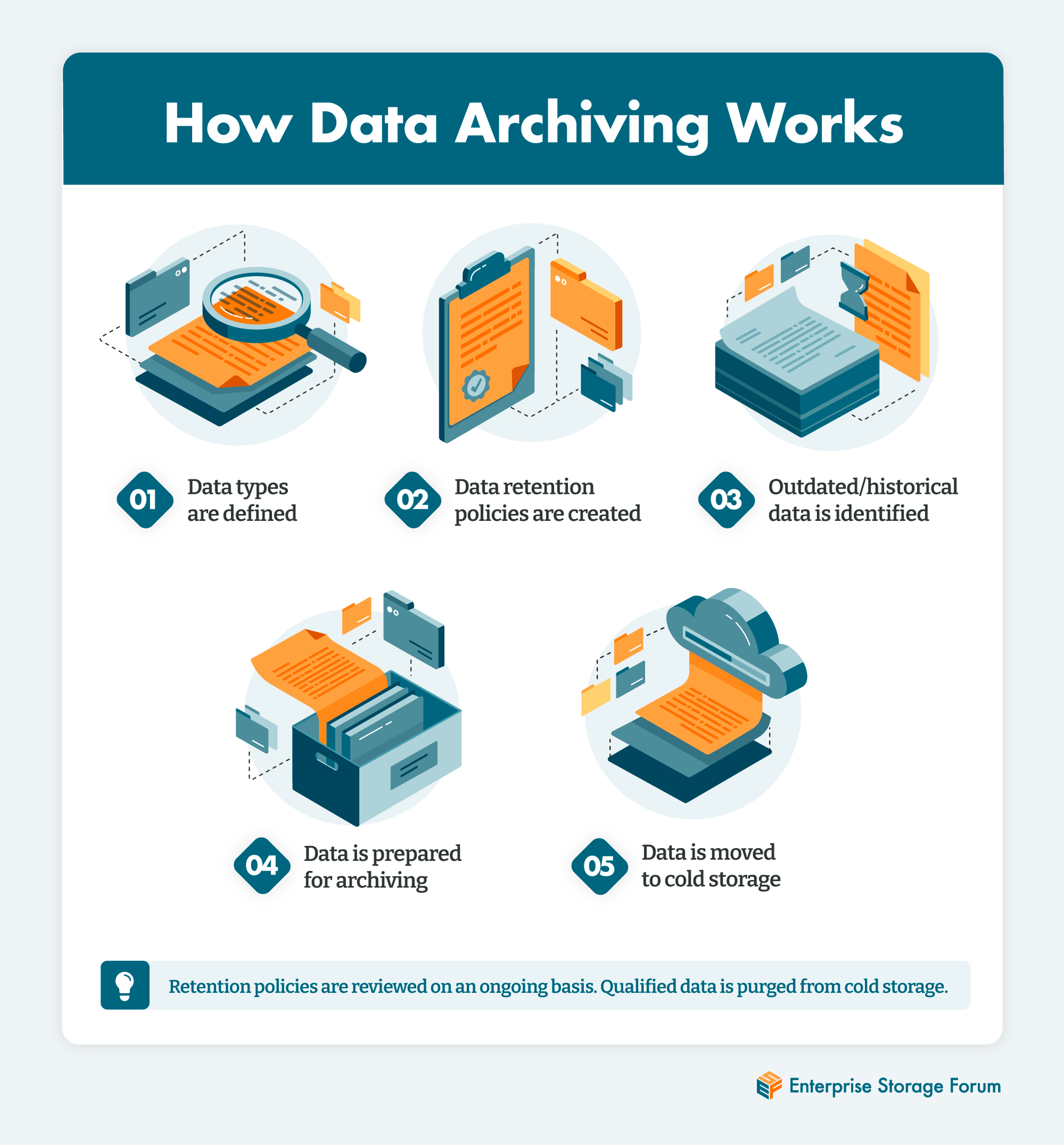
Archiving data storage is the strategic process of moving inactive or infrequently accessed data from expensive primary storage to specialized, low-cost secondary storage systems for long-term retention. Unlike backups, archives are designed for historical preservation, regulatory compliance, and efficient data retrieval, ensuring that vital organizational knowledge remains accessible without taxing active production environments.
In 2026, the global data landscape has reached a point where "keep everything forever" is no longer a viable strategy without a sophisticated archiving framework. As organizations grapple with massive datasets generated by artificial intelligence (AI), the Internet of Things (IoT), and stringent global privacy regulations, the distinction between active data and archival data has become the cornerstone of efficient IT infrastructure.
The Fundamental Differences Between Archiving and Backup
One of the most common misconceptions in data management is treating archiving and backup as interchangeable terms. While both involve storing data outside of primary production systems, their purposes, architectures, and recovery objectives differ significantly.
Backups: Short-term Recovery
A backup is a copy of active data used to restore a system to a previous state in the event of hardware failure, cyberattacks (like ransomware), or accidental deletion. Backups are inherently temporary; they are frequently overwritten as new versions are created. The primary metric for success in backup is the Recovery Time Objective (RTO)—how fast can we get back to work?
Archives: Long-term Preservation
An archive is a repository for data that is no longer being modified but must be kept for months, years, or decades. Once data is moved to an archive, the original version is typically deleted from the primary storage to free up space. The primary metrics for archiving are data integrity over time and searchability. In 2026, modern archiving systems prioritize metadata richness, allowing legal and compliance teams to locate a single document among petabytes of information without restoring an entire volume.
Why Organizations Need a Data Archiving Strategy in 2026
The shift toward proactive archiving is driven by three primary factors: cost optimization, regulatory necessity, and the rise of "Dark Data" management.
1. Primary Storage Performance and Cost
High-performance storage, such as NVMe-based All-Flash Arrays (AFAs), is expensive. Filling these drives with static data that hasn't been accessed in six months is a poor use of capital. By offloading this data to an archive tier, organizations can maintain smaller, faster, and more manageable primary storage footprints.
2. Regulatory Compliance and Litigation
From the evolved GDPR and CCPA frameworks to sector-specific rules like SEC Rule 17a-4 for financial services, the legal requirement to store data for specific periods (and delete it afterward) is absolute. Archiving storage provides the "immutable" environment required to prove that data has not been altered since it was stored.
3. The AI and Analytics Pipeline
In 2026, archived data is no longer "dead." It serves as the training ground for Large Language Models (LLMs) and predictive analytics. Modern archiving solutions include automated indexing that prepares historical data for AI ingestion, turning a liability (storage cost) into an asset (training data).
Key Technologies for Archiving Data Storage
The choice of archiving media depends on the balance between "warm" archives (data that might need to be accessed within minutes) and "cold" archives (data that can wait hours or days for retrieval).
Tape Storage (LTO-10 and Beyond)
Despite decades of predictions about its demise, tape storage remains the gold standard for massive-scale, low-cost archiving. In 2026, LTO-10 technology provides unprecedented capacity and an "air-gapped" security layer that is physically immune to online cyberattacks. Tape is the preferred choice for organizations needing to store hundreds of petabytes with the lowest possible power consumption and cooling costs.
Cloud Cold Storage
Hyperscale providers like Amazon Web Services (AWS), Microsoft Azure, and Google Cloud offer specialized archival tiers (e.g., AWS S3 Glacier Deep Archive). These services offer virtually infinite scalability and "pay-as-you-go" pricing. However, users must account for "egress fees" and retrieval latency, which can range from minutes to 12+ hours depending on the service level.
Object Storage (On-Premises and Hybrid)
Object storage uses a flat address space rather than a hierarchical file system, making it ideal for unstructured data like images, videos, and log files. By using S3-compatible APIs, on-premises object storage allows enterprises to build their own private "cloud" archive, providing the ease of cloud management with the security of local hardware.
Optical and Emerging Media
For ultra-long-term retention (50-100 years), specialized optical solutions and glass-based storage are emerging as niche players for cultural heritage sites and scientific research institutions where even the 30-year lifespan of tape is insufficient.
Comparing Archiving Storage Tiers
| Feature | Tape (LTO-10) | Cloud Cold Storage | On-Premises Object Storage |
|---|---|---|---|
| Primary Cost | Lowest (per GB) | Low (Monthly Opex) | Moderate (Capex) |
| Retrieval Speed | Minutes to Hours | Milliseconds to Days | Milliseconds |
| Durability | High (Media life 30yrs) | Extremely High (11 nines) | High (Erasure Coding) |
| Security | Physical Air-Gap | Virtual Encryption | Local Control |
| Best Use Case | Massive Scale/Compliance | General Business Archive | Active/Warm Archives |
Implementing a Data Archiving Policy: A Step-by-Step Framework
A successful archive is not just a technology purchase; it is a governance strategy. Without a clear policy, an archive quickly becomes a "data swamp."
Step 1: Data Profiling and Categorization
Before moving data, you must understand what you have. Use data discovery tools to identify "ROT" data (Redundant, Obsolete, or Trivial). In 2026, AI-driven discovery tools can automatically categorize data based on content, sentiment, and legal relevance.
Step 2: Defining Retention Periods
Consult with legal and compliance departments to determine how long specific types of data must be kept. For example:
- Employee Records: 7 years after termination.
- Financial Transactions: 7 to 10 years.
- Medical Records: Often 25 years or the life of the patient.
- AI Training Data: Indefinite, or until the model is superseded.
Step 3: Selecting the Target Media
Match the data's "value" to the storage cost. Critical legal data might go to an immutable on-premises object store, while raw sensor logs from five years ago are sent to LTO-10 tape.
Step 4: Automating the Tiering Process
Manual archiving is prone to error. Use storage management software that employs "stubbing" or "symbolic links." This allows users to see a file in its original location, but when they click it, the system automatically retrieves the data from the archive tier behind the scenes.
Step 5: Integrity Verification (Data Scrubbing)
Digital storage is subject to "bit rot"—the slow degradation of data on a physical medium. A robust archiving system must perform regular integrity checks (scrubbing) to ensure that the data written five years ago is still readable today.
Security and Compliance in the Archive
Security for archives requires a different mindset than security for active systems. Because archival data is often sensitive and voluminous, it is a high-value target for data exfiltration.
- Encryption at Rest and in Transit: All archived data must be encrypted using AES-256 or stronger standards. In 2026, managing your own encryption keys (KMIP) is essential for cloud archives to prevent unauthorized provider access.
- Immutability (WORM): Write-Once-Read-Many (WORM) storage prevents any user, even an administrator, from deleting or modifying data before its retention period expires. This is a critical defense against "delete-everything" ransomware attacks.
- Auditing and Chain of Custody: The archiving system should maintain a detailed log of who accessed what data and when. This is vital for legal "chain of custody" requirements in court proceedings.
Common Pitfalls to Avoid
- Ignoring Retrieval Costs: Cloud storage is cheap to put data into, but "egress" (taking data out) can be prohibitively expensive. Always model your expected retrieval frequency before committing to a provider.
- Proprietary Lock-in: Ensure your data is archived in a non-proprietary format. If your archiving software company goes out of business in ten years, you must still be able to read your data using standard tools.
- Lack of Metadata: Moving a file named
report_final_v2.pdfto an archive without contextual metadata (who wrote it, what project it belongs to) makes it nearly impossible to find later.
Frequently Asked Questions
What is "Bit Rot" and how do archives prevent it?
Bit rot, or data decay, occurs when the physical medium (magnetic bits on a disk or tape) loses its orientation over time, leading to corrupted files. Modern archiving systems prevent this through Erasure Coding and periodic "scrubbing," where the system reads the data, checks it against a checksum, and repairs any detected errors using redundant data chunks.
Can I use a NAS (Network Attached Storage) as an archive?
While a NAS can serve as a secondary storage tier, it is generally not a true archiving solution unless it supports WORM, advanced metadata tagging, and automated retention policies. A simple NAS is essentially just "cheap primary storage" rather than a governed archive.
Is cloud archiving more secure than on-premises tape?
Both have different security profiles. Cloud providers offer massive physical security and redundancy across multiple geographic zones. On-premises tape offers a "physical air-gap," meaning the data is not connected to any network, making it impossible to hack remotely. Many 2026 enterprises use a 3-2-1-1 strategy: 3 copies of data, 2 different media, 1 offsite, and 1 air-gapped/immutable.
How does "Dark Data" relate to archiving?
Dark data is information that an organization collects and stores but fails to use for any purpose. A proper archiving strategy identifies dark data, determines its value, and either archives it for future AI analysis or securely deletes it to reduce liability and cost.
Does archiving help with ransomware recovery?
Yes. Because archives are often stored on immutable or air-gapped media, they are frequently the "last line of defense" when backups have been compromised or encrypted by sophisticated ransomware.
Next Steps for Organizations
To modernize your archiving data storage in 2026, begin by conducting a Data Storage Audit. Identify volumes that have not been accessed in over 90 days and calculate the potential cost savings of moving that data to a cold tier. Evaluate current LTO-10 tape solutions for air-gapped security and compare them against the egress costs of cloud providers. Finally, ensure that any selected solution integrates with your existing identity management (IAM) and compliance frameworks to maintain a unified security posture.