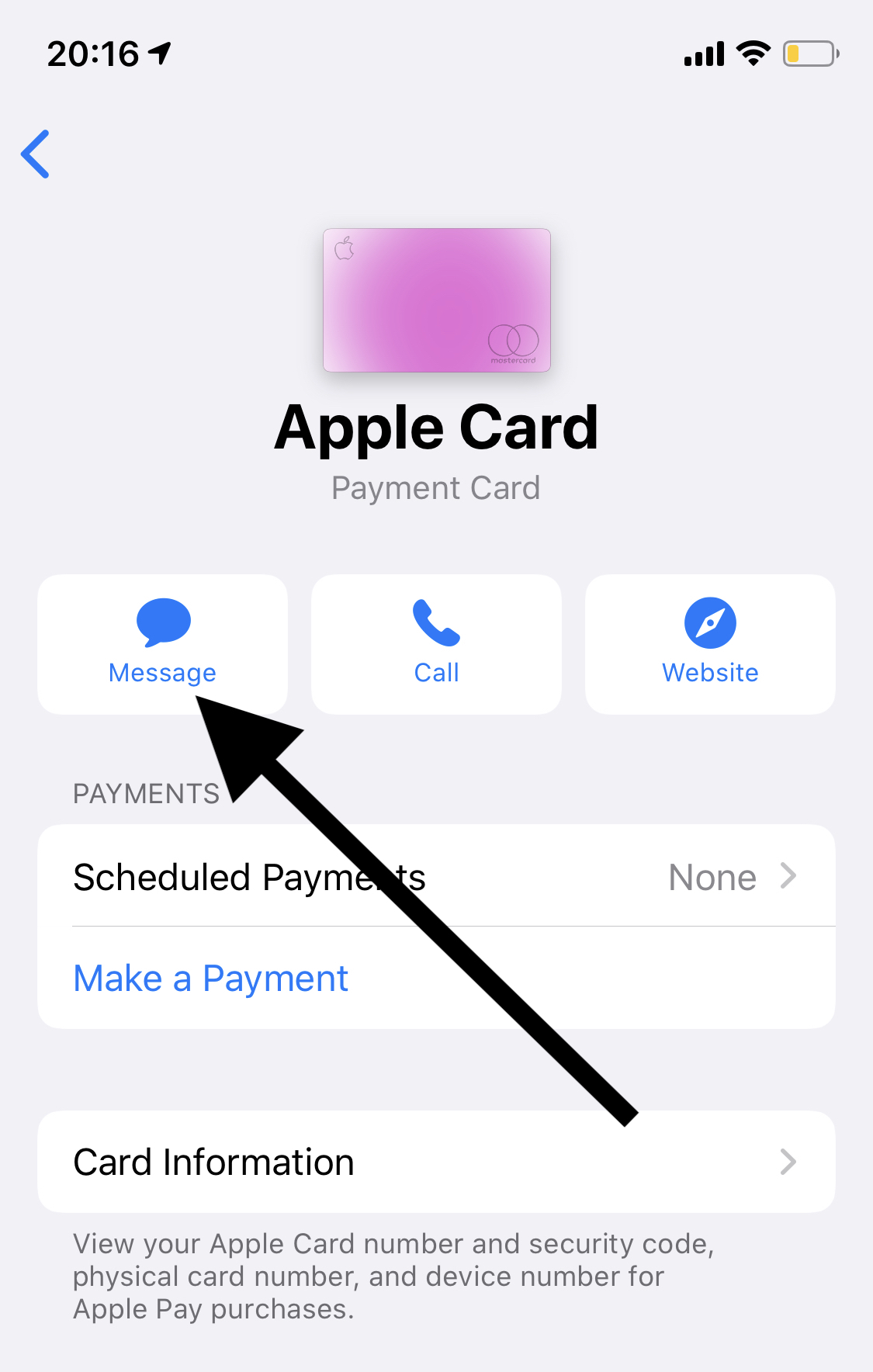
To request an Apple Card credit limit increase, open the Wallet app on your iPhone, select Apple Card, tap the Message button under card details, and text "Credit Limit Increase" to Goldman Sachs support. The process relies on a soft credit check that does not impact your credit score. Most cardholders are eligible to submit a request after 90 days of consistent account activity.
Disclaimer: This article is for informational purposes only and does not constitute formal financial, legal, or credit counseling advice. Credit policies, underwriting criteria, and issuer partnerships may change over time. Consult a qualified financial advisor for guidance tailored to your specific situation.
Understanding the Apple Card Credit Limit Increase Mechanics
The Apple Card, issued by Goldman Sachs Bank USA, operates with a distinct digital-first interface designed to streamline account management through iOS. Unlike traditional credit cards that often require logging into a desktop web portal or navigating complex phone menus, the Apple Card credit limit increase (CLI) process takes place primarily within the Messages app on Apple devices.
When evaluating an account for a credit limit adjustment, Goldman Sachs evaluates financial indicators beyond basic credit scores. Understanding the underlying mechanics helps you timing your request for the highest probability of approval.
- Initiate via iPhone Wallet App (Tap Apple Card > Details > Message)
- iMessage Prompt with Automated Assistant (Confirm / Update Gross Annual Income & Info)
- Soft Credit Check (TransUnion) (Zero Impact to FICO / Credit Score)
- Decision Outcomes:
- APPROVED: Limit Updated Instantly
- DENIED: Adverse Action Email Sent (Explanation)
Soft Inquiry vs. Hard Inquiry
One major benefit of the Apple Card limit increase process is that requesting an increase results only in a soft credit inquiry.
- Soft Credit Inquiry: Goldman Sachs reviews your credit file—typically sourced from TransUnion—without placing a hard check on your credit report. Soft inquiries are visible only to you and do not affect your FICO Score or VantageScore.
- Hard Credit Inquiry: A hard pull occurs during formal new credit applications (such as your initial application for the Apple Card) and can temporarily drop your credit score by a few points.
Because requesting an Apple Card CLI relies strictly on soft inquiry data, there is no credit score penalty for submitting a request, even if Goldman Sachs declines the increase.
Automatic vs. Customer-Initiated Increases
Goldman Sachs regularly reviews active Apple Card accounts for automatic credit line increases. These proactive adjustments usually occur after consistent spending and prompt repayment over 6 to 12 months.
However, you do not need to wait for an automated system to trigger an upgrade. Submitting a customer-initiated request through the Wallet app forces an immediate review of your account, allowing you to secure a higher spending limit as soon as your financial credentials justify it.
Eligibility Criteria and Prerequisites
Before initiating a credit limit increase request, ensure your account satisfies Goldman Sachs' internal underwriting benchmarks. Requesting an increase prematurely can lead to an automated refusal.
| Criterion | Standard Expectation |
|---|---|
| Minimum Account Age | 90+ days since opening/last CLI |
| Payment History | 100% on-time, no returned payments |
| Card Usage | Regular monthly transactions |
| Account Balance Trend | Low balance relative to current cap |
| Credit File Status | No recent severe derogatories |
1. Account Age and the 90-Day Benchmark
Goldman Sachs generally requires an account to be open for at least 90 days before granting a credit line adjustment.
- New Accounts: If you opened your Apple Card less than three months ago, system automation will likely reject your request immediately.
- Subsequent Requests: After receiving an increase, wait at least 90 to 180 days before submitting your next request. While some cardholders report approvals at 90-day intervals, waiting 180 days yields higher approval rates and larger line increases.
2. On-Time Payment History
Your payment track record on the Apple Card is the single most important factor. To qualify for a higher limit:
- You must have zero late payments across all credit accounts.
- Avoid returned payments (NSF errors due to insufficient bank funds). A single returned payment can trigger a temporary restriction on limit increases for 6 to 12 months.
- Paying more than the minimum balance—ideally clearing your statement balance in full every month—demonstrates financial stability and strong debt-handling capacity.
3. Credit Utilization Ratios
Underwriters evaluate your credit utilization ratio across two dimensions:
- Apple Card Utilization: Operating near your maximum credit limit for months without paying it down signals potential risk. Conversely, carrying a moderate balance and regularly paying it off shows strong demand for credit paired with responsible management.
- Overall Credit Utilization: Goldman Sachs assesses your revolving utilization across all open credit cards via TransUnion. Keeping overall revolving utilization below 30% (and ideally below 10%) significantly improves your odds.
4. Updated Gross Annual Income
Credit card issuers are legally required under the Credit Card Accountability Responsibility and Disclosure (CARD) Act of 2009 to evaluate a consumer's ability to pay before extending additional credit. You must report an accurate, up-to-date gross annual income figure when prompted during the request flow.
Step-by-Step Guide: How to Request an Increase
You can submit an Apple Card credit limit increase request through three different channels: iPhone, iPad, or Apple Watch/Mac supported workflows. The primary method remains the iPhone Wallet app.
Method 1: Requesting via iPhone Wallet App (Recommended)
Launch Wallet: Open the Wallet app on your iPhone.
Select Card: Tap on your Apple Card tile.
Access Card Details: Tap the More (...) icon or the Card Details icon in the upper-right corner.
Initiate Chat: Tap the Message button to open an iMessage conversation with Apple Card Support.
Type Request: Send a message stating:
"I would like to request a credit limit increase."Complete Prompts: The automated assistant will reply with prompts requesting your total annual income. Enter your updated Gross Annual Income in numerical format when prompted.
Confirm Financial Status: Answer any follow-up questions regarding employment status or monthly housing costs if prompted.
Receive Decision: In most cases, an immediate reply will provide your approval status, new total credit line, or a notification that your account requires manual review.
Step 1: Open Wallet App
Step 2: Select Apple Card
Step 3: Tap (...) Details Icon
Step 4: Tap Message Icon & Type "CLI"
Step 5: Input Income
Step 6: Receive Decision
Method 2: Requesting via iPad or Mac
If you use an iPad configured with Apple Pay:
- Open Settings on your iPad.
- Scroll down and tap Wallet & Apple Pay.
- Select Apple Card.
- Tap the Support tab, then tap Message to launch Messages and submit your request.
On macOS (macOS Big Sur or later):
- Open System Settings (or System Preferences).
- Select Wallet & Apple Pay.
- Choose Apple Card, click Support, and launch a message conversation with Goldman Sachs.
Method 3: Requesting via Telephone
For users who prefer speaking directly with a customer service representative:
- Call Apple Card Support at 1-877-255-5923.
- Authenticate your identity using your account details and passcode.
- Request a credit line increase with the specialist.
- Provide your updated gross annual income verbally.
What Happens After Submitting Your Request?
Once you submit your financial information, Goldman Sachs processes the request through an automated decision engine.
| Outcome | Immediate System Result | Next Action |
|---|---|---|
| Approved | New limit applies immediately | Use card responsibly |
| Under Review | Decision deferred (24-72 hours) | Await email notification |
| Declined | Limit remains unchanged | Read Adverse Action email |
Immediate Approval
If your account qualifies, the automated system will reply within seconds displaying your new overall credit limit, your available credit, and the incremental amount added to your account. The updated limit takes effect immediately in your Wallet app.
Deferred or Manual Review
If your account falls into an edge-case category, the automated system will inform you that your request requires additional time to process.
- Manual reviews generally take 24 to 72 hours.
- You will receive a formal status update via your account email address outlining the decision once underwriting completes the review.
Declined Requests and Adverse Action Notices
If Goldman Sachs declines your request, your current credit limit remains unchanged.
By law, the bank must provide an Adverse Action Notice. Within 7 to 10 business days (often delivered electronically via email), Goldman Sachs will send a document detailing the specific reasons for the denial. Common reasons include:
- Your Apple Card account is too new.
- You have not used enough of your current credit limit.
- Recent payments were not made on time.
- Your credit utilization across external accounts is too high.
- TransUnion credit score does not meet internal guidelines.
- Obligation-to-income ratio is too elevated.
Comparison: Apple Card vs. Major Card Issuers
Different credit card issuers apply distinct policies regarding credit limit increases, inquiry types, minimum waiting periods, and submission tools. The table below outlines how Apple Card compares to major industry competitors.
| Card Issuer / Product | Soft Inquiry for CLI? | Standard Waiting Period | Primary Request Method | Hard Inquiry Risk? |
|---|---|---|---|---|
| Apple Card (Goldman Sachs) | Yes | 90 to 180 Days | iMessage / Wallet App | No (Soft pull only) |
| American Express | Yes | 60 to 90 Days | Amex Mobile App / Website | No (Rare cases excepted) |
| Chase | Yes (as of recent policy) | 180 Days | Chase App / Phone | No (Historically hard, now mostly soft) |
| Capital One | Yes | 180 Days | Capital One Mobile App | No |
| Discover | Yes | 30 to 90 Days | Account Center App / Online | No |
| Bank of America | Yes | 180 Days | Online Banking / App | No |
Strategies to Increase Your Approval Odds
To maximize your chances of securing a significant credit limit increase on your Apple Card, implement these actionable habits:
1. Show Consistent Card Usage
Goldman Sachs favors active cardholders. If you rarely use your card or only spend small amounts monthly, the bank has little incentive to grant a higher credit limit.
- Use your Apple Card for regular monthly purchases (such as groceries, subscriptions, and Apple Pay transactions).
- High spend volume that is consistently paid off demonstrates that your current limit restricts your genuine purchasing needs.
2. Time Your Request Strategically
Avoid requesting increases during periods of elevated credit usage or right after taking on major debts (such as a mortgage or auto loan).
- The 180-Day Rule: While 90 days is the minimum requirement, waiting 180 days yields significantly higher approval rates and larger incremental adjustments.
- Post-Paydown Timing: Submit your request right after paying down your monthly statement balance, before new spending reports to credit bureaus.
3. Report All Legally Allowable Income
When prompted for your gross annual income, report all total household income you can reasonably access, consistent with federal consumer protection regulations:
- Personal salary or wages
- Spousal or partner income (if accessible to pay obligations)
- Bonuses, commissions, and investment dividends
- Retirement income or pensions
- Rental income and trusted household contributions
Caution: Always report accurate figures. Exaggerating income on a credit application constitutes financial fraud and can lead to account closure or adverse legal action.
4. Review Your TransUnion Credit Report
Because Goldman Sachs relies heavily on TransUnion data, monitor your report for errors or negative marks:
- Review your credit report for free at AnnualCreditReport.com.
- Dispute incorrect delinquency entries or unauthorized inquiries before requesting a credit limit increase.
Troubleshooting Common Issues
Issue 1: "Message Failed to Send" in Wallet App
If texting Apple Card Support fails, check your device setup:
- Ensure iMessage is enabled under Settings > Messages.
- Verify your iPhone has an active cellular or Wi-Fi data connection.
- If iMessage remains unavailable, call 1-877-255-5923 to complete your request over the phone.
Issue 2: Immediate Denial Due to Account Age
If you receive an instant automated refusal citing account age, check the date of your last approved increase or account opening. The system enforces strict 90-day locks. Set a calendar reminder for day 91 or day 181 before submitting a new request.
Issue 3: Stagnant Line Increases ("Bucket Scheme")
If your limit increases are small or consistently denied despite good credit habits, your account may be flagged based on its initial risk profile at opening.
- Maintain zero balances across other credit accounts to lower your overall debt ratio.
- Increase your overall annual spending on the card to demonstrate clear capacity and demand.
Frequently Asked Questions
Does requesting an Apple Card credit limit increase hard pull your credit score?
No. Submitting a request for an Apple Card credit limit increase involves a soft inquiry on your credit report (typically through TransUnion). Soft inquiries do not impact your FICO score or credit file, making the request risk-free for your credit score.
How long should you wait between Apple Card credit limit increase requests?
You must wait at least 90 days after account opening or after your last credit limit change. However, waiting 180 days (6 months) gives you a higher statistical chance of approval and larger line increases, as it provides a longer track record of positive spending and repayment behavior.
Can you request an Apple Card limit increase online without an iPhone?
Yes, though the process is easiest on an iOS device. If you do not have an iPhone available, you can initiate a request using an iPad or Mac through the Wallet & Apple Pay system settings. Alternatively, call Apple Card customer support directly at 1-877-255-5923.
What gross annual income should you report for an Apple Card limit increase?
Report your total gross annual income before taxes. This includes salary, wages, self-employment income, bonuses, and investment returns. Under federal rules, consumers aged 21 and older can also include shared household income (such as a spouse's or partner's salary) if they have a reasonable expectation of access to those funds to meet credit obligations.
Why was your Apple Card credit limit increase request denied?
Goldman Sachs denies credit limit increases for several common reasons, including account age under 90 days, low usage of your current limit, high utilization on external accounts, late payments on your credit file, or insufficient reported income. Review your Adverse Action notice via email for the exact factors impacting your decision.
Recommended Next Steps
If you are planning to request a credit limit increase on your Apple Card:
- Check Your Calendar: Confirm it has been at least 90 days (ideally 180 days) since your account opening or last credit limit increase.
- Pay Down Existing Balances: Lower your current Apple Card balance and external card utilization to under 10% of total available credit.
- Calculate Total Income: Aggregate your gross annual income source data so you can enter an accurate figure quickly.
- Initiate Request: Open the Wallet app on your iPhone, tap Apple Card > Details > Message, and text
"Credit Limit Increase". - Set Reminders: If approved, mark your calendar for 180 days out to review your eligibility for your next increase. If declined, review your Adverse Action email, address the cited risk factors, and reapply in 90 days.