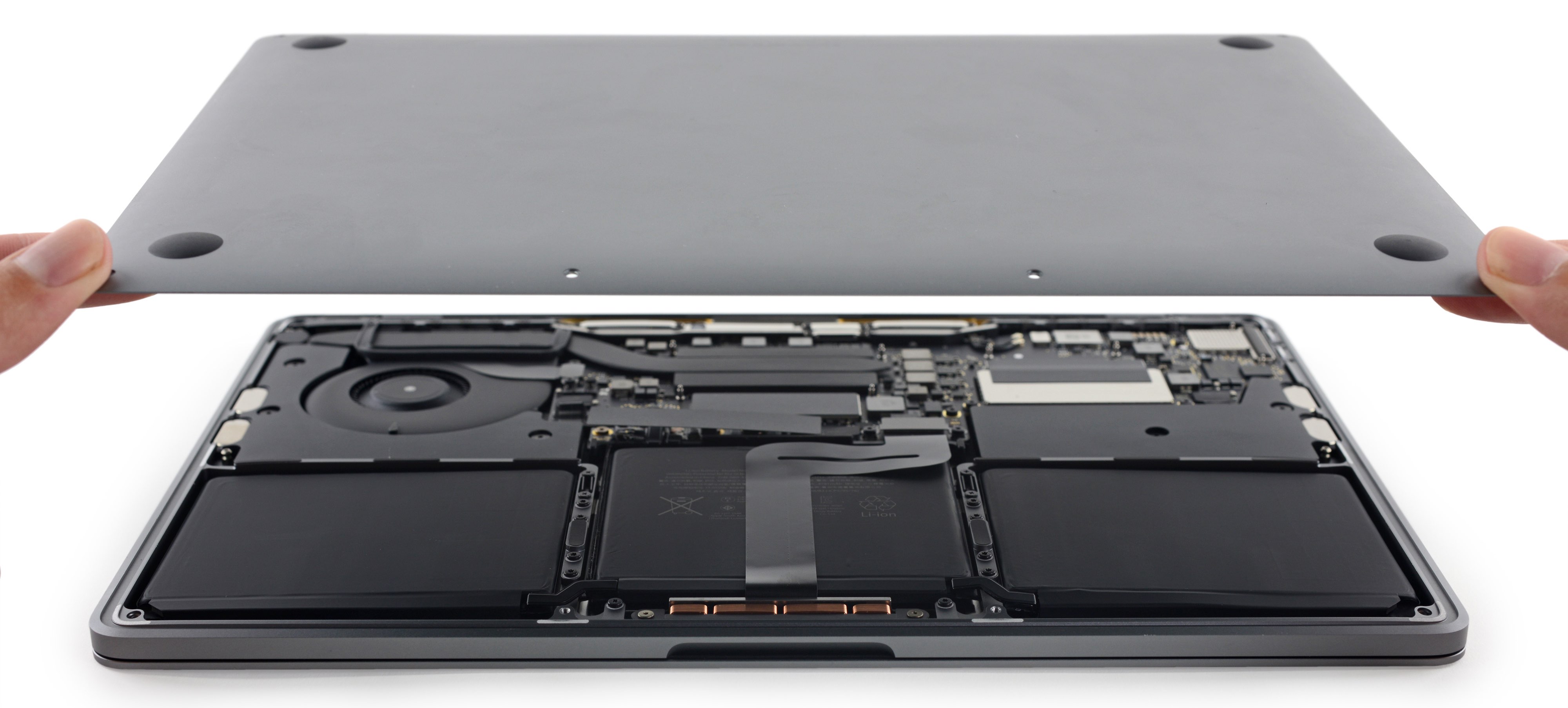
Apple provides free battery replacements for iPhones, MacBooks, iPads, and Apple Watches if the device is covered under active AppleCare+ or the standard one-year limited warranty and its battery capacity drops below 80%. You may also qualify for a zero-cost battery replacement through an official Apple Quality Program or regional consumer protection laws.
Understanding Apple’s Free Battery Replacement Eligibility
Getting a free battery replacement directly from Apple requires meeting specific coverage conditions. Apple treats rechargeable batteries as consumable components, meaning they naturally degrade over time as they age chemically. Because capacity loss from regular use is standard behavior for lithium-ion batteries, Apple does not offer free battery replacements to out-of-warranty devices experiencing normal wear and tear. However, four distinct pathways allow hardware owners to receive battery service at zero cost.
Standard 1-Year Limited Warranty Coverage
Every new Apple device comes with a standard one-year limited warranty against manufacturing defects. If your device’s battery fails due to a defect in materials or workmanship within the first 12 months, Apple will repair or replace the battery for free.
It is important to distinguish between defective battery behavior and normal capacity degradation:
- Defective Battery: A battery that fails to hold a charge, suffers from sudden unexpected shutdowns, inflates physically, or exhibits rapid health degradation (dropping below 80% maximum capacity within the first year under normal operating conditions) is generally classified as defective and covered under warranty.
- Normal Wear: A battery that gradually drops in capacity due to heavy charge cycles over the course of a year without falling below Apple's official diagnostic failure threshold is considered standard wear and is not covered for free under the standard limited warranty unless a manufacturing fault is identified.
AppleCare+ Battery Coverage and the 80% Rule
If you purchased AppleCare+ for your iPhone, iPad, Mac, or Apple Watch, your coverage extends beyond standard defect protection to include capacity loss. Under official Apple policy, any device with active AppleCare+ coverage qualifies for a $0 battery replacement if the battery retains less than 80 percent of its original maximum capacity.
This 80% cutoff is strict. If your device's diagnostic test returns a maximum capacity of 81%, Apple will not perform a free replacement under AppleCare+ until the health metric officially drops to 79% or lower, or unless the battery exhibits an independent hardware failure during diagnostic testing.
Apple Quality Programs and Exchange Recalls
Periodically, Apple identifies component issues affecting specific product lines and opens public service programs. Under these Quality Programs (often called recall programs), Apple replaces defective batteries free of charge regardless of your warranty status or AppleCare+ enrollment.
Historical examples include specific production batches of the 13-inch MacBook Pro (non Touch Bar) and certain iPhone 6s units. If Apple determines that a batch of devices shipped with a factory flaw affecting power delivery or battery stability, owners can submit their serial number to Apple's support portal to verify if their device is covered for a free repair.
Regional Consumer Protection Laws
In several international jurisdictions, local statutory laws override standard manufacturer warranties. If you live in an area with strong consumer protection laws—such as the European Union, the United Kingdom, Australia, or Quebec—you may be legally entitled to a free repair or replacement for hardware defects beyond Apple's standard one-year period.
- European Union & UK: Consumer law allows claims for hardware defects that existed at the time of delivery for up to two years (or up to six years in parts of the UK).
- Australia: Australian Consumer Law provides statutory guarantees that products must be of acceptable quality and last a reasonable duration based on product type and cost.
To claim a free battery replacement under consumer law, you must generally establish that the battery failure stems from a defect present at manufacture or an unreasonable failure rate relative to normal product expectations, rather than expected consumable depletion.
How Apple Evaluates Battery Health and Diagnostics
Before authorizing a free battery replacement under warranty or AppleCare+, Apple technicians run an automated hardware diagnostic to evaluate the chemical status of the component.
Battery Status Diagnostic Flow:
- User Device
- Apple Diagnostics / Settings Check
- Capacity < 80% or Hardware Fault
- Free Replacement ($0) (If under Warranty/AppleCare+)
- Capacity >= 80% & No Faults
- Out-of-Warranty Fee / Retain Device
- Capacity < 80% or Hardware Fault
Battery Chemistry and Chemical Aging
Apple devices use rechargeable lithium-ion technology. Lithium-ion batteries charge faster, last longer, and offer higher power density than traditional battery chemistry. However, all lithium-ion batteries are chemically limited components.
As lithium-ion batteries age chemically, the amount of charge they can hold decreases. This results in shorter amounts of time before a device needs to be recharged. Additionally, a battery's ability to deliver maximum instantaneous power (peak power) may decline over time, leading to unexpected device shutdowns under heavy processing loads if software management is not applied.
How to Check Battery Capacity Across Devices
On iPhone (iOS)
- Open the Settings app.
- Scroll down and tap Battery.
- Tap Battery Health & Charging (or Battery Health on older iOS versions).
- Review the Maximum Capacity percentage. If the number is 79% or lower and you have active AppleCare+ or warranty coverage, you are eligible for a free replacement.
On MacBook (macOS)
- Open System Settings (or System Preferences).
- Click Battery in the sidebar.
- Look at the Battery Health status indicator.
- Click the Info (i) button next to the condition listing. If the system reports "Service Recommended" or maximum capacity is below 80%, the laptop qualifies for battery service.
On Apple Watch (watchOS)
- Open Settings on the Apple Watch.
- Scroll down and tap Battery.
- Tap Battery Health.
- Observe the Maximum Capacity figure.
On iPad (iPadOS)
Unlike iPhone and Mac, iPadOS does not display a user-facing maximum capacity percentage directly in the Settings menu for most older models. To verify iPad battery health, you must connect the iPad to an Apple Store technician, use an Authorized Service Provider diagnostic, or contact Apple Support online to run remote hardware diagnostics.
Apple’s In-Store Diagnostic System
When you bring a device to an Apple Store Genius Bar or an Apple Authorized Service Provider (AASP), a technician connects your hardware to Apple Console Diagnostic Software via Wi-Fi or cable. This software evaluates:
- Cycle Count: The total number of full charge-and-discharge cycles the battery has completed.
- Actual Charge Retention: The precise milliamp-hour (mAh) capacity remaining relative to factory specifications.
- Power Delivery Events: Logs of sudden voltage drops or power panics.
- Physical Safety Flags: Internal sensor warnings detecting battery swelling or abnormal heat spikes.
If the internal diagnostic flags a battery failure or confirms maximum capacity is under 80%, the system automatically generates an eligible $0 work order if an active warranty or AppleCare+ agreement is attached to the serial number.
Step-by-Step: How to Claim Your Free Battery Replacement
If your device meets the eligibility criteria, follow these operational steps to request and complete your battery service.
Service Preparation Steps:
- Backup Device: Create full iCloud or Mac/PC backup
- Disable Find My: Turn off Activation Lock in Settings
- Unpair Watch: (If servicing Apple Watch)
- Schedule Service: Book Genius Bar or Mail-In via Apple Portal
Step 1: Verify Warranty Coverage and Serial Number
Before contacting service channels, confirm your device's coverage status.
- Locate your device Serial Number (found in Settings > General > About).
- Visit the official Apple Check Coverage tool.
- Enter your serial number to confirm whether standard warranty or AppleCare+ is active.
Step 2: Create a Complete Device Backup
Battery replacements often involve opening the device chassis, disconnecting internal logic boards, or completely replacing the unit (common with iPads and Apple Watches). Data loss can occur.
- iCloud Backup: Go to Settings > [Your Name] > iCloud > iCloud Backup > Tap Back Up Now.
- Mac/PC Backup: Connect your iOS device to a computer, open Finder or iTunes, select your device, and perform an encrypted local backup to preserve sensitive health and password data.
Step 3: Turn Off Find My and Activation Lock
Apple repair policies prohibit technicians from performing hardware service on devices with active anti-theft locks.
- On iOS: Go to Settings > [Your Name] > Find My > Find My iPhone, and toggle it off (requires your Apple Account password).
- On Mac: Go to System Settings > [Your Name] > iCloud > Find My Mac, and turn it off.
Step 4: Schedule Service Through Official Apple Channels
Do not drop off your device at an unauthorized repair shop if you want a free official service. You must use official Apple pathways:
- Apple Support Portal: Access getsupport.apple.com or use the Apple Support App on iOS.
- Select Device & Issue: Choose your hardware, navigate to Repairs & Physical Damage, and select Battery Service.
- Choose Service Method:
- In-Person Repair: Schedule an appointment at an Apple Store Genius Bar or an Apple Authorized Service Provider (such as Best Buy or certified repair partners).
- Mail-In Repair: Apple sends a prepaid shipping box to your home. You package the device, ship it to an Apple Repair Center, and receive it back via courier.
Comparison of Apple Battery Replacement Scenarios
The table below outlines costs, diagnostic requirements, and fulfillment expectations across common coverage states and product lines.
| Device Family | Coverage Status | Condition for Free Service | Out-of-Warranty Fee (If Ineligible) | Fulfillment Method |
|---|---|---|---|---|
| iPhone (iPhone 13–16 series) | AppleCare+ | Max Capacity < 80% or diagnostic hardware failure | $99 – $119 | Same-day in-store or mail-in |
| iPhone (Older models) | Standard 1-Year Warranty | Defective manufacturing issue (or < 80% within 1 year) | $69 – $99 | Same-day in-store or mail-in |
| MacBook Air / Pro | AppleCare+ | Max Capacity < 80% or diagnostic failure | $159 – $249 | 3–7 day mail-in / depot repair |
| Apple Watch | AppleCare+ | Max Capacity < 80% or hardware failure | $99 | Whole unit replacement |
| iPad (All models) | AppleCare+ | Max Capacity < 80% or hardware failure | $99 – $179 | Whole unit replacement |
| Any Supported Device | Quality Recall Program | Covered serial number under open recall program | $0 (Covered by program) | In-store or mail-in |
| Any Supported Device | Out of Warranty / No AppleCare+ | None (Must pay full fee) | Full standard repair price | In-store or mail-in |
Important Rules, Caveats, and Potential Hardware Obstacles
Even if your battery health is below 80% and you have active AppleCare+, certain hardware conditions can block or complicate a free battery replacement.
The Impact of Existing Physical Damage
Apple technicians must safely disassemble your device to replace internal components. If your device has pre-existing damage that prevents technicians from completing the battery repair safely, that damage must be fixed first.
- Cracked Screens on iPhones: If an iPhone has a cracked screen, removing the display to access the battery will likely cause the screen to shatter completely. Apple policies dictate that the screen must be replaced at the same time. If you have AppleCare+, the screen repair will carry a minor deductible (typically $29), but if you do not have accidental damage coverage, you will be required to pay the full screen replacement fee before the battery service can be completed.
- Bent Enclosures and Liquid Damage: Devices with severely bent frames, broken back glass, or active internal liquid corrosion may be rejected for standalone battery service. In these scenarios, Apple may require a full device replacement under AppleCare+ incident rules.
Whole Unit Replacements vs. Component Swaps
Not all Apple devices receive an simple internal battery swap:
- iPhones and MacBooks: Technicians generally remove the back panel or display, extract the degraded battery module, install a genuine new battery with fresh adhesive strips, recalibrate the hardware, and return your original device.
- iPads and Apple Watches: Due to the compact internal construction and heavy adhesive bonding of these devices, Apple standard practice is to replace the entire unit with a refurbished equivalent of the exact same model, color, and specification rather than replacing only the battery cell inside the original housing.
Third-Party Repairs and Non-Genuine Parts Warning
If your device was previously repaired at an unauthorized third-party shop using non-genuine components, Apple may refuse service—even if the device is covered under warranty or AppleCare+.
If an uncertified technician replaced your screen, lightning port, or battery previously:
- Apple diagnostics may detect non-genuine hardware signatures.
- The technician can refuse to work on the device due to safety concerns regarding uncertified third-party lithium-ion cells.
- iOS will display an "Unknown Part" message in Settings > General > About, disabling built-in Battery Health metrics for that uncertified component.
Options If You Do Not Qualify for a Free Replacement
If your device is out of warranty, lacks AppleCare+, and is not part of a recall program, you must evaluate paid options.
Official Paid Apple Battery Service
Paying Apple for an official out-of-warranty battery service guarantees that your hardware receives an authentic Apple battery installed by certified technicians. This service preserves waterproof seals, maintains system diagnostics, and includes a 90-day Apple service warranty on the replaced component.
Standard out-of-warranty battery replacement costs typically range from:
- iPhones: $69 to $119 depending on model generation.
- Apple Watch: $99 across most modern series.
- iPads: $99 to $179 depending on screen size and Pro vs. Air configuration.
- MacBook Air & Pro: $159 to $249 depending on display size and enclosure architecture.
Apple Self Service Repair Program
If you have technical experience and wish to repair your own device, Apple operates a Self Service Repair program. Apple provides genuine replacement parts, professional repair manuals, and specialized tool rentals directly to consumers.
While purchasing parts through Self Service Repair is not free, it allows owners to install official Apple batteries without visiting an Apple Store. After installing the new cell, you initiate a remote System Configuration process with Apple to pair the new battery's cryptographic serial number to your logic board, restoring full Battery Health monitoring functionality in iOS or macOS.
Best Practices to Preserve Apple Battery Health
To minimize chemical degradation and prevent your battery capacity from dropping prematurely, apply these operational battery health management rules:
Battery Longevity Best Practices:
Enable Optimized Charging: Limits time at 100% capacity
Avoid Thermal Extremes: Keep between 16° to 22° C
Store at 50% Charge: For long-term non-use storage
Update Software Regularly: Ensures power management fixes
Enable Optimized Battery Charging: On iOS, watchOS, and macOS, turn on Optimized Battery Charging. This feature uses machine learning to understand your daily charging routine, delaying full charge past 80% until just before you need to use the device, reducing the time the battery spends at high voltage states.
Avoid Thermal Stress: Extreme temperatures permanently damage battery capacity. Avoid leaving your iPhone or MacBook on a car dashboard in direct sunlight or charging your device in ambient temperatures exceeding 95° F (35° C).
Remove Heavy Cases During Charging: Charging a device inside a thick, non-breathable protective case can trap heat, elevating internal battery temperatures during fast-charging cycles.
Maintain Long-Term Storage at 50%: If you plan to store an Apple device for extended periods without use, charge or discharge it to approximately 50% capacity before turning it off. Storing a device with a completely empty or fully charged battery can lead to deep discharge states or permanent capacity loss.
Frequently Asked Questions
Does Apple replace iPhone batteries for free under standard warranty?
Apple replaces iPhone batteries for free under the standard 1-year limited warranty only if diagnostic testing proves the battery has a manufacturing defect or if its maximum capacity drops below 80% within that first year due to a hardware fault. Standard wear and tear from normal usage is not covered at zero cost unless AppleCare+ is active or a specific manufacturing recall applies.
What is the AppleCare+ 80% battery rule?
Under AppleCare+ policy, Apple guarantees that your device's battery will be replaced for $0 if its maximum capacity drops below 80% during the active coverage period. If the diagnostic health shows 80% or higher, the device does not qualify for free replacement under AppleCare+ unless an independent hardware malfunction is detected.
Can I get a free battery replacement if my screen is cracked?
You can still receive a battery replacement, but it may not be completely free. If your iPhone screen is cracked, technicians must replace the screen to safely access the battery. If you have AppleCare+ with accidental damage protection, you will pay the screen repair copay fee alongside the free battery replacement. If you do not have accidental damage coverage, you must pay the out-of-warranty price for screen repair before Apple can service the battery.
How long does an Apple battery replacement take?
For iPhones, an in-store battery replacement at an Apple Store or Authorized Service Provider typically takes between 1 to 3 hours, depending on appointment availability and technician workload. For MacBooks, iPads, and Apple Watches, or mail-in repairs, the service timeframe generally takes between 3 to 7 business days.
Will replacing my battery delete my data?
While technicians attempt to preserve user data during battery service, system resets or hardware component swaps (especially for iPads and Apple Watches) can result in data loss. You should always perform a complete iCloud or local computer backup before surrendering your hardware for service.
Summary Action Plan
If your Apple device is experiencing poor battery life, take these concrete steps to resolve the issue:
- Check Battery Health: Open Settings on your iPhone, Apple Watch, or Mac and confirm whether maximum capacity is below 80%.
- Verify Coverage Status: Run your serial number through Apple’s official coverage portal to confirm active AppleCare+, standard warranty, or quality program eligibility.
- Backup and Disable Locks: Create a complete device backup to iCloud or your computer, and disable Find My in your account settings.
- Book Service Directly: Schedule an appointment at an official Apple Store Genius Bar or Authorized Service Provider via the official Apple Support app or web portal to secure your $0 battery replacement.