Under the current 7th Edition standards used in 2026, APA style includes a title page for every manuscript, whether it is a student assignment or a professional journal submission. The title page serves as the first impression of your work, providing essential metadata such as the paper title, author names, and institutional affiliations in a strictly standardized format.
The Essential Role of the Title Page in Academic Writing
In the realm of behavioral and social sciences, clarity and precision are paramount. The American Psychological Association (APA) established formatting rules to ensure that readers can quickly identify the subject of a paper, the credibility of its authors, and the context in which the work was produced. By 2026, these standards remain the benchmark for consistency across thousands of academic journals and higher education institutions.
The title page is more than just a cover; it is a functional tool for indexing and identification. For professional researchers, the title page provides the information necessary for databases to categorize their work. For students, it ensures that instructors can easily track submissions and verify that the student has followed the formal conventions of their discipline. While the complexity of the title page varies depending on whether you are a student or a professional, the core requirement remains: every APA paper must begin with a distinct title page.
Distinguishing Between Student and Professional Title Pages
One of the most significant updates in recent APA history—which continues to be the standard in 2026—is the formal distinction between student and professional title pages. This separation was designed to simplify the process for undergraduate and graduate students who do not necessarily need to include information required for peer-reviewed publication, such as an author note or a running head.
The Student Title Page
The student version is optimized for classroom settings. It focuses on the relationship between the student, the instructor, and the specific course. In most cases, students are not required to include a running head unless specifically requested by their institution. This version prioritizes the due date and the course name, making it easier for faculty to manage grading and records.
The Professional Title Page
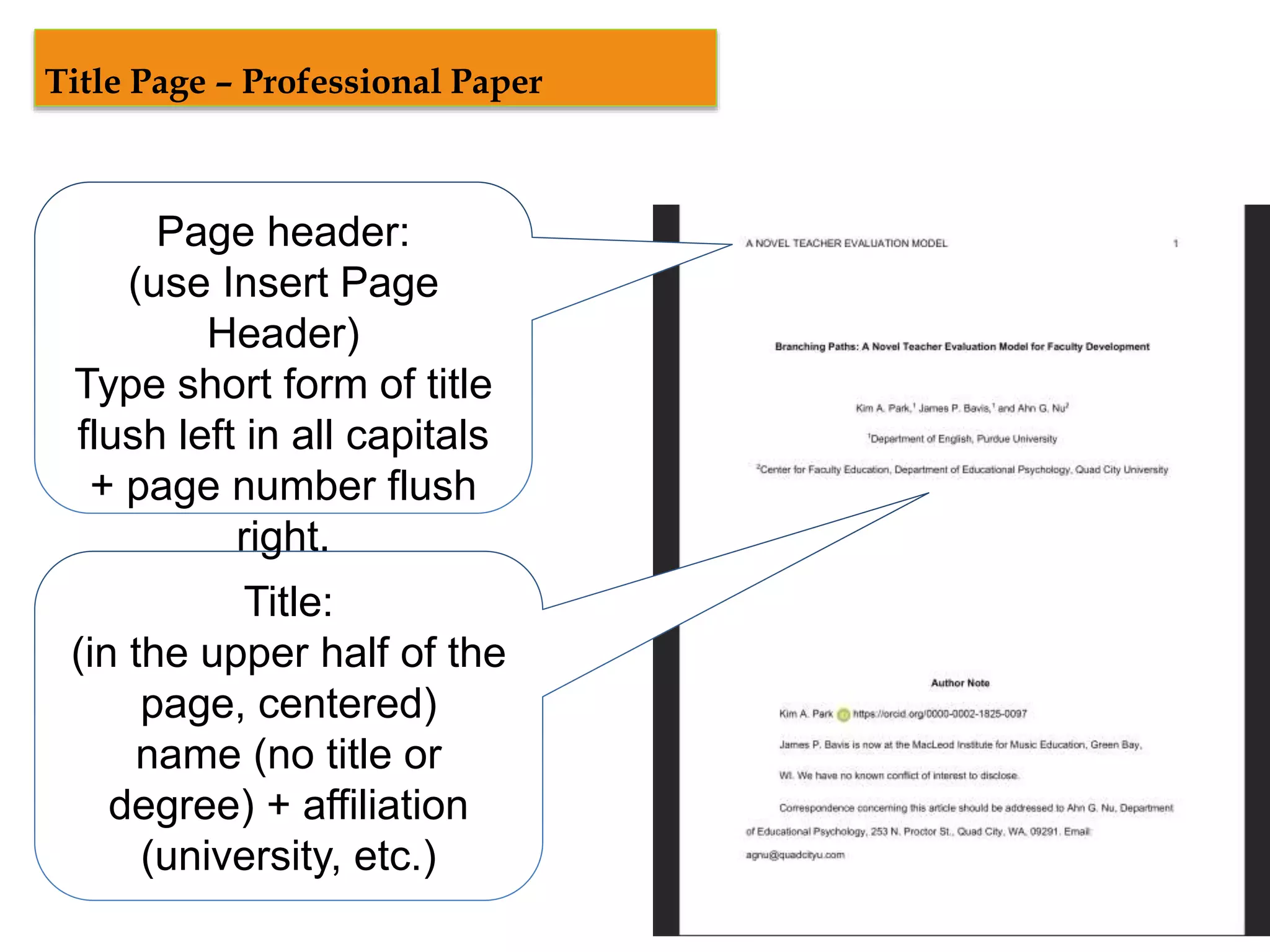
The professional version is intended for manuscripts being submitted for publication. It requires a "running head"—an abbreviated version of the title that appears in the page header of every page. Additionally, it must include an "Author Note," which provides a space for disclosures, acknowledgments, and contact information. These elements are vital for the peer-review process and for subsequent academic citations.
Core Components of the APA Student Title Page
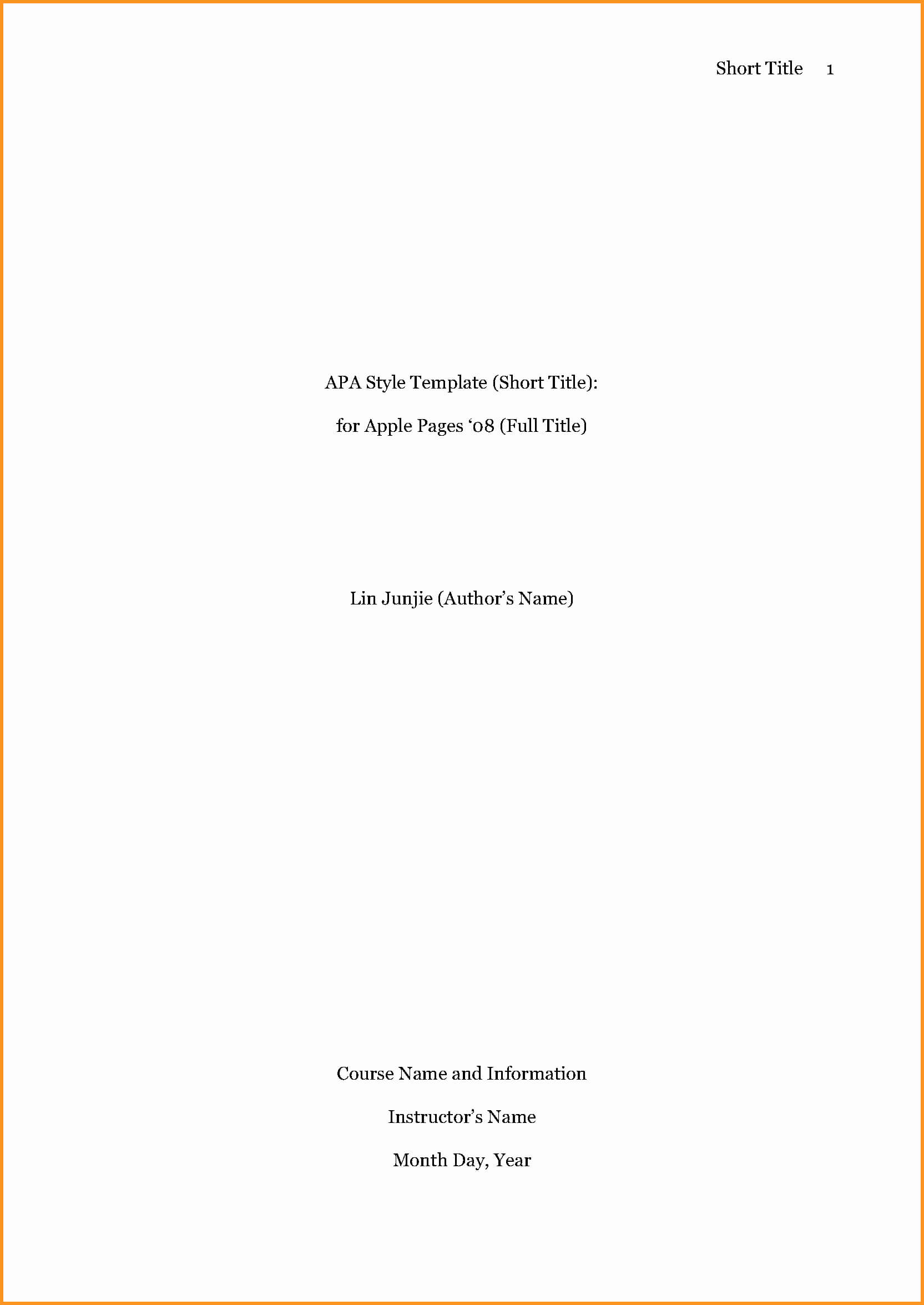
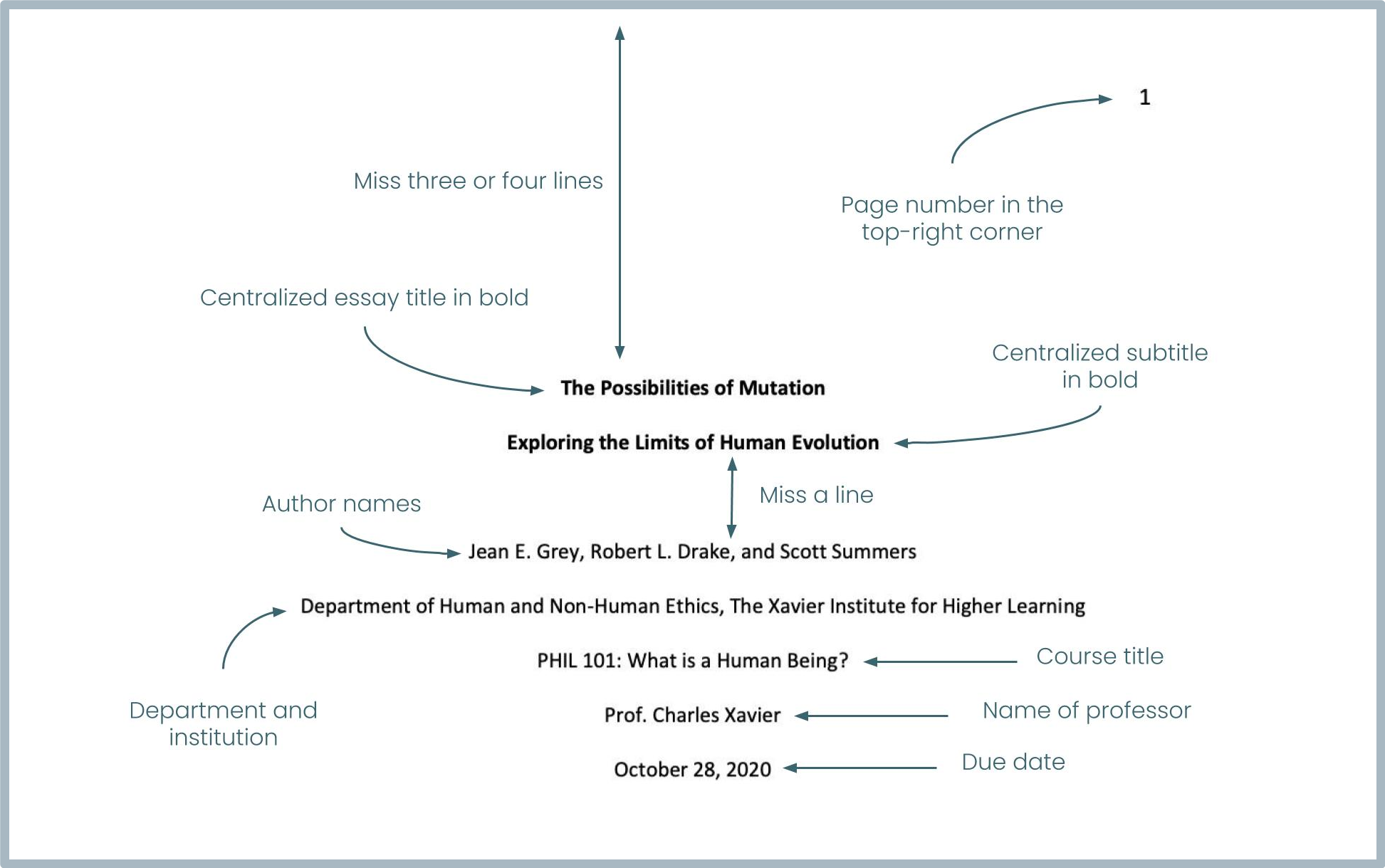
When a student prepares a paper, the title page must contain specific elements arranged in a precise order. Each element is centered and double-spaced.
The Paper Title
The title should be the most prominent element. It must be bolded, centered, and positioned in the upper half of the page (typically three or four blank double-spaced lines down from the top margin). The title should be written in title case, meaning all major words are capitalized. It should be concise, ideally avoiding unnecessary words like "A Study of" or "An Investigation into."
Author Names
The name of the author appears one double-spaced line below the paper title. It is centered and not bolded. If there are multiple authors, their names are formatted according to specific conjunction rules (e.g., "John S. Doe and Jane R. Smith").
Institutional Affiliation
This identifies where the research was conducted or where the student is enrolled. For a student paper, this usually includes the name of the department followed by the name of the university (e.g., "Department of Psychology, University of Texas at Austin").
Course Information
Below the affiliation, students must list the course number and name. This is a critical detail for academic record-keeping. The format should match the official course catalog (e.g., "PSY 101: Introduction to Psychology").
Instructor Name
The name of the instructor for the course should be listed clearly. It is respectful and standard practice to use the instructor's preferred title and full name (e.g., "Dr. Susan Miller").
Due Date
The final element of the student title page is the assignment due date. The standard format is the full name of the month, followed by the day and the year (e.g., "October 24, 2026").
Technical Formatting and Layout Requirements
APA style includes a title page that adheres to strict layout rules. Regardless of the content, the physical appearance of the page must be consistent with the rest of the document.
Margins and Spacing
Every page of an APA document, starting with the title page, must have 1-inch margins on all sides. The entire document must be double-spaced. You should not add extra blank lines between the components of the title page, with the single exception of the space between the paper title and the author's name.
Font Options for 2026
While Times New Roman was once the only acceptable choice, APA 7th Edition—and current 2026 practice—allows for several highly legible fonts to improve digital accessibility. Acceptable options include:
- Sans Serif Fonts: Calibri (11 point), Arial (11 point), or Lucida Sans Unicode (10 point).
- Serif Fonts: Times New Roman (12 point), Georgia (11 point), or Computer Modern (10 point).
Consistency is key; the font used on the title page must be used throughout the entire manuscript.
Page Numbering
The title page is always "Page 1." The page number should appear in the top right corner of the header. In modern word processing software, this is achieved by inserting a page number in the header aligned to the right margin.
Detailed Elements of the Professional Title Page
Professional researchers must include additional metadata that students typically omit. These elements ensure the paper meets the standards of academic journals and professional archives.
The Running Head
The running head is a shortened version of the paper's title. It appears in the header of every page, aligned to the left, directly opposite the page number. It must be in all capital letters and cannot exceed 50 characters, including spaces. Unlike previous editions, the words "Running head:" are no longer required; only the title itself appears.
The Author Note
The Author Note is placed in the bottom half of the title page. It is centered and bolded. Below the label, several paragraphs (not indented) provide context:
- ORCID iDs: Links to the authors' professional research profiles.
- Changes in Affiliation: If an author has moved to a different institution since the research was completed.
- Disclosures and Acknowledgments: Information regarding grants, conflicts of interest, or thanks to colleagues.
- Contact Information: A designated corresponding author’s email address.
Comparative Overview: Student vs. Professional
To ensure you are using the correct format for your specific needs, refer to the table below which highlights the structural differences.
| Element | Student Title Page | Professional Title Page |
|---|---|---|
| Page Number | Yes (Top Right) | Yes (Top Right) |
| Running Head | No (Unless requested) | Yes (Left-aligned Header) |
| Paper Title | Bold, Centered | Bold, Centered |
| Author Names | Standard Font, Centered | Standard Font, Centered |
| Affiliation | Dept and University | Dept, University, City, State/Country |
| Course Name/No. | Yes | No |
| Instructor Name | Yes | No |
| Due Date | Yes | No |
| Author Note | No | Yes (Bottom of page) |
Step-by-Step Guide: Setting Up the Title Page in 2026
Setting up an APA title page in software like Microsoft Word or Google Docs requires attention to the header and paragraph settings.
- Set Margins: Go to Layout or Page Setup and ensure all four margins are set to 1 inch.
- Set Spacing: Select the entire document (Ctrl+A) and set line spacing to 2.0 (Double). Ensure "Remove space after paragraph" is selected so no extra gaps appear.
- Insert Page Number: Go to the Insert menu, select Header/Page Number, and choose the top right corner.
- Position the Title: Press "Enter" three or four times to move the cursor down. Center the text and turn on Bold. Type your full title in title case.
- Add Author and Affiliation: Press "Enter" twice (leaving one blank double-spaced line). Turn off Bold. Type your name, then your department and university on the next line.
- Add Course Details (Student Only): Continue typing the course number/name, instructor, and date on separate lines.
- Add Author Note (Professional Only): Move to the bottom half of the page to insert the Author Note sections as described previously.
Common Mistakes to Avoid
Even seasoned writers occasionally falter when formatting the title page. Avoiding these common pitfalls will ensure your paper remains compliant with 2026 APA standards.
- Excessive Boldness: Only the paper title and the "Author Note" label should be bolded. Author names, affiliations, and course details should be in standard type.
- Running Head Confusion: Students often include a running head when it is not required, or they include the phrase "Running head:" which is an outdated practice from the 6th edition.
- Title Length: Avoid titles that are either too vague ("Biology Paper") or excessively long. A good title is a concise summary of the paper’s main idea.
- Font Inconsistency: Ensure the font in your header (the page number) matches the font in the body of your title page. Word processors sometimes default the header font to a different style.
For more detailed inquiries on specific edge cases, such as papers with dozens of authors or complex institutional affiliations, the Official APA Style Website remains the primary authority. Additionally, the Purdue Online Writing Lab (OWL) provides updated visual samples that are widely used in 2026.
Frequently Asked Questions
Does the title page count toward the total page count?
Yes, the title page is considered page 1 of your manuscript. If an instructor requires a 10-page paper, they usually mean 10 pages of content, but in terms of APA formatting, the title page is always the first page in the sequence.
Should I include my middle initial in the author name?
APA style recommends including the middle initial to reduce ambiguity between authors with similar names. The preferred format is First Name, Middle Initial, and Last Name (e.g., "Jane R. Smith"). This facilitates more accurate indexing in academic databases.
Is the title page always a separate page?
Yes. The title page must be a standalone page. Even if your title and author information only take up the top third of the page, you must insert a page break after the final line of title page information so that the abstract or the body of the paper begins on page 2.
Do I need a title page for a one-page reaction paper?
According to APA standards, yes. Regardless of the length of the body text, APA style includes a title page as a requirement for formal formatting. However, always check your specific instructor's syllabus, as they may waive this requirement for very short or informal reflections.
How do I format multiple affiliations for a single author?
In a professional paper, if an author holds positions at two different institutions, list both affiliations on separate lines immediately following the author’s name. If there are multiple authors with different affiliations, use superscript numbers to link each author to their respective institution.
Final Recommendation for 2026 Academic Writing
When preparing your manuscript, always identify whether you are following the student or professional guidelines before you begin. For students, the primary goal is to provide clear identifying information for your instructor. For professionals, the goal is to provide comprehensive metadata for publication. By strictly adhering to the 7th edition APA rules—which remain the gold standard in 2026—you ensure that your work is presented with the professionalism and clarity expected in higher education and scientific research.