Choosing the right hosting for an ASP.NET MVC application in 2026 requires balancing performance, scalability, and cost across diverse environments. Modern options range from fully managed Cloud PaaS like Azure App Service to containerized deployments on Kubernetes or traditional Windows-based Virtual Private Servers (VPS) for legacy .NET Framework applications.
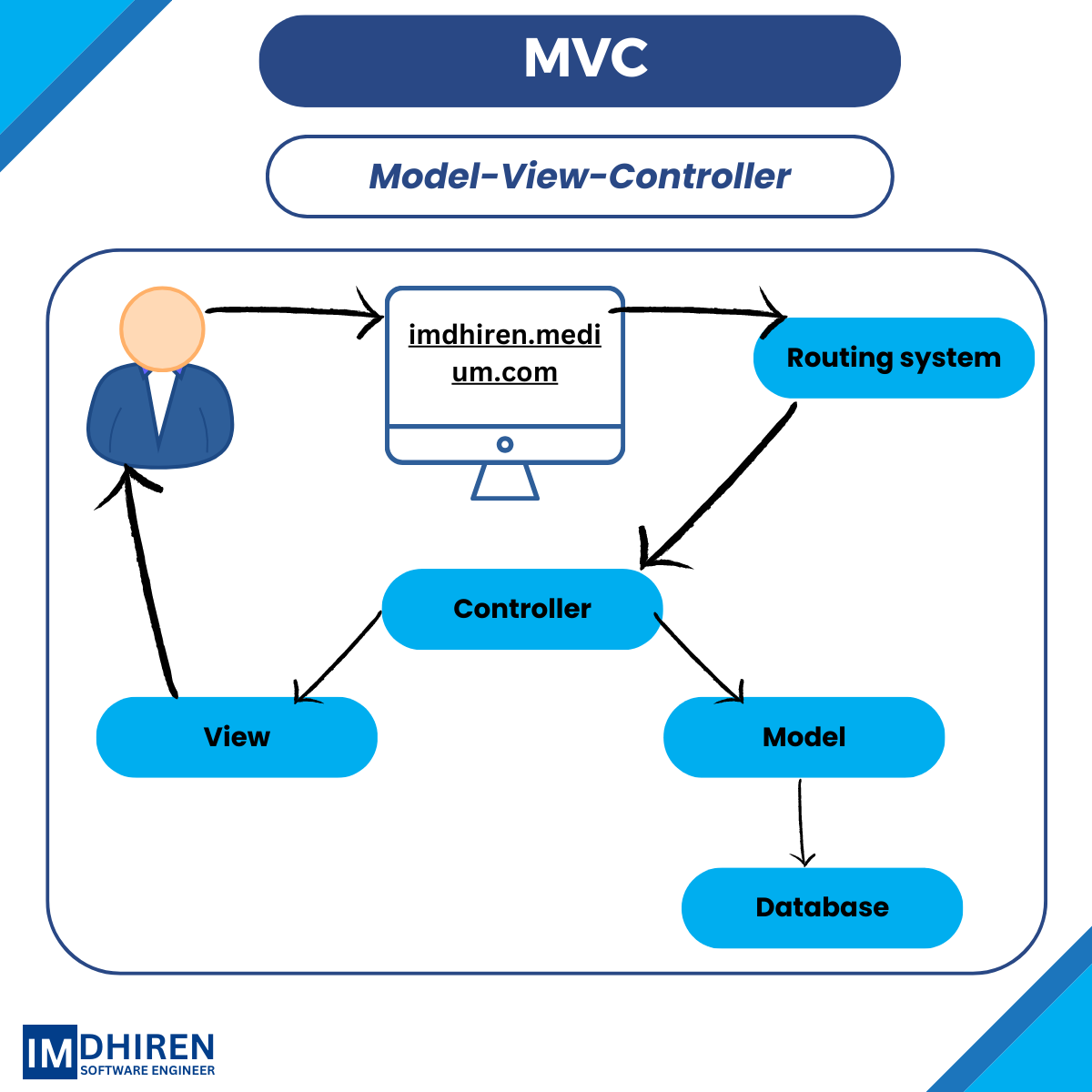
The landscape of web hosting has evolved significantly, yet the ASP.NET MVC (Model-View-Controller) pattern remains a cornerstone of enterprise-grade web development. Whether you are running a legacy application built on .NET Framework 4.8 or a modern solution on .NET 9 or 10, the infrastructure you choose directly impacts your application's uptime, security, and developer productivity. In 2026, the distinction between hosting "Legacy MVC" and "Modern MVC" (ASP.NET Core) is the most critical factor in your decision-making process.
Understanding the ASP.NET MVC Hosting Landscape in 2026
Before selecting a provider, you must identify the specific architectural requirements of your application. ASP.NET MVC exists in two primary ecosystems that dictate hosting compatibility:
- Legacy ASP.NET MVC (.NET Framework 4.5 – 4.8.x): These applications are strictly tied to the Windows operating system and Internet Information Services (IIS). They cannot run on Linux or within standard Linux containers without significant refactoring or using Windows Containers.
- Modern ASP.NET Core MVC (.NET 6 through .NET 10): These applications are cross-platform. They can be hosted on Windows (via IIS), Linux (via Kestrel with Nginx/Apache), or within lightweight Docker containers.
In 2026, while many organizations have migrated to the unified .NET platform, a substantial number of enterprise systems still rely on the stability of the .NET Framework. Consequently, hosting providers have bifurcated their offerings to support both specialized Windows environments and high-performance, container-native Linux clusters.
Cloud Platform as a Service (PaaS)
Cloud PaaS is the preferred choice for modern development teams who want to focus on code rather than server maintenance. These platforms handle OS patching, hardware scaling, and load balancing automatically.
Microsoft Azure App Service
As the native home for .NET, Azure App Service remains the premier hosting option in 2026. It offers first-class support for both Windows and Linux environments.
- Deployment Slots: One of Azure’s most powerful features is the ability to create staging environments (slots). You can deploy your MVC app to a "Staging" slot, verify it, and then swap it into "Production" with zero downtime.
- Integration with GitHub and Azure DevOps: In 2026, CI/CD is non-negotiable. Azure provides seamless "Right-click to Publish" (for small projects) or robust YAML-based pipelines for automated deployments.
- Auto-scaling: Azure can automatically increase your instance count based on CPU or memory triggers, ensuring your MVC application handles traffic spikes during peak hours without manual intervention.
AWS Elastic Beanstalk and App Runner
Amazon Web Services (AWS) provides a highly competitive environment for .NET developers. AWS Elastic Beanstalk supports .NET on Windows Server (using IIS) and .NET on Linux.
- Elastic Beanstalk: This acts as an orchestration service that manages EC2 instances, load balancers, and scaling groups. It is ideal for MVC apps that need deep integration with other AWS services like RDS (SQL Server) or S3.
- AWS App Runner: For modern ASP.NET Core MVC apps, App Runner provides a direct path from source code or container image to a scalable web service, bypassing the need to manage servers entirely.
Virtual Private Servers (VPS) and Dedicated Hosting
For developers who require full administrative control over the web server, a Virtual Private Server (VPS) is the standard alternative to the cloud. This is often the most cost-effective way to host multiple ASP.NET MVC applications on a single license of Windows Server.
The Role of IIS (Internet Information Services)
When hosting on a VPS, you are responsible for configuring IIS. In 2026, IIS remains a robust, feature-rich web server. Key configurations for MVC apps include:
- Application Pools: Isolating different MVC applications into their own pools ensures that a crash in one site does not take down others on the same server.
- Environment Variables: Managing connection strings and API keys through the IIS Manager or
web.configtransformations is a critical security practice. - SSL/TLS Management: Utilizing tools like Let’s Encrypt via "Win-ACME" allows for automated, free SSL certificates on Windows VPS environments.
Choosing a VPS Provider
Providers like SmarterASP.NET, InterServer, and Kamatera continue to offer specialized Windows VPS plans. When evaluating these, look for:
- NVMe SSD Storage: Essential for the fast I/O required by modern databases and logging frameworks.
- Windows Server 2022/2025 Licenses: Ensure the provider is using modern OS versions to support the latest security protocols.
- RDP Access: Full Remote Desktop access is necessary for manual configuration, though many developers now prefer using Web Deploy or PowerShell Remoting.
Container-Based Hosting (Docker & Kubernetes)
By 2026, containerization has become the standard for large-scale ASP.NET MVC deployments. Packaging an MVC application as a Docker image ensures that the environment remains identical from the developer's laptop to the production server.
Azure Container Apps
For teams that want the benefits of Kubernetes without the complexity of managing a cluster, Azure Container Apps is a "serverless" container service. It scales to zero when not in use, making it highly cost-efficient for internal business tools or low-traffic MVC sites.
Amazon ECS and EKS
AWS offers Elastic Container Service (ECS) and Elastic Kubernetes Service (EKS). These are best suited for microservices architectures where an MVC application might serve as the front-end for various back-end APIs. Using Linux containers for ASP.NET Core MVC significantly reduces licensing costs, as you no longer need to pay the "Windows Tax" for every node in your cluster.
Shared Hosting: Is it Still Relevant?
Shared hosting is the most budget-friendly option, often starting at a few dollars per month. While it has limitations, it remains a viable choice for small-scale projects.
- Pros: Extremely low cost, includes email hosting, and usually features a one-click installer for databases.
- Cons: Limited "Trust Levels" (often restricted to Medium Trust, which can break some MVC libraries), shared resources with other users, and lack of control over server-level updates.
In 2026, shared hosting is only recommended for portfolios, student projects, or very low-traffic specialized landing pages. For any professional or commercial ASP.NET MVC application, a VPS or PaaS solution is required for stability and security.
Comparison of Hosting Types for ASP.NET MVC
| Hosting Type | Control Level | Scalability | Complexity | Best For |
|---|---|---|---|---|
| Azure App Service | Medium | High (Auto) | Low | Enterprise Apps, Rapid Development |
| Windows VPS | High | Manual | Medium | Legacy Apps, Multi-site Hosting |
| Containers (AKS/EKS) | Very High | Elite | High | Microservices, High-Traffic Systems |
| Shared Hosting | Very Low | None | Very Low | Small Personal Projects, Portfolios |
| AWS App Runner | Medium | High | Low | Modern .NET Core MVC Apps |
Technical Requirements and Prerequisites
Regardless of the hosting provider, your ASP.NET MVC application has specific environmental needs that must be met for a successful deployment.
1. Database Compatibility
ASP.NET MVC applications traditionally use Microsoft SQL Server.
- Managed Databases: Services like Azure SQL Database or AWS RDS for SQL Server are recommended. They provide automated backups, point-in-time recovery, and high availability.
- Local DB: If using a VPS, you can install SQL Server Express, but be mindful of the 10GB database size limit and RAM restrictions.
2. .NET Runtime Installation
If you are not using a PaaS (which manages runtimes for you), you must ensure the correct .NET Hosting Bundle is installed on the server. This bundle includes the .NET Runtime and the IIS Support engine required to bridge IIS and your application code.
3. Security and Identity
In 2026, hosting must support modern authentication. Ensure your host allows for:
- WebSockets: Required if your MVC app uses SignalR for real-time updates.
- HTTP/3 Support: The latest version of the HTTP protocol, which improves performance on high-latency connections.
- External Identity Providers: Seamless integration with Microsoft Entra ID (formerly Azure AD), Auth0, or Okta.
Troubleshooting Common Hosting Issues
Deploying to a production environment often reveals issues that were hidden during local development.
Permission and Identity Issues
A frequent error in ASP.NET MVC hosting is the 500.19 - Internal Server Error. This is usually caused by the IIS Application Pool Identity lacking permissions to the application folder. Always ensure the "IIS AppPool[YourPoolName]" user has "Read & Execute" permissions on the root directory.
Missing Dependencies
If your application works locally but fails on the server with a "File Not Found" error for a DLL, ensure that Copy Local is set to "True" in Visual Studio for all third-party libraries. Modern .NET deployments often use "Self-Contained" publishing, which includes all necessary libraries in the deployment package, eliminating the need for the runtime to be pre-installed on the server.
Connection String Errors
Never hardcode connection strings. Use environment variables or encrypted configuration sections. In 2026, most cloud hosts provide a dedicated "Configuration" or "Secrets" blade to inject these values at runtime, preventing sensitive data from being checked into source control.
Practical Recommendations for 2026
- For New Enterprise Projects: Use Azure App Service with the latest version of .NET. The integration with the broader Microsoft ecosystem provides the most efficient path from development to production.
- For Migrating Legacy Apps: If you have an older MVC 5 application that cannot be easily rewritten, opt for a Windows VPS or Azure VM. This allows you to maintain the specific IIS configurations the app requires.
- For Cost-Conscious Small Businesses: SmarterASP.NET or similar specialized .NET hosts provide a middle ground between restrictive shared hosting and expensive cloud services.
- For High-Scale Microservices: Package your MVC front-end into a Docker container and deploy it to Azure Container Apps or AWS Fargate. This allows you to scale the front-end independently of your back-end services.
Before finalizing your choice, verify the data residency requirements of your project. If you are handling European user data, ensure your hosting provider offers data centers within the EU to maintain GDPR compliance. Similarly, check for SOC2 or HIPAA compliance if your MVC application handles financial or medical records.