Apple Music’s integration of Dolby Atmos and Spatial Audio represents a fundamental shift in how digital music is delivered and experienced. By utilizing object-based audio, this technology moves beyond traditional stereo, creating an immersive, three-dimensional soundscape that allows listeners to perceive instruments and vocals as distinct points in a physical space rather than just left-and-right channels.
The Evolution of Music Consumption
For decades, the standard for recorded music was stereophonic sound. Producers mixed tracks to exist on a two-dimensional plane, balancing elements between the left and right speakers. While this method defined the golden age of music, it relied on the listener’s brain to interpret depth and placement. Dolby Atmos changes this paradigm by treating individual sounds as "objects."
In a Dolby Atmos mix, a sound engineer can place a guitar riff, a vocal harmony, or a percussion hit at a specific coordinate within a 3D environment. When you play these songs on Apple Music, the audio engine translates this data into a format that creates the sensation of being surrounded by the performance. This is the core of Spatial Audio, which aims to replicate the experience of sitting in a room with the musicians.
Technical Foundations: How Spatial Audio Works
Spatial Audio is not a single file format but rather an implementation of multi-channel audio processing. At its heart lies the Dolby Atmos codec, which supports up to 128 simultaneous objects. When a label provides a track in Dolby Atmos, it includes metadata that tells the rendering engine where each sound should originate relative to the listener.
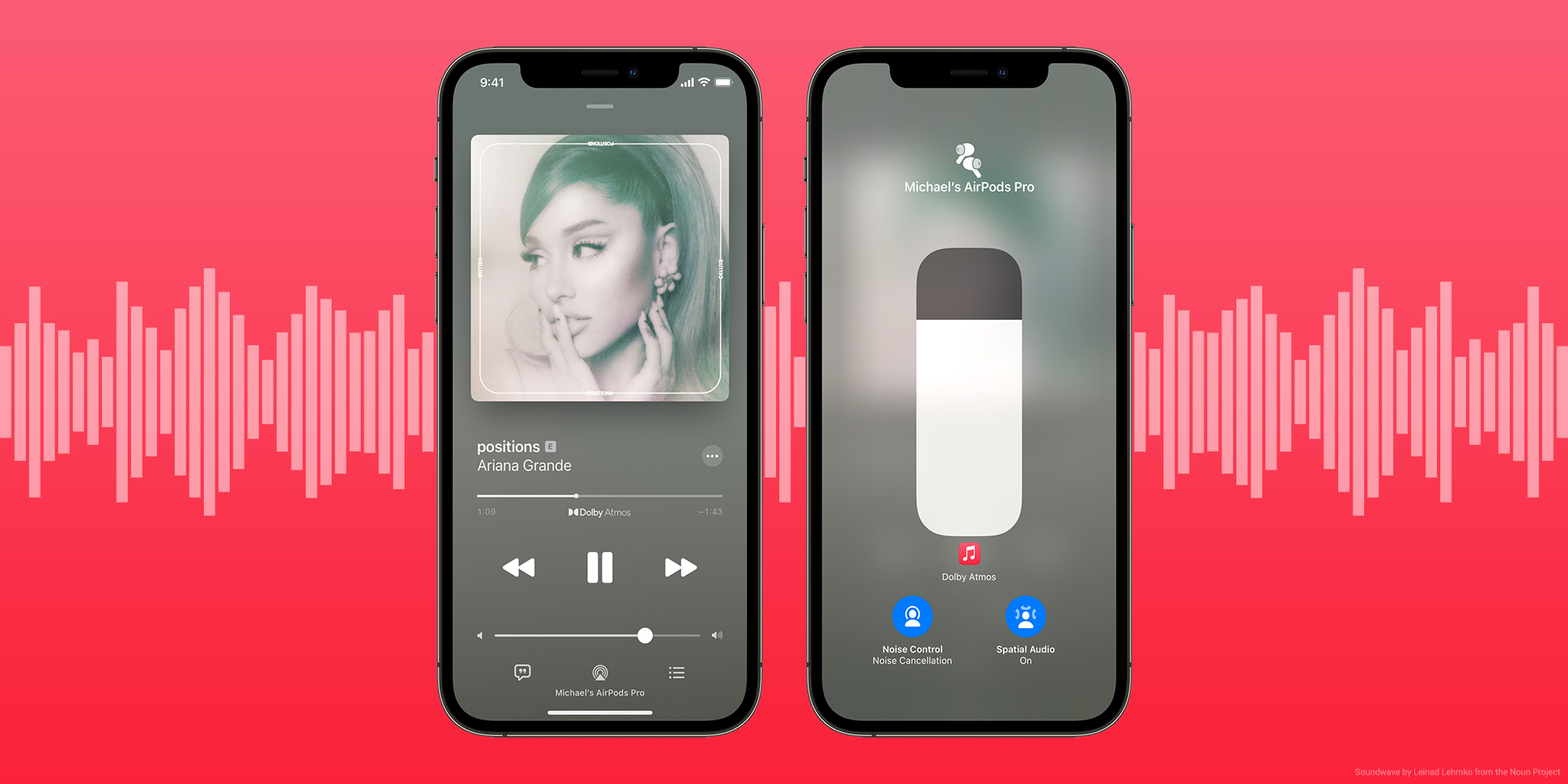
On Apple hardware, this is managed by the H1 or H2 chip (found in AirPods and certain Beats headphones) and the software processing within iOS, iPadOS, macOS, and visionOS. These devices use dynamic head tracking to maintain the relative positions of the instruments even when you move your head. If you turn to look at a friend, the sound stage remains "locked" to the screen or the primary source, maintaining the illusion of a fixed, physical performance space.
Requirements for the Full Experience
To access Dolby Atmos content on Apple Music, you need more than just a subscription. The hardware and software environment must be correctly configured to handle the high data throughput and specific spatial processing required.
- Hardware Compatibility: While Apple Music automatically plays Dolby Atmos on all AirPods and Beats headphones that feature the H1 or H2 chip, it also works with newer versions of built-in speakers in iPhones, iPads, MacBooks, and HomePod speakers.
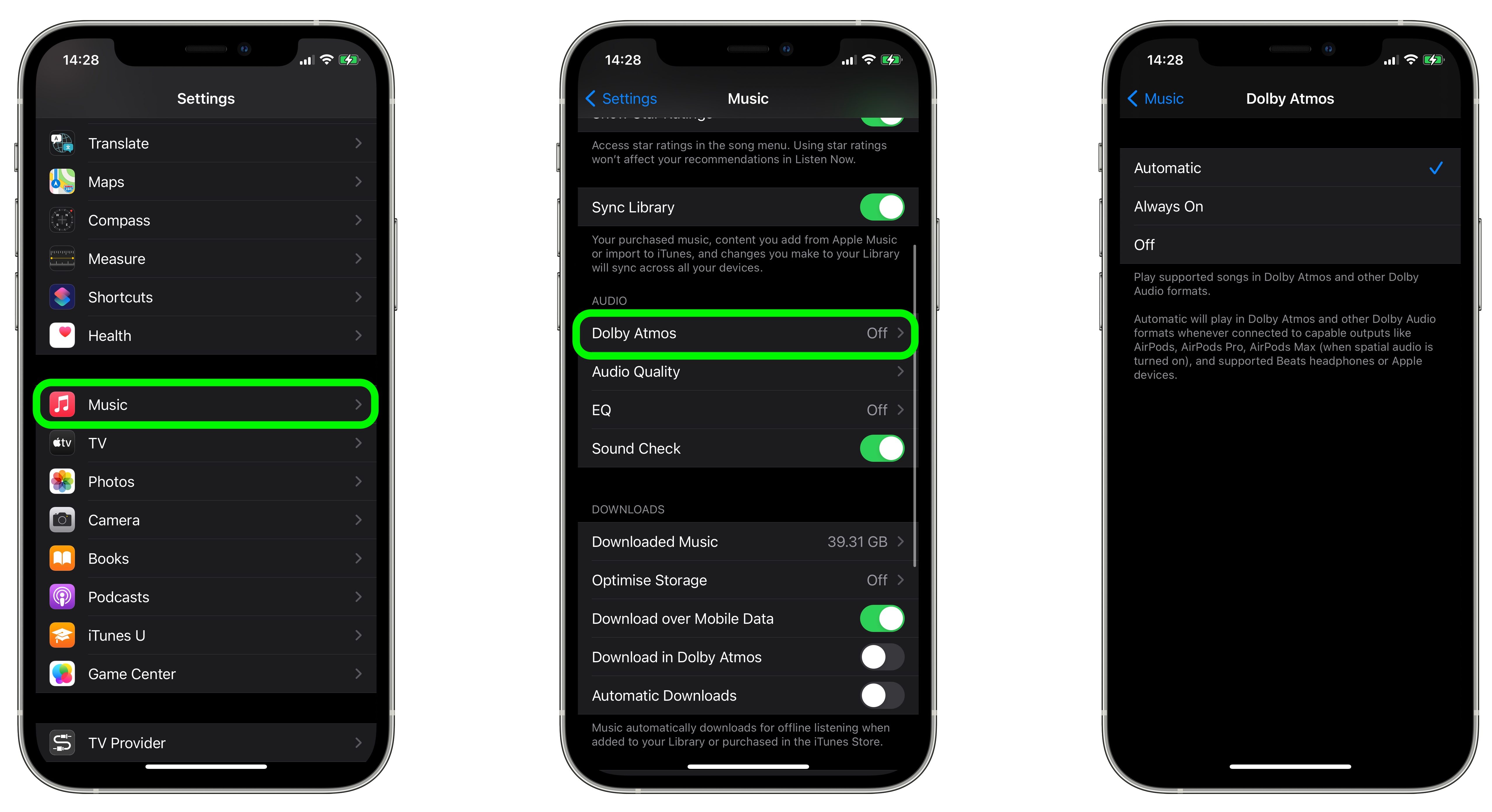
- Software Settings: Within the Apple Music settings, you must ensure the "Dolby Atmos" setting is set to "Automatic" or "Always On." If it is set to "Off," the device will default to standard stereo, nullifying the spatial effect.
- Connection Standards: When using third-party wired headphones, you may need a DAC (Digital-to-Analog Converter) or specific settings to ensure the multi-channel signal is correctly interpreted by your hardware.
Comparative Impact on Sound Quality
The shift to Spatial Audio is often compared to the transition from mono to stereo or the move from low-bitrate MP3s to Lossless audio. However, the impact is fundamentally different because it addresses immersion rather than fidelity.
| Feature | Standard Stereo | Spatial Audio (Dolby Atmos) |
|---|---|---|
| Sound Stage | Linear (Left to Right) | Spherical (360-degree) |
| Mixing Style | Channel-based | Object-based |
| Hardware Need | Basic headphones | H1/H2 chip or compatible surround system |
| Primary Goal | High-fidelity reproduction | Immersive environment |
It is important to note that a song mixed in Dolby Atmos is not inherently "higher quality" in the technical sense of frequency response, but it is "higher density" in terms of spatial information. A master engineer must specifically create a Dolby Atmos mix; simply converting a stereo track to Atmos does not provide the same benefits as a dedicated spatial mix.
The Role of Dynamic Head Tracking
One of the most significant impacts of Spatial Audio on Apple Music is the implementation of dynamic head tracking. This feature, exclusive to specific Apple devices, uses internal gyroscopes and accelerometers to monitor your head's position.
If you are listening to a live orchestral recording and you turn your head, the instruments that were "in front" of you remain in that position relative to the sound stage. This level of interaction was previously reserved for professional cinema setups and high-end home theater systems. By bringing this to mobile listeners, Apple has made the "acoustic reality" of a recording far more convincing.
Troubleshooting and Common Pitfalls
Many users report that they cannot hear a difference when toggling between stereo and Spatial Audio. This usually stems from a few common issues:
- The "Hidden" Stereo Mix: Some tracks on Apple Music are labeled "Dolby Atmos" but have been mastered with a very subtle spatial effect to remain faithful to the original stereo mix. These are often less "impressive" than tracks specifically mixed to showcase the technology.
- Disabled Head Tracking: If you find the sound feels unnatural, check if Head Tracking is enabled in your Bluetooth settings for your headphones. Some users prefer the immersion of Spatial Audio without the active tracking.
- The Streaming vs. Download Conflict: Occasionally, if a track was downloaded to your device before the Atmos mix was available, the device will continue to play the stereo version. To fix this, delete the song from your local library and re-download it to pull the latest version of the file.
Limitations and Professional Considerations
While the technology is impressive, it is not without limitations. First, Spatial Audio requires high-quality production. A poorly mixed Dolby Atmos track can sound "hollow" or disconnected, where instruments seem to float in a way that feels unnatural or distracting.
Second, the technology is highly dependent on the "HRTF" (Head-Related Transfer Function) algorithms developed by Apple. These algorithms estimate how sound waves interact with human anatomy—like the ears and shoulders—to create a sense of height and depth. Because every person's anatomy is unique, the effectiveness of the spatial effect can vary from user to user.
Future Trajectory
As of 2026, the library of available Dolby Atmos music continues to expand, moving beyond newly released pop music into the remastery of classic albums. Artists are increasingly designing music with Spatial Audio in mind from the recording phase, rather than treating it as an afterthought during the mixing process. This change in workflow is likely to result in more creative uses of the sound field, such as utilizing verticality and complex surround-sound panning as standard compositional tools.
Frequently Asked Questions
Does Spatial Audio consume more cellular data than standard stereo? Yes. Dolby Atmos tracks contain significantly more metadata and, in many cases, higher-resolution audio data than standard stereo files. If you are on a limited mobile data plan, you may want to set your Apple Music streaming quality to "High Efficiency" when away from Wi-Fi.
Can I experience Dolby Atmos through wired headphones? You can, but your experience depends on your DAC and your software environment. On an iPhone or Mac, if you have a wired connection, you may need to use a high-quality external DAC that supports multi-channel processing to ensure the Spatial Audio signal is rendered correctly by the system.
Why do some songs sound quieter in Dolby Atmos? Dolby Atmos mixes often adhere to different loudness standards than standard stereo masters, which are frequently compressed for maximum volume. Atmos mixes tend to prioritize dynamic range, which can lead to a lower perceived volume but a more natural, less fatiguing listening experience.
Does Spatial Audio work on Android devices? Yes, Apple Music for Android supports Dolby Atmos on compatible devices. However, you will not get the seamless, system-level dynamic head tracking found on Apple’s H1/H2-powered hardware.
Is it worth using if I only have basic speakers? Spatial Audio is designed primarily for headphones. While it can work on stereo speakers via virtualization, the effect is significantly diminished. The true "impact" of the technology is best realized through over-ear or in-ear headphones that can create a private, controlled sound field for the binaural processing to occur.
Recommendation
For the best experience, start by listening to "Spatial Audio" curated playlists provided within the Apple Music app. These are professionally selected tracks that demonstrate the maximum potential of the technology, often featuring complex arrangements that move sounds around your head. If you are using AirPods, ensure your firmware is up to date, as Apple frequently releases improvements to the HRTF algorithms that govern how sound is placed in the virtual 3D space. If you find the experience distracting, adjust the "Spatial Audio" settings to "Fixed" rather than "Head Tracked" to enjoy the wide soundstage without the active movement adjustments.