Choosing the right productivity suite for an organization requires evaluating specific operational needs, security requirements, and team sizes, as Microsoft offers distinct tier structures designed to accommodate everything from single-person startups to multinational enterprises.
Microsoft 365 business plans are subscription-based productivity and collaboration suites designed for organizations, ranging from solopreneurs and small teams to massive global enterprises. Selecting the ideal package involves balancing application requirements—such as desktop versus web-only versions of Word, Excel, and Outlook—with administrative controls, data security compliance, and user licensing limits.
Understanding Microsoft 365 Business Foundations
Before exploring the individual options, administrators and business leaders must understand how Microsoft categorizes its commercial offerings. Microsoft 365 splits its commercial portfolio into two primary categories: Business plans (strictly capped at 300 users) and Enterprise plans (unlimited user capacity).
Organizations with fewer than 300 employees can choose from standard business plans, while larger entities must utilize enterprise-grade licensing. Within the sub-300 user business category, offerings are further differentiated by whether they include desktop application installations, advanced threat protection, or hosted email servers with custom domains.
The 7 Core Microsoft 365 Business Options
Evaluating the primary choices helps map organizational workflows to the correct subscription tier. Each tier addresses distinct operational boundaries, ranging from budget-conscious web access to rigorous enterprise-grade security compliance.
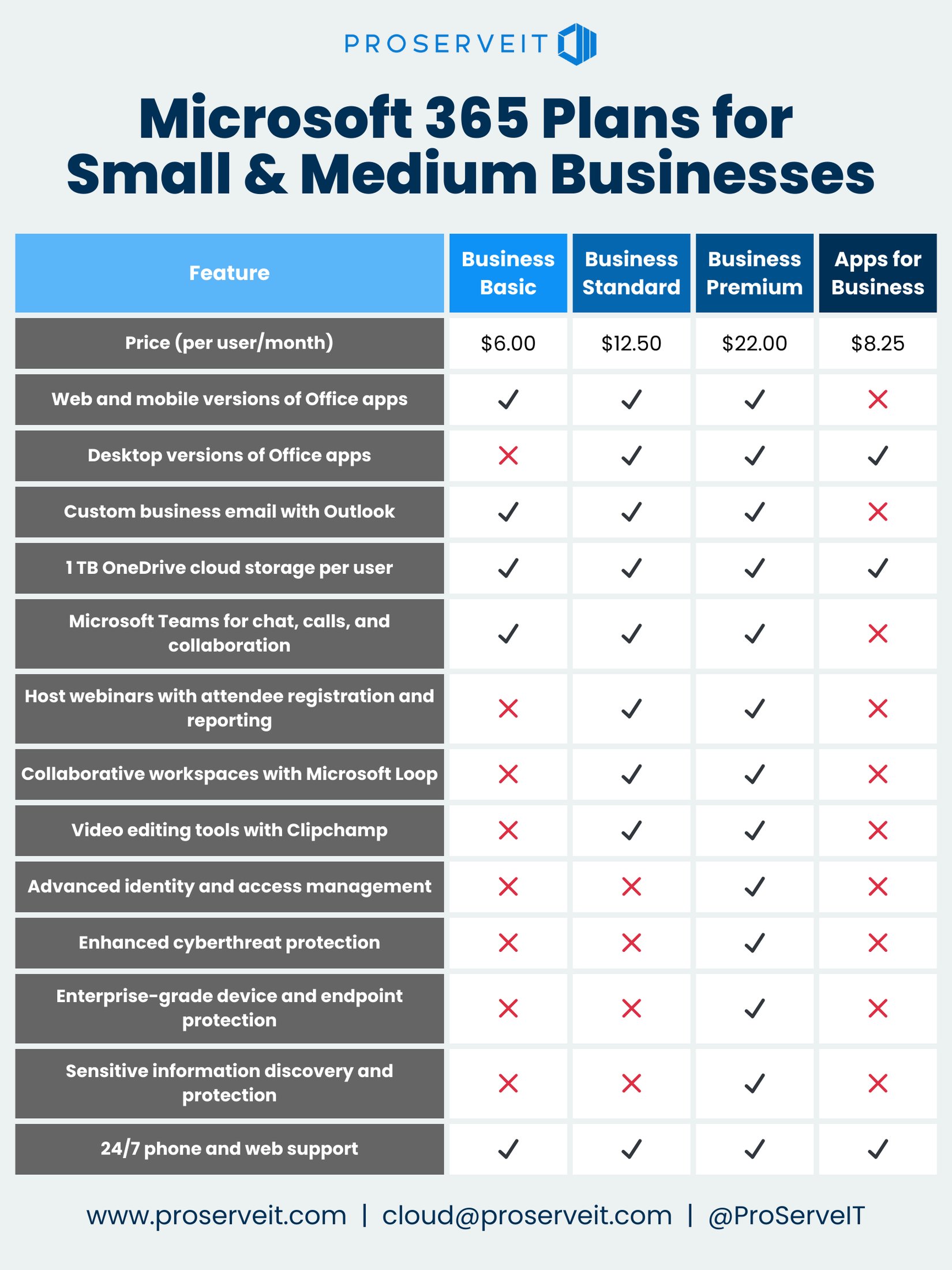
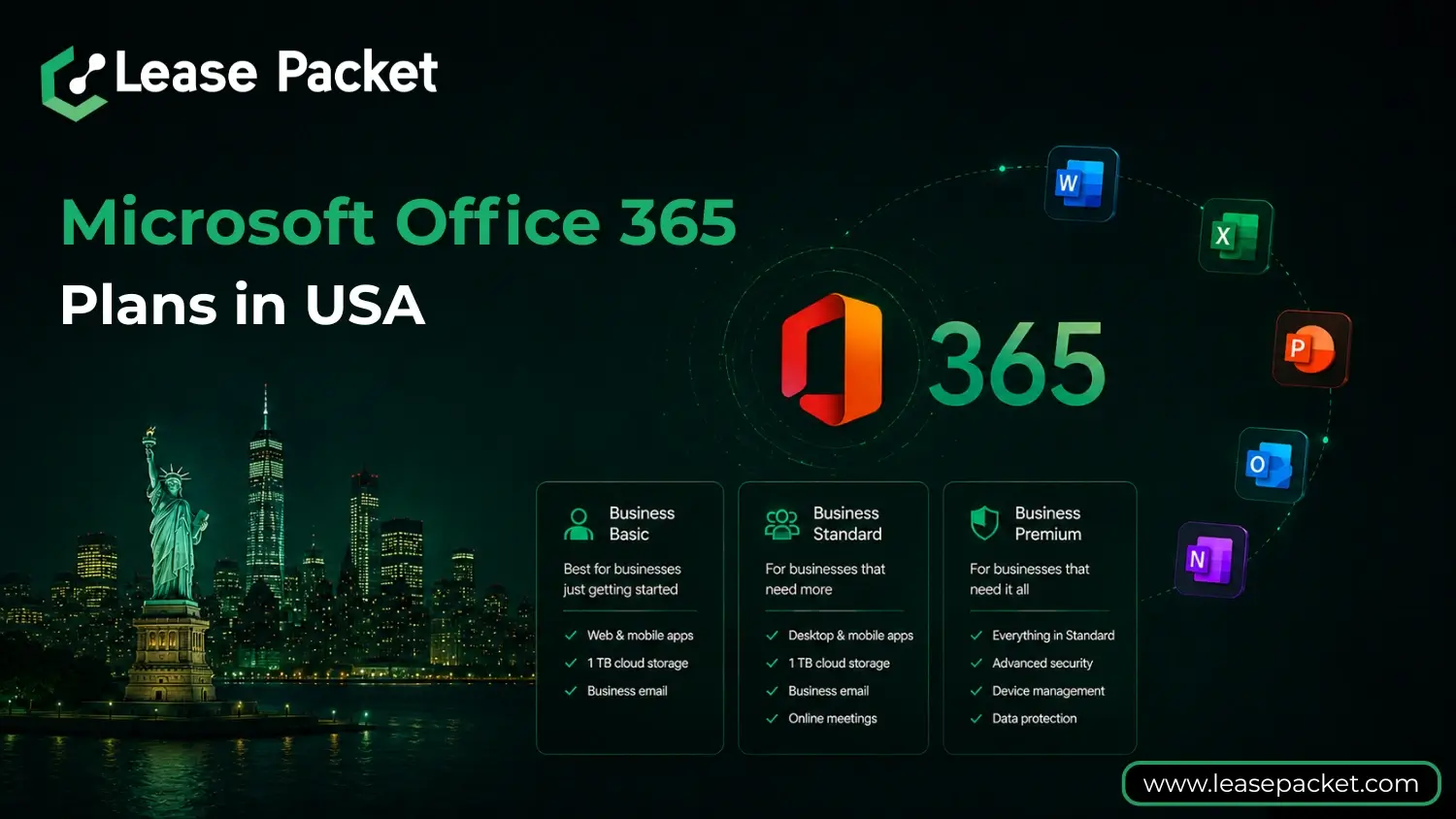
1. Microsoft 365 Business Basic
Designed for businesses that require web and mobile versions of core productivity tools without heavy reliance on local desktop installations.
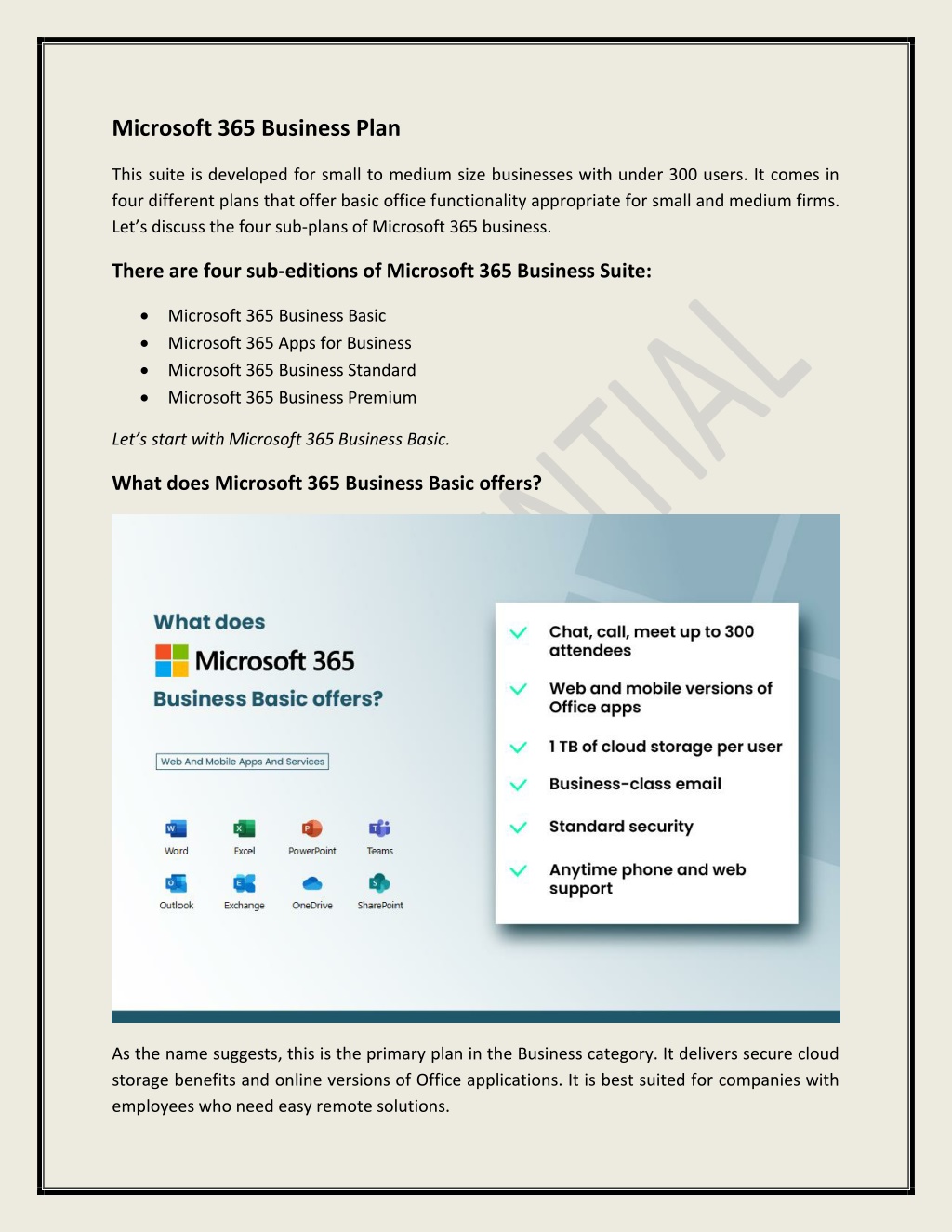
- Core Applications: Web and mobile versions of Word, Excel, PowerPoint, and Outlook (desktop apps are not included).
- Services: Exchange email hosting (50 GB mailbox per user), OneDrive for Business cloud storage (1 TB per user), Microsoft Teams, and SharePoint.
- User Limit: Up to 300 users.
- Ideal For: Remote workers, field personnel, or auxiliary staff who primarily interact with documents via web browsers or mobile devices and require professional business email.
2. Microsoft 365 Business Standard
The flagship mid-tier plan that blends cloud-based collaboration tools with fully installed desktop applications for workstations.
- Core Applications: Fully installed, always up-to-date desktop, web, and mobile versions of Word, Excel, PowerPoint, Outlook, Access (PC only), and Publisher (PC only).
- Services: All features of Business Basic, including Exchange hosting, 1 TB of OneDrive storage per user, Teams, and SharePoint. Each user can install desktop apps on up to 5 PCs or Macs, 5 phones, and 5 tablets.
- User Limit: Up to 300 users.
- Ideal For: Standard office workers and knowledge professionals who rely on advanced desktop software features, macros, and offline functionality.
3. Microsoft 365 Business Premium
A comprehensive plan that integrates advanced cybersecurity defenses and device management capabilities alongside standard productivity applications.
- Core Applications: Same full suite of desktop, web, and mobile applications found in Business Standard.
- Advanced Security & Management: Includes Microsoft Defender for Business (advanced endpoint security), Microsoft Entra ID Plan 1 (formerly Azure Active Directory for conditional access and multi-factor authentication), and Microsoft Intune (mobile device management for Windows, iOS, Android, and macOS).
- Services: All foundational Exchange, OneDrive, Teams, and SharePoint capabilities.
- User Limit: Up to 300 users.
- Ideal For: Small-to-medium businesses handling sensitive data, subject to regulatory compliance, or managing BYOD (Bring Your Own Device) environments requiring strict security controls.
4. Microsoft 365 Apps for Business
A focused, application-only subscription tailored for organizations that already maintain separate email and collaboration infrastructure but require reliable office software.
- Core Applications: Fully installed desktop and mobile versions of Word, Excel, PowerPoint, Outlook, Access (PC only), and Publisher (PC only).
- Services: 1 TB of OneDrive cloud storage per user. Exchange email hosting and Microsoft Teams are not included.
- User Limit: Up to 300 users.
- Ideal For: Businesses that utilize third-party email providers (such as Google Workspace or on-premises servers) but want standard Microsoft Office desktop applications for their staff.
5. Microsoft 365 Enterprise E3
The entry point for enterprise-level deployments, removing the 300-seat restriction and introducing advanced compliance and information protection tools.
- Core Applications: Fully installed desktop apps with advanced analytical and compliance features.
- Services & Security: Unlimited user capacity, advanced data governance, information protection (rights management, data loss prevention), and enterprise-grade compliance tooling (eDiscovery, legal hold).
- Ideal For: Mid-to-large organizations scaling past 300 employees or requiring deeper regulatory control over unstructured data.
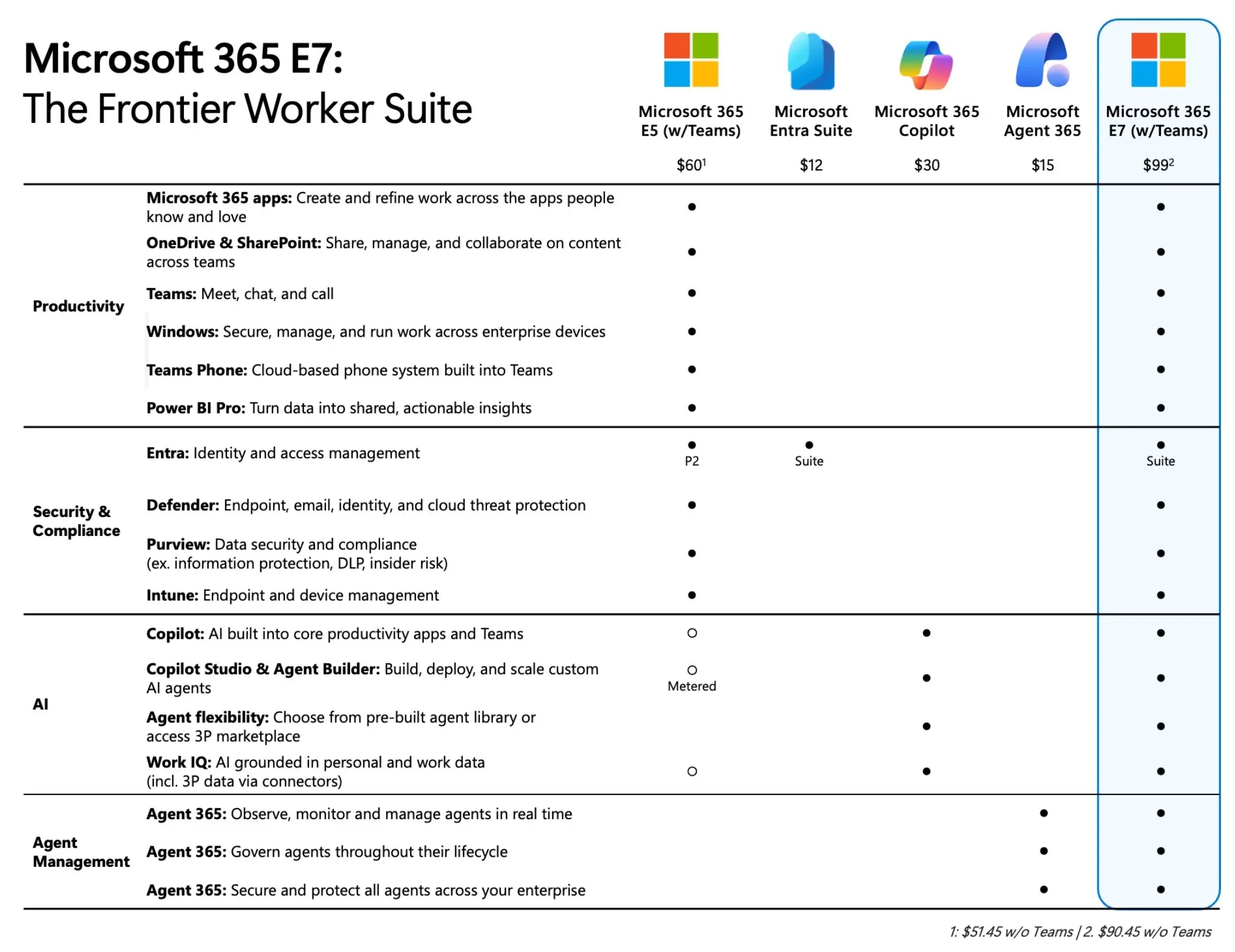
6. Microsoft 365 Enterprise E5
The most comprehensive tier offered by Microsoft, combining productivity apps with state-of-the-art security, voice capabilities, and automated compliance auditing.
- Core Applications: Complete desktop and web productivity suite.
- Advanced Security & Analytics: Microsoft Defender for Endpoint, Microsoft Defender for Office 365 Plan 2, Azure Information Protection Plan 2, advanced eDiscovery, Priva, and Power BI Pro integrations. Phone System and Audio Conferencing capabilities are also built-in.
- Ideal For: Large enterprises operating in highly regulated industries (finance, healthcare, defense) that require automated threat hunting, advanced data loss prevention, and integrated cloud telephony.
7. Microsoft 365 Apps for Enterprise
An enterprise-grade application-only package designed for large organizations that need desktop productivity software decoupled from basic cloud services or email hosting.
- Core Applications: Fully installed desktop apps of the Office suite with extended deployment flexibility and virtualization support (Shared Computer Activation for Remote Desktop Services).
- Services: 1 TB of OneDrive storage. Excludes Exchange email and SharePoint hosting.
- Ideal For: Large enterprises utilizing virtual desktop infrastructure (VDI) or third-party email environments that need licensed Microsoft desktop apps scaled across thousands of endpoints.
Feature Comparison of Core Microsoft 365 Business Options
| Plan Name | Desktop Apps Included? | Cloud Storage (OneDrive) | Exchange Email Included? | Advanced Security & Compliance | Max User Limit |
|---|---|---|---|---|---|
| Business Basic | No (Web/Mobile only) | 1 TB / user | Yes (50 GB mailbox) | Basic (Standard MFA) | 300 |
| Business Standard | Yes (PC/Mac/Mobile) | 1 TB / user | Yes (50 GB mailbox) | Basic (Standard MFA) | 300 |
| Business Premium | Yes (PC/Mac/Mobile) | 1 TB / user | Yes (50 GB mailbox) | Advanced (Defender, Intune) | 300 |
| Apps for Business | Yes (PC/Mac/Mobile) | 1 TB / user | No | Basic | 300 |
| Enterprise E3 | Yes (PC/Mac/Mobile) | Unlimited* | Yes | Moderate (Data loss prevention) | Unlimited |
| Enterprise E5 | Yes (PC/Mac/Mobile) | Unlimited* | Yes | Maximum (Automated threat defense) | Unlimited |
| Apps for Enterprise | Yes (PC/Mac/Mobile) | 1 TB / user | No | Enterprise deployment tools | Unlimited |
*Note: Enterprise storage starts at 1 TB per user with options to scale up based on organization size and seat count.
Evaluating Technical Requirements and Prerequisites
Transitioning an organization to a Microsoft 365 business plan requires verifying technical prerequisites to ensure seamless deployment.
- Custom Domain Verification: To establish professional email addresses (e.g.,
name@yourcompany.com), administrators must own a custom domain and possess access to the domain registrar (such as GoDaddy, Cloudflare, or Route 53) to update DNS records (MX, TXT, and CNAME records). - Operating System Compatibility: Desktop applications require supported operating systems. Typically, Microsoft 365 apps require Windows 10 or Windows 11 for PC environments, or one of the three most recent versions of Apple's macOS.
- Network Bandwidth: Initial installations and recurring monthly updates for desktop applications require adequate internet bandwidth. Organizations should plan bandwidth allocation to prevent network congestion during peak update cycles.
- Licensing Management Portal: Administrative control is managed via the Microsoft 365 Admin Center. Organizations must designate a Global Administrator to manage user accounts, assign licenses, and configure security baselines.
Common Mistakes When Selecting a Microsoft 365 Plan
Selecting the wrong tier often leads to unexpected software limitations, security vulnerabilities, or unnecessary expenditure. Avoiding these pitfalls streamlines procurement:
- Ignoring the 300-Seat Threshold: Purchasing a "Business" tier (like Business Standard) for an organization experiencing rapid growth past 300 employees creates a licensing bottleneck, requiring a complex tenant migration to Enterprise plans later.
- Overlooking Security Requirements: Opting for Business Basic or Standard to save on costs while handling sensitive financial or client data exposes the organization to cyber threats. Businesses requiring multi-factor conditional access and device management should prioritize Business Premium.
- Confusing Email Hosting with Apps: Buying Apps for Business assuming it includes business email leads to operational friction when users discover they lack an Exchange mailbox. Always verify whether the plan includes Exchange services.
Frequently Asked Questions
Can I mix and match different Microsoft 365 business plans within the same organization?
Yes, Microsoft allows organizations to assign different licenses to different users within the same tenant. For example, field workers can be assigned Business Basic, administrative staff can use Business Standard, and executives can utilize Business Premium, provided the total user count across business tiers remains under 300.
What happens to my data if my Microsoft 365 subscription expires?
When a subscription expires, Microsoft enters a grace period (typically 30 days) where data remains intact but user access is restricted. Following this grace period, data is disabled for an additional period before being permanently deleted. Administrators must back up or renew subscriptions promptly to prevent data loss.
Is Microsoft 365 Business Premium difficult to set up for small teams?
While basic setup can be completed quickly via the guided wizard, configuring advanced security features like Microsoft Intune and Conditional Access policies in Business Premium often requires IT expertise. Smaller organizations without dedicated IT staff frequently partner with Microsoft Cloud Solution Providers (CSPs) for deployment.
Can I upgrade my Microsoft 365 plan later if my business needs grow?
Yes, Microsoft provides seamless in-tenant licensing upgrades. Administrators can transition users from Business Basic to Business Standard or Business Premium directly through the Microsoft 365 Admin Center without reinstalling software or migrating user data.
Final Recommendation and Next Action
To determine the exact plan required, audit your current software utilization and security posture. If your team requires local desktop applications, standard cloud storage, and business email while staying under 300 users, Microsoft 365 Business Standard offers the most balanced value. If your organization handles sensitive client data or requires remote device management, upgrade directly to Microsoft 365 Business Premium to secure endpoints and data against modern threats. Review your user headcount and compliance mandates today before initiating your subscription procurement.