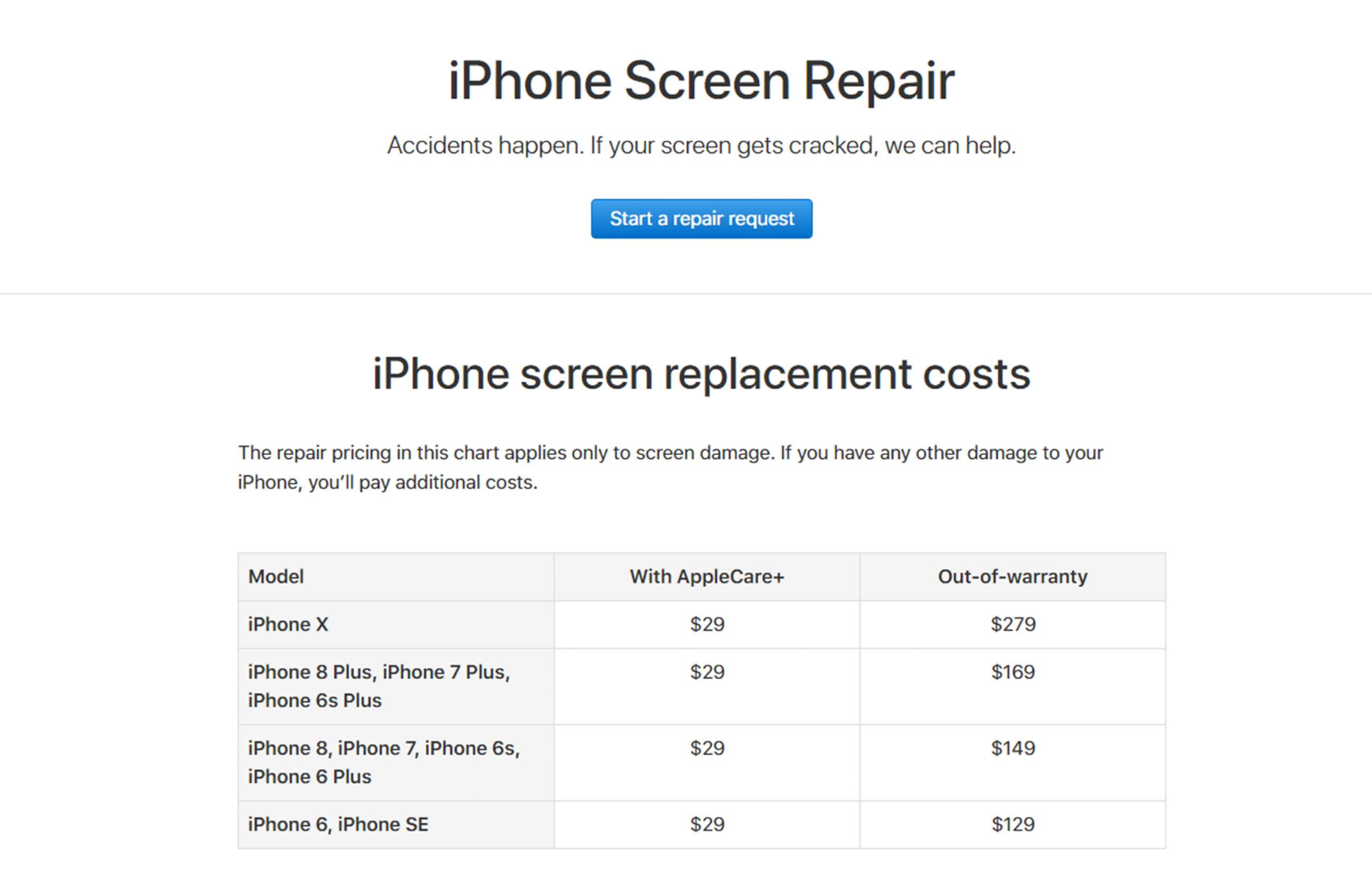
The cost of an Apple screen replacement in 2026 varies significantly based on your specific device model and whether you hold an active AppleCare+ plan. Generally, out-of-warranty screen repairs range from $129 for older base-model iPhones to upwards of $500 for the latest Pro Max or foldable-style display assemblies. If covered by AppleCare+, the flat-rate service fee for screen-only damage is consistently $29.
Understanding the Factors Influencing Repair Costs
When you face a cracked or unresponsive screen, the final bill is determined by several variables. Understanding these components helps you navigate the official Apple support ecosystem more effectively.
1. Warranty Status and AppleCare+
Your primary cost mitigation tool is AppleCare+. This extended warranty program provides two incidents of accidental damage protection every 12 months. With this coverage, the out-of-pocket cost is limited to a service fee of $29 for screen damage. Without this protection, you are responsible for the full out-of-warranty cost, which encompasses the price of the proprietary OLED or Super Retina display panel, the diagnostic labor, and the specialized recalibration required to maintain features like True Tone and Face ID.
2. Device Model Complexity
Apple’s display technology has evolved from standard LCDs to sophisticated LTPO OLED panels with integrated haptic sensors and facial recognition components. Newer models, such as the iPhone 18 series or the most recent iPad Pro iterations, require more expensive components and more complex assembly procedures. Furthermore, screen repairs often necessitate the replacement of adhesive seals that maintain the device's IP68 water and dust resistance rating, adding to the specialized nature of the service.
3. Scope of Damage
It is critical to distinguish between "screen-only" damage and "other damage." If your device has suffered a cracked screen but the frame is bent, the back glass is shattered, or the internal cameras are compromised, the service center may classify the repair as "other damage." This moves the repair into a higher pricing tier, often approaching the cost of a full unit replacement rather than a simple screen swap.
Standard Pricing Tiers for iPhones in 2026
While pricing fluctuates based on regional taxes and minor logistical adjustments, the following table provides a representative overview of the costs associated with screen replacement at an Apple Store or Apple Authorized Service Provider.
| Device Series | AppleCare+ Cost | Out-of-Warranty Cost (Est.) |
|---|---|---|
| iPhone 16 / 17 / 18 Series | $29 | $279 – $449 |
| iPhone 15 / 14 Series | $29 | $229 – $379 |
| iPhone 13 / 12 / 11 Series | $29 | $199 – $329 |
| iPhone SE (All Generations) | $29 | $129 – $169 |
Note: Prices reflect Apple's internal service guidelines as of 2026. Prices for iPad and Apple Watch displays differ due to the specific bonding processes and screen sizes utilized in those product lines.
Prerequisites Before Seeking Repair
Before visiting an Apple Store or mailing in your device, you must perform several administrative and security tasks to ensure a smooth repair process.
- Back Up Your Data: Whether using iCloud or a physical computer, always ensure you have a complete, current backup. During the repair process, or if the device is found to have underlying logic board issues, your data might be erased.
- Disable Find My: Apple’s service protocol requires you to disable the "Find My" feature before they can access the device for physical repair. This is a security measure designed to protect your privacy and prevent unauthorized access to a locked device.
- Remove Accessories: Take off any third-party screen protectors or bulky cases. While Apple may remove these for you, they are rarely returned in usable condition, and they can interfere with the precision tools used to calibrate the new screen.
- Gather Proof of Purchase: If you believe you have active AppleCare+ coverage, having your original receipt or the digital contract number can expedite the verification process if the system does not automatically detect your status.
Exploring Service Channels
You generally have three primary paths when your Apple device screen requires attention.
Apple Store Genius Bar
Visiting an Apple Store in person remains the gold standard for repairs. In many cases, if the store is not at maximum capacity, technicians can complete a screen replacement on the same day. This ensures the use of genuine Apple parts and calibration software, which is vital for maintaining the performance of Face ID or Touch ID sensors.
Apple Authorized Service Providers (AASPs)
These are third-party businesses authorized by Apple to perform repairs using genuine parts and tools. They are bound by the same pricing guidelines as official Apple Stores regarding AppleCare+ claims and often offer similar turnaround times. They are an excellent alternative if you live in an area without a physical Apple Store.
Mail-In Repair
If you do not have proximity to a service center, you can initiate a mail-in repair via the Apple Support portal. Apple will send a prepaid shipping box to your address. Once they receive the device, they typically complete the repair and return it to you within three to five business days. While convenient, this option leaves you without a device for a period, which is a significant consideration for most users.
The Importance of Genuine Parts
One of the most frequently asked questions regarding the cost of screen replacement is why it is more expensive at Apple than at independent repair shops. The answer lies in the display assembly itself. Apple displays are factory-calibrated to integrate with the logic board. When a screen is replaced, the software must perform a "handshake" to ensure the new component is recognized as authentic. Using non-genuine screens can lead to the permanent loss of True Tone, adaptive brightness, and, in some cases, the complete deactivation of biometric security features. Official repairs ensure that your device remains fully functional and retains its trade-in or resale value.
Troubleshooting and Verification
If you notice your screen is malfunctioning but there is no visible crack, consider these steps before assuming a physical repair is necessary:
- Forced Restart: A simple system hang can sometimes make a screen appear unresponsive. Perform a force restart by following the sequence specific to your model (usually involving a quick press of the volume buttons and holding the power button).
- Software Updates: Ensure your device is running the latest version of iOS or iPadOS. Occasionally, display driver bugs are addressed in software patches.
- Calibration Check: If your screen works but colors seem "off," check your Accessibility settings. Ensure that "Color Filters" or "Reduce White Point" have not been accidentally enabled, as these can mimic screen hardware failure.
Frequently Asked Questions
1. Does my homeowners or renters insurance cover a broken Apple screen? Some policies do cover accidental damage, but the deductible is often higher than the $29 AppleCare+ fee or even the out-of-warranty cost. You should check your specific policy terms regarding "personal property coverage" before filing a claim.
2. Can I get a free screen replacement if the screen is defective but not cracked? Yes. If the screen has a factory defect (e.g., dead pixels, lines on the display, or ghosting) and the device is within the one-year limited warranty or covered by AppleCare+, Apple will replace it at no cost, provided there is no evidence of accidental impact or liquid damage.
3. Will a screen replacement affect my warranty? If you have your screen replaced by an Apple Store or an AASP, your warranty remains intact. If you choose an unauthorized third-party repair, you may void the remaining Apple warranty on the device.
4. How long does a typical in-store screen replacement take? At an Apple Store, a screen replacement usually takes between 1 to 3 hours. However, this is dependent on the availability of parts for your specific model and the current volume of the repair queue. Always book an appointment online beforehand.
5. What happens if they find other damage while replacing the screen? If a technician discovers that your display damage caused internal components to fail or if the frame is damaged, they will inform you of the additional costs for a "whole unit replacement." You can then choose whether to proceed with that repair or decline the service.
Final Recommendation
Before proceeding with any payment for a screen repair, always verify your serial number on the official Apple "Check Coverage" website. If your device is eligible for AppleCare+, it is almost always more cost-effective to purchase the plan, wait the required processing period, and then initiate the repair at the $29 service fee. For devices out of warranty, prioritize an Apple-authorized channel to ensure that your device retains its hardware integrity and security features. If the repair cost exceeds 50% of the current market value of your device, consider if it is more economical to trade in the damaged device toward a new model.