A 100 Mbps internet connection delivers data download speeds of up to 100 megabits per second, providing more than enough bandwidth for multiple people to stream high-definition video, join video conference calls, and browse the web simultaneously. Understanding what this speed means in practical terms helps households and small offices choose the right broadband plan without paying for unnecessary capacity.
Defining 100 Mbps Internet Speed
To understand a 100 Mbps internet connection, it helps to break down the technical terminology. "Mbps" stands for megabits per second, which is a measure of data transfer rate. A single megabit contains one million bits of data. When an Internet Service Provider (ISP) advertises a 100 Mbps plan, they are specifying the maximum theoretical rate at which digital data can be downloaded from the wider internet to your local network device, such as a modem or router.
It is critical to distinguish between megabits (Mb) and megabytes (MB). File sizes on computers and smartphones are typically measured in megabytes, where one megabyte equals eight megabits. Therefore, a download speed of 100 Mbps translates to a maximum theoretical transfer rate of approximately 12.5 megabytes per second under ideal laboratory conditions.
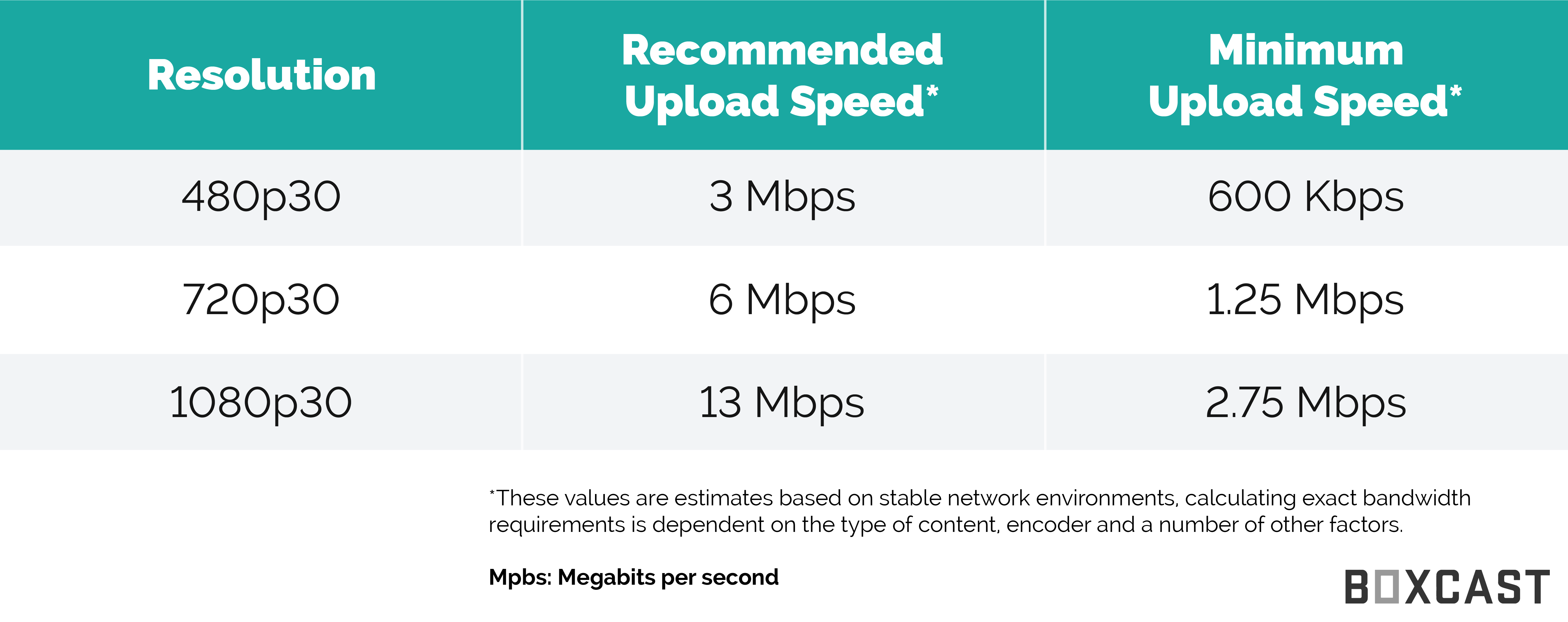
Furthermore, standard consumer internet plans are often asymmetric, meaning the download speed (fetching data from the internet) is significantly higher than the upload speed (sending data out to the internet). While a plan might offer 100 Mbps for downloads, its upload speed might range anywhere from 10 Mbps to 100 Mbps depending on whether the underlying technology is cable, digital subscriber line (DSL), or fiber-optic broadband.
How 100 Mbps Performs in Daily Tasks
Evaluating how a 100 Mbps connection handles everyday digital activities requires looking at the bandwidth demands of modern applications. Most online tasks consume only a fraction of this total capacity, allowing multiple users to operate concurrently without noticeable lag or buffering.
Video Streaming and Entertainment
Streaming video is one of the most common bandwidth-heavy activities in modern households. High-definition (HD) video streams, such as those on Netflix or YouTube, typically require about 5 Mbps of dedicated bandwidth per stream. 4K Ultra HD video streams demand more capacity, generally requiring between 15 Mbps and 25 Mbps per stream. With a 100 Mbps connection, a household can stream up to four separate 4K video feeds at the exact same time, or upwards of fifteen HD streams, assuming network congestion and Wi-Fi signal strength do not introduce bottlenecks.
Gaming and Large Downloads
For online multiplayer gaming, 100 Mbps provides ample speed. Actual gameplay consumes very little bandwidth—often less than 5 Mbps—because games transmit lightweight coordinate and status updates rather than heavy media files. However, modern video game titles frequently range from 50 GB to over 150 GB in file size. At a consistent speed of 100 Mbps (yielding roughly 12.5 MB/s), downloading a 100 GB game file takes approximately two hours and thirteen minutes.
Remote Work and Video Conferencing
Professional tasks such as participating in Zoom, Microsoft Teams, or Google Meet video calls require roughly 2.5 Mbps to 4 Mbps for high-definition group video feeds. A 100 Mbps connection easily supports multiple family members working from home while others attend remote classes, browse websites, and check email simultaneously.
Comparing 100 Mbps to Other Speed Tiers
Choosing the correct internet tier depends heavily on household size, device count, and the types of applications running on the network. The following table compares 100 Mbps to other common broadband speed tiers available from modern ISPs.
| Speed Tier | Ideal Household Size | Best Suited For | Theoretical File Download Time (5 GB File) |
|---|---|---|---|
| 25 Mbps | 1 to 2 users | Basic browsing, email, single HD video stream | ~26 minutes |
| 100 Mbps | 2 to 4 users | Multiple HD/4K streams, remote work, moderate gaming | ~6 minutes |
| 300 Mbps | 4 to 6 users | Heavy 4K streaming, rapid large file downloads, smart homes | ~2 minutes |
| 1 Gig (1,000 Mbps) | 6+ users or power users | Professional media creators, smart homes with dozens of active devices | ~40 seconds |
Factors That Impact Your Actual Speeds
While paying for a 100 Mbps plan guarantees that your ISP delivers that bandwidth to your home's entry point, several internal and external factors influence the actual speed experienced on individual devices.
Wi-Fi Hardware and Interference
Wireless networking introduces variables that can severely degrade performance. Older Wi-Fi standards (such as 802.11n) or congested 2.4 GHz frequency bands struggle to deliver full 100 Mbps speeds wirelessly. Upgrading to a modern router supporting Wi-Fi 5 or Wi-Fi 6, utilizing the 5 GHz band, or connecting via a physical Ethernet cable (Cat5e or Cat6) ensures that devices receive the full throughput of the broadband plan.
Network Congestion and Peak Hours
Cable internet infrastructure relies on shared nodes within neighborhoods. When many local residents go online simultaneously—typically between 7:00 PM and 11:00 PM—network congestion can temporarily reduce actual speeds. Fiber-optic connections are generally immune to this type of neighborhood slowdown because they use dedicated glass strands for each subscriber.
Background Updates and Connected Devices
Modern homes feature dozens of connected devices, including smartphones, smart televisions, security cameras, and smart speakers. Even when idle, these devices frequently download operating system updates, back up photos to cloud storage, and synchronize data in the background, consuming available bandwidth without human intervention.
Frequently Asked Questions
Is 100 Mbps fast enough for a family of four?
Yes, 100 Mbps is generally sufficient for a family of four, provided the household members engage in standard activities like remote work, online learning, casual gaming, and streaming HD or 4K video. However, if multiple members routinely download massive files exceeding 50 GB or engage in heavy data-intensive professional work simultaneously, upgrading to 300 Mbps or higher may prevent minor bottlenecks.
Does 100 Mbps mean I can download at 100 megabytes per second?
No. Internet speeds are measured in megabits (Mb), whereas file storage sizes are measured in megabytes (MB). Because there are eight bits in a single byte, a 100 Mbps connection translates to a maximum theoretical download speed of roughly 12.5 megabytes per second under optimal conditions.
Is fiber internet at 100 Mbps better than cable internet at 100 Mbps?
Fiber internet is generally superior because it offers symmetrical speeds, meaning your upload speed matches your download speed of 100 Mbps. Cable internet plans at 100 Mbps typically feature much lower upload speeds (often between 10 Mbps and 20 Mbps) and can experience slowdowns during peak evening hours due to shared neighborhood nodes.
Do I need a special router to get 100 Mbps?
Most modern routers manufactured within the last decade easily support speeds up to 100 Mbps and beyond. However, to achieve these speeds over a wireless connection, your router and device must support modern Wi-Fi standards and connect via the less congested 5 GHz frequency band rather than the older 2.4 GHz band.
Next Actions and Recommendations
If you are currently evaluating your internet options, audit your household's actual usage by checking how many devices run concurrently and whether you frequently experience buffering or sluggish file transfers. For households with moderate demands, a 100 Mbps plan offers an excellent balance between performance and monthly cost. When signing up for service, verify whether the advertised 100 Mbps rate applies equally to uploads and downloads, and inspect your home network hardware to ensure old Wi-Fi routers do not artificially restrict your connection speed.