An Apache proxy server acts as an intermediary for requests from clients seeking resources from other servers. By utilizing the mod_proxy module, the Apache HTTP Server can function as a forward proxy to provide internet access to private networks or as a reverse proxy to balance loads and secure backend web servers.
The Evolution and Role of Apache Proxy Servers in 2026
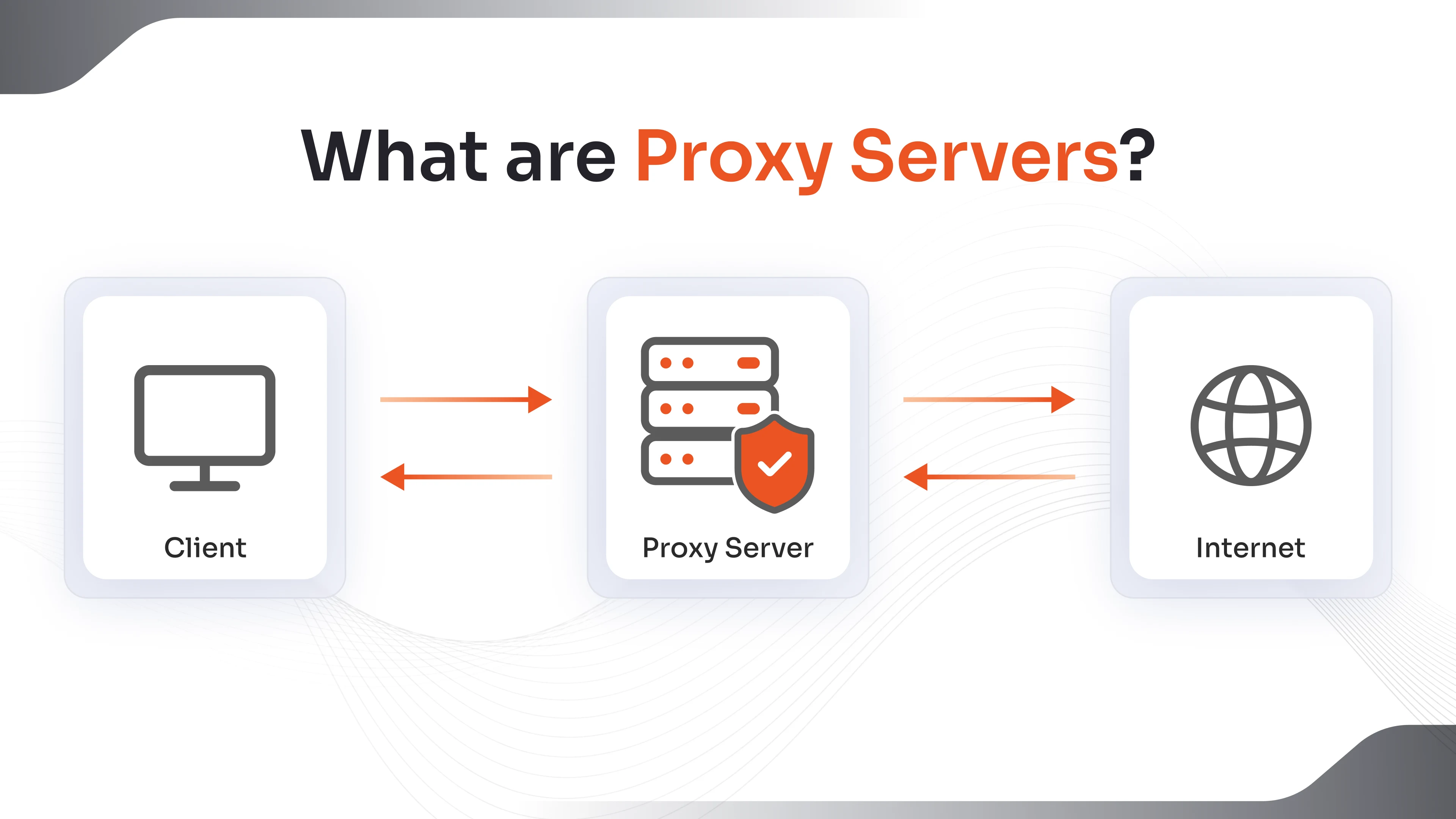
The Apache HTTP Server remains a cornerstone of web infrastructure in 2026. While newer technologies have emerged, the versatility of the Apache proxy server—specifically its ability to handle complex routing, heavy-duty processing, and diverse protocol support—ensures its continued relevance in enterprise environments. A proxy server essentially sits between a user and a destination server, capturing requests and forwarding them according to a set of predefined rules.
In modern networking, the Apache proxy server is not merely a "pass-through" mechanism. It serves as a sophisticated control point for security, performance optimization, and traffic management. Whether you are managing a legacy monolithic application or a distributed microservices architecture, understanding how to leverage Apache's proxying capabilities is essential for robust systems administration.
Distinguishing Between Forward and Reverse Proxies
To effectively deploy an Apache proxy server, one must first distinguish between the two primary modes of operation: forward and reverse proxying. Each serves a distinct purpose and requires a specific configuration logic.
Forward Proxying (Inside-Out) A forward proxy is used by clients within an internal network to access resources on the public internet. The proxy server acts on behalf of the client. When a client requests a website, the request goes to the Apache server first. Apache then fetches the resource from the internet and returns it to the client. This is frequently used for:
- Monitoring and filtering internet usage in corporate environments.
- Circumventing IP-based restrictions.
- Reducing bandwidth consumption through centralized caching of frequently accessed external content.
Reverse Proxying (Outside-In) The reverse proxy is the more common implementation for web service providers in 2026. Here, the proxy server sits in front of one or more backend servers and presents a single interface to the public. When a user visits a website, they are actually communicating with the Apache proxy, which then retrieves the data from a backend application server (like Tomcat, Node.js, or a Python-based API). Key benefits include:
- Load Balancing: Distributing incoming traffic across multiple backend servers to prevent overload.
- SSL/TLS Termination: Handling encryption and decryption at the proxy level to reduce the CPU load on backend servers.
- Anonymity: Protecting the identity and internal IP structure of backend servers from direct exposure to the internet.
Essential Apache Modules for Proxy Functionality
The Apache HTTP Server is modular by design. To transform a standard web server into a proxy server, specific modules must be enabled. The core of this functionality is mod_proxy, but it requires support modules depending on the protocols being handled.
- mod_proxy: The main engine that handles proxying infrastructure. It cannot function alone and requires protocol-specific modules.
- mod_proxy_http: This is the most widely used submodule, enabling the proxying of HTTP and HTTPS requests.
- mod_proxy_balancer: Essential for load balancing, this module allows the server to manage clusters of backend servers (members) and distribute traffic based on various algorithms.
- mod_proxy_connect: This module is critical for handling the CONNECT method, which is primarily used for tunneling SSL/TLS traffic through the proxy.
- mod_proxy_ajp: Used specifically for communicating with Apache JServ Protocol (AJP) backends, commonly found in environments running Apache Tomcat.
- mod_proxy_wstunnel: In the context of 2026 web applications, this module is vital for supporting WebSockets, allowing for persistent, real-time communication between the client and backend.
Prerequisites and Initial Environment Setup
Before configuring the Apache proxy server, ensure your environment meets the necessary requirements. In 2026, standard deployments typically run on Linux distributions such as Ubuntu 24.04 LTS, Debian 13, or RHEL 10.
System Requirements:
- A functional installation of Apache HTTP Server (version 2.4.x or higher).
- Root or sudo access to the server.
- DNS records correctly pointing to the proxy server's IP address.
- Open ports in the firewall (typically 80 for HTTP and 443 for HTTPS).
To begin, you must enable the necessary modules. On Debian-based systems, this is achieved using the a2enmod command:
sudo a2enmod proxy sudo a2enmod proxy_http sudo a2enmod proxy_balancer sudo a2enmod lbmethod_byrequests
After enabling these modules, the Apache service must be restarted to apply the changes. It is a best practice to verify that the modules are loaded by checking the output of the apachectl -M command, which lists all active modules.
Implementing a Reverse Proxy Configuration
Setting up a reverse proxy involves modifying the virtual host files of your Apache installation. This configuration directs Apache to listen for specific domain requests and pass them to a backend service.
Consider a scenario where an application is running on an internal server at 192.168.1.50 on port 8080. You want the public to access this via example.com.
Inside your virtual host file (e.g., /etc/apache2/sites-available/000-default.conf), you would define the following directives:
ProxyPreserveHost On This directive ensures that the original "Host" header sent by the client is passed to the backend server. This is often necessary for backend applications that rely on the hostname to generate absolute URLs.
ProxyPass / http://192.168.1.50:8080/ This tells Apache that all requests starting from the root (/) should be forwarded to the backend address.
ProxyPassReverse / http://192.168.1.50:8080/ This is a crucial directive. It adjusts the headers in HTTP redirect responses sent by the backend server. Without this, if the backend server sends a redirect, the client might try to connect directly to the internal IP, which would fail.
Advanced Load Balancing with Apache
In 2026, high availability is a standard requirement for web services. Apache's mod_proxy_balancer allows you to group multiple backend servers into a "balancer member" group. This creates a resilient architecture where if one server fails, the proxy can reroute traffic to healthy nodes.
A typical load balancer configuration looks like this:
ProxyHCExpr ok200 {hc('body') =~ /working/} ProxyPass "/app" "balancer://mycluster" BalancerMember "http://backend1.example.local:8080" BalancerMember "http://backend2.example.local:8080" loadfactor=2 ProxySet lbmethod=byrequests
In this example, the loadfactor parameter allows you to send more traffic to "backend2" if it has more powerful hardware. The lbmethod determines how requests are assigned. The most common methods include:
- byrequests: Performs weighted request counting.
- bytraffic: Performs weighted traffic byte count balancing.
- bybusyness: Tracks active requests and sends the new request to the server with the fewest active connections.
Security Hardening for Proxy Servers
An Apache proxy server is a high-value target because it acts as the gateway to your internal infrastructure. Security must be implemented at multiple layers.
Restricting Proxy Access For forward proxies, it is imperative to prevent "open proxy" scenarios where anyone on the internet can use your server to hide their identity. You should restrict access to specific IP ranges using the block and Require ip directives.
SSL/TLS Termination In 2026, unencrypted traffic is unacceptable. Apache should handle the SSL handshake, using modern protocols like TLS 1.3. This allows you to manage certificates in one place rather than on every backend server. Integration with automated certificate authorities like Let's Encrypt is the industry standard for maintaining valid certificates without manual intervention.
Header Manipulation To further secure the backend, you can use mod_headers to remove sensitive information. For example, removing the "Server" header prevents attackers from easily identifying the specific version of the software running behind the proxy. You can also implement security headers such as Strict-Transport-Security (HSTS), X-Content-Type-Options, and Content-Security-Policy (CSP) at the proxy level to protect users.
Comparison of Leading Proxy Solutions in 2026
Choosing the right proxy server depends on your specific performance needs and architectural complexity. While Apache is highly flexible, other solutions like Nginx and HAProxy offer different advantages.
| Feature | Apache (mod_proxy) | Nginx | HAProxy |
|---|---|---|---|
| Primary Strength | Flexibility & Module Richness | Static Content & Concurrency | High-Performance Load Balancing |
| Architecture | Process/Thread-based | Event-driven (Asynchronous) | Event-driven |
| Protocol Support | Extensive (HTTP, FTP, AJP, etc.) | High (HTTP, Stream, gRPC) | Specialized (TCP/HTTP) |
| Configuration | Complex, but granular | Simple, readable syntax | Specialized for balancing |
| Dynamic Reconfig | Requires reload (mostly) | Requires reload | Supported via Runtime API |
| SSL Performance | Excellent in 2026 | Industry Standard | Highly Optimized |
Performance Optimization Techniques
To ensure your Apache proxy server handles 2026-level traffic volumes, performance tuning is required. The choice of Multi-Processing Module (MPM) is the most significant factor.
The Event MPM For proxy workloads, the Event MPM is generally superior to the older Prefork or Worker modules. It is designed to handle a large number of concurrent connections by passing off the "keep-alive" state to a dedicated listener thread, freeing up worker threads to handle new requests.
Connection Pooling The mod_proxy module supports connection pooling, which keeps connections to backend servers open. This avoids the overhead of the three-way TCP handshake for every single request. Using the "enablereuse=On" and "max=100" parameters within the BalancerMember or ProxyPass directives can significantly reduce latency.
Caching Implementing mod_cache alongside mod_proxy allows the server to store copies of backend responses. If a second user requests the same resource, Apache can serve it from the local cache without contacting the backend server at all. This is particularly effective for static assets like images, CSS, and JavaScript files.
Troubleshooting Common Proxy Issues
Even with a perfect configuration, issues can arise due to network instability or backend failures.
- 502 Bad Gateway: This indicates that the Apache proxy received an invalid response from the backend server. Check if the backend service is actually running and if there are firewall rules blocking communication between the proxy and the backend.
- 503 Service Unavailable: Usually occurs when the backend server is overloaded or when all members of a balancer group are marked as "in error." Check the Apache error logs to see if the "timeout" threshold has been reached.
- 504 Gateway Timeout: The proxy server did not receive a timely response from the backend. This is common with long-running database queries or script executions. You may need to increase the "ProxyTimeout" value in your configuration.
- Mixed Content Warnings: If your proxy is using HTTPS but your backend is using HTTP, some applications might generate absolute links with "http://". Ensure ProxyPreserveHost is On and that your application is "proxy-aware."
Verification and Monitoring
Once the Apache proxy server is live, consistent monitoring is required to maintain uptime. The mod_status module provides an HTML page showing the current state of the server, including active connections, CPU usage, and the status of balancer members.
For deeper insights, integrate your Apache logs with a centralized logging system. Tools like Prometheus (using the apache_exporter) or the ELK stack (Elasticsearch, Logstash, Kibana) allow you to visualize traffic patterns and identify potential bottlenecks before they impact users.
Frequently Asked Questions
Does an Apache proxy server support HTTP/3 in 2026? Yes, by 2026, Apache supports HTTP/3 through mod_http2 and appropriate library links (like nghttp3). While proxying HTTP/3 usually involves translating it to HTTP/1.1 or HTTP/2 for the backend, Apache can handle the client-facing QUIC connections efficiently.
Can I use Apache as a proxy for non-web protocols? While Apache is primarily an HTTP/HTTPS proxy, it can handle other protocols through specific modules. For example, mod_proxy_ftp handles FTP, and mod_proxy_connect can tunnel virtually any TCP protocol. However, for raw TCP/UDP load balancing, a dedicated tool like HAProxy or a cloud-native Load Balancer might be more efficient.
What is the impact of ProxyPassReverse? ProxyPassReverse is essential for preventing "leaked" internal URLs. If a backend server sends an HTTP 302 redirect to an internal IP like http://10.0.0.5/login, the ProxyPassReverse directive intercepts this and rewrites it to the public URL (https://example.com/login) before it reaches the user's browser.
Is it better to use Apache or Nginx as a reverse proxy? There is no single "best" choice in 2026. Nginx is often preferred for high-concurrency environments and simple configurations. Apache is preferred when you need complex URL rewriting (mod_rewrite), extensive protocol support, or if you are already using Apache features like .htaccess or specific enterprise modules.
How do I secure the communication between the proxy and the backend? The most secure method is to use "End-to-End Encryption." This means the proxy connects to the backend via HTTPS. You can configure this by using "ProxyPass / https://backend-server/" and ensuring the proxy trusts the backend's SSL certificate (using SSLProxyCACertificateFile).
Practical Recommendation for Next Actions
If you are just starting with an Apache proxy server, begin by setting up a basic reverse proxy in a staging environment. Focus first on successful connectivity and header preservation using ProxyPreserveHost. Once the basic connection is stable, introduce SSL/TLS termination using Let's Encrypt (via Certbot). Only after securing the connection should you move into advanced territory like load balancing or caching. Always keep your Apache installation updated to the latest security patch to protect against emerging vulnerabilities in the 2026 threat landscape.