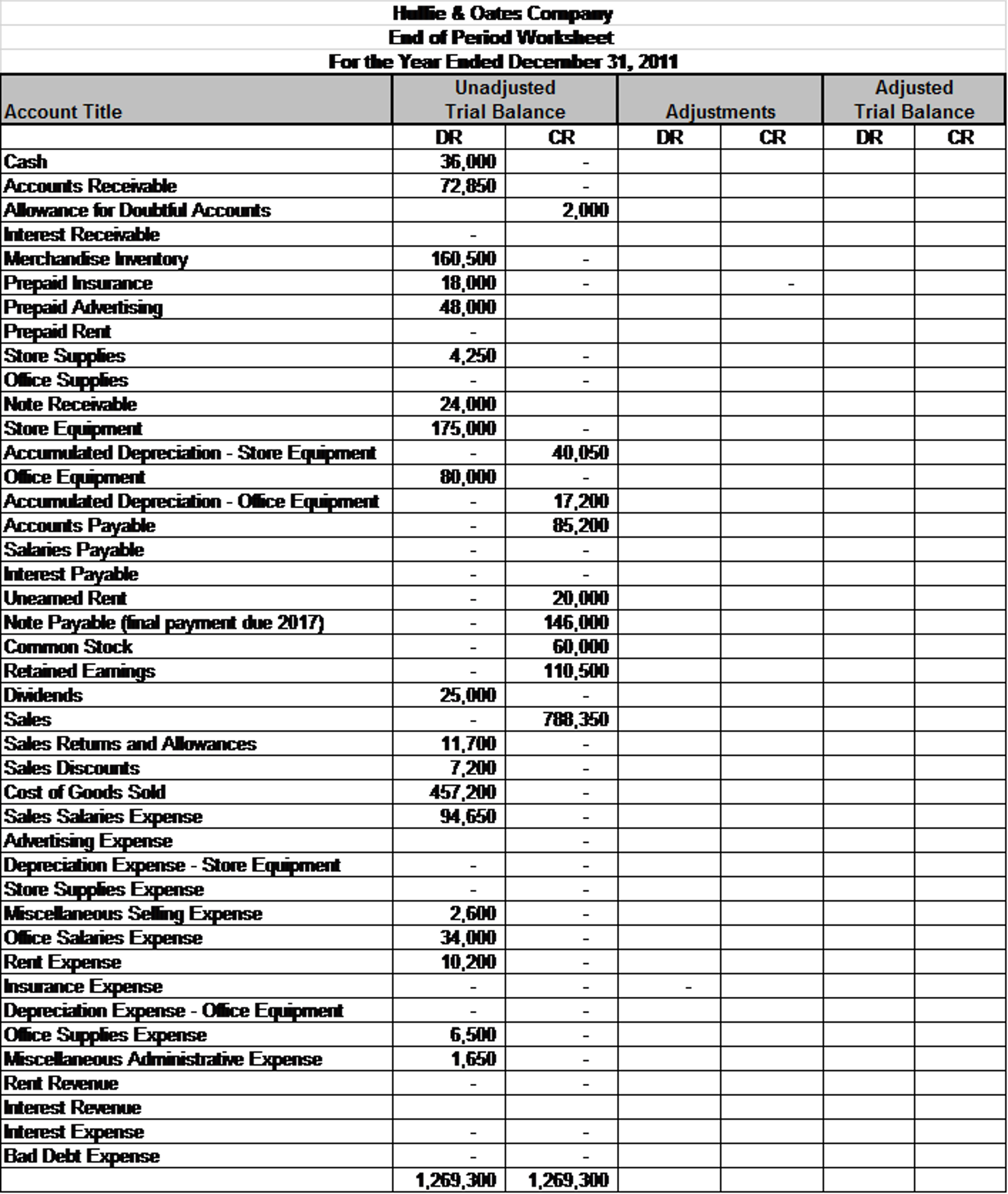
Closing entries are the final series of accounting steps performed at the end of an annual accounting cycle to transfer the balances of temporary accounts—such as revenue, expenses, and dividends—into the permanent retained earnings account. This process resets the income statement accounts to zero, ensuring that the financial reporting for the upcoming fiscal year begins with a clean slate while preserving the cumulative profit or loss history in the company's equity section.
Understanding the Purpose of Closing Entries
At the heart of the accrual basis of accounting is the distinction between temporary (nominal) accounts and permanent (real) accounts. Temporary accounts are used to track financial activities—revenue earned, costs incurred, and dividends distributed—within a single, discrete reporting period. These figures tell the story of how a business performed during a specific year. Once that year concludes, those numbers must be "closed out."
If a business failed to perform closing entries, the revenue and expense figures from January 2026 would erroneously remain on the books when the business opens its journals for January 2027. This would result in an inflated and inaccurate representation of the company’s ongoing financial health. Closing entries serve three primary purposes:
- Resetting for the New Year: By clearing out the balances of temporary accounts, the business ensures that the next accounting period starts with a zero balance for revenue and expenses.
- Updating Retained Earnings: The net income (or net loss) calculated for the year must be moved into the equity section of the balance sheet. This process captures the change in the company’s value resulting from its operations.
- Internal Control and Compliance: Standardizing the closing process provides an audit trail that demonstrates how the net results of operations were reconciled against the balance sheet.
The Four-Step Closing Process
In a standard accounting workflow, closing entries are typically executed in a sequence of four distinct steps. This methodology ensures that every temporary account is properly zeroed out and that the net income is mathematically reconciled.
1. Closing Revenue Accounts to the Income Summary
The first step involves transferring the balances of all revenue accounts (such as Sales Revenue, Service Revenue, or Interest Income) to the Income Summary account. Since revenue accounts normally carry a credit balance, you must debit these accounts to bring their balances to zero and credit the Income Summary account by the same total amount.
2. Closing Expense Accounts to the Income Summary
The second step is the inverse of the first. Expense accounts (such as Rent Expense, Wages Expense, and Supplies Expense) typically carry a debit balance. To close them, you must credit each expense account and debit the Income Summary account for the total sum of all expenses. At this point, the balance residing in the Income Summary account represents the net income (if the credit balance is higher) or net loss (if the debit balance is higher) for the period.
3. Closing the Income Summary to Retained Earnings
Once the revenue and expenses are netted out in the Income Summary, this remaining balance must be transferred to the Retained Earnings account. If the business achieved a profit, you debit the Income Summary and credit Retained Earnings. If the business incurred a loss, the entry is reversed: you credit the Income Summary and debit Retained Earnings.
4. Closing Dividends to Retained Earnings
Finally, if the business declared and paid dividends during the year, these are usually tracked in a "Dividends" temporary account. Because dividends reduce equity, this account carries a debit balance. You must credit the Dividends account and debit Retained Earnings to reflect the distribution of profits to shareholders.
Practical Example of Closing Entries
To visualize how these entries function, consider a small business, "ABC Services," which reported the following balances at the end of the 2026 fiscal year:
- Service Revenue: $100,000 (Credit)
- Rent Expense: $20,000 (Debit)
- Wages Expense: $40,000 (Debit)
- Dividends: $5,000 (Debit)
Journal Entry Table for ABC Services
| Transaction Description | Debit ($) | Credit ($) |
|---|---|---|
| Close Revenue: Service Revenue | 100,000 | |
| To Income Summary | 100,000 | |
| Close Expenses: Income Summary | 60,000 | |
| To Rent Expense | 20,000 | |
| To Wages Expense | 40,000 | |
| Close Net Income: Income Summary | 40,000 | |
| To Retained Earnings | 40,000 | |
| Close Dividends: Retained Earnings | 5,000 | |
| To Dividends | 5,000 |
Note: In the second entry, Income Summary is debited for $60,000 (the sum of Rent and Wages expenses). In the third entry, the credit balance in the Income Summary ($100k revenue minus $60k expenses) of $40,000 is moved to Retained Earnings.
Distinguishing Between Temporary and Permanent Accounts
A common point of confusion for small business owners is understanding which accounts belong in which category. Misclassifying an account can lead to errors in the closing process.
Temporary (Nominal) Accounts:
- Revenue/Sales
- Cost of Goods Sold (COGS)
- Operating Expenses (Utilities, Salaries, Insurance, Advertising)
- Interest Expense
- Dividends/Draws
Permanent (Real) Accounts:
- Cash and Cash Equivalents
- Accounts Receivable
- Inventory
- Prepaid Expenses
- Property, Plant, and Equipment (PP&E)
- Accounts Payable
- Common Stock
- Retained Earnings
Permanent accounts are never closed. Their balances carry over from the end of one year directly into the beginning of the next. If your "Cash" account were closed at the end of the year, you would lose the record of the actual money remaining in your bank account, which would make subsequent reporting impossible.
Common Mistakes During the Closing Process
Accounting professionals often encounter specific, recurring errors when businesses attempt the closing process manually. Being aware of these can help you avoid a "broken" trial balance in the new year.
Forgetting the Dividends Account
Some business owners forget to close the Dividends account to Retained Earnings, leaving it as a hanging debit balance in the new year. Dividends represent a distribution of accumulated earnings; if not closed, they will distort the equity report in the following period.
Miscalculating the Income Summary Balance
If the Income Summary account does not show the correct net income or loss before it is closed to Retained Earnings, the final Retained Earnings balance will be incorrect. Always verify that your Income Summary balance matches your Net Income figure from the Income Statement before finalizing the closing entry.
Posting to the Wrong Year
In automated accounting software used in 2026, the software often handles the closing entries automatically. However, if you manually enter closing entries, it is vital to ensure that the date is set to the final day of the fiscal year (e.g., December 31, 2026). Posting an entry into the first day of the next year will cause the "closed" accounts to show activity in the wrong period.
Adjusting Entries vs. Closing Entries
Do not confuse closing entries with adjusting entries. Adjusting entries are made before the closing process to ensure all accruals, deferrals, and depreciation have been recorded. Closing entries are the final step, occurring only after all financial statements have been prepared and verified.
Leveraging Accounting Software in 2026
Modern accounting platforms like QuickBooks Online, Xero, or Sage Intacct have significantly reduced the manual labor associated with closing entries. In 2026, these cloud-based systems typically feature a "Year-End Close" tool.
When you trigger the year-end closing process in these systems, the software automatically performs the following:
- Calculates net income.
- Zeroes out revenue and expense accounts.
- Automatically posts the difference to the Retained Earnings account.
- Locks the previous year's books to prevent accidental edits to historical data.
Even with automation, it is the responsibility of the business owner or the accountant to reconcile all bank accounts and credit cards before the close. Automation cannot compensate for unreconciled transactions or missing invoices. Always review the "Post-Closing Trial Balance" generated by your software to ensure all temporary accounts indeed show a zero balance.
Frequently Asked Questions
Do all businesses need to perform closing entries?
Yes. Any business that uses an accrual-based accounting system must perform closing entries to accurately measure performance over specific periods. While sole proprietorships or very small cash-basis businesses may find it easier to manage, formal financial reporting requires this process to separate one year’s performance from the next.
What happens if I make a mistake in my closing entries?
If you make an error, the books will be out of balance. You will notice this when you generate a "Post-Closing Trial Balance." If the debits do not equal the credits, you must review the entries to ensure all temporary accounts were zeroed correctly. In most cases, you can simply reverse the incorrect entry and re-enter the correct one, provided the period has not been permanently locked by your accounting software.
Should I close my books every month or only once a year?
While the official closing of revenue and expenses to Retained Earnings is typically an annual event, many businesses perform "monthly closes." During a monthly close, you reconcile your accounts and finalize your financial statements for that month, but you do not necessarily move the net income to Retained Earnings. You simply "lock" the month to prevent further changes.
Is the Income Summary account a permanent account?
No. The Income Summary is a temporary clearing account used only during the closing process. It does not appear on any financial statements (Balance Sheet or Income Statement) because its balance is always zeroed out during the final step of the closing sequence.
Can I reopen the books once they are closed?
Most accounting software allows you to reopen a closed period if you need to make a year-end adjustment (such as a late-arriving invoice). However, this should be done with caution. Reopening a period and making changes will change your Net Income and Retained Earnings, meaning you must re-run the closing entries to reflect those changes accurately.
Next Actions for Business Owners
As you approach the end of the 2026 fiscal year, follow these practical steps to ensure a smooth transition:
- Reconcile All Accounts: Ensure every bank account, credit card, and loan balance matches your statement as of December 31, 2026.
- Verify Adjusting Entries: Confirm that you have recorded all depreciation, accruals for unpaid invoices, and deferrals for prepaid expenses.
- Generate Reports: Print a final Income Statement and Balance Sheet. Ensure the "Net Income" on the Income Statement matches the figure you intend to move to Retained Earnings.
- Run the Closing Sequence: Utilize your accounting software's "Close Period" feature. If you are using manual spreadsheets, document the four journal entries as outlined above.
- Review the Post-Closing Trial Balance: Confirm that all revenue and expense accounts have a zero balance.
Maintaining this rigorous approach to closing your books provides a clear, reliable financial history for your business, supporting better decision-making for the year ahead.