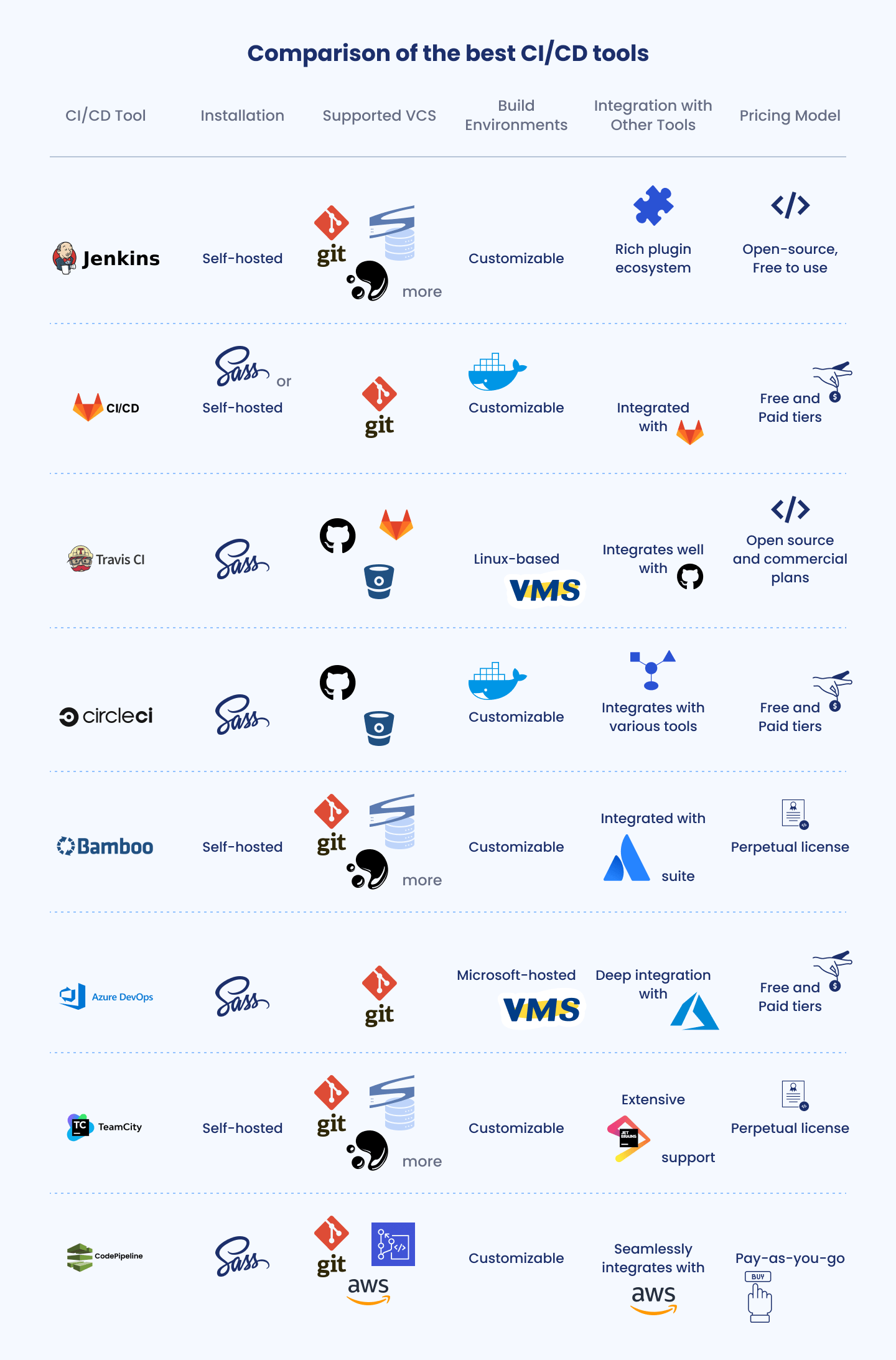
Choosing the right Continuous Integration and Continuous Deployment (CI/CD) tool is essential for modern software engineering teams striving to balance release velocity with code reliability. The optimal platform streamlines code testing, automates build pipelines, and accelerates deployments while maintaining enterprise-grade security and developer ergonomics.
Understanding Modern CI/CD Requirements
Continuous Integration and Continuous Deployment form the backbone of modern DevOps workflows. Continuous Integration requires developers to frequently merge their code changes into a central repository, where automated builds and tests verify the integrity of the additions. Continuous Deployment takes this a step further by automatically pushing validated changes to staging or production environments without manual intervention.
Evaluating tools in this space requires looking beyond basic build speeds. Engineering teams must weigh ecosystem integrations, configuration complexity, scalability, security compliance, and total cost of ownership. The modern software development lifecycle (SDLC) demands support for containerized microservices, infrastructure as code (IaC), and ephemeral environments that spin up and down dynamically on demand.
1. GitHub Actions
GitHub Actions has rapidly emerged as a dominant force in the CI/CD landscape, primarily due to its native integration with GitHub repositories. By embedding workflow automation directly into the platform where code lives, GitHub Actions minimizes context switching and simplifies secret management.
name: CI Pipeline on: [push] jobs: build: runs-on: ubuntu-latest steps: - uses: actions/checkout@v4 - name: Set up Node.js uses: actions/setup-node@v4 with: node-version: '20' - name: Install dependencies and test run: | npm ci npm test
Key Features and Strengths
The platform relies on YAML-based workflow configuration files stored directly within the repository under .github/workflows. Its defining feature is the GitHub Marketplace, a vast library of pre-built actions created by the community and official vendors that handle everything from cloud deployments to security vulnerability scanning.
- Native Ecosystem Integration: Eliminates the friction of linking external third-party services to source code management systems.
- Matrix Builds: Allows developers to test code concurrently across multiple operating systems, programming language versions, and runtime environments simultaneously.
- Generous Free Tier: Offers robust free allocations for public and private repositories, making it accessible for open-source projects and small teams.
Limitations and Considerations
While GitHub Actions excels for projects hosted on GitHub, teams utilizing self-hosted GitLab or Bitbucket must look elsewhere. Complex workflows can occasionally result in verbose YAML files that are difficult to debug locally without specialized command-line utilities like act. Furthermore, runner resource limits on standard public runners can bottleneck heavy compute workloads.
2. GitLab CI/CD
GitLab CI/CD is a deeply integrated component of the broader GitLab DevOps platform. Unlike tools that function purely as build servers, GitLab CI/CD provides an end-to-end delivery framework that covers issue tracking, source code management, security scanning, and package registries under a single application interface.
Key Features and Strengths
Configuration is managed via a single .gitlab-ci.yml file residing at the root of the repository. GitLab utilizes a runner architecture—written in Go—that can be executed on cloud infrastructure, bare-metal servers, or Kubernetes clusters.
- Comprehensive Monolithic Platform: Minimizes tool sprawl by integrating security testing (SAST, DAST), container scanning, and license compliance directly into the pipeline stages.
- Auto DevOps: Automatically detects, builds, tests, and deploys applications based on predefined conventions, drastically reducing initial setup time for standard web applications.
- Robust Permissions and Governance: Provides enterprise-grade access controls, compliance management, and audit event tracking suitable for heavily regulated industries.
Limitations and Considerations
The primary trade-off with GitLab CI/CD is its platform dependency. While you can use GitLab CI with external repositories, the full power of the tool is unlocked only when migrating your entire git hosting workflow to GitLab. Additionally, self-hosting the GitLab instance and its runners requires dedicated DevOps overhead and careful resource provisioning.
3. Jenkins
As the grandfather of open-source automation servers, Jenkins remains deeply entrenched in enterprise environments. With its extensible architecture and massive plugin ecosystem, Jenkins can be adapted to orchestrate virtually any automation task imaginable.
Key Features and Strengths
Jenkins operates on a master-agent architecture where the master node coordinates tasks and distributes workloads to various agent nodes. Pipelines are defined using Jenkinsfile syntax, supporting both declarative and scripted pipeline models.
- Unmatched Extensibility: Boasts thousands of community-contributed plugins integrating with legacy systems, specialized hardware, and proprietary enterprise software.
- On-Premises Control: Gives organizations absolute control over their data, infrastructure, and network boundaries, which is critical for air-gapped or hyper-secure environments.
- Flexibility: Can handle intricate, multi-step deployment pipelines that require complex conditional logic and manual approval gates.
Limitations and Considerations
Jenkins suffers from significant architectural overhead. Maintaining a secure Jenkins master, managing plugin compatibility, and handling scaling logistics require specialized administrative effort. The user interface can feel dated compared to modern SaaS-first competitors, and pipeline security relies heavily on correct configuration and timely plugin updates to mitigate vulnerabilities.
4. CircleCI
CircleCI pioneered fast, container-centric cloud CI/CD pipelines and continues to be a favorite among fast-growing engineering teams and startups focused on execution speed and developer productivity.
Key Features and Strengths
CircleCI emphasizes configuration as code using YAML, paired with powerful caching mechanisms and parallel execution capabilities. Orbs—reusable configuration packages—allow teams to share and standardize pipeline snippets across multiple projects easily.
- Exceptional Performance and Caching: Advanced dependency caching drastically cuts down build times by avoiding redundant downloads of packages and libraries.
- Insights Dashboard: Provides deep analytics on pipeline duration, failure rates, and credit consumption, helping engineering managers identify bottlenecks.
- Flexible Execution Environments: Supports Docker, Linux, macOS, and Windows execution environments, making it versatile for cross-platform and mobile application development.
Limitations and Considerations
CircleCI operates primarily on a usage-based pricing model measured in credits. As build concurrency and test suites grow, costs can scale quickly if pipelines are not carefully optimized. While its cloud offering is robust, setting up self-hosted runners requires additional configuration compared to fully integrated platforms like GitHub Actions.
5. Argo Workflows
Argo Workflows is an open-source container-native workflow engine for Kubernetes, designed specifically to orchestrate parallel jobs and complex deployment pipelines within cloud-native architectures.
Key Features and Strengths
Unlike traditional CI/CD servers that run on virtual machines or isolated containers, Argo runs directly on Kubernetes as a Custom Resource Definition (CRD). Every step in an Argo workflow is executed as a distinct pod.
- Kubernetes-Native Architecture: Scales effortlessly by leveraging the underlying elasticity and resource scheduling of Kubernetes clusters.
- Isolation and Ephemerality: Because each task runs in its own pod, dependencies never bleed between jobs, ensuring clean execution environments.
- Advanced DAG Support: Handles complex Directed Acyclic Graphs (DAGs) and step-based workflows, making it ideal for data-intensive pipelines, machine learning operations (MLOps), and microservices delivery.
Limitations and Considerations
Argo Workflows has a steeper learning curve than traditional CI/CD tools. It assumes a strong working knowledge of Kubernetes, pod networking, and persistent volume management. It is not an out-of-the-box source code management tool; it must be triggered by external webhooks from Git repositories or event brokers.
Comparison of Top CI/CD Platforms
| Tool | Primary Hosting | Configuration Format | Best Suited For | Key Advantage |
|---|---|---|---|---|
| GitHub Actions | Cloud (SaaS) / Self-Hosted | YAML (.github/workflows) |
GitHub-centric teams & open-source projects | Native ecosystem integration and rich marketplace |
| GitLab CI/CD | Cloud (SaaS) / Self-Hosted | YAML (.gitlab-ci.yml) |
All-in-one DevOps lifecycle management | Integrated security scanning and single application experience |
| Jenkins | Self-Hosted / On-Premises | Groovy / Jenkinsfile | Legacy enterprise apps & custom hardware integration | Unmatched extensibility through thousands of plugins |
| CircleCI | Cloud (SaaS) / Self-Hosted | YAML (.circleci/config.yml) |
Fast-growing tech companies & mobile development | High-speed builds, robust caching, and reusable Orbs |
| Argo Workflows | Kubernetes Cluster | YAML (Kubernetes CRDs) | Cloud-native microservices & data pipelines | Native Kubernetes orchestration and complete container isolation |
Frequently Asked Questions
Which CI/CD tool is best for beginners?
GitHub Actions and CircleCI are generally considered the most approachable for developers starting out with CI/CD. GitHub Actions requires minimal setup if your code is already hosted on GitHub, while CircleCI offers clear documentation, straightforward YAML syntax, and a robust free tier to help teams experiment without financial commitment.
How do cloud-hosted and self-hosted CI/CD tools differ?
Cloud-hosted (SaaS) solutions manage the underlying hardware, scaling, and server maintenance for you, allowing your team to focus strictly on writing pipelines. Self-hosted tools give your organization total control over data residency, security boundaries, and custom runner hardware, but require dedicated engineering bandwidth to maintain uptime and updates.
Can I run multiple CI/CD tools concurrently?
Yes. Many modern enterprises use a hybrid approach. For instance, a team might use GitHub Actions for quick pull request validation and automated testing, while utilizing Argo Workflows or Jenkins to manage heavy-duty production deployments and continuous delivery pipelines across multi-cloud Kubernetes clusters.
How do I optimize CI/CD pipeline execution speed?
Optimizing build times involves leveraging effective dependency caching, running independent tests in parallel using matrix builds, and removing unnecessary steps from critical paths. Additionally, keeping container images lean and utilizing incremental compilation strategies will dramatically reduce feedback loops for developers.
Conclusion and Next Actions
Selecting the right CI/CD tool depends heavily on your team's existing infrastructure, budget, and architectural patterns. If your codebase lives on GitHub, start with GitHub Actions for frictionless integration. If you require an all-encompassing DevOps platform with built-in security auditing, explore GitLab. Teams deeply invested in Kubernetes orchestration will find Argo Workflows exceptionally powerful, while organizations prioritizing raw execution speed often gravitate toward CircleCI. Review your project requirements, run a proof-of-concept on a representative repository, and choose the platform that best accelerates your engineering workflow.