Amazon FBM (Fulfillment by Merchant) allows home-based sellers to list products on Amazon while storing, packing, and shipping orders directly from their personal residence or home warehouse. By bypassing Amazon fulfillment center fees, home sellers gain strict control over inventory, packaging costs, and profit margins, provided they maintain Amazon's stringent seller performance standards.
Understanding Amazon FBM for Home-Based Businesses
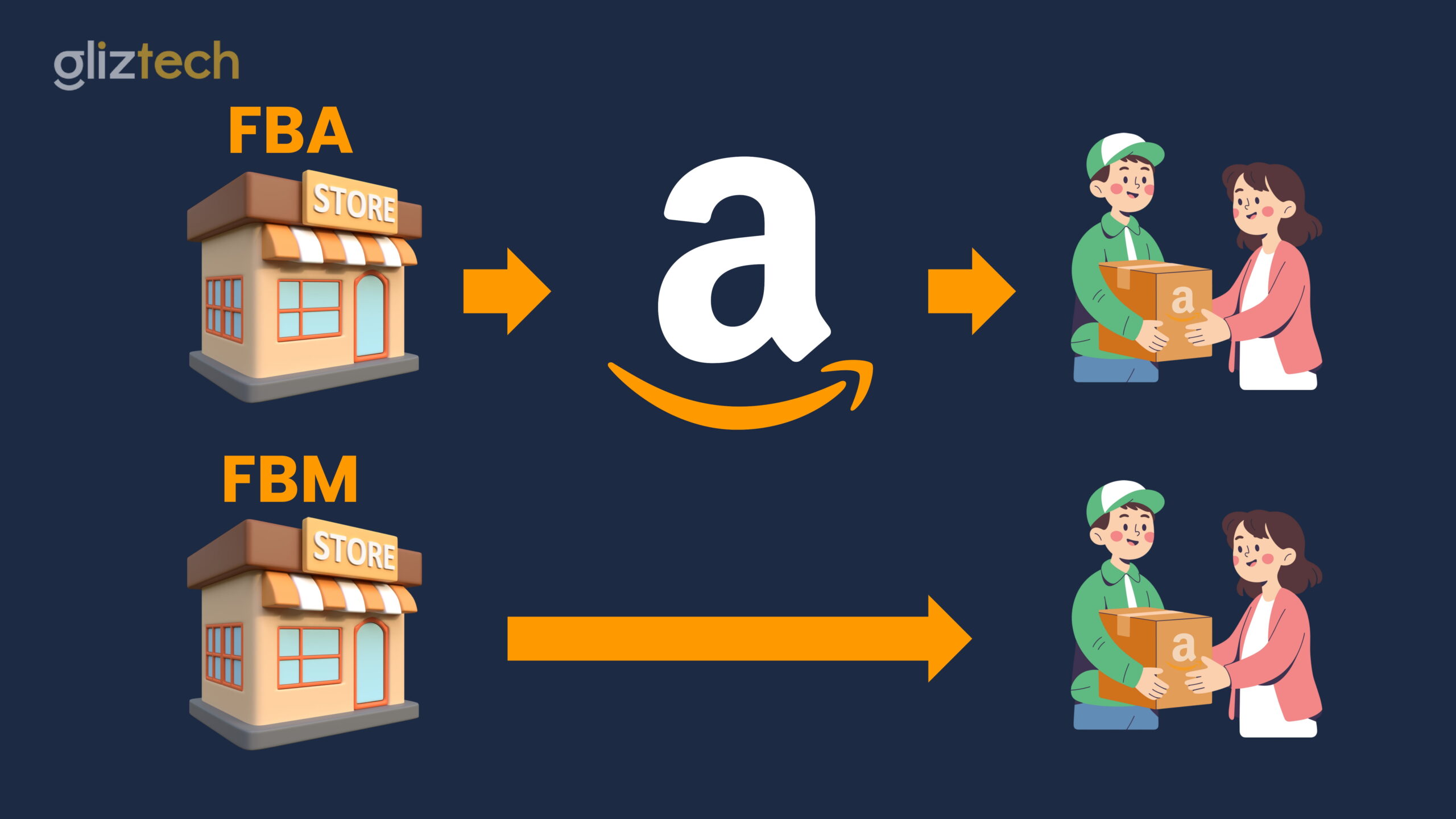
Amazon Fulfillment by Merchant (FBM) is an e-commerce fulfillment model where the merchant assumes complete responsibility for storing inventory, picking and packing orders, purchasing postage, and delivering shipments to buyers. For entrepreneurs operating out of a home office, spare bedroom, garage, or dedicated residential workshop, FBM provides an alternative to Amazon Fulfillment by Amazon (FBA).
While FBA requires sellers to ship bulk inventory to Amazon fulfillment centers—incurring inbound transportation fees, monthly inventory storage charges, aged inventory surcharges, and per-unit fulfillment fees—FBM keeps the entire supply chain under your residential roof.
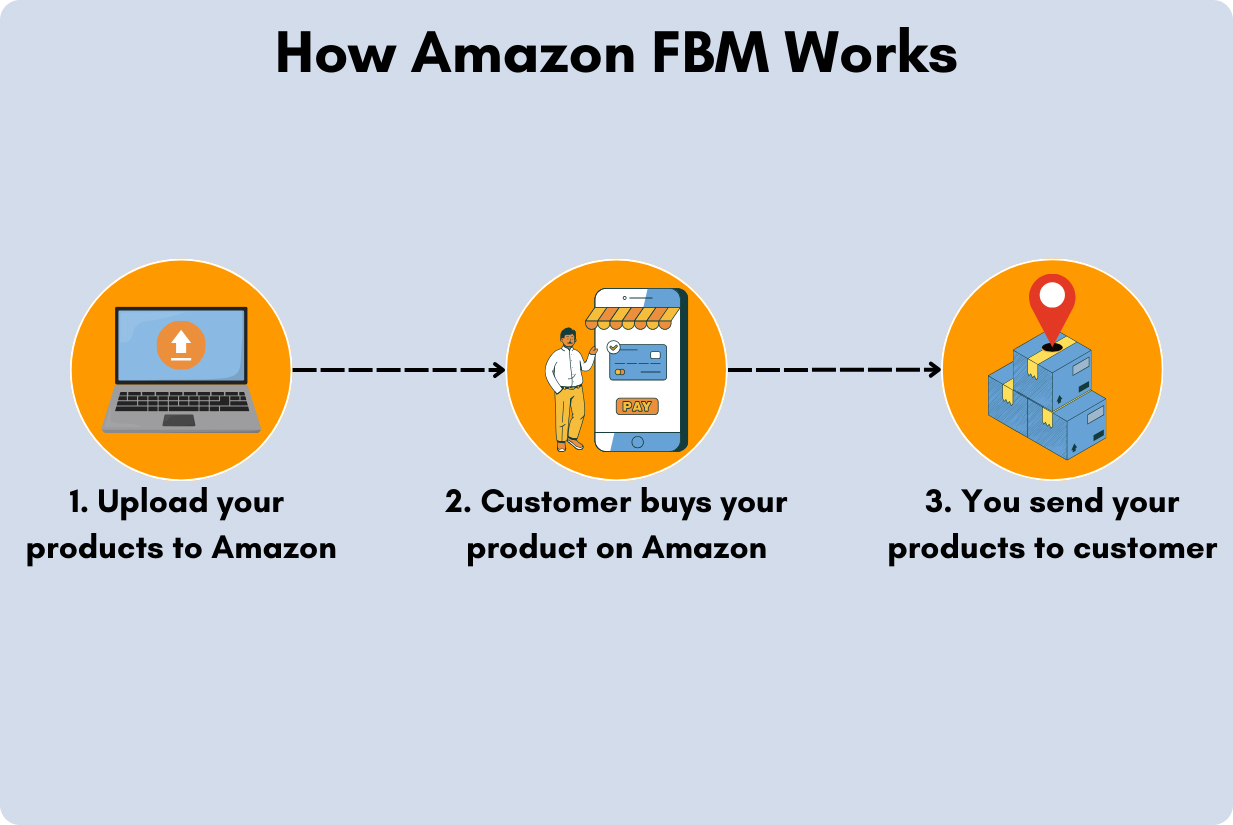
- Amazon Customer Places Order
- Order Appears in Seller Central
- Home Seller Picks & Packs at Home Station
- Prints Postage via Amazon Buy Shipping
- Carrier Pickup / Drop-off (USPS, UPS, FedEx)
- Delivered to Customer
When a customer places an order on Amazon, the purchase details appear in your Seller Central dashboard. As a home seller, you retrieve the item from your home storage, pack it securely, print a shipping label, and hand the package off to a commercial carrier such as USPS, UPS, or FedEx.
FBM is particularly relevant for home businesses navigating inventory policies, low-inventory-level fees, and fluctuating storage surcharges. Storing product at home eliminates recurring warehouse holding costs and gives sellers direct physical access to their stock.
Pros and Cons of Operating FBM from Home
Selling on Amazon via FBM from a residential location offers distinct financial and operational advantages, but it also imposes physical constraints and rigorous performance requirements.
Key Advantages
- Elimination of Amazon Storage and Fulfillment Fees: Home sellers avoid monthly per-cubic-foot storage fees, peak holiday storage surcharges, long-term storage fees, and unit pick-and-pack costs. This structure preserves margins on slow-moving inventory, oversized goods, and high-volume product lines.
- Complete Quality and Packaging Control: FBM sellers inspect every item prior to shipment. This minimizes product defect issues and allows home sellers to implement specialized packaging, protective bubble cushioning, custom branding, or personalized packing slips.
- Immediate Inventory Deployment: Unlike FBA, which requires shipping inventory to Amazon regional fulfillment centers and waiting for warehouse staff to receive and check in units, FBM listings go live instantly once inventory is added to Seller Central.
- Suitability for Specialty Product Categories: Heavy items, oversized goods, custom or print-on-demand products, fragile home decor, and hazmat merchandise (such as specific paints or cleaning products) are often cost-prohibitive or restricted under FBA, making FBM the preferred operational model.
Operational Challenges
- Loss of Automatic Prime Badge: Standard FBM listings do not automatically carry the Prime badge. Products without Prime status generally experience lower conversion rates compared to FBA listings, unless enrolled in Seller Fulfilled Prime (SFP), which requires meeting demanding delivery speed and coverage standards.
- Manual Order Processing Demands: Home sellers must process orders every business day. Spikes in order volume during holidays or promotions require personal labor to pick, pack, and dispatch goods within designated handling windows.
- Buy Box Competition: The Amazon Buy Box algorithm favors fulfillment methods with guaranteed fast delivery speeds. FBM sellers often need to price products slightly lower or offer exceptionally fast handling times to win the Buy Box against competing FBA sellers.
- Residential Physical Space Constraints: Managing inventory, packing supplies, boxes, and shipping stations inside a residential footprint requires rigorous space management to prevent clutter and operational bottlenecks.
Essential Amazon Performance Metrics for Home FBM Sellers
To sell successfully via FBM, home-based merchants must strictly adhere to Amazon's Seller Standard metrics. Failure to meet these benchmarks can lead to loss of Buy Box eligibility, account warnings, category restrictions, or seller account suspension.
| Core FBM Performance Metric | Target Standard |
|---|---|
| Late Shipment Rate (LSR) | < 4.0% |
| Valid Tracking Rate (VTR) | ≥ 95.0% |
| Pre-fulfillment Cancel Rate | < 2.5% |
| Order Defect Rate (ODR) | < 1.0% |
| On-Time Delivery Rate (OTDR) | ≥ 90.0% |
Late Shipment Rate (LSR)
The Late Shipment Rate represents the percentage of orders confirmed after the expected ship date divided by the total orders in a 10-day or 30-day period. Amazon requires sellers to maintain an LSR below 4%.
For home sellers, setting realistic default handling times (such as 1 business day or 2 business days) in Seller Central settings is critical. If an order is packed on time but not scanned by the shipping carrier before the expected ship date, Amazon considers it late.
Valid Tracking Rate (VTR)
The Valid Tracking Rate measures the percentage of shipments that include a valid tracking number recorded in Seller Central. FBM sellers must maintain a VTR of 95% or higher over a rolling 30-day period for packages shipped in each product category.
Using official shipping integration tools or buying shipping directly through Amazon automatically satisfies tracking requirements.
Pre-Fulfillment Cancel Rate
The Pre-Fulfillment Cancel Rate accounts for all seller-initiated order cancellations prior to shipment confirmation, divided by total orders over a 7-day period. Sellers must keep this metric below 2.5%.
For home sellers, this metric spikes when home inventory counts are inaccurately listed on Seller Central, leading to stockouts. Regular physical stock audits at home prevent overselling.
Order Defect Rate (ODR)
The Order Defect Rate evaluates customer service performance over a 60-day period. An order is counted as defective if it results in:
- A negative feedback score (1 or 2 stars).
- A successful A-to-z Guarantee claim.
- A credit card chargeback.
Home sellers must keep their aggregate ODR under 1%. Careful packaging to avoid shipping damage and prompt customer communication directly minimize defect rates.
On-Time Delivery Rate (OTDR)
The On-Time Delivery Rate tracks the percentage of shipments delivered on or before the estimated delivery date displayed to the buyer. Amazon recommends maintaining an OTDR of 90% or higher to ensure customer satisfaction and support Buy Box eligibility.
Building an Efficient Home Fulfillment Setup
Transforming a residential space into an efficient e-commerce fulfillment operation requires dedicated infrastructure, systematic organization, and carrier management.
- Inventory Racks
- Labeled Bins
- SKU Mapping
- Packing Station
- Digital Scale
- Thermal Printer
- Dispatch Bay
- Outbound Bins
- Carrier Pickup
Physical Station Layout
Structure your home workspace to establish an ergonomic, linear packing workflow:
- Inventory Storage & Labeling: Utilize heavy-duty steel shelving units fitted with clear plastic storage bins. Assign every product variant a specific bin location code (e.g., Rack A, Shelf 2, Bin B) and mirror these bin locations in your inventory management software to minimize pick times.
- Dedicated Packing Bench: Set up a flat, sturdy packing table at a standing height. Keep essential packing tools within arm's reach: heavy-duty tape dispensers, utility knives, bubble wrap, poly mailers, corrugated boxes, and void-fill materials.
- Hardware Infrastructure: Invest in a dedicated commercial thermal label printer (e.g., 4x6 label format) and a precision digital shipping scale capable of weighing items up to 50 lbs in fractional ounces. Thermal printers operate without ink cartridges, reducing long-term consumable expenses.
Software & Postage Integration
Managing postage purchases manually on individual carrier websites creates delay and increases error rates.
Utilizing Amazon Buy Shipping within Seller Central allows home sellers to buy discounted shipping labels directly from carriers like USPS, UPS, and FedEx.
Buying postage via Amazon Buy Shipping provides critical protection:
- A-to-z Claim Protection: If an order is shipped on time using Amazon Buy Shipping and a customer files an A-to-z claim claiming non-receipt ("Item Not Received"), Amazon covers the cost of the claim and excludes the claim from impacting your Order Defect Rate.
- Automated Tracking Entry: Tracking numbers automatically populate in the buyer's order details, ensuring 100% Valid Tracking Rate accuracy.
Carrier Logistics & Daily Pickups
To maintain daily dispatch without leaving your home office, establish daily pick-up schedules with primary logistics carriers:
- USPS: Offers free daily pickups during regular mail delivery if at least one premium service package (such as Priority Mail or Ground Advantage) is scheduled online through the United States Postal Service Schedule a Pickup tool.
- UPS & FedEx: Provide daily scheduled recurring pickups for home businesses for a nominal weekly fee, or allow free drop-offs at nearby authorized drop boxes and access points.
Financial & Cost Structure Comparison: FBM vs. FBA
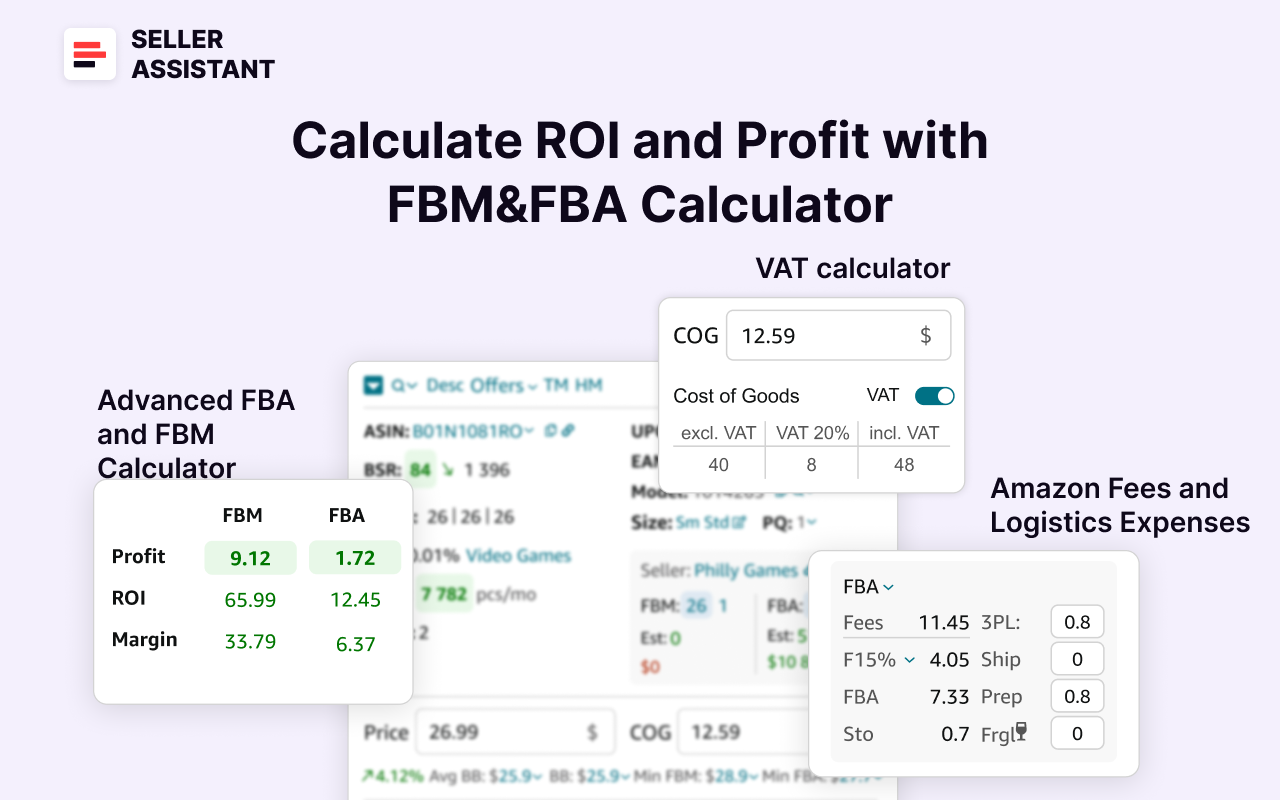
Evaluating whether to ship from home via FBM or utilize Amazon FBA requires examining all direct, indirect, and operational costs.
| Financial & Operational Feature | Amazon FBM (Home-Based) | Amazon FBA (Fulfillment by Amazon) |
|---|---|---|
| Storage Fee Structure | $0 recurring storage fees; utilizes existing home footprint. | Monthly fee per cubic foot + heavy seasonal peak surcharges. |
| Aged Inventory Surcharges | None. Inventory can remain stored at home indefinitely. | Tiered surcharges applied to inventory aged beyond 181+ days. |
| Fulfillment Charges | Direct carrier postage + packing supplies (box, tape, mailer). | Standardized per-unit pick, pack, and weight-handling fees. |
| Amazon Referral Fees | Category referral fee (typically 8% to 15% of total sales price). | Category referral fee (typically 8% to 15% of total sales price). |
| Customer Service Handling | Seller directly manages buyer messages within 24 hours. | Customer service handled directly by Amazon. |
| Returns Management | Seller receives returned items at home; manual inspection. | Amazon customer service processes returns; optional removal orders. |
| Buy Box Advantage | Competitive; requires lower pricing or exceptional metrics. | High; FBA listings receive algorithmic fulfillment priority. |
| Packaging & Branding Flexibility | Full control over packaging inserts, boxes, and custom wrap. | Standardized Amazon-branded boxes and tape. |
| Item Size Suitability | Excellent for oversized, heavy, fragile, or slow-moving items. | Ideal for lightweight, compact, fast-turning products. |
Step-by-Step Order Processing Workflow for Home Sellers
Executing a repeatable daily order fulfillment routine guarantees high operational compliance and keeps customer feedback scores high.
- Step 1: Daily Order Audit
- Check Seller Central dashboard twice daily for new pending/unshipped orders.
- Step 2: Package Weight & Dimension Verification
- Weigh the packed product on a digital scale; record exact dimensions.
- Step 3: Label Generation via Amazon Buy Shipping
- Select optimal carrier service (USPS Ground Advantage, UPS Ground, etc.).
- Step 4: Picking and Packing
- Retrieve SKU from labeled home shelf bin; apply internal cushioning.
- Step 5: Label Application & Quality Inspection
- Affix thermal shipping label over box seams; verify barcode readability.
- Step 6: Carrier Hand-Off & Dispatch Confirmation
- Pass package to carrier driver or drop box; verify physical acceptance scan.
Step 1: Daily Order Audit
Log into Seller Central twice daily (morning and early afternoon). Review the Manage Orders dashboard for newly cleared unshipped orders. Filter by expected ship date to prioritize urgent fulfillments.
Step 2: Weight and Dimension Verification
Place the unsealed box containing the item and all protective cushioning onto your digital scale. Record the exact weight in pounds and ounces. Measure the package dimensions (Length x Width x Height) in inches. Accurately entering dimensions avoids carrier adjustment penalties.
Step 3: Purchase Label via Amazon Buy Shipping
Click Buy Shipping next to the designated order in Seller Central. Input your package dimensions and weight. Compare real-time discounted shipping rates across available carriers (USPS, UPS, FedEx). Select a service that guarantees delivery within the promise window displayed to the buyer.
Step 4: Pick, Pack, and Protect
Retrieve the item from your home storage shelving using the designated SKU location. Inspect the product for physical defects. Wrap the item in bubble wrap, place it inside an appropriately sized shipping box or poly mailer, and fill remaining void space with kraft paper or air pillows to prevent movement during transit.
Step 5: Label Application
Print the shipping label using your thermal printer. Securely affix the adhesive label flat on the largest side of the package, ensuring the tracking barcode is not folded over edges, taped over with reflective tape, or wrinkled.
Step 6: Carrier Scan & Manifest Confirmation
Place processed packages in your designated dispatch area for carrier pickup. Ensure the mail carrier or truck driver scans the parcel acceptance barcode or SCAN form. Physical acceptance scans update the tracking status instantly, protecting your Late Shipment Rate.
Navigating Returns and Privacy as a Home Seller
Managing customer inquiries, return shipments, and personal privacy requires clear operational boundaries when running an e-commerce store out of a residence.
- Buyer Requests Return
- Amazon Issues Prepaid Return Label (APRL)
- Package Delivered to Home Address
- Inspect Item Condition
- If Item Resellable: Issue Full Refund
- If Item Damaged/Used: Apply Restocking Fee / File SAFE-T Claim
Managing Returns & Refund Rules
FBM orders fall under Amazon’s Prepaid Return Label (APRL) program. When a buyer initiates a return, Amazon automatically issues a prepaid shipping label on your behalf using Amazon-negotiated carrier rates.
- Return Receipt & Physical Inspection: Returned goods arrive directly at your home fulfillment address. Inspect returned products immediately to verify if the item is in unused, resellable condition.
- Return Reasons & Shipping Costs: If a return is buyer-fault (e.g., "Bought by mistake" or "No longer needed"), the cost of the prepaid return label is automatically deducted from the buyer's refund total. If the return is seller-fault (e.g., "Item defective" or "Wrong item sent"), the seller absorbs the return shipping cost.
- Restocking Fees & SAFE-T Claims: If an item is returned damaged, altered, or missing components due to customer misuse, sellers can withhold a restocking fee according to Amazon guidelines or file a SAFE-T Claim (Seller Assurance for E-commerce Transactions) in Seller Central to seek reimbursement for unfair returns.
Protecting Residential Address Privacy
By default, Amazon displays the merchant's business address on the public Seller Profile page and on package shipping labels. To maintain privacy at your home:
- Obtain a Commercial Address Alternative: Register for a Post Office Box (P.O. Box) with Street Addressing services, or secure a Virtual Business Address or commercial mailbox rental (such as through a UPS Store).
- Update Seller Central Settings: Update your legal entity address, seller profile display address, and ship-from address within Seller Central settings to mirror your private business mailbox location rather than your private residential door number.
Frequently Asked Questions
Can a home seller win the Amazon Buy Box using FBM?
Yes. While FBA listings receive an algorithmic preference for fast shipping, FBM sellers regularly win the Buy Box by offering competitive pricing, setting fast handling times (such as same-day or 1-day handling), maintaining high feedback scores, and keeping an Order Defect Rate well below 1%.
Do I have to display my personal home address on Amazon as an FBM seller?
No. While Amazon regulations require a valid address on your seller profile, you can use a P.O. Box with street addressing, a Virtual Business Address, or a commercial mailbox service as your public business address and ship-from address to keep your personal residence private.
How does Amazon Buy Shipping protect home sellers against A-to-z claims?
When you purchase shipping labels through Amazon Buy Shipping and dispatch the order on time, Amazon covers the financial liability for claims where the customer states the item was not received ("Item Not Received"). Additionally, these covered claims do not impact your Order Defect Rate (ODR).
What types of products yield the highest profit margins for home FBM sellers?
Home FBM selling is particularly profitable for oversized or heavy merchandise, custom or made-to-order items, slow-turning specialty goods, fragile home decor, and bundled product kits. These items frequently incur high FBA storage fees or special handling fees that diminish margins when stored in Amazon facilities.
Can I sell the same product using both FBM and FBA simultaneously?
Yes. Amazon allows sellers to create two separate fulfillment listings under the same product detail page (ASIN): one configured for FBA and another configured for FBM. This hybrid setup ensures that if your FBA inventory runs out of stock, your FBM listing automatically steps in to keep your sales active.
Strategic Recommendations for Home FBM Operations
- Start Small and Test Handling Times: Begin by fulfilling a manageable quantity of daily orders using 2-day handling settings. As your home picking, packing, and carrier pickup routine stabilizes, lower handling time to 1 day to improve Buy Box competitiveness.
- Standardize Packaging Sizes: Select two to three standard box and mailer sizes for your products. Standardizing packaging streamlines your packing station setup, reduces void fill costs, and accelerates shipping label creation.
- Always Use Amazon Buy Shipping: Protect your account against non-delivery claims and valid tracking penalties by generating shipping labels strictly within Seller Central.
- Conduct Weekly Physical Stock Checks: Reconcile your actual home inventory with your listed inventory counts on Seller Central every week to prevent overselling and protect your Pre-Fulfillment Cancel Rate.
- Evaluate Hybrid Operations as You Scale: As order volumes outgrow your home footprint, consider migrating your high-velocity, lightweight items to FBA while keeping custom, heavy, or slow-moving items managed via FBM from home.
EDITORIAL CATEGORY METADATA: