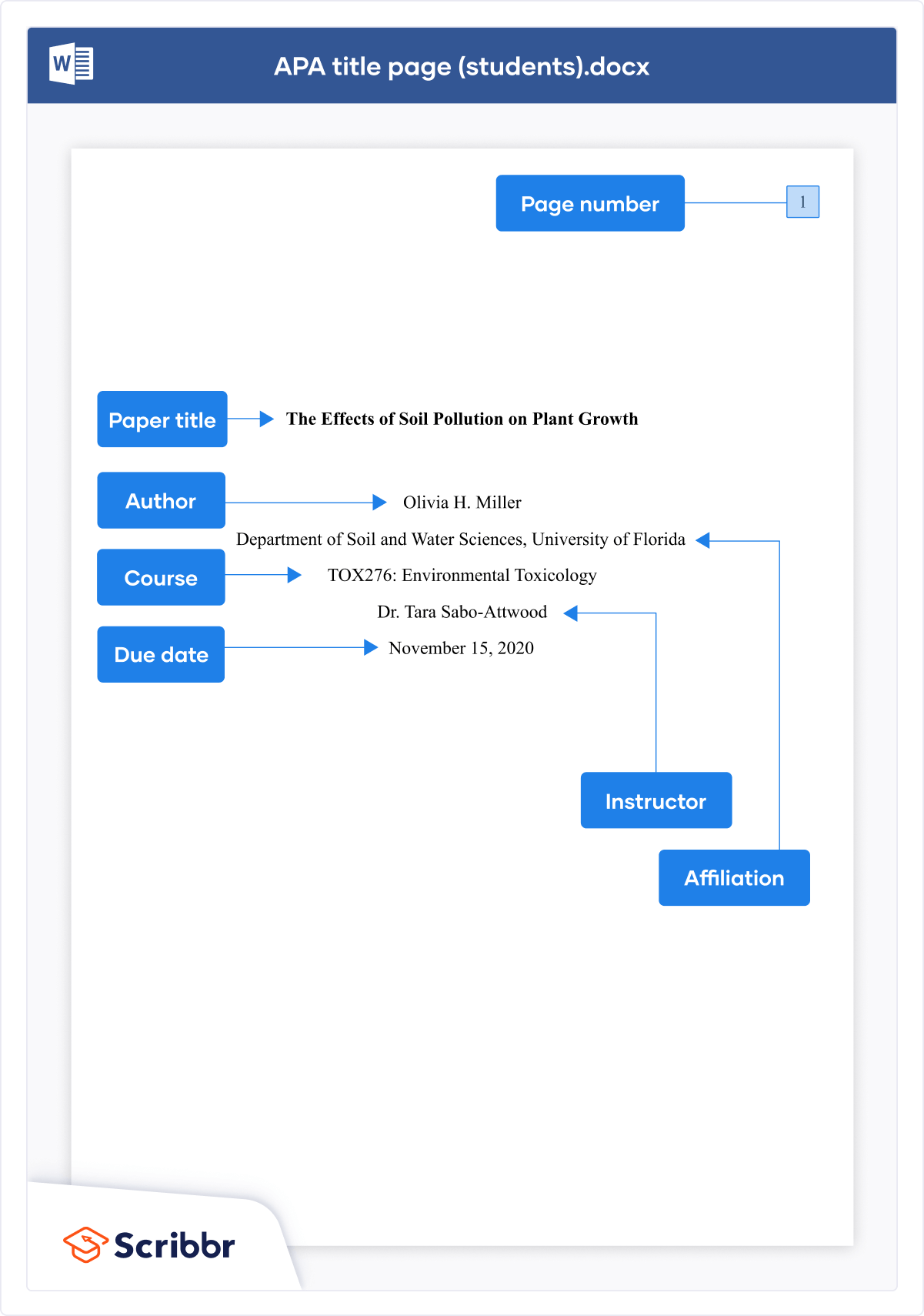
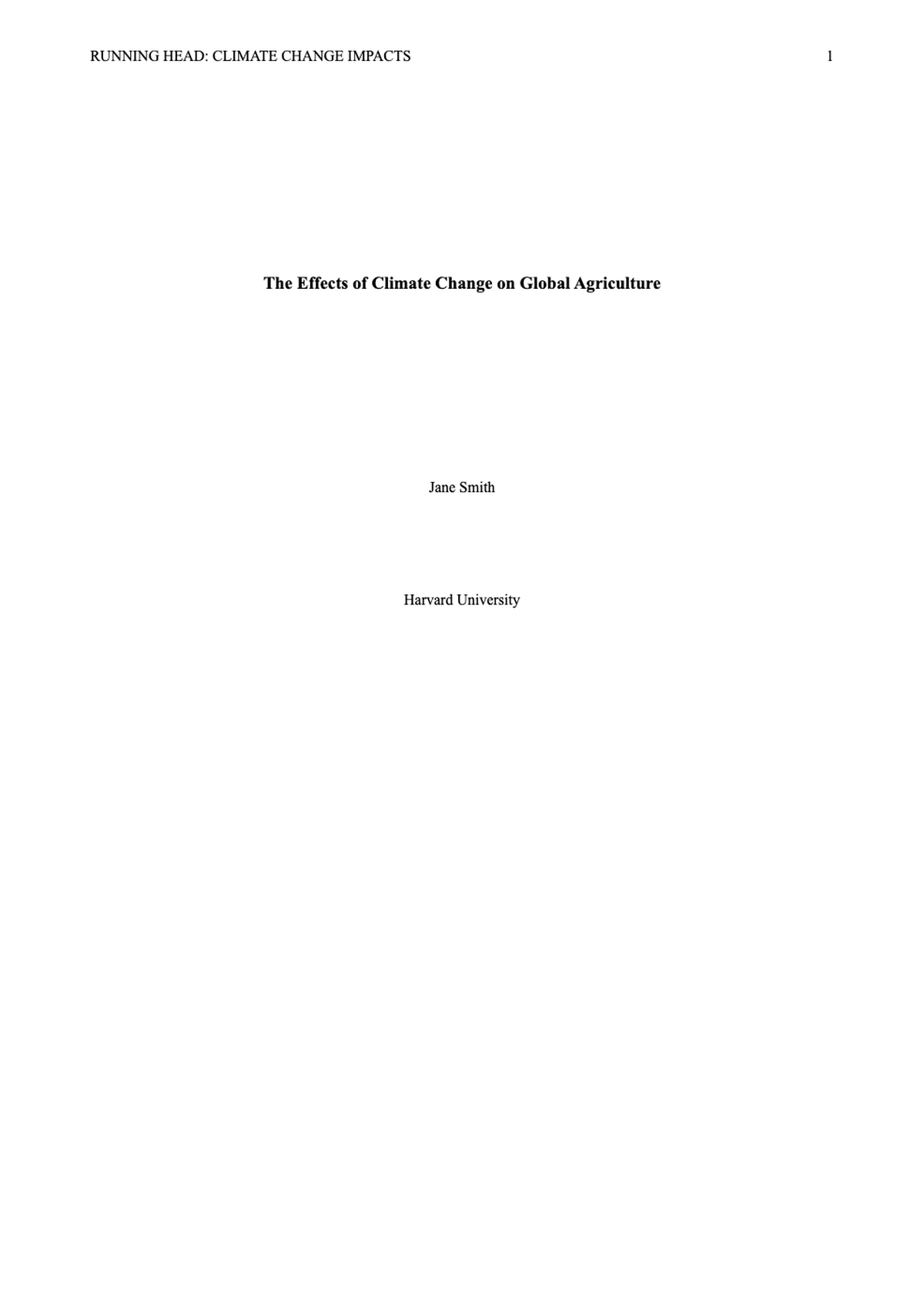
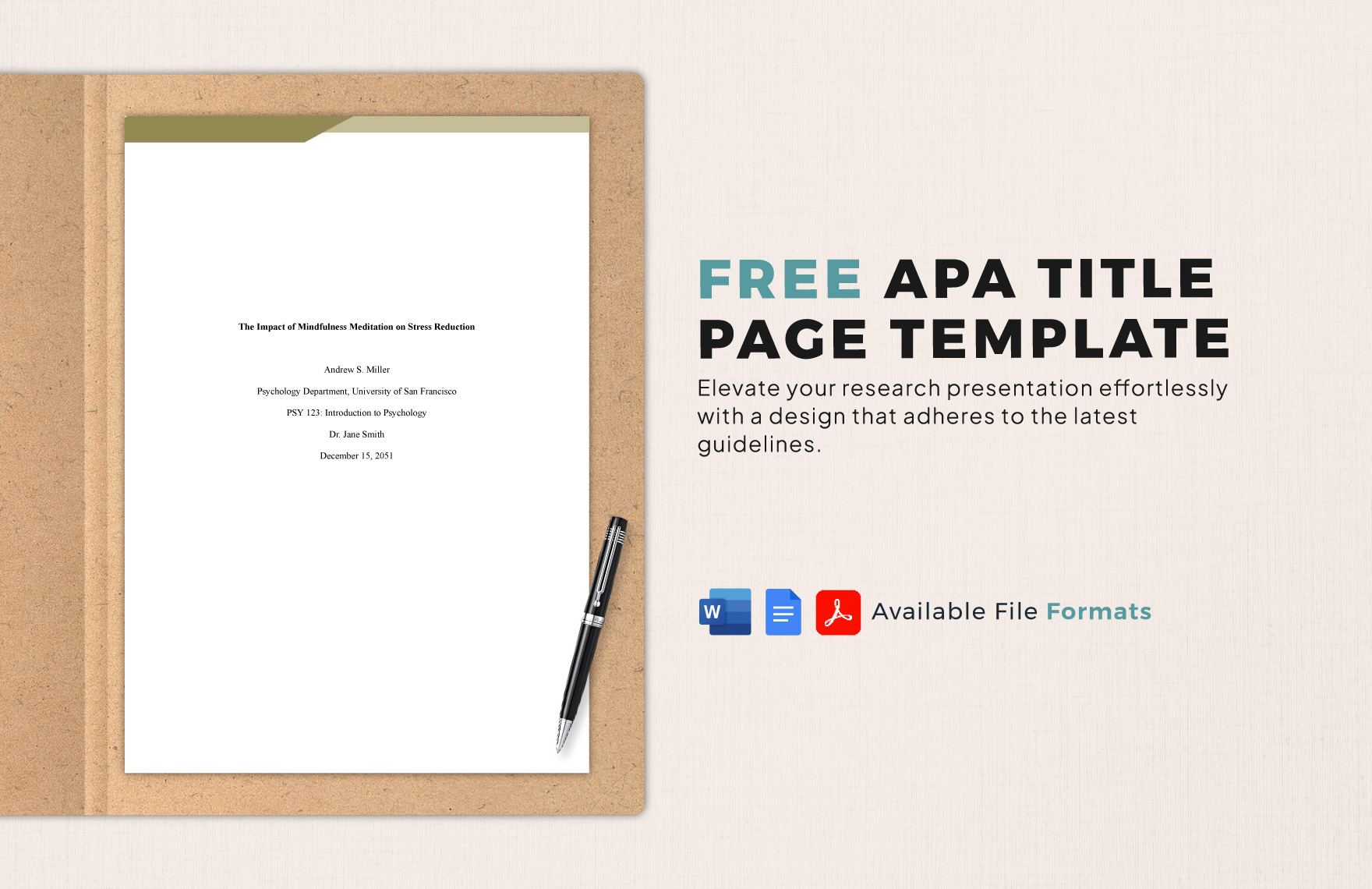
The APA paper title format requires a title that is centered, bolded, and written in title case, positioned in the upper half of the title page. For student papers, the format includes the title, author name, affiliation, course info, instructor, and date. Professional papers require a running head and an author note.
Properly formatting an American Psychological Association (APA) title page is the first step toward academic and professional credibility. As of 2026, the APA 7th Edition remains the gold standard for social sciences, nursing, education, and business disciplines. While the rules may seem rigid, they serve a vital purpose: providing a standardized "map" for readers to identify the subject, authorship, and institutional origin of the work without distraction. Whether you are submitting a sophomore-year essay or a peer-reviewed journal article, adhering to the specific nuances of the APA paper title format ensures your work is taken seriously from the moment it is opened.
The Core Anatomy of an APA Paper Title
The title itself is the most important element of your title page. According to APA guidelines, the title should be a concise statement of the main topic and should identify the variables or theoretical issues under investigation and the relationship between them. A common misconception is that a title needs to be "catchy." In academic writing, clarity and precision take precedence over creative flair.
Title Length and Precision
While previous editions of the APA manual suggested a limit of 12 words, the current 7th Edition (effective through 2026) recommends that titles be focused but does not enforce a hard word count. However, brevity is still encouraged. A title should be long enough to be descriptive but short enough to be scanned quickly in a database or table of contents. You should avoid unnecessary words like "A Study of" or "An Investigation into," as these are implied by the nature of the document.
Capitalization and Font Style
The title must be formatted in Title Case. This means you capitalize the first word of the title, even if it is a minor word like "the" or "a," and all major words (nouns, verbs, adjectives, adverbs, and pronouns). You should also capitalize any word that is four letters or longer.
The title must be bolded and centered. It is placed in the upper half of the page, typically three to four double-spaced lines down from the top margin. There should be one blank double-spaced line between the title and the author’s name to provide visual separation.
Formatting the Student Title Page
The 7th Edition of the APA manual introduced a significant distinction between student and professional formatting. This change was designed to simplify the process for students who do not need the complex tracking elements required for journal publication.
The Author Name (Byline)
The author’s name appears one double-spaced line below the title. The preferred format is First Name, Middle Initial(s), and Last Name (e.g., Jane M. Doe). This consistency helps with indexing and ensures you receive proper credit for your work throughout your academic career. If there are multiple authors, specific conjunction rules apply, which we will detail in the comparison table below.
Institutional Affiliation
For students, the affiliation is the department and the name of the college or university where the work was completed. This should be placed immediately below the author's name. For example: Department of Psychology, University of Texas at Austin.
Course Information and Instructor
One of the most helpful additions for the student format is the inclusion of the course name and number (e.g., PSY 101: Introduction to Psychology) and the instructor’s name. This ensures that the paper is easily filed and graded within the correct academic context. The instructor’s name should include their preferred title (Dr., Professor, etc.) as requested by the faculty member.
The Due Date
The final element of the student title page is the assignment due date. APA style specifies that this should be written in the format commonly used in your country. In the United States, this is typically Month, Day, Year (e.g., October 24, 2026).
Formatting the Professional Title Page
Professional manuscripts intended for publication have a more rigorous set of requirements. These elements are designed to facilitate the peer-review process and provide metadata for digital archives.
The Running Head
The running head is an abbreviated version of the paper's title that appears in the page header of every page. For professional papers, it is required on the title page and all subsequent pages. It must be in all capital letters and cannot exceed 50 characters, including spaces and punctuation. It is aligned to the left margin in the header, while the page number is aligned to the right.
Note: In the 7th Edition, the prefix "Running head:" is no longer used. You simply type the shortened title.
Author Note
Professional papers require an "Author Note" placed in the bottom half of the title page. This section provides a space for:
- ORCID iDs: Digital identifiers for researchers.
- Changes in Affiliation: If an author has moved institutions since the research was conducted.
- Disclosures: Statements regarding conflicts of interest, financial support, or acknowledgments of participants.
- Contact Information: A specific email address for the corresponding author.
The Author Note is centered and bolded as a heading, and the paragraphs within it are left-aligned with standard indentations.
Visual Standards: Margins, Spacing, and Typography
The APA paper title format is not just about the words; it is about the "white space" and technical layout. Failure to adhere to these visual standards can result in a paper that looks cluttered or unprofessional.
| Element | Student Format Requirement | Professional Format Requirement |
|---|---|---|
| Page Number | Top right (starts on page 1) | Top right (starts on page 1) |
| Running Head | Not Required | Required (All caps, max 50 chars) |
| Paper Title | Bold, Centered, Upper Half | Bold, Centered, Upper Half |
| Author Name | Below Title (one extra line space) | Below Title (one extra line space) |
| Affiliation | Department and University | University or Organization |
| Course Info | Required (Course # and Name) | Not Required |
| Instructor | Required | Not Required |
| Due Date | Required | Not Required |
| Author Note | Not Required | Required (Bottom of page) |
Font Accessibility in 2026
While Times New Roman (12 pt) was the mandatory font for decades, APA style now allows for several accessible font options to accommodate digital reading and neurodiversity. Acceptable fonts include:
- Sans Serif: Calibri (11 pt), Arial (11 pt), or Lucida Sans Unicode (10 pt).
- Serif: Times New Roman (12 pt), Georgia (11 pt), or Normal Computer Modern (10 pt).
The key is consistency. Whatever font you choose for your title page must be used throughout the entire body of the manuscript.
Double-Spacing and Margins
The entire title page must be double-spaced. This includes the space between the title and the author, and all lines of the affiliation and course data. Margins must be at least one inch (2.54 cm) on all four sides. When setting up your document in software like Microsoft Word or Google Docs, ensure the "Paragraph Spacing" is set to 0 pt for both "Before" and "After" to avoid hidden extra gaps between lines.
Detailed Requirements for Authors and Affiliations
Handling multiple authors or complex affiliations requires specific punctuation and placement to remain compliant with APA paper title format standards.
Multiple Authors
When a paper has two authors, use the word "and" between their names (e.g., Sarah Jenkins and Mark Lee). For three or more authors, use commas between names and use "and" before the final name (e.g., Sarah Jenkins, Mark Lee, and Robert Chen).
Formatting Affiliations
If multiple authors share the same affiliation, list the affiliation once below the names. If authors have different affiliations, use superscript Arabic numerals after the names and before the corresponding affiliations to link them.
- Example:
- Sarah Jenkins¹ and Mark Lee²
- ¹Department of Biology, Stanford University
- ²Department of Chemistry, University of California, Berkeley
This level of detail is crucial for professional papers where institutional funding and credit are tied directly to the title page metadata.
Common Mistakes in APA Title Formatting
Even experienced researchers can stumble on the nuances of the APA 7th Edition. Avoiding these common pitfalls will save time during the revision process.
- Using "Title:" as a Prefix: Never label your title with the word "Title." The bolding and centering already indicate its function.
- Underlining or Italicizing: The title should be bolded, but it should never be underlined or italicized. Italics are reserved for book titles or periodical names within the reference list, not the title of your own paper.
- Incorrect Vertical Placement: Placing the title too high (at the very top margin) or too low (dead center of the page) is a frequent error. Aim for 3-4 double-spaced returns from the top.
- Running Head in Student Papers: Many students mistakenly include a running head because they are looking at older 6th Edition templates. For 2026 student submissions, unless specifically requested by your professor, leave the running head out.
- Page Number Confusion: The title page is page 1. The number must appear in the top right header. Some students mistakenly start numbering on the second page (the introduction).
Troubleshooting Specific Title Scenarios
Using Subtitles
If your paper includes a subtitle, it should appear on the line immediately below the main title. Like the main title, the subtitle must be centered, bolded, and in title case. A colon is used at the end of the main title to introduce the subtitle, but the colon itself is not bolded if it's on the same line. However, the current preference for visual clarity is to place the subtitle on its own line if the main title is already long.
Specialized Characters and Abbreviations
Avoid using abbreviations in your title unless they are very well-known in your field (e.g., DNA, HIV). Technical formulas or chemical symbols should be spelled out if possible to ensure the title is accessible to a broader academic audience. If you must use a symbol, ensure it is formatted correctly using the "Insert Symbol" function in your word processor to prevent "ghost" characters in digital PDFs.
Digital Submission and Final Verification
In 2026, most APA papers are submitted digitally as PDF or DOCX files. Before you hit "upload," perform a final visual audit.
- Check the "View" settings: Switch your word processor to "One Page" view to see the vertical balance of the title page.
- Verify the Header: Ensure the page number is consistently in the top right and that the font matches the body of your paper.
- Confirm Bold Status: Many students forget to bold the title because earlier versions of APA did not require it. Double-check that your title stands out in bold.
Frequently Asked Questions
Does the title need to be the same on the title page and the first page of text?
Yes. The full title of your paper should be repeated at the very top of the first page of the actual text (Page 2 or Page 3, depending on if you have an abstract). On that page, the title is also centered, bolded, and in title case.
What is the maximum character limit for a running head?
The limit is 50 characters, including spaces and punctuation. If your full title is shorter than 50 characters, your running head can be the same as your title, just converted to all caps. If your title is longer, you must select a logical abbreviated version.
Should I include my middle name on the title page?
APA recommends including a middle initial to reduce the likelihood of being confused with another researcher who has the same first and last name. It is not a strict requirement, but it is highly recommended for those pursuing a career in research.
Is the "Author Note" required for a PhD dissertation?
Usually, no. While a dissertation is a professional-level document, most universities have their own specific "Front Matter" requirements that supersede standard APA title page rules. Always check your university’s thesis and dissertation manual.
Can I use a bold font for the author name?
No. Only the title of the paper and the headings (like "Author Note") should be bolded on the title page. The author’s name, affiliations, and course information should be in regular (non-bold) font.
Final Recommendation for Accurate Formatting
For the most reliable results, always use a clean template or create your title page from scratch rather than modifying an old document. Standardizing your workflow—by setting your margins, font, and line spacing before you type a single word—prevents formatting "drift" that can occur when pasting text from other sources. If you are a student, prioritize the inclusion of your course and instructor data, as these are the elements most likely to impact the administrative processing of your work. For professionals, focus on the running head and Author Note, as these are the primary metadata sources for journal editors.