Realizing that you cannot find your Form W-2, Wage and Tax Statement, just as tax season swings into gear can trigger an immediate wave of anxiety. This essential document, which details your annual earnings and the amount of federal, state, and other taxes withheld from your paycheck, is required by the Internal Revenue Service (IRS) to file an accurate tax return. Missing it means your tax return will likely be delayed, flagged for discrepancies, or rejected outright. Fortunately, locating this critical document or securing an acceptable substitute is a systematic process that relies on established protocols between employers, payroll providers, and federal agencies.
1. Contact Your Employer or Payroll Department First
The single most efficient and direct way to resolve a missing Form W-2 is to contact your employer's human resources (HR) or payroll department. By law, employers are required to issue Form W-2 to their employees by January 31st each year, covering the previous tax year. Even if you have misplaced a copy that was already sent via mail or electronic delivery, most organizations maintain digital records or utilize third-party payroll services that make generating duplicate copies straightforward.
When you reach out, be prepared to verify your identity. Provide your full legal name, Social Security number (SSN), exact dates of employment, and your current mailing address or secure email address. If your former employer has gone out of business, merged with another corporation, or filed for bankruptcy, this step may prove unsuccessful, which will necessitate moving on to alternative federal strategies outlined below.
Common Reasons W-2s Go Missing
- Outdated Mailing Address: Failing to update your address with your employer before they processed year-end documents.
- Electronic Delivery Delays: Misplacing login credentials for third-party payroll portals like ADP, Workday, or Gusto.
- Spam Filters: Electronic notifications containing secure download links being automatically filtered into junk or spam folders.
2. Check Online Employee Portals and Payroll Providers
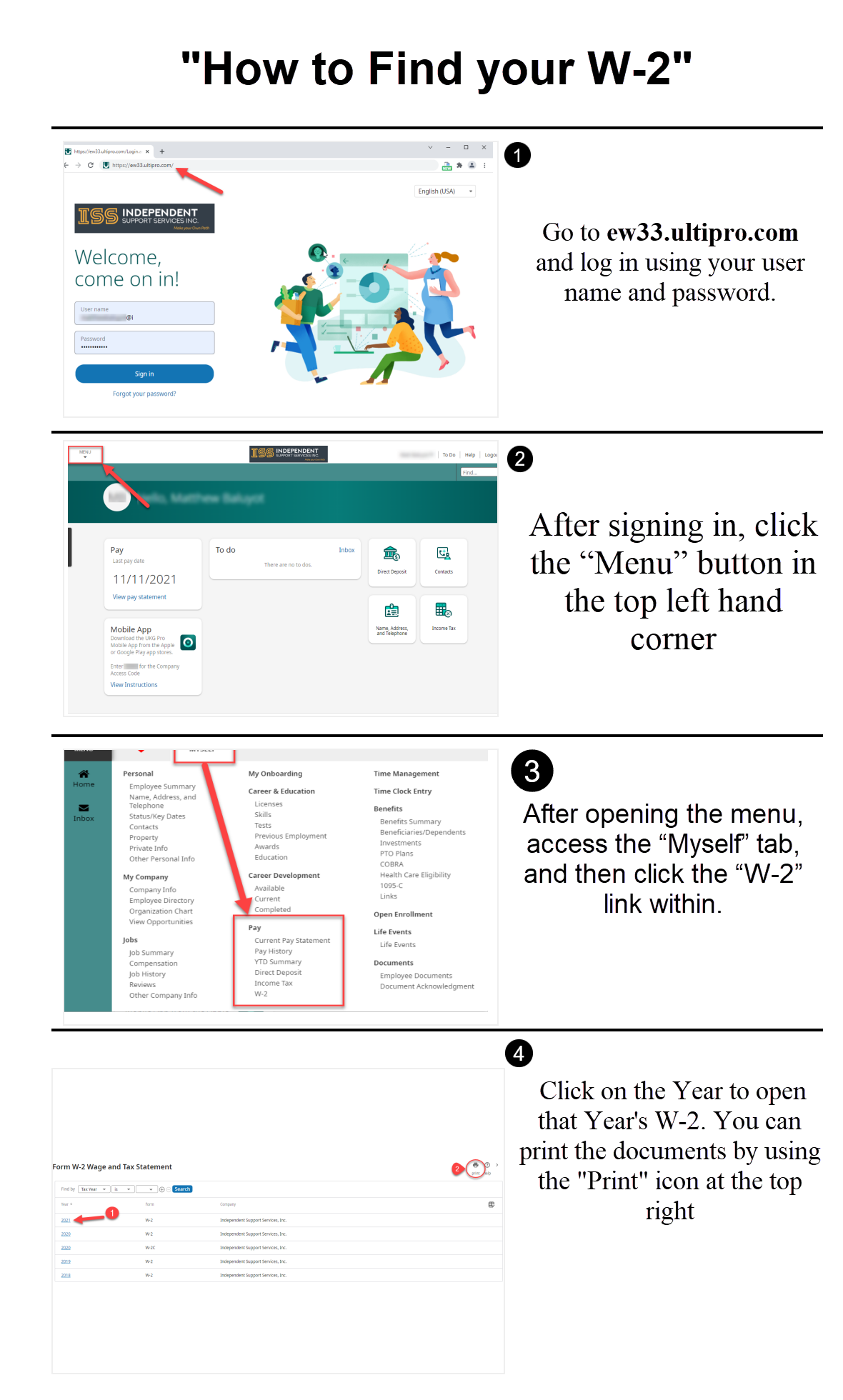
Modern workforce management relies heavily on digital portals. If your current or former employer utilizes a payroll service provider, your Form W-2 is likely stored safely within an online archive. Platforms such as ADP, Workday, Paychex, and Gusto allow former and current employees to log in years after leaving a company to retrieve historical tax documents.
If you remember using an app or website to view your pay stubs during your employment, navigate directly to that platform rather than waiting for customer support. Reset your password if necessary and look for a designated "Tax Statements" or "W-2 Documents" tab. Downloading a digital copy from these secure portals provides an instant, high-resolution PDF that can be uploaded directly into tax preparation software like TurboTax, H&R Block, or FreeTaxUSA.
3. Contact the IRS for Direct Assistance
If you have waited patiently, contacted your employer multiple times, and exhausted all digital portal options without success, the IRS provides a formal escalation path. You should contact the IRS directly at 1-800-829-1040 for assistance.
When you call the IRS, ensure you have the following information ready to expedite the process:
- Your name, address, phone number, and Social Security number.
- Your employer's name, address, and telephone number (if known).
- The dates you worked for the employer.
- An estimate of your total earnings and federal income tax withheld during the tax year, which can typically be calculated using your final year-end pay stub.
Once contacted, the IRS will reach out to your employer on your behalf, reminding them of their legal obligation to provide the form. Simultaneously, the IRS will send you Form 4852, Substitute for Form W-2, Wage and Tax Statement, along with instructions on how to proceed with filing your tax return without the original document.
4. Use Your Final Pay Stub to Estimate Earnings
If the tax deadline is looming and you have not received a response from your employer or the IRS, you can use your final pay stub of the year to reconstruct your income data. Your final pay stub for December generally includes a "Year-to-Date" (YTD) column that aggregates your total gross pay, pre-tax deductions (such as health insurance or 401(k) contributions), and exact federal, state, and local tax withholdings.
Filing with a substitute document requires precision. If you choose to file using Form 4852, you must calculate your figures as accurately as possible based on your final pay stub. Keep in mind that using estimated numbers significantly increases the likelihood that the IRS will audit or delay your return while they verify your figures against the official W-2 data submitted independently by your employer.
5. Obtain an IRS Wage and Income Transcript
A powerful yet underutilized resource for missing tax documents is the IRS Wage and Income Transcript. This official government record compiles data from information returns—including Forms W-2, 1099, 1098, and 5498—that third-party payers have submitted to the IRS.
You can access your Wage and Income Transcript instantly by navigating to the "Get Transcript" tool on the official IRS website. Doing so requires passing a rigorous identity verification process using Secure Access, which typically involves providing a financial account number (such as a credit card or auto loan) and validating a mobile phone number linked to your name.
While the IRS Wage and Income Transcript contains all the exact figures needed to file your taxes, it is important to note that state tax agencies may or may not accept transcript data in lieu of an actual Form W-2. If you reside in a state with state income tax, check your state department of revenue guidelines before filing solely with transcript data.
Comparison of W-2 Recovery Methods
| Recovery Method | Speed / Timeframe | Best Used For | Potential Limitations |
|---|---|---|---|
| Employer / HR Contact | Immediate to 5 business days | Current or cooperative former employers | Unresponsive management or closed businesses |
| Online Payroll Portal | Immediate access | Companies using platforms like ADP or Workday | Lost login credentials or expired portal access |
| IRS Phone Assistance | 2 to 4 weeks | Employers who refuse or fail to respond | Requires lengthy phone wait times |
| Final Pay Stub (Form 4852) | Immediate execution | Emergency filings right before the deadline | May trigger processing delays or IRS verification audits |
| IRS Wage Transcript | Immediate (Online) | Retrieving verified data reported to the government | State tax authorities may not accept transcript data |
Frequently Asked Questions
What happens if I file my taxes without my W-2 and the numbers are wrong?
If you file using estimates on Form 4852 and your figures do not match the official W-2 your employer eventually submits to the IRS, your return will be flagged. The IRS will send you a notice detailing the discrepancy and may adjust your tax liability, resulting in an unexpected tax bill, additional interest, or penalties. If this occurs, you will need to file an amended return using Form 1040-X.
Can I get my W-2 from previous years if I lost an old one?
Yes. Employers are generally required to keep payroll records for at least four years, though many retain them indefinitely. Furthermore, your historical IRS Wage and Income Transcripts remain available online for up to ten prior tax years through the IRS online portal, making older data relatively simple to retrieve.
Does my state tax return require a physical W-2 copy?
Most state departments of revenue require you to attach a physical or digital copy of Form W-2 to your state tax return if state income tax was withheld. If you use tax software and file electronically, the software will format and transmit this data. However, if you are filing by mail, you must attach Copy B of your W-2 or your substitute Form 4852.
What should I do if my employer refuses to provide a W-2?
If an employer refuses to issue a W-2 or retaliates against you for requesting it, do not attempt to bypass them indefinitely. Contact the IRS immediately to report the violation. The IRS will investigate the employer for non-compliance, as withholding tax documents violates federal employment and tax laws.
Final Recommendations
Discovering that your Form W-2 is missing does not have to derail your tax season. Begin by exhausting the simplest channels—contacting your HR department or logging into your online payroll provider. If those efforts fail, leverage official IRS tools like the Wage and Income Transcript or file using a substitute form backed by your year-end pay stub data. Taking prompt, organized action ensures you meet filing deadlines while maintaining total compliance with federal tax regulations.