Cloud security is a comprehensive framework of policies, technologies, and controls designed to protect data, applications, and infrastructure within cloud computing environments. It operates through a shared responsibility model, where security duties are divided between the cloud service provider and the customer to ensure confidentiality, integrity, and availability.
As organizations in 2026 continue to migrate mission-critical workloads to decentralized environments, understanding the mechanics of cloud security is no longer an optional IT function; it is a fundamental business requirement. This primer explores the architectural pillars, responsibility frameworks, and emerging challenges of securing the modern cloud.
Understanding the Shared Responsibility Model
The most critical concept in cloud security is the Shared Responsibility Model. This framework dictates that security is not a monolithic task handled solely by the provider (such as Amazon Web Services, Microsoft Azure, or Google Cloud). Instead, it is a partnership.
The Provider’s Domain: Security "of" the Cloud
The Cloud Service Provider (CSP) is responsible for the physical and foundational layers of the environment. This includes the security of the data centers, the physical servers, the storage hardware, and the virtualization layer that allows multiple customers to share resources. The CSP ensures that the infrastructure is resilient against physical intrusion, natural disasters, and hardware-level exploits.
The Customer’s Domain: Security "in" the Cloud
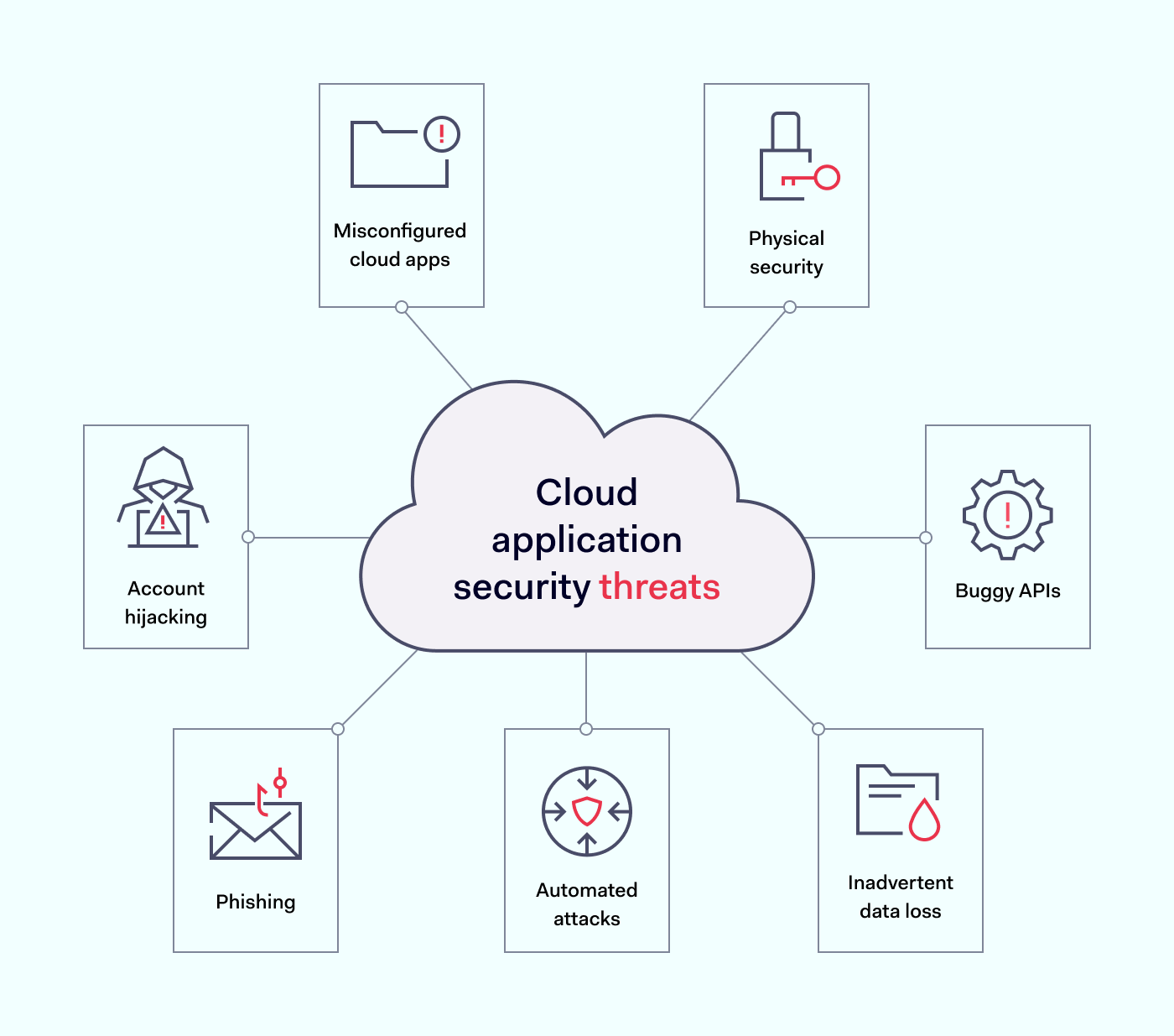
As a customer, you are responsible for everything you place within that infrastructure. This includes your data, the configuration of your operating systems, identity and access management (IAM), and the security of your applications. A common pitfall for organizations is assuming the CSP handles all security, leading to "misconfiguration leaks" where data is left exposed to the public internet because a bucket or database was not properly locked down.
Core Pillars of a Robust Cloud Security Strategy
To build a secure cloud environment, organizations must focus on five primary pillars. These pillars work in tandem to create a defense-in-depth strategy that protects against both external attackers and internal errors.
1. Identity and Access Management (IAM)
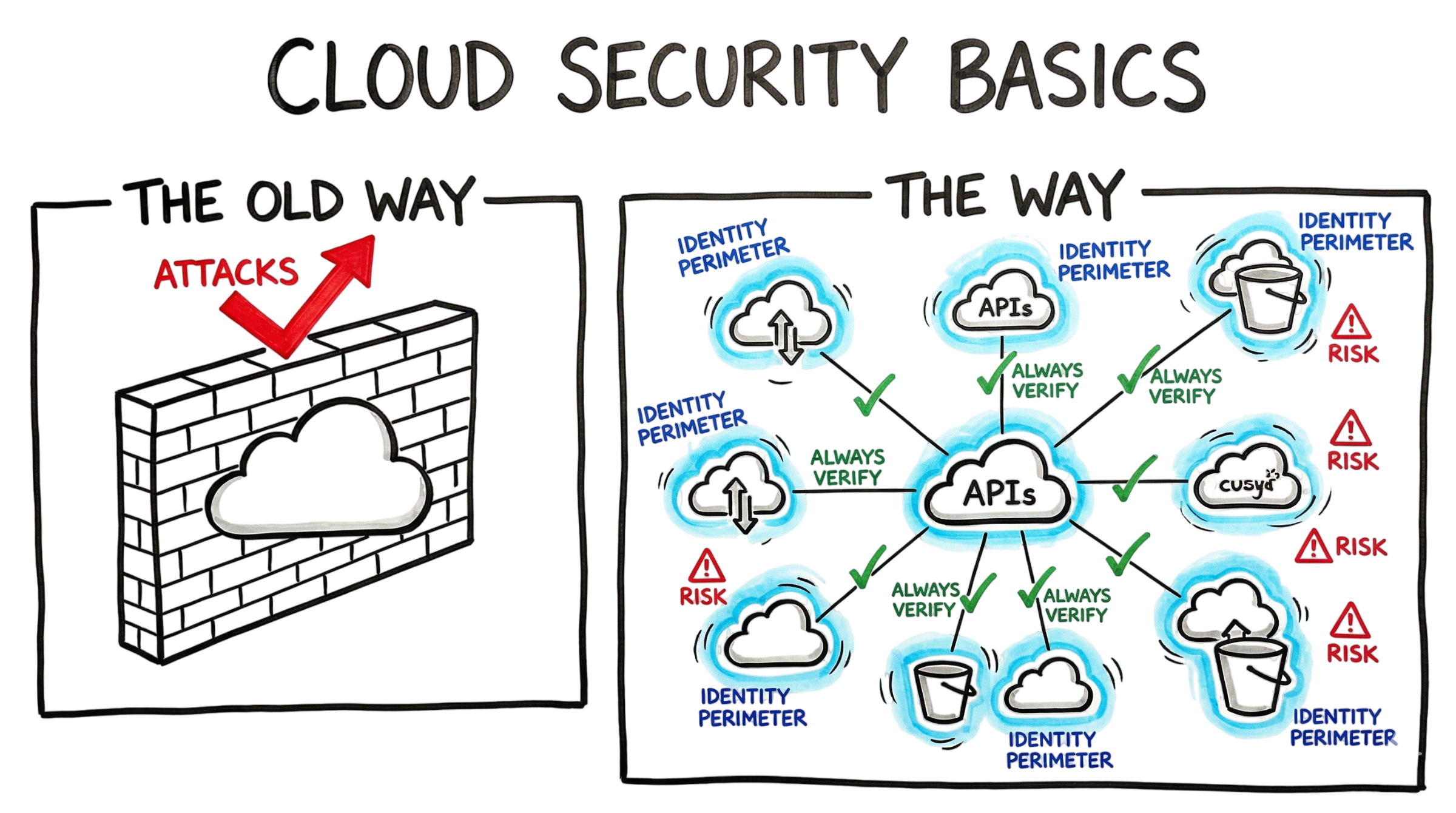
In the cloud, the traditional network perimeter has effectively disappeared. Identity is the new perimeter. IAM systems control who can access what resources and under what conditions. In 2026, standard best practices involve:
- Zero Trust Architecture: Never trust, always verify. Every request for access must be authenticated and authorized, regardless of where it originates.
- Multi-Factor Authentication (MFA): Utilizing biometric or hardware-based keys to prevent credential theft.
- Principle of Least Privilege (PoLP): Ensuring users and service accounts have only the minimum level of access required to perform their jobs.
2. Data Protection and Encryption
Data is the most valuable asset in the cloud. Protecting it requires a two-pronged approach: encryption at rest and encryption in transit.
- At Rest: Data stored on disks or in databases must be encrypted using strong algorithms like AES-256. Modern cloud environments often allow customers to manage their own encryption keys (Bring Your Own Key - BYOK) for maximum control.
- In Transit: Data moving between the user and the cloud, or between different cloud services, must be protected using Transport Layer Security (TLS) 1.3. This prevents "man-in-the-middle" attacks where hackers intercept data packets.
3. Network Security and Micro-segmentation
While the physical network is managed by the CSP, the virtual network is the customer's responsibility. Organizations use Virtual Private Clouds (VPCs) to isolate resources. Micro-segmentation takes this further by dividing the cloud environment into small, isolated zones. If one application is compromised, micro-segmentation prevents the attacker from moving laterally to other parts of the network.
4. Visibility and Continuous Monitoring
You cannot secure what you cannot see. Cloud environments are highly dynamic, with resources being created and destroyed in seconds. Continuous monitoring tools (often categorized as Cloud Security Posture Management or CSPM) scan the environment for misconfigurations, unauthorized changes, and suspicious behavior in real-time.
5. Compliance and Governance
Cloud security must align with legal and regulatory requirements such as GDPR, SOC2, or HIPAA. Governance involves setting internal policies that dictate how cloud resources are used, ensuring that security is not bypassed for the sake of speed or convenience.
Comparative Security Responsibilities by Service Model
The extent of your security responsibility changes depending on which cloud service model you utilize. The following table outlines how the burden of security shifts from the customer to the provider as you move from Infrastructure as a Service (IaaS) to Software as a Service (SaaS).
| Component | IaaS (e.g., AWS EC2) | PaaS (e.g., Azure SQL) | SaaS (e.g., Microsoft 365) |
|---|---|---|---|
| Physical Security | Provider | Provider | Provider |
| Network Infrastructure | Shared (Provider/Customer) | Provider | Provider |
| Operating System | Customer | Provider | Provider |
| Application Logic | Customer | Customer | Provider |
| Identity & Access | Customer | Customer | Shared (Provider/Customer) |
| Data & Content | Customer | Customer | Customer |
The 2026 Threat Landscape: Evolving Challenges
As of 2026, the threats facing cloud environments have become more sophisticated, often leveraging the same technologies used to defend them.
AI-Driven Attacks
Threat actors now use machine learning to identify vulnerabilities in cloud configurations at speeds human analysts cannot match. This makes automated defense and rapid patching essential. AI is also used to create highly personalized phishing campaigns designed to steal administrative credentials, which are the "keys to the kingdom" in cloud security.
Supply Chain Vulnerabilities
Modern cloud applications rely heavily on third-party APIs and open-source libraries. An attacker does not necessarily need to breach your cloud directly; they can compromise a widely used library or a third-party service you integrate with. This "upstream" attack can grant them access to your data through trusted channels.
Multi-Cloud Complexity
Most large organizations now use multiple providers (e.g., a mix of Azure and AWS). Managing security across different platforms creates "visibility gaps." Security teams struggle to maintain consistent policies when each provider uses different terminology, tools, and identity structures.
Implementing Cloud Security: A Step-by-Step Approach
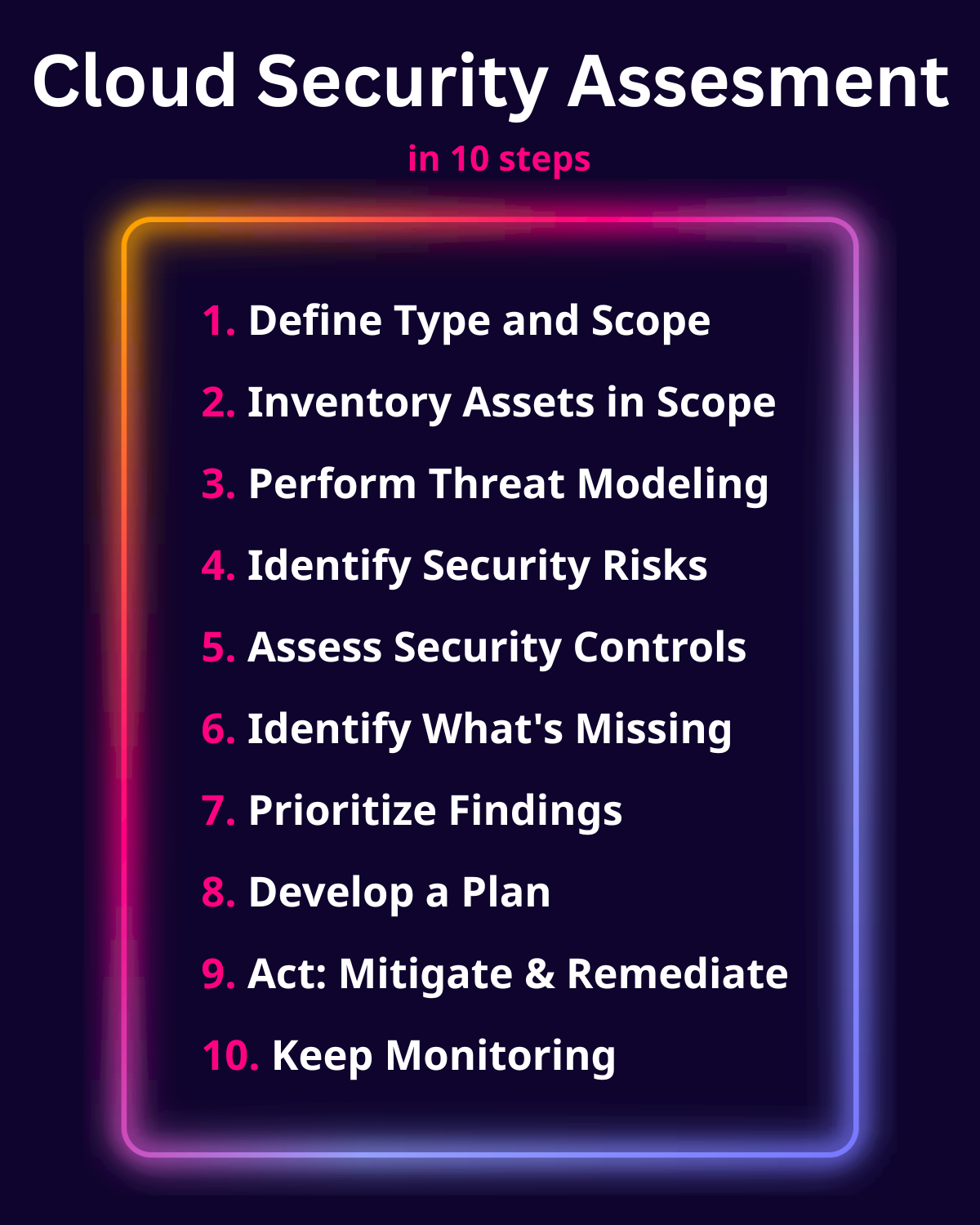
Securing a cloud environment is an ongoing process rather than a one-time setup. Follow these steps to establish a baseline of protection.
- Conduct a Cloud Inventory: You must identify every asset currently running in your cloud. Use automated discovery tools to find "shadow IT"—resources created by employees without the IT department's knowledge.
- Define Your Identity Strategy: Implement a centralized identity provider (IdP) that supports Single Sign-On (SSO) and MFA. Eliminate long-lived credentials (like static access keys) in favor of temporary, short-lived tokens.
- Encrypt Everything: Enable default encryption for all storage buckets and databases. Ensure that no data is transmitted over unencrypted HTTP.
- Automate Configuration Audits: Use CSPM tools to automatically check your environment against security benchmarks, such as those provided by the Center for Internet Security (CIS).
- Establish an Incident Response Plan: Cloud breaches happen fast. Your team needs a pre-defined plan for isolating compromised instances, revoking access, and conducting forensic analysis in a virtualized environment.
Common Mistakes to Avoid
Even seasoned IT professionals make errors when transitioning to the cloud. Avoiding these common pitfalls can significantly reduce your risk profile.
- Hardcoding Secrets: Never place API keys, passwords, or encryption keys directly in your application code or configuration files. Use a dedicated secret management service like AWS Secrets Manager or HashiCorp Vault.
- Neglecting Egress Filtering: Many organizations focus on blocking traffic coming in but ignore traffic going out. If a server is compromised, it will likely try to communicate with an external "command and control" server. Filtering outbound traffic can prevent data exfiltration.
- Over-Privileged Service Accounts: Applications often have more permissions than they need. If an application with "Administrator" access is compromised, the attacker gains full control over the entire cloud environment.
- Treating Cloud Like On-Prem: The cloud is software-defined. Traditional hardware-based firewalls do not scale well in the cloud. Instead, utilize native cloud security services that are designed to handle the scale and elasticity of the environment.
Frequently Asked Questions
Is the cloud inherently more secure than on-premises data centers?
The cloud is not inherently "more" or "less" secure; it is different. While major providers like Google or Microsoft invest billions in physical and foundational security—far more than most private companies could—the complexity of cloud configurations introduces new risks. Most cloud breaches are the result of customer misconfigurations, not provider failures.
What is a Cloud-Native Application Protection Platform (CNAPP)?
A CNAPP is a unified security solution that combines several previously separate tools, including CSPM (posture management), CWPP (workload protection), and CIEM (entitlement management). It provides a "single pane of glass" to monitor security from development through production.
How does "Serverless" security work?
In serverless computing (like AWS Lambda), you don't manage the server at all. However, you are still responsible for the security of the code you write, the permissions granted to the function, and the security of the data the function processes.
Can I use my existing local security tools in the cloud?
While some legacy tools have cloud versions, they are often less effective than "cloud-native" tools. Cloud-native tools integrate directly with the provider's APIs, allowing them to react instantly to changes in the environment, whereas legacy tools may lack the necessary visibility into virtualized assets.
How does the 2026 regulatory environment affect cloud security?
Regulations have become more stringent regarding data sovereignty—the requirement that data be stored and processed within specific geographic borders. Cloud security strategies must now include "geofencing" and precise control over which regions data is allowed to reside in to remain compliant.
Final Recommendation
To secure your cloud environment effectively, transition immediately to a Zero Trust framework and prioritize Identity and Access Management above all else. In a world where infrastructure is ephemeral and the perimeter is gone, the only constant is identity. Ensure that every person and every machine-based service in your cloud has the absolute minimum access required, and use automated tools to audit these permissions daily.