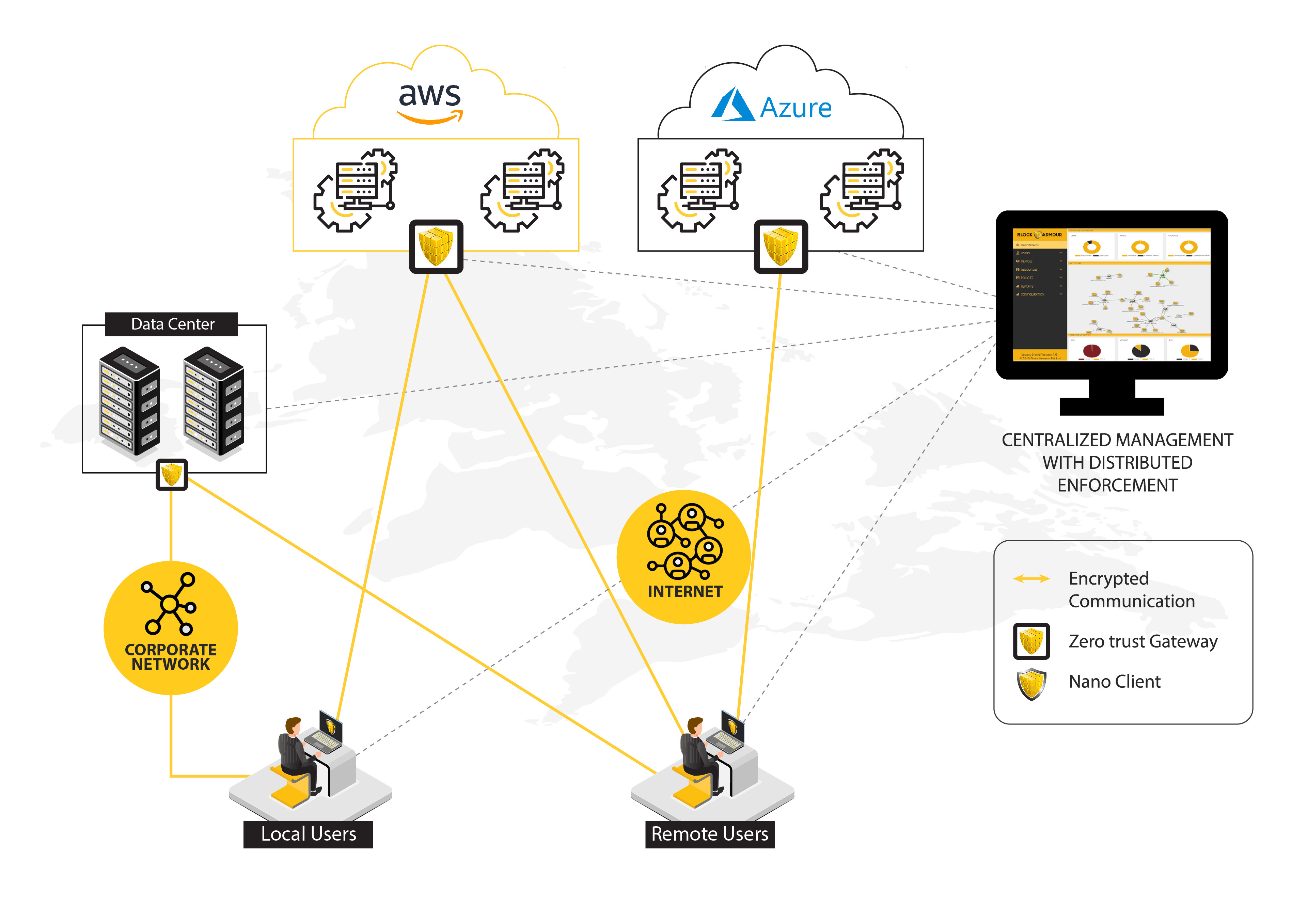
Securing a multi-cloud environment requires consolidating disparate telemetry streams into a unified behavioral analytics framework. By leveraging Exabeam’s Security Operations Platform, organizations can normalize logs across AWS, Azure, and Google Cloud, automate incident response workflows, and establish robust baseline behaviors to detect unauthorized access, credential abuse, and lateral movement in distributed infrastructure.
Managing security across a multi-cloud landscape is one of the most significant challenges for modern Security Operations Centers (SOCs). As data, workloads, and identities span various cloud service providers (CSPs), the traditional perimeter-based security model becomes obsolete. Visibility gaps, fragmented logging formats, and the speed at which cloud misconfigurations occur create an ideal environment for sophisticated threats to persist undetected. To mitigate these risks, security teams must transition from reactive log monitoring to a proactive, behavior-based detection strategy.
1. Standardize Multi-Cloud Log Ingestion
The foundation of effective cloud security is the ability to ingest data consistently. Each cloud provider offers proprietary logging mechanisms—such as AWS CloudTrail, Azure Monitor, and Google Cloud Logging—but these formats are rarely interoperable.
To improve security, you must normalize these disparate logs into a common schema. Exabeam allows you to ingest logs from various sources and map them to a standardized format. By ensuring your ingestion pipeline maintains high data fidelity, you prevent the "black hole" effect where critical security events are lost because they do not conform to standard parsing rules. Focus on normalizing identity-based logs (who accessed the resource) and administrative logs (what changes were made to the configuration) first, as these provide the highest value for behavioral analytics.
2. Establish Behavioral Baselines for Service Accounts
In a multi-cloud environment, service accounts and non-human identities often outnumber human users. These accounts are frequently over-privileged and remain unmonitored because they do not possess traditional login habits.
Use Exabeam to define behavioral baselines for these service accounts. A baseline should account for the typical source IP addresses, the specific API calls triggered, and the frequency of activity. If a service account in AWS suddenly starts performing reconnaissance tasks in a Google Cloud environment—activity that deviates from its established "norm"—the Exabeam platform should trigger a high-fidelity alert. Identifying these anomalies early is essential for preventing automated lateral movement by attackers who have compromised an API key.
3. Implement Cross-Cloud Identity Correlation
Attackers often exploit the disconnect between identity providers (IdPs) and cloud services. An attacker might compromise a credential in an on-premises environment and use it to escalate privileges in an Azure tenant.
Exabeam’s user entity behavior analytics (UEBA) capabilities are designed to link disparate accounts to a single, unified entity. By correlating activity across different platforms, you can track an attacker’s journey as they move through your multi-cloud environment. Ensure that your ingestion includes identity metadata from your primary IAM (Identity and Access Management) solution. This allows the system to recognize that "User_A" in AWS and "User_A" in Azure are the same entity, enabling a consolidated view of their risk score.
4. Optimize Alerts with Dynamic Thresholding
"Alert fatigue" is a common byproduct of multi-cloud monitoring. Static thresholding—such as alerting when a user logs in from an "unusual location"—is insufficient because cloud environments are inherently global and ephemeral.
Shift toward dynamic, risk-based thresholding. Instead of alerting on every anomalous login, leverage Exabeam to aggregate risk scores based on a sequence of events. A single login from a new location might be a low-risk event, but that login followed by the creation of an IAM user and the snapshotting of an S3 bucket should trigger an immediate incident. By focusing on the context of the activity rather than individual events, you reduce noise and focus your team on actual threats.
5. Automate Response to Cloud Misconfigurations
Cloud misconfigurations are the leading cause of security breaches. Manual remediation is rarely fast enough to keep pace with the speed of cloud development.
Integrate your Exabeam implementation with your cloud orchestration tools to automate the response to identified threats. For example, if Exabeam detects an unauthorized S3 bucket policy change, the system can trigger an automated workflow to revoke the credentials of the user who performed the change or revert the bucket to a private status. While automation should be implemented cautiously, starting with low-risk, high-confidence detections can significantly reduce your mean time to respond (MTTR).
6. Enhance Visibility into Data Egress Patterns
In multi-cloud architectures, the movement of data between clouds and external endpoints is a prime target for exfiltration. Attackers often attempt to mask data movement by blending it with legitimate cloud service traffic.
Configure your monitoring to specifically track high-volume egress activity. Exabeam can baseline typical data transfer volumes for specific cloud workloads. If an application that typically transfers 10MB of data to an external bucket suddenly starts transferring gigabytes of data to an unrecognized endpoint, the platform can flag this as potential exfiltration. Always correlate this traffic with identity logs to determine if the transfer was initiated by a legitimate process or a compromised account.
7. Conduct Regular "Cloud Hunt" Simulations
Technology platforms are only as effective as the processes that support them. Use your current security stack to run scheduled threat-hunting exercises specific to your multi-cloud environment.
Task your team with simulating a "cross-cloud breakout"—where an attacker moves from a compromised dev environment in one cloud to a production environment in another. Use these exercises to verify that your logs are being correctly ingested, that your behavioral baselines are flagging the right anomalies, and that your automated response playbooks are executing as expected. Documenting the findings of these hunts is vital for refining your detection logic and closing visibility gaps.
Comparison of Multi-Cloud Security Strategies
| Strategy | Traditional Method | Exabeam/Behavioral Method |
|---|---|---|
| Log Management | Siloed per Cloud Provider | Unified Schema & Normalization |
| Alerting | Static/Threshold-based | Dynamic/Risk-based |
| Entity Tracking | Account-specific | Unified Identity Correlation |
| Response | Manual Intervention | Automated Playbook Execution |
| Detection Focus | Known Signatures/Rules | Behavioral Anomalies |
Frequently Asked Questions
How does Exabeam differentiate between normal cloud scaling and a security threat? Exabeam uses machine learning to learn the "normal" activity patterns for specific roles and accounts. While cloud scaling often involves repetitive, predictable API calls, an attacker’s activity usually involves discovery and exfiltration steps that do not match the standard automated orchestration patterns, allowing the system to distinguish between the two.
Do I need a centralized SIEM to use Exabeam in a multi-cloud environment? Exabeam serves as a specialized layer that sits on top of your existing data infrastructure. It does not necessarily require a legacy SIEM to function; it can ingest logs directly from cloud-native sources (like AWS S3 or Azure Event Hubs) to perform its behavioral analysis.
What is the most common mistake made during multi-cloud security integration? The most common mistake is failing to capture enough context. Simply logs are not enough; without metadata like user roles, source geolocation, and application-specific activity logs, the behavior analytics engine cannot build accurate baselines.
Can Exabeam identify insider threats within my cloud infrastructure? Yes. By establishing baselines for every user, the platform is uniquely equipped to identify "low and slow" attacks, such as an employee accessing sensitive data they do not normally interact with or performing administrative actions during off-hours, which traditional signature-based tools often miss.
How often should I tune my behavioral models? You should review your models quarterly or following any major infrastructure update (e.g., migrating a significant service or implementing a new IAM policy). This ensures that the "normal" baseline reflects your current operational reality rather than outdated configurations.
Next Steps for Implementation
To start, perform a gap analysis of your current telemetry. Identify which cloud service logs are currently unindexed or sitting in siloed storage. Once you have identified these gaps, prioritize the ingestion of logs that track identity and access, as these are the most critical data points for Exabeam’s behavior engine. Begin by building a single "cross-cloud" incident response playbook to test your correlation capabilities and validate that your team can track an entity across the AWS-Azure-GCP ecosystem.