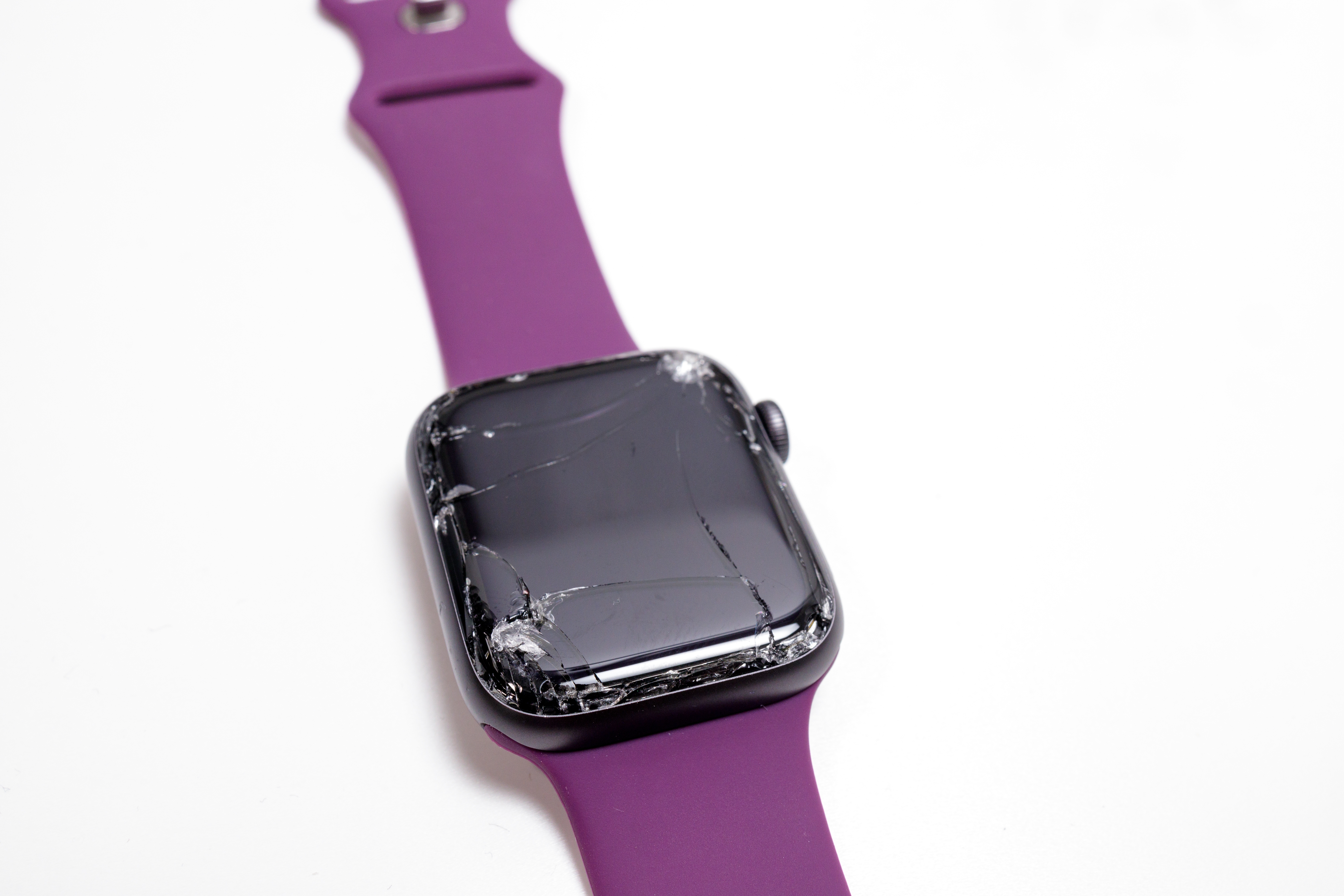
If your Apple Watch screen is cracked, your immediate priority should be protecting your skin from glass shards and backing up your data. Depending on your AppleCare+ status, a professional repair or "Whole Unit Replacement" will cost between $69 and $800. Do not submerge the device, as even hairline fractures completely compromise the factory water resistance.
Finding a crack on your Apple Watch screen is a disheartening experience, especially given how integral these devices have become to our daily fitness tracking, communication, and health monitoring. Unlike an iPhone, where a cracked screen is often a manageable nuisance, a damaged Apple Watch presents unique technical challenges due to its compact size, specialized glass, and high-density internal components. In 2026, Apple Watches—including the Series 11 and Ultra 3—utilize incredibly sophisticated display technology that is tightly integrated with the device's housing, making "simple" repairs nearly impossible for the average user.
Immediate Steps and Safety Precautions
The moment you notice a crack or shatter on your Apple Watch, you must stop using it as you normally would. While it may still appear to function, several risks emerge immediately upon the breach of the glass or sapphire crystal.
Assessing the Type of Damage
Not all cracks are created equal. You likely have one of three types of damage:
- Hairline Cracks: A single, thin line across the glass. This is often the result of a specific point of impact or extreme temperature fluctuation.
- Shattered Glass: Multiple cracks radiating from an impact point. This usually involves loose glass fragments.
- Display Failure: The glass is cracked, and the underlying OLED panel shows lines, black spots (dead pixels), or is completely dark.
If your screen is shattered, do not run your finger across the display. Apple Watch screens are made of either Ion-X glass (on aluminum models) or Sapphire crystal (on stainless steel and Ultra models). Both can produce microscopic, razor-sharp slivers when broken. If you must use the watch briefly to unpair it or check a notification, apply a piece of clear packing tape over the entire face to stabilize the glass and protect your skin.
Loss of Water Resistance
Apple Watches are famous for their water resistance, often rated for swimming or even recreational diving in the case of the Ultra series. However, this resistance relies entirely on a vacuum-sealed adhesive gasket between the screen and the casing. Even a hairline crack—one you can barely see—destroys the water-resistant seal.
Continuing to wear a cracked watch during a workout where you sweat, or exposing it to rain, can allow moisture to enter the internal cavity. Once moisture reaches the logic board or the battery, the device can short-circuit, potentially leading to permanent data loss or, in rare cases, battery swelling.
Understanding Repair Costs in 2026
Repairing an Apple Watch is notoriously expensive when compared to the original purchase price. This is largely because Apple does not typically "repair" the screen in the traditional sense; instead, they provide a "Whole Unit Replacement." You send in your broken watch, and they send you a factory-refurbished replacement of the exact same model and configuration.
AppleCare+ Coverage
If you had the foresight to purchase AppleCare+ (either the two-year plan or the monthly subscription), your costs are significantly mitigated. AppleCare+ covers "accidental damage from handling," which includes cracked screens.
- Standard Models (Series 10, 11, SE): The service fee is generally $69.
- Ultra Models (Ultra 2, Ultra 3): The service fee is generally $79.
Under AppleCare+, you are entitled to unlimited incidents of accidental damage protection, provided you pay the deductible each time. This remains the most cost-effective way to handle a cracked screen.
Out-of-Warranty Repair Costs
If you do not have AppleCare+, the costs are substantially higher. Because the Apple Watch is a "sealed" device, the labor and parts required to maintain the integrity of the device are reflected in the high service fees.
| Model Category | Estimated Out-of-Warranty Cost (2026) |
|---|---|
| Apple Watch SE (All Generations) | $199 - $229 |
| Apple Watch Series 10 / 11 (Aluminum) | $299 - $349 |
| Apple Watch Series 10 / 11 (Stainless Steel) | $399 - $499 |
| Apple Watch Ultra / Ultra 2 / Ultra 3 | $499 - $599 |
| Apple Watch Hermès / Edition | $749 - $800+ |
These prices are estimates based on standard Apple service pricing structures. The cost often approaches 60-70% of the price of a brand-new device, leading many users to consider an upgrade rather than a repair.
Official vs. Third-Party Repair Shops
When faced with a $350 repair bill for a three-year-old watch, many users look toward independent repair shops. However, the Apple Watch is one of the most difficult consumer electronics to repair correctly.
The Complexity of the Display Assembly
The Apple Watch screen is not just a piece of glass. It is a laminated assembly consisting of:
- Cover Glass/Sapphire: The outer protective layer.
- Touch Digitizer: The layer that senses your finger.
- Force Touch Gasket (in older models): A pressure-sensitive sensor around the perimeter.
- OLED Panel: The actual display that produces the image.
- NFC Antenna: Often integrated near the display for Apple Pay.
The Risks of Third-Party Parts
Independent shops may offer to replace just the glass for a lower price (often $100-$150). While this sounds appealing, there are several significant drawbacks:
- Component Quality: Third-party "Ion-X" glass is often just standard tempered glass, which is more prone to scratching and shattering than Apple's proprietary materials.
- Display Calibration: Apple uses software "handshakes" to pair the display with the logic board. Using a non-genuine screen can disable features like the Always-On display or lead to erratic touch behavior.
- Seal Integrity: Independent shops rarely have the industrial-grade presses and specialized adhesives required to restore the Apple Watch’s water resistance. After a third-party repair, your watch should be considered "splash-proof" at best.
- No More Apple Support: Once an unauthorized technician opens your Apple Watch, Apple will likely refuse to service that device in the future, even for unrelated issues like battery replacements.
The Technical Difficulty of DIY Repair
For the tech-savvy individual, the idea of a DIY repair might arise. Sites like iFixit provide guides, but they almost universally rate the Apple Watch repair as "Difficult" or "Very Difficult."
The process involves using a specialized heating tool (like an iOpener) to soften the ultra-strong adhesive holding the screen to the tiny 1mm lip of the watch case. Because the screen is so thin, it is incredibly easy to accidentally slice the delicate ribbon cables for the display or the haptic engine while trying to pry the glass up. Furthermore, if you are replacing just the glass, you must use a vacuum lamination machine to bond the new glass to the OLED without bubbles—an expensive piece of equipment that most hobbyists do not own.
For 99% of users, DIY screen replacement is not recommended. The high risk of bricking the device entirely usually outweighs the potential savings.
Step-by-Step: Preparing Your Watch for Service
If you decide to proceed with an official Apple repair, you must prepare the device to protect your privacy and ensure the technicians can work on it.
- Back Up Your Watch: Apple Watch backups happen automatically to the paired iPhone. To trigger a manual backup, simply ensure your watch and iPhone are near each other and connected.
- Unpair the Watch: Open the Watch App on your iPhone, go to My Watch > All Watches, tap the "i" icon next to your watch, and select Unpair Apple Watch. This action does three vital things:
- It creates a final backup on your iPhone.
- It removes the Activation Lock (so Apple can service it).
- It wipes your personal data and credit card information from the device.
- Remove the Band: Apple explicitly requests that you do not send your watch bands or any accessories with the device. They will not be returned if you send them to the repair center.
- Charge the Device: While not strictly necessary for a screen repair, it is helpful for the diagnostic intake if the device has at least some battery life.
Is It Worth Repairing or Replacing?
In 2026, the "Repair vs. Replace" calculation is more relevant than ever. Since a screen repair often results in a replacement unit anyway, you are essentially buying a "like-new" version of your current model.
- Repair it if: You have AppleCare+, or if you have a high-end model (Ultra or Stainless Steel) that is less than two years old.
- Replace it if: You have a base-model Aluminum watch or an SE that is out of warranty. The cost of repair is often so close to the price of a new model that it makes more sense to trade in the broken device (Apple occasionally gives a small credit even for damaged units) and put that money toward the latest Series 11.
Frequently Asked Questions
Can I use a screen protector to fix a cracked Apple Watch?
A screen protector will not "fix" the crack, but it can serve as a temporary band-aid. It will prevent glass shards from falling out and protect your skin from cuts. However, it will not restore water resistance or stop the crack from spreading due to pressure or temperature changes. Use this only as a stopgap until you can arrange a professional repair.
Does the Apple limited warranty cover a cracked screen?
No. The standard one-year Apple Limited Warranty covers manufacturing defects, such as a battery that fails prematurely or a software glitch. It does not cover accidental damage. If the screen cracked because you dropped it or hit it against a wall, the standard warranty will not apply. The only exception is if Apple determines the crack was caused by a "spontaneous" defect (which is extremely rare and usually presents as a single, perfectly straight hairline crack with no visible impact point).
How long does an Apple Watch screen repair take?
If you visit an Apple Store with an appointment, they may be able to swap your device immediately if they have the exact replacement model in stock. However, in most cases, the watch must be sent to a centralized repair center. This typically takes 3 to 5 business days. If you use the mail-in service, Apple sends you a box, you ship it back, and the turnaround is usually about a week.
My screen is cracked but the touch still works. Can I still swim with it?
Absolutely not. The seal is compromised. Even if the OLED and touch layers are functioning perfectly, water will seep through the cracks and reach the internal electronics. This can lead to a catastrophic failure of the device, making it unrepairable and potentially causing the battery to malfunction.
Will Apple repair a watch with a third-party screen?
Generally, Apple will refuse to service a device that has non-genuine parts. If they do agree to service it, they will charge the full out-of-warranty "Whole Unit Replacement" fee, regardless of whether you have AppleCare+, because the presence of third-party parts often voids the extended coverage terms.
Final Recommendation
If your Apple Watch screen is cracked, your best course of action is to check your AppleCare+ status immediately via the "Support" app on your iPhone. If covered, schedule an appointment at an Apple Store or an Authorized Service Provider like Best Buy to utilize the low-cost deductible. If you are out of warranty, weigh the $300-$500 repair cost against the price of a new Series 11 or SE. Often, the most logical path is to recycle the damaged unit and invest in a new model with a fresh battery and updated sensors. Regardless of your choice, stop wearing the watch in water immediately to avoid turning a repairable screen issue into a total electronic failure.