Navigating the landscape of AMD processors requires understanding how the company categorizes its hardware across different architectures and product lines. Identifying the specific generation of an AMD CPU is essential for users looking to upgrade their systems, compare performance capabilities, or ensure compatibility with motherboards and memory standards.
When evaluating AMD processors, the term "generation" refers to the underlying microarchitecture (the physical design of the chip) rather than the year of release. Since the launch of the Ryzen series in 2017, AMD has used a clear naming convention that links the first digit of the model number to the generation, though this system has evolved as the company transitioned through various process nodes and socket types. By examining the model number, series branding, and the supporting chipset, you can determine exactly where a processor sits in the technical timeline.
Defining Generations and Architectures
To understand the AMD processor list, you must first distinguish between the product branding (Ryzen 3, 5, 7, and 9) and the underlying microarchitecture. Product branding indicates the performance tier, whereas the generation denotes the technological iteration.
The Zen Architecture Roadmap
The foundation of modern AMD processors is the Zen architecture. Each iteration introduces improvements in Instructions Per Clock (IPC), power efficiency, and manufacturing processes, typically measured in nanometers (nm).
- Zen (1st Gen): Introduced in 2017 with the Ryzen 1000 series, this architecture marked a massive shift for AMD, moving to the AM4 socket and DDR4 memory support.
- Zen+ (2nd Gen): A refined version of the original Zen, the Ryzen 2000 series focused on increased clock speeds and reduced cache latency, utilizing a 12nm process.
- Zen 2 (3rd Gen): A significant leap that moved to the 7nm process, the Ryzen 3000 series introduced PCIe 4.0, greatly increasing bandwidth for GPUs and NVMe storage.
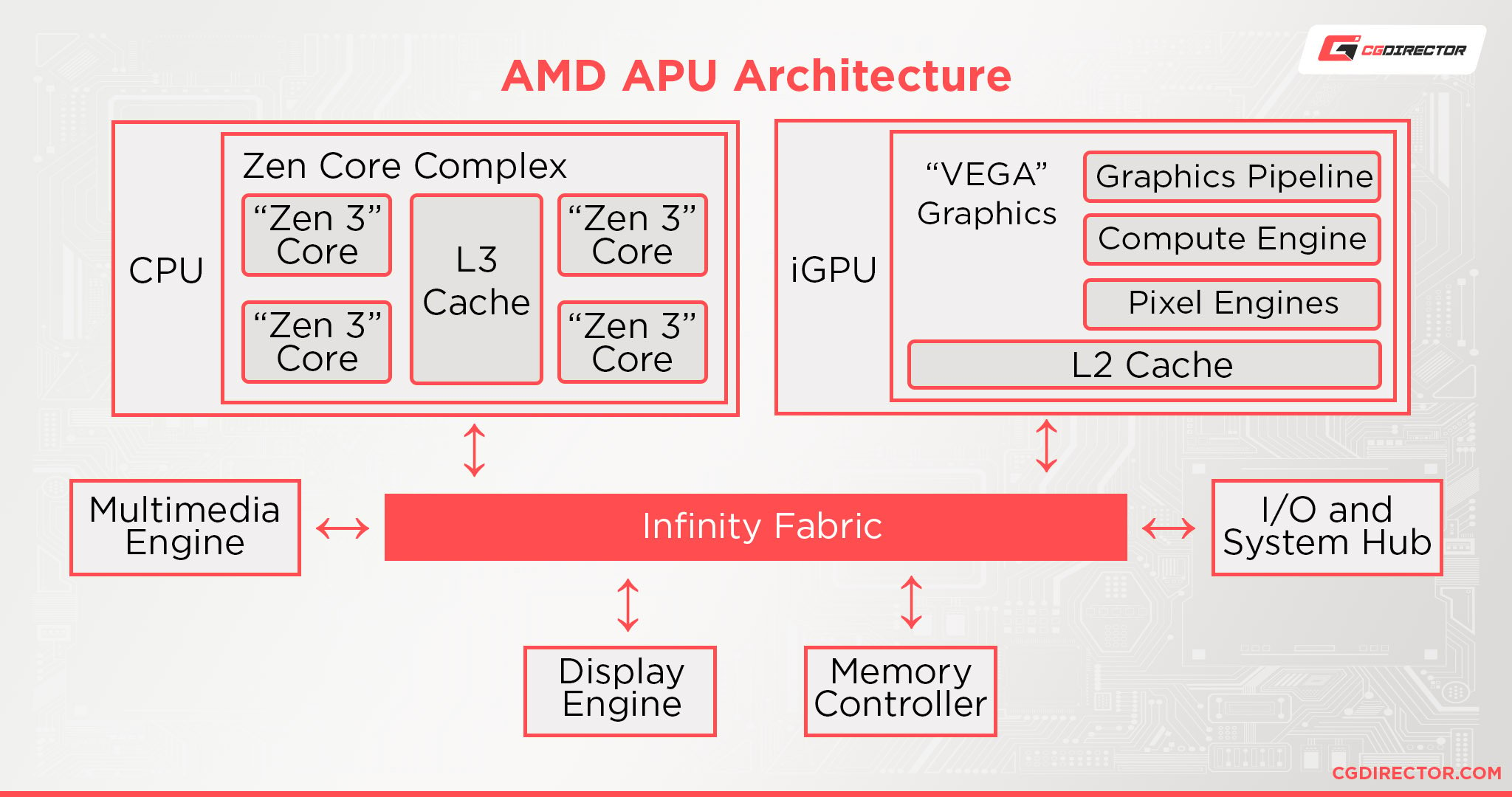
- Zen 3 (4th Gen): Featuring the Ryzen 5000 series, this generation consolidated core complexes to reduce latency further, solidifying AMD’s position in gaming performance.
- Zen 4 (5th Gen): Marking the transition to the AM5 socket and DDR5 memory, the Ryzen 7000 series utilized the 5nm process and introduced AVX-512 support.
- Zen 5 (6th Gen): The latest iteration as of 2026, the Ryzen 9000 series further optimizes branch prediction and throughput, continuing the high-efficiency trend on the AM5 platform.
Decoding the Model Numbering System
AMD’s model numbering system is the most reliable way to identify the generation of a specific CPU. A typical model number, such as Ryzen 7 9700X, contains specific information:
- Brand Modifier: "Ryzen 7" indicates the performance tier (Core/Thread count).
- Generation Digit: The first number in the suffix (e.g., the '9' in 9700) denotes the generation.
- Performance Level: The subsequent numbers reflect relative performance within that generation.
- Suffix: Letters like "X" (higher clocks), "G" (integrated graphics), "X3D" (3D V-Cache technology), or "U" (mobile power efficiency) denote specific functional capabilities.
Table: AMD Ryzen Desktop Generation Comparison
| Generation | Ryzen Series | Architecture | Process Node | Socket | RAM Support |
|---|---|---|---|---|---|
| 1st Gen | 1000 | Zen | 14nm | AM4 | DDR4 |
| 2nd Gen | 2000 | Zen+ | 12nm | AM4 | DDR4 |
| 3rd Gen | 3000 | Zen 2 | 7nm | AM4 | DDR4 |
| 4th Gen | 5000 | Zen 3 | 7nm | AM4 | DDR4 |
| 5th Gen | 7000 | Zen 4 | 5nm | AM5 | DDR5 |
| 6th Gen | 9000 | Zen 5 | 4nm | AM5 | DDR5 |
Socket Compatibility and Upgrading
One of the primary reasons for tracking generations is to manage platform longevity. AMD has a history of maintaining socket support for multiple generations, allowing users to upgrade their CPU without replacing the motherboard.
AM4 Platform (1st–4th Gen)
The AM4 socket is one of the most versatile in PC history. Users starting with a 1000 series processor could theoretically move to a 5000 series processor on the same motherboard, provided they performed a BIOS update. This makes the AM4 platform a high-value ecosystem for mid-tier builds.
AM5 Platform (5th–6th Gen and beyond)
AM5 represents the modern standard for AMD. It is exclusive to DDR5 memory and requires a motherboard with the AM5 socket. While this requires a higher upfront cost than older systems, it ensures compatibility with future generations beyond the 6th Gen, protecting the longevity of your investment for years to come.
Performance Tiers: Ryzen 3, 5, 7, and 9
Regardless of the generation, AMD organizes its processors by tiers to help users match hardware to their specific workloads. Understanding these tiers helps prevent overspending on features you may not use.
- Ryzen 3: Targeted at entry-level office productivity, web browsing, and lightweight gaming.
- Ryzen 5: Generally considered the "sweet spot" for most gamers and home users, offering a balance of core count and thermal efficiency.
- Ryzen 7: Designed for high-end gaming, streaming, and heavy multitasking. These chips typically feature eight cores.
- Ryzen 9: Aimed at content creators, video editors, and professionals requiring heavy multithreaded performance. These feature higher core counts and larger cache pools.
Special Suffixes and Their Meanings
When analyzing the processor list, you will encounter suffixes that modify the base behavior of the chip. Recognizing these is vital for avoiding mistakes, such as buying a chip that lacks integrated graphics if your PC build does not have a dedicated GPU.
- X: High-performance versions with increased Thermal Design Power (TDP) and higher clock speeds.
- G: These chips feature integrated Radeon Graphics. This is essential for users who do not intend to install a separate graphics card.
- X3D: These processors utilize AMD’s 3D V-Cache technology. By stacking additional L3 cache directly on the chip, these CPUs offer a significant performance boost in cache-sensitive tasks like gaming.
- U/H/HS/HX: These are mobile suffixes found in laptops. "U" represents ultra-low power consumption, "H" indicates high-performance, and "HX" represents extreme mobile performance.
Common Pitfalls and Troubleshooting
When upgrading, users often face compatibility issues related to BIOS versions. Even if a processor fits physically in a socket, the motherboard must recognize it.
- BIOS Version Mismatch: If you drop a 5000 series CPU into a motherboard originally designed for the 1000 series, you must update the motherboard firmware (BIOS) while the old CPU is installed.
- RAM Speed Limitations: Older generations (Zen and Zen+) struggle with higher-frequency DDR4 memory. Ensure your RAM speeds are supported by the specific CPU's memory controller specifications.
- Cooling Requirements: Newer, high-performance chips (especially Ryzen 9 models) have high thermal output. Ensure your cooling solution is rated for the TDP of the specific processor you select.
Frequently Asked Questions
Is a newer generation always better than an older one?
Generally, yes. Each generation offers better IPC performance and power efficiency. However, a high-end chip from an older generation (e.g., Ryzen 9 5900X) may still outperform an entry-level chip from a newer generation (e.g., Ryzen 3 7300) in specific multithreaded tasks. Always compare the specific core and thread count alongside the architecture.
How do I check which AMD generation I currently have?
You can identify your current processor by opening the Task Manager in Windows, navigating to the "Performance" tab, and selecting "CPU." The exact model name will be displayed. Alternatively, third-party utilities like CPU-Z provide detailed information on the architecture, process node, and codename.
Can I mix generations on my motherboard?
Only if the socket is the same. For example, you can mix 1st, 2nd, 3rd, and 4th generation CPUs on an AM4 motherboard. You cannot mix an AM4 CPU (Ryzen 5000) with an AM5 motherboard (Ryzen 7000 or 9000).
Does "X3D" technology work with all generations?
No. X3D technology was introduced starting with the Zen 3 (Ryzen 5000) series and continues into newer generations. It is not available for the 1000, 2000, or 3000 series processors.
Do I need to reinstall Windows when upgrading the CPU?
Typically, no. Windows is generally capable of detecting a new processor and installing the necessary drivers automatically. However, if you are also changing your motherboard, a clean installation of the operating system is recommended to avoid driver conflicts.
Recommendation for Next Steps
If you are planning an upgrade, start by identifying your current motherboard socket. If you are on an AM4 board, moving to a Ryzen 5000 series CPU with X3D technology offers the most significant performance per dollar. If you are building a new system, prioritize the AM5 platform to ensure compatibility with future generations, as the industry shift to DDR5 is already well-established. Always verify your motherboard’s "CPU Support List" on the manufacturer’s website before purchasing any processor, as this is the definitive authority on what your specific hardware can run.