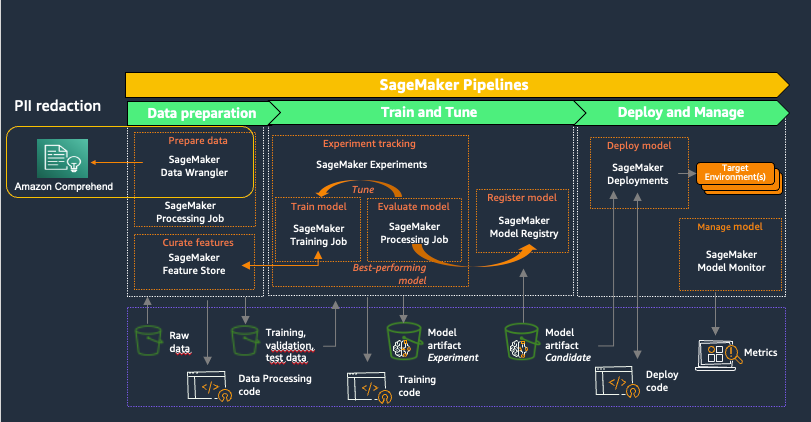
Amazon SageMaker Pipelines is a purpose-built CI/CD service designed to help data science teams automate and scale machine learning workflows. By integrating orchestration, lineage tracking, and model management into a single "Pipelines-as-Code" framework, it enables teams to move from experimental notebooks to production-ready deployments with increased reliability and operational speed.
The Evolution of Machine Learning Orchestration
For many data science teams, the journey from a successful experiment to a production-grade model is fraught with manual hurdles. Historically, machine learning (ML) workflows involved fragmented steps: data preparation in one notebook, training in another, and manual hand-offs to engineering teams for deployment. This "manual ML" approach often results in non-reproducible results, difficult-to-track model versions, and significant delays in delivering value.
As of 2026, the maturity of Amazon SageMaker Pipelines has addressed these challenges by providing a unified environment where the entire workflow—from data ingestion to model monitoring—is defined as a Directed Acyclic Graph (DAG). This structural clarity allows teams to treat their ML workflows with the same rigor as traditional software engineering, implementing version control, automated testing, and continuous integration.
For data science teams, the primary value lies in reproducibility. When every step of a pipeline is logged and every artifact is tracked, teams can recreate a specific model version with absolute certainty. This is not merely a convenience; it is a requirement for governance, compliance, and debugging in modern enterprise environments.
Core Architecture of SageMaker Pipelines
The architecture of SageMaker Pipelines is built on the concept of "Pipelines as Code," primarily utilizing the SageMaker Python SDK. This approach allows data scientists to define their infrastructure and logic in a language they already use, rather than requiring them to master complex YAML or JSON configuration files.
The Directed Acyclic Graph (DAG)
At its heart, a pipeline is a series of interconnected steps. The "directed" nature ensures that the flow of data moves from one step to the next, while the "acyclic" nature prevents infinite loops, ensuring the pipeline eventually reaches a completion or failure state. This structure is essential for dependency management—for example, a training step cannot begin until the data processing step has successfully output the training datasets to Amazon S3.
Pipeline Parameters
To make workflows reusable, SageMaker Pipelines utilizes parameters. These act as variables that can be injected into the pipeline at runtime. For example, a team might define parameters for:
- Instance Type: Choosing between a standard instance for testing and a high-performance GPU instance for production training.
- Hyperparameters: Passing learning rates or batch sizes without modifying the underlying code.
- Data Paths: Specifying different S3 buckets for training, validation, and testing.
By using parameters, a single pipeline definition can serve multiple environments or experiments, significantly reducing the maintenance overhead for the team.
Key Step Types for Robust Workflows
A pipeline is only as effective as the steps it contains. SageMaker Pipelines offers a variety of specialized step types that cater to the unique requirements of the ML lifecycle.
Processing Steps
The ProcessingStep is often the first operational block in a pipeline. It leverages SageMaker Processing jobs to run data pre-processing, post-processing, or feature engineering. Teams can use built-in containers for Scikit-learn or Spark, or bring their own custom Docker images. This step is crucial for ensuring that the data used for training is clean, normalized, and correctly partitioned.
Training and Tuning Steps
The TrainingStep encapsulates the model training logic. It points to a SageMaker Training Job, specifying the algorithm (built-in or custom) and the input data source. For teams looking to optimize performance, the TuningStep can be used to trigger a Hyperparameter Tuning Job, which automatically explores the best combinations of parameters to maximize model accuracy.
Condition Steps
One of the most powerful features for automation is the ConditionStep. This allows the pipeline to branch based on a specific metric. For instance, a team can set a condition that only permits the pipeline to proceed to the model registration step if the model's accuracy exceeds a defined threshold (e.g., 0.85). If the condition fails, the pipeline can trigger a FailStep or simply stop, preventing poor-quality models from reaching production.
RegisterModel and CreateModel Steps
Once a model is trained and validated, the RegisterModel step adds the model to the SageMaker Model Registry. This is a centralized repository where versions are tracked, and approval workflows are managed. The CreateModel step prepares the model for deployment by creating a SageMaker model entity, which includes the location of the model artifacts and the inference code.
Empowering Data Science Teams through Collaboration
While individual data scientists benefit from automation, the true power of SageMaker Pipelines is realized at the team level. Collaboration in machine learning often suffers from "knowledge silos," where only one person understands how a specific model was created.
Shared Lineage and Metadata
SageMaker Pipelines automatically integrates with SageMaker Lineage Tracking. This means that for every execution, the system records exactly which data version, which code version, and which parameters were used. If a model starts underperforming in production, any team member can trace back through the lineage to find the exact processing script and raw data file that produced it. This shared transparency is vital for collective troubleshooting.
SageMaker Projects
For teams requiring a higher level of organizational structure, SageMaker Projects provide a way to package pipelines with CI/CD infrastructure. Using pre-configured templates (based on AWS Service Catalog), a project can automatically provision a Git repository, an orchestration service (like AWS CodePipeline), and the necessary IAM roles. This allows data science teams to adopt MLOps (Machine Learning Operations) practices without needing to be experts in cloud infrastructure.
Implementation Guide: Building Your First Pipeline
Setting up a pipeline requires a logical progression from environment preparation to script development.
Prerequisites and Requirements
Before a team can execute a pipeline, several foundational components must be in place:
- AWS Identity and Access Management (IAM): An execution role with permissions for SageMaker, S3, and CloudWatch is mandatory.
- Amazon S3 Buckets: A centralized storage location for raw data, intermediate artifacts, and final model weights.
- SageMaker Studio: While pipelines can be run from any environment using the SDK, SageMaker Studio provides the best visual interface for monitoring and debugging.
- Python Environment: Ensure the
sagemakerandboto3Python libraries are updated to the latest versions supported in 2026.
The Construction Process
The typical workflow for building a pipeline involves three phases:
- Step Definition: Defining individual steps like
ProcessingStepandTrainingStepusing the SageMaker SDK. - Pipeline Definition: Combining these steps into a
Pipelineobject, specifying the order of execution and data dependencies. - Upsert and Execution: Using the
pipeline.upsert()method to upload the definition to the SageMaker service andpipeline.start()to begin an execution.
Teams should focus on modularity. By keeping the processing logic in separate Python scripts (referenced by the pipeline steps), the code remains readable and easier to unit test.
Cost Management and Optimization
Operating machine learning pipelines can become expensive if compute resources are managed inefficiently. Data science teams must be proactive in monitoring costs.
Compute Efficiency
The primary cost driver in SageMaker Pipelines is the compute time used by individual steps (training, processing, and batch transform). To optimize these costs, teams should:
- Right-size Instances: Use the smallest instance type that meets the memory and CPU requirements of the task.
- Utilize Managed Spot Instances: For training jobs that are not time-sensitive, Spot instances can offer up to a 90% discount compared to On-Demand pricing.
- Pipeline Caching: SageMaker Pipelines includes a caching feature. If a step (like data processing) is run with the same inputs and configuration as a previous run, the pipeline can reuse the previous result instead of re-running the job. This saves both time and money.
Orchestration Costs
A significant advantage of SageMaker Pipelines is that AWS generally does not charge a separate fee for the orchestration itself. Users only pay for the underlying resources consumed by the steps within the pipeline (e.g., EC2 instances, S3 storage, and data transfer). This makes it a cost-effective alternative to third-party orchestration tools that may require dedicated server maintenance.
Comparison: SageMaker Pipelines vs. Alternatives
Choosing the right orchestration tool depends on the team's existing infrastructure and technical expertise.
| Feature | SageMaker Pipelines | AWS Step Functions | Apache Airflow (MWAA) |
|---|---|---|---|
| Primary Intent | Dedicated MLOps & CI/CD | General Purpose Workflow | General Data Orchestration |
| Integration | Native SageMaker/AWS | Deep AWS Integration | Multi-Cloud/Open Source |
| Lineage Tracking | Built-in (SageMaker Lineage) | Manual Configuration | External Tools Needed |
| Programming | Python SDK (Pipelines-as-Code) | JSON/YAML (ASL) | Python (DAGs) |
| Infrastructure | Fully Managed | Fully Managed | Managed (AWS MWAA) |
| Ideal For | Data Science Teams on AWS | Serverless Applications | Complex, Multi-platform Data Pipes |
While Apache Airflow is highly flexible, it often requires more management overhead. AWS Step Functions is excellent for serverless orchestration but lacks the ML-specific features like the Model Registry and lineage tracking that are baked into SageMaker Pipelines.
Frequently Asked Questions
Do data science teams need to use SageMaker Studio for Pipelines?
No, while SageMaker Studio offers a powerful visual interface for viewing DAGs and execution logs, it is not a requirement. Teams can define, update, and trigger pipelines using the SageMaker Python SDK from any IDE, including VS Code, PyCharm, or local Jupyter instances, provided they have the correct AWS credentials and network access.
Can I include custom validation logic in a pipeline?
Yes. Custom validation is typically handled via a ProcessingStep or a LambdaStep. In 2026, many teams use LambdaStep to trigger lightweight validation checks or to call external APIs (like Slack or Microsoft Teams) to notify the team when a specific stage of the pipeline is reached.
How does SageMaker Pipelines handle sensitive data?
SageMaker Pipelines supports all standard AWS security features. This includes encryption of data at rest using AWS Key Management Service (KMS), encryption of data in transit, and the ability to run all pipeline components within a private Virtual Private Cloud (VPC) to ensure data never traverses the public internet.
Is it possible to restart a pipeline from a specific failed step?
As of current updates in 2026, SageMaker Pipelines supports execution retries and caching. While you cannot "restart" a DAG from the middle of a failed node in a single click, the caching mechanism ensures that when you re-run the pipeline, any successfully completed steps with identical parameters will be skipped, effectively resuming progress from where the failure occurred.
Can teams use R or Java with SageMaker Pipelines?
The SageMaker Python SDK is the primary way to define the pipeline structure. However, the code inside the steps (the processing or training scripts) can be written in any language supported by the container. If you provide a custom Docker container with R or Java installed, SageMaker Pipelines will execute that logic seamlessly.
Practical Recommendations for Data Science Teams
To maximize the impact of Amazon SageMaker Pipelines, data science teams should move away from the "one-off" mindset and embrace a structured, automated approach to ML delivery.
- Standardize on Templates: Use SageMaker Projects to create standard pipeline templates for the team. This ensures that every new project starts with a robust structure for logging, testing, and deployment.
- Enable Caching Early: Turn on pipeline caching for all processing and training steps. This is the simplest way to reduce development time and AWS costs during the iterative phase of a project.
- Strict Governance via Model Registry: Never deploy a model directly from a training job. Always use the
RegisterModelstep and require a manual or automated approval in the Model Registry before the model can be used for inference. - Monitor Pipeline Health: Use Amazon CloudWatch to set up alerts for pipeline failures. This ensures the team is notified immediately if a scheduled retraining job fails, preventing stale models from remaining in production.
By shifting toward an automated workflow, teams can reduce the time spent on infrastructure management and focus more on the core task of data science: extracting insights and building high-performing models that drive business value.