Choosing the best software for remote assistance is essential for IT support teams, customer service departments, and organizations managing distributed workforces. Remote assistance tools allow technicians or colleagues to view, troubleshoot, and control remote computers, mobile devices, and servers in real time, transforming distant technical issues into solvable problems without requiring an on-site visit.
Evaluating the top remote assistance platforms requires looking at critical factors such as operating system compatibility, session security standards, unattended access capabilities, ease of use for non-technical end users, and pricing structures. While some solutions cater to enterprise-grade IT infrastructure management with comprehensive administrative tools, others focus on lightweight, ad-hoc connections for quick customer support. Understanding these technical capabilities and operational constraints ensures that organizations deploy the correct solution for their specific diagnostic and support workflows.
Understanding Remote Assistance Technology
Remote assistance software functions by establishing a secure network connection between a host device (operated by the technician) and a client device (operated by the end user or left unattended). When a session is initiated, the software captures the display output of the remote machine and transmits it to the technician's screen while relaying keyboard and mouse inputs back to the host. Modern solutions utilize advanced video codecs and adaptive streaming protocols to minimize latency, ensuring that remote mouse movements and screen updates appear fluid even over high-latency internet connections.
Beyond basic desktop viewing, comprehensive remote assistance platforms incorporate file transfer utilities, multi-monitor navigation, remote command-line execution, session recording for auditing purposes, and voice or text chat channels. These capabilities transform a simple screen-sharing utility into an enterprise diagnostic suite. Security remains a foundational pillar of this technology; because these applications grant deep access to system resources, they rely on robust encryption protocols—such as Advanced Encryption Standard (AES) and Transport Layer Security (TLS)—alongside multi-factor authentication (MFA) to prevent unauthorized interception or access.
Key Criteria for Selecting Remote Assistance Software
Selecting the appropriate remote assistance software requires a structured evaluation of technical requirements, operational scale, and user experience metrics. Organizations must look beyond marketing claims to analyze how software performs under real-world networking conditions and within existing IT ecosystems.
- Cross-Platform Compatibility: The software must seamlessly bridge different operating systems, allowing technicians running Windows, macOS, or Linux to support client devices across Windows, macOS, Linux, iOS, and Android.
- Security and Compliance: Enterprise environments demand end-to-end encryption, role-based access control (RBAC), and compliance certifications such as HIPAA, SOC 2, or GDPR to protect sensitive data during diagnostic sessions.
- Unattended Access: For managing servers or remote office computers without a local user present to accept connections, reliable unattended access with secure credentials is vital.
- Ease of Deployment and Use: Ad-hoc support scenarios require lightweight, executable client modules that do not demand administrator privileges or lengthy installation procedures for end users.
- Pricing and Licensing Models: Licensing structures vary widely, from concurrent-user models and device-based subscriptions to tiered enterprise plans that charge based on the number of managed endpoints or specialized technicians.
Detailed Reviews of the 5 Best Software for Remote Assistance
1. TeamViewer
TeamViewer is a globally recognized industry veteran in remote connectivity, renowned for its broad feature set, high reliability, and extensive cross-platform compatibility. It bridges virtually any combination of desktop and mobile operating systems, making it a versatile choice for heterogeneous IT environments.
TeamViewer excels in ad-hoc support through its QuickSupport module—a lightweight, executable application that requires no installation or administrator rights for the end user. Technicians simply provide a numeric ID and password generated by the client module to initiate a secure session. Beyond basic desktop sharing, TeamViewer offers robust features such as remote printing, file transfer speeds optimized for large archives, session recording, and augmented reality (AR) support via TeamViewer Assist AR for troubleshooting physical hardware and machinery.
On the security front, TeamViewer enforces 256-bit AES encryption and 2-factor authentication, ensuring that remote sessions are shielded from unauthorized access. However, TeamViewer’s pricing model can be restrictive for smaller businesses or independent technicians, as commercial licenses are often tied to specific user seats and carry substantial annual subscription costs.
2. AnyDesk
AnyDesk is designed for high-performance remote assistance, utilizing a proprietary video codec called DeskRT. DeskRT was built specifically to transmit graphical user interface data efficiently, resulting in remarkably low latency and high frame rates even over low-bandwidth cellular or congested Wi-Fi connections.
The AnyDesk application is remarkably lightweight, with a standalone client executable typically measuring just a few megabytes. This minimalist footprint allows for rapid deployment and execution on underpowered or restricted client machines. Users can run AnyDesk as a portable application or install it for persistent unattended access. Features include remote audio streaming, clipboard synchronization, interactive drawing tools on the remote screen, and file sharing via a straightforward drag-and-drop interface.
Security is managed via TLS 1.2 technology and asymmetric RSA 2048-bit key exchange. AnyDesk appeals heavily to organizations seeking a balance between high-speed performance and cost-effectiveness, offering tiered pricing models that are generally more accessible for small-to-medium-sized businesses than enterprise legacy alternatives.
3. Microsoft Quick Assist
Built directly into Windows 10 and Windows 11, Microsoft Quick Assist is a native utility designed specifically for peer-to-peer remote assistance within Windows environments. Because it requires no third-party software installation or external downloads for standard Windows users, it represents an immediate, zero-friction solution for internal IT helpdesks.
To initiate a session, the support technician opens Quick Assist, generates a six-digit security code via their Microsoft account, and shares that code with the user. Once entered, the technician can view or take full control of the desktop, request task manager access, and utilize a built-in annotation tool to highlight items on the screen.
While Quick Assist is entirely free for Windows-to-Windows support and highly secure due to its integration with Microsoft Entra ID (formerly Azure AD) and Microsoft accounts, its feature set is strictly limited compared to dedicated third-party platforms. It lacks advanced cross-platform support for macOS or Linux, robust multi-monitor navigation controls, unattended access management, and comprehensive session logging, making it best suited for basic internal troubleshooting rather than complex managed service provider (MSP) operations.
4. Splashtop
Splashtop delivers high-performance remote access and assistance with a strong focus on value, reliability, and security compliance. Originally built to deliver smooth remote desktop streaming for media and gaming, Splashtop translates those low-latency video streaming capabilities into a responsive IT support tool.
Splashtop supports cross-platform connections across Windows, Mac, iOS, Android, and Chromebooks. For IT support teams, Splashtop SOS provides an on-demand, ad-hoc support solution where technicians can connect to a user's device using a simple nine-digit code generated by a small app or web link. Features include multi-to-multi monitor viewing, remote rebooting in safe mode, file transfer, chat, and technician grouping for collaborative troubleshooting.
Splashtop stands out for its straightforward, transparent pricing structures, which often cost significantly less than comparable legacy solutions while offering robust security features including device authentication, two-step verification, and SSL/TLS encryption. It is a preferred choice for organizations looking for enterprise-grade performance without enterprise-tier subscription overhead.
5. ConnectWise Control (formerly ScreenConnect)
ConnectWise Control is an enterprise-grade remote support and access management platform tailored specifically for managed service providers (MSPs) and dedicated IT support organizations that require deep customization, extensive integrations, and rigorous administrative controls.
ConnectWise Control is famous for its speed and browser-based connection model, allowing technicians to initiate and manage support sessions directly from web dashboards without necessarily requiring heavy desktop software installations. The platform offers exceptional customizability: organizations can white-label the portal with their own corporate branding, configure granular role-based security permissions down to individual technicians, and integrate the tool seamlessly with professional services automation (PSA) and ticketing platforms like ServiceNow, Zendesk, and ConnectWise Manage.
The platform provides robust unattended access, command-line execution, toolbox extensions, diagnostic reporting, and multi-session management. While ConnectWise Control represents a steeper learning curve and a higher financial investment compared to lightweight consumer-grade tools, its scalability, customization, and power make it the gold standard for professional IT service operations.
Feature Comparison of Top Remote Assistance Software
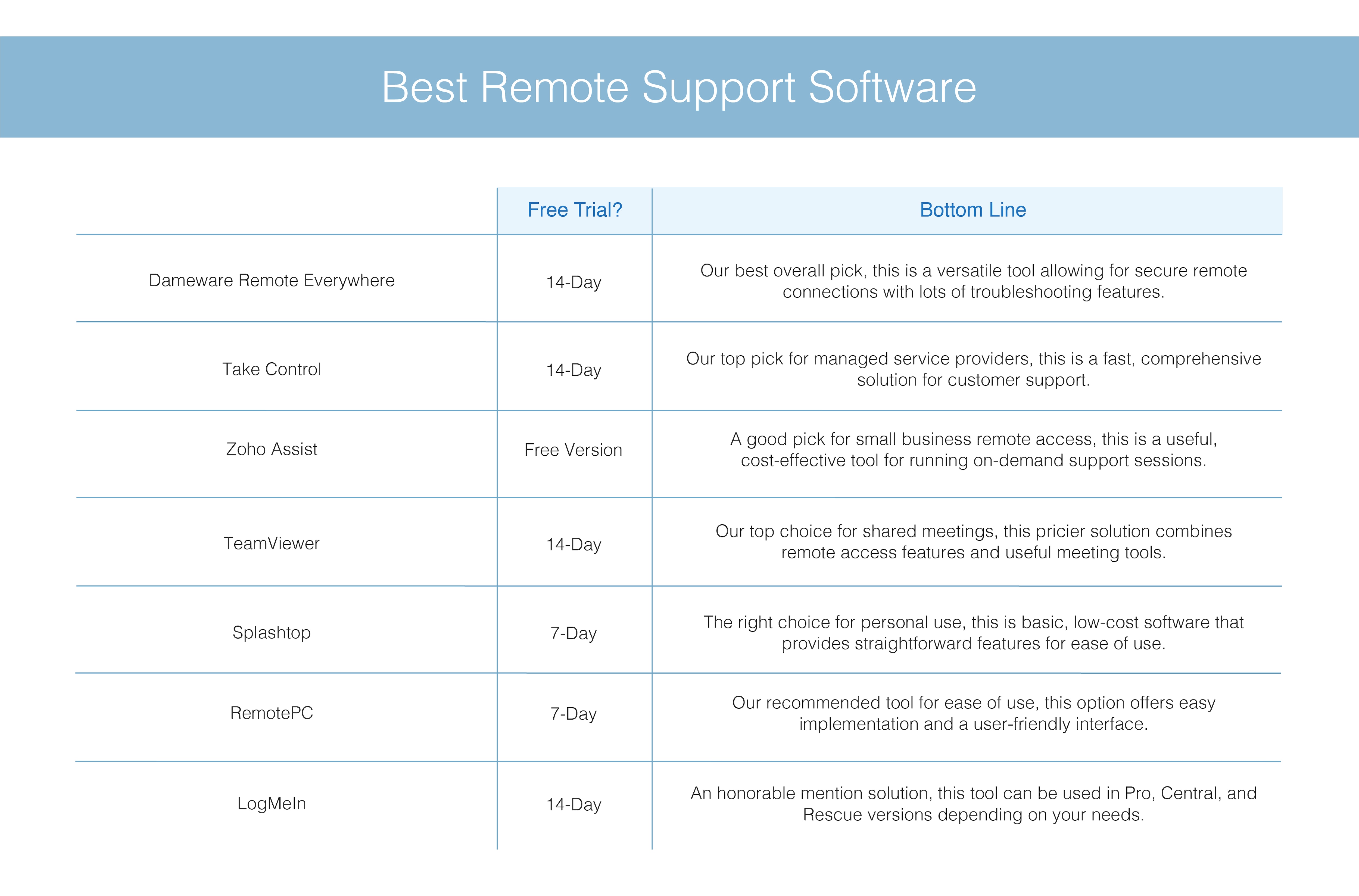
| Software | Primary Use Case | Key Strengths | Operating Systems | Pricing Tier |
|---|---|---|---|---|
| TeamViewer | General IT Support & AR | Extensive ecosystem, high reliability, AR support | Win, Mac, Linux, iOS, Android | Premium / Enterprise |
| AnyDesk | Low-Latency Performance | Extremely lightweight, DeskRT codec, fast file transfer | Win, Mac, Linux, iOS, Android | Standard / Advanced |
| Microsoft Quick Assist | Basic Windows Troubleshooting | Built-in native utility, no downloads required, free | Windows 10 & 11 | Free (Native) |
| Splashtop | Cost-Effective IT Support | High performance, transparent pricing, robust security | Win, Mac, Linux, iOS, Android | SOS / Enterprise |
| ConnectWise Control | MSPs & Enterprise Helpdesks | Highly customizable, deep ticketing integrations, branding | Win, Mac, Linux, iOS, Android | Professional / Enterprise |
Common Mistakes and Security Considerations
Operating remote assistance software improperly can introduce severe security vulnerabilities into an organization's digital infrastructure. Technicians and administrators must remain vigilant regarding access control, session hygiene, and user authentication protocols.
- Failing to Enforce Multi-Factor Authentication (MFA): Relying solely on passwords for technician accounts leaves management consoles vulnerable to credential stuffing and brute-force attacks. MFA must be mandatory for all administrative and technician logins.
- Leaving Unattended Access Unsecured: Configuring unattended access without setting strong, complex passwords, or failing to disable access credentials when an employee departs, creates an open door for unauthorized external intrusions.
- Ignoring Session Auditing: Failing to record or log remote sessions prevents organizations from maintaining compliance with regulatory frameworks and obscures accountability during security incidents or data breaches.
- Neglecting Client Permissions: Technicians should always inform end users before taking active control of a mouse or keyboard, and client software should clearly display a visual indicator (such as a highlighted border) letting the user know their screen is being monitored.
Frequently Asked Questions
What is the difference between remote assistance and remote desktop access?
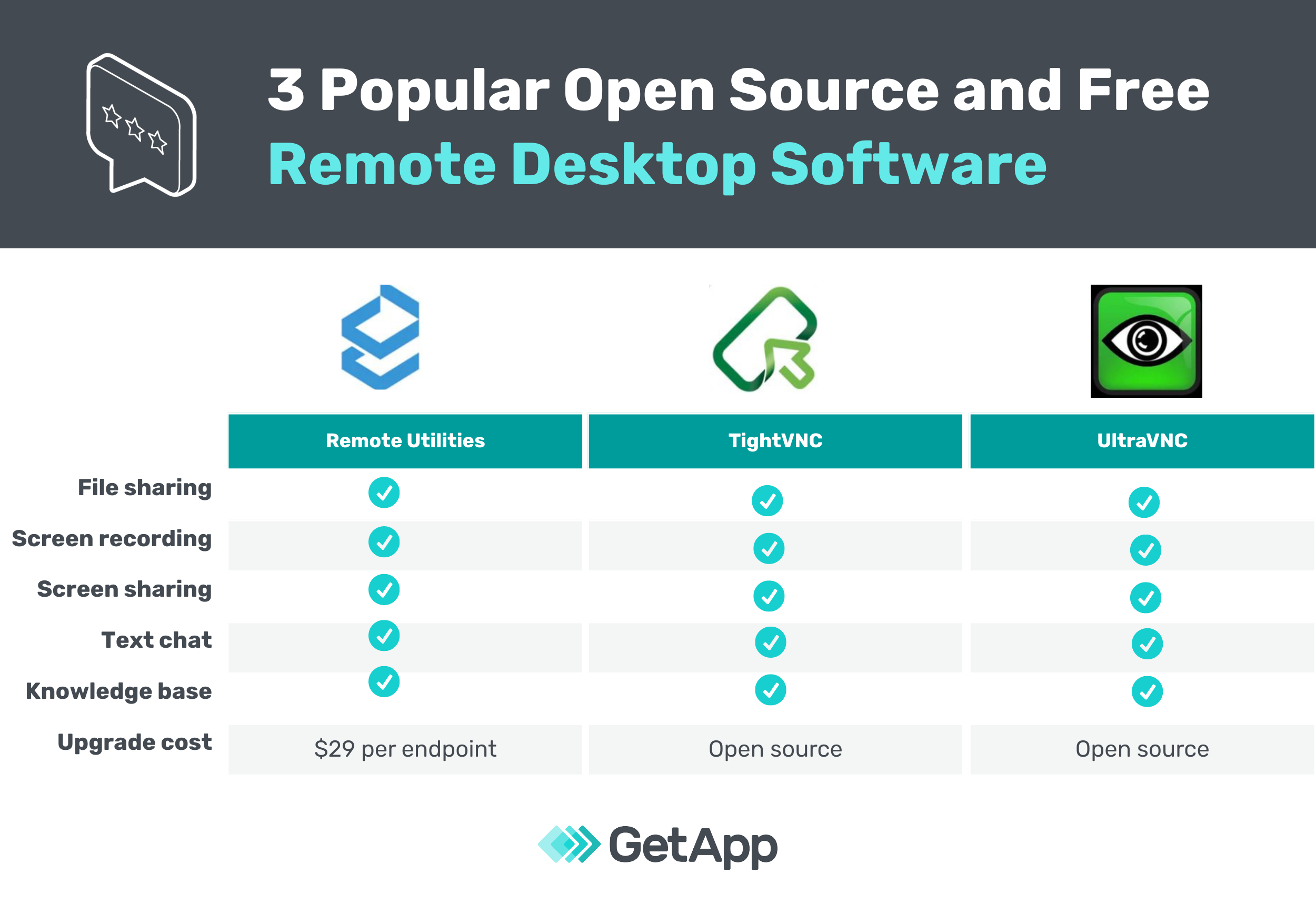
Remote assistance typically implies an interactive session where a technician connects to a user's device with their knowledge and active participation to solve a problem. Remote desktop access often refers to connecting to an unattended machine (such as a work computer from home) where no local user is present to supervise the session.
Do remote assistance tools require administrative privileges to run?
Many ad-hoc support tools offer lightweight client modules (such as TeamViewer QuickSupport or AnyDesk portable) that run entirely within user space and do not require administrator rights on the client machine. However, performing system-level updates, installing software, or configuring persistent unattended access will require administrator credentials.
Are these remote assistance tools safe from cyber attacks?
Reputable remote assistance software utilizes robust encryption standards (such as 256-bit AES and TLS) to protect data in transit. However, security ultimately depends on proper configuration, including enforcing multi-factor authentication, using strong passwords, and ensuring software clients are kept updated to patch potential vulnerabilities.
Can I provide remote support to mobile devices like smartphones and tablets?
Yes, modern platforms like TeamViewer, AnyDesk, and Splashtop allow technicians to view screens and provide diagnostic assistance on iOS and Android devices, though full interactive remote control may be limited on certain mobile operating systems due to platform security restrictions.
How do I choose between free native tools and paid third-party software?
If your support scope is strictly limited to Windows-to-Windows troubleshooting within a single organization, Microsoft Quick Assist provides a free, secure, and zero-installation solution. If your workflow demands cross-platform support, unattended server management, custom branding, ticketing integrations, or multi-monitor navigation, a paid third-party platform is necessary.
Conclusion and Recommended Next Actions
Selecting the ideal software for remote assistance depends entirely on your operational scope, technical environment, and budget. Organizations managing heterogeneous device fleets and complex IT helpdesks will benefit greatly from robust platforms like TeamViewer or ConnectWise Control, whereas teams seeking high-speed performance at a competitive price point should evaluate AnyDesk or Splashtop. For simple, occasional Windows-to-Windows support, the built-in Microsoft Quick Assist utility serves as an immediate and cost-free alternative.
To determine the best fit, audit your organization's specific cross-platform requirements, security mandates, and daily support volume. Take advantage of free trials offered by commercial vendors to test performance under your local networking conditions before committing to an annual enterprise subscription.