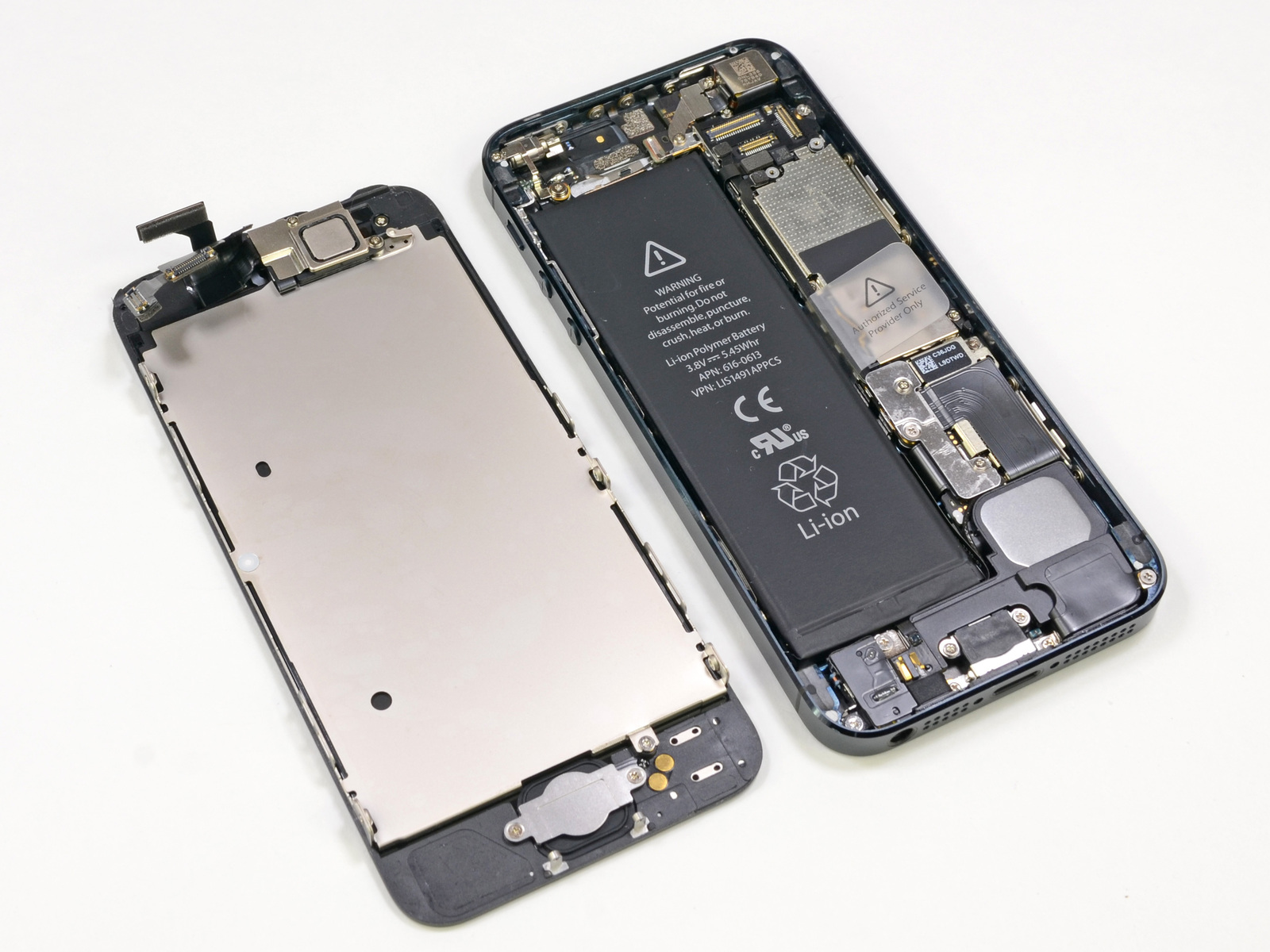
Replacing an iPhone 5s screen is a classic DIY smartphone repair project that involves swapping out the fragile glass and digitizer assembly, while carefully managing delicate internal components like the Touch ID home button and front-facing camera assembly.
The iPhone 5s, released in September 2013, remains an iconic piece of mobile engineering. While it is long past its commercial prime in 2026, many units still exist in drawers, pockets, or as dedicated music players and testing devices. When a screen shatters on one of these vintage devices, owners often weigh the cost of professional repair against a DIY fix. Understanding the realities of replacing an iPhone 5s screen requires looking past simple tutorial videos and examining the hardware quirks, component dependencies, and physical limitations inherent to Apple's design from that era.
1. The Touch ID Sensor Is Permanently Bound to the Original Logic Board
One of the most critical technical facts regarding the iPhone 5s is the hardware-level pairing between the Touch ID fingerprint sensor and the device's original logic board. Unlike modern modular repairs where biometric sensors can often be swapped or reprogrammed with specialized equipment, the iPhone 5s Touch ID cable is uniquely cryptographically paired to the primary processor during manufacturing.
If you damage the home button cable during a screen replacement, or if you attempt to replace the home button with a generic aftermarket part, Touch ID functionality will be permanently disabled. While the physical "click" and home navigation features can still function with a replacement button, the biometric fingerprint scanning capability will never work again on that logic board.
Consequently, technicians must perform screen replacements on the iPhone 5s with extreme caution, lifting the front assembly like a book cover rather than pulling it completely away, as the fragile Touch ID cable bridges the logic board and the display panel.
2. Front Camera and Sensor Flex Cables Are Highly Prone to Fatigue
The interior layout of the iPhone 5s packs multiple components into a tightly sealed aluminum chassis. Running along the top edge of the display assembly is the front-facing camera, the secondary microphone, and the ambient light/proximity sensor flex cable.
When replacing the screen, this entire assembly must be detached from the old broken glass and meticulously transferred to the new replacement screen. Over years of aging, the adhesive holding these ribbon cables in place degrades, and the copper traces within the ribbon become brittle.
- The Proximity Sensor Issue: A common side effect of a poorly executed screen swap on an iPhone 5s is a screen that goes black and refuses to wake up during phone calls. This happens when the proximity sensor gasket is misaligned or the delicate flex cable is damaged during transfer.
- Camera Degradation: Dust trapped over the front camera lens or a strained ribbon cable can result in blurry selfies or complete camera failure, requiring a second teardown to correct.
3. LCD Technology Dictates Replacement Screen Thickness and Weight
Unlike the OLED (Organic Light-Emitting Diode) displays found on modern iPhones, the iPhone 5s utilizes a traditional IPS LCD (In-Plane Switching Liquid Crystal Display) panel with a separate LED backlight layer.
When purchasing a replacement screen, consumers generally choose between three distinct tiers of quality, which directly impact the device's look, feel, and structural integrity:
| Screen Type | Build Quality | Color Accuracy | Price Point | Potential Drawbacks |
|---|---|---|---|---|
| Original Refurbished | OEM glass and LCD with replaced top glass | Identical to factory original | Highest | Harder to source genuine parts |
| Aftermarket In-Cell LCD | Third-party manufacturing mimicking original thickness | Good, though sometimes cooler color tones | Moderate | Slight variations in brightness and saturation |
| Aftermarket TFT LCD | Budget third-party manufacturing | Noticeably washed-out colors, poor viewing angles | Lowest | Thicker profile, higher battery consumption, poor touch responsiveness |
Opting for the cheapest TFT replacement screen often results in a thicker profile that can bulge slightly out of the aluminum frame, alongside significantly reduced battery life due to inefficient backlighting.
4. Screw Organization Dictates Logic Board Survival
Perhaps the most notorious hazard of working inside an iPhone 5s is a phenomenon known among repair technicians as "long screw damage."
The metal shield that secures the display data cables to the logic board is held down by screws of varying lengths. Crucially, these screw holes are positioned directly above vital traces and micro-components on the logic board itself. If a technician accidentally places a longer screw into a shorter hole and tightens it down, it will puncture the underlying logic board layers.
This error causes permanent, unrecoverable damage, often manifesting as:
- Permanent boot-looping (the Apple logo flashing endlessly).
- Complete failure of the touch screen digitizer.
- Total loss of power, turning the device into an expensive paperweight.
Successful iPhone 5s screen replacement demands a magnetic project mat or a detailed screw template to ensure every fastener returns to its exact original location.
5. Adhesive Gaskets and Waterproofing Realities
When Apple manufactured the iPhone 5s, smartphones were not marketed as water-resistant. Unlike the iPhone 7 and later models, the iPhone 5s lacks a formal IP-rated rubber gasket designed to keep liquid out. However, factory units still featured a thin, pressure-sensitive adhesive strip running along the perimeter of the housing to keep dust, pocket lint, and moisture away from the internal electronics.
When you pry open a broken iPhone 5s screen, this adhesive layer is completely destroyed.
- The Need for Replacement Adhesive: Reinstalling a screen without applying a new adhesive strip leaves a microscopic gap between the glass and the aluminum housing.
- Physical Consequences: Without this seal, the screen can rattle slightly when tapped, dust will rapidly accumulate behind the front glass and camera lenses, and the display may pop out of its clips if the phone experiences a minor drop.
Repair kits should always include a fresh, pre-cut adhesive gasket to restore structural rigidity and seal the device perimeter properly.
Frequently Asked Questions
Can I replace an iPhone 5s screen myself?
Yes, replacing an iPhone 5s screen is entirely feasible for a beginner with patience, a steady hand, and the correct precision tool kit (including a Pentalobe screwdriver, suction cup, spudger, and tweezers). However, success depends heavily on carefully managing tiny screws and preserving the fragile Touch ID cable.
Do replacement screens come with the home button and camera pre-installed?
Most standard replacement screens are sold as a digitizer and LCD assembly only. This means you must carefully remove and transfer the home button, front camera flex cable, ear speaker, and metal backplate from your old screen to the new one. Pre-assembled screens do exist, but they usually omit the Touch ID home button due to the cryptographic pairing requirement.
Why is my touch screen unresponsive after a replacement?
An unresponsive touch screen usually indicates one of three issues: the digitizer data cable is not securely seated in its logic board connector, static electricity or debris contaminated the connector pins during installation, or the replacement screen itself is defective. Power down the device, disconnect the battery, and reseat both display ribbon cables to troubleshoot.
Is it worth fixing an iPhone 5s screen in 2026?
From a financial perspective, purchasing a replacement screen for an iPhone 5s typically costs very little. However, because the device no longer supports modern iOS updates or contemporary security patches, physical repair is usually justified only for sentimentality, data recovery from a locked device, or hobbyist restoration projects.
How do I avoid breaking the Touch ID cable during repair?
When opening the iPhone 5s, do not swing the screen open like a car hood. Instead, lift the display assembly slightly at a 90-degree angle, look inside to locate the short Touch ID ribbon cable connecting the home button to the logic board, and use a plastic spudger to disconnect it before separating the two halves of the phone.
Final Recommendation
If you decide to proceed with replacing an iPhone 5s screen, prioritize purchasing a high-quality aftermarket In-Cell LCD or a refurbished OEM panel rather than the cheapest option available online. Invest in a dedicated magnetic repair mat to track the notoriously dangerous variable-length screws, and never rush the transfer of the delicate Touch ID and front camera assemblies. Taking these precautions transforms a frustrating repair hazard into a successful, satisfying restoration project.