WPA2-PSK (Wi-Fi Protected Access 2-Pre-Shared Key) requires a password between 8 and 63 printable ASCII characters. This range ensures compatibility with the IEEE 802.11i standard, balancing cryptographic strength with network interoperability. Selecting a password within these bounds is essential for securing wireless access points against unauthorized intrusion and dictionary-based brute-force attacks.
The Technical Foundations of WPA2-PSK Security
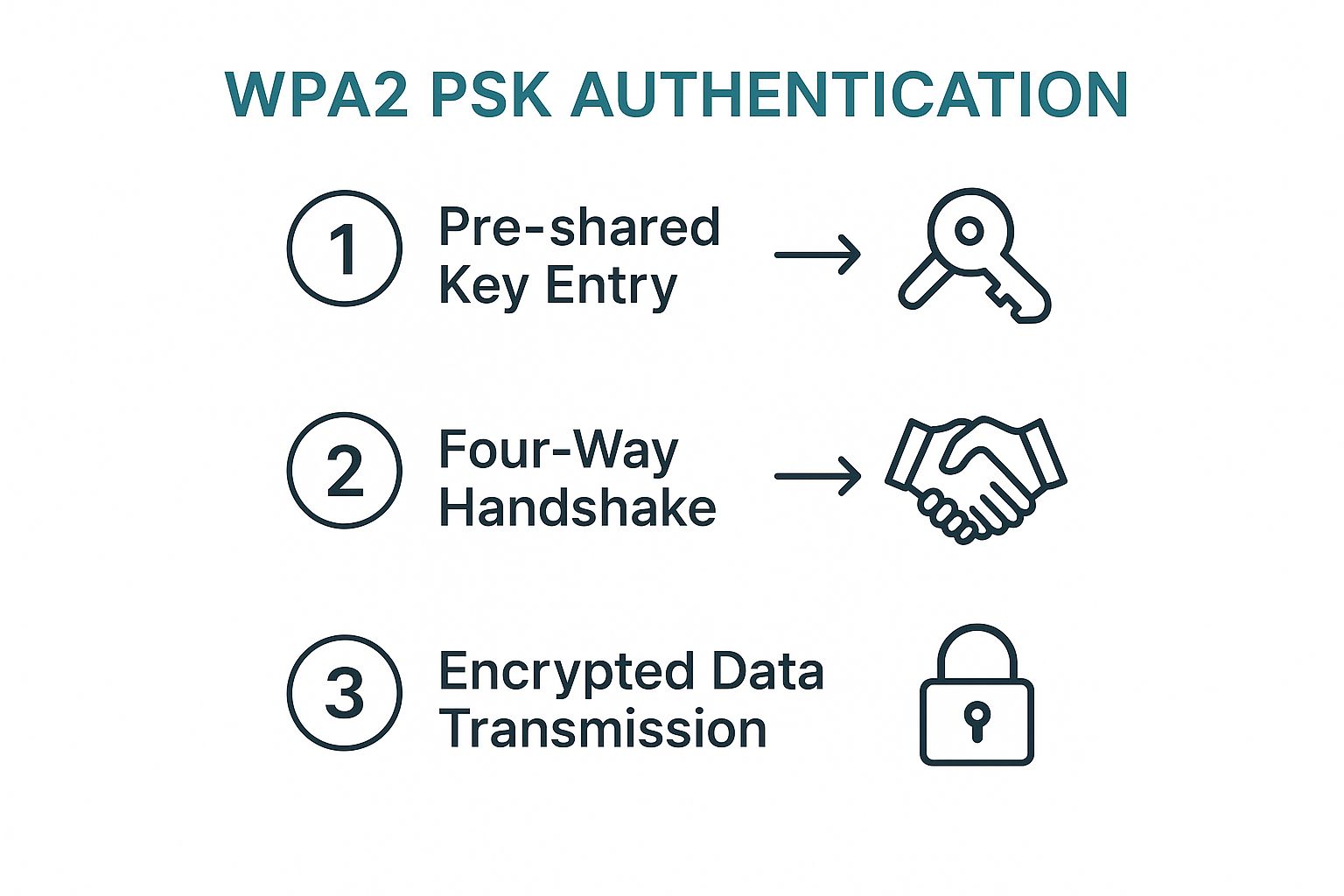
WPA2-PSK is the industry-standard security protocol for most residential and small office wireless networks. The "PSK" component refers to the Pre-Shared Key, which is the password you enter to join the network. This key serves as the seed for the 4-way handshake process, which derives the temporal keys used to encrypt data packets sent between the client device and the wireless router.
The requirement for a password length of 8 to 63 characters is not an arbitrary design choice; it is a fundamental constraint defined by the IEEE 802.11i amendment. If a passphrase falls below 8 characters, it fails to provide sufficient entropy to resist modern password-cracking algorithms. Conversely, if a passphrase exceeds 63 characters, it conflicts with the variable-length encoding format used in the PSK exchange.
Printable ASCII Characters and Encoding
When establishing your password, the system relies on printable ASCII (American Standard Code for Information Interchange). This set includes:
- Uppercase and lowercase letters: A–Z, a–z.
- Numerals: 0–9.
- Special characters: Symbols such as !, @, #, $, %, ^, &, *, (, ), _, +, =, [, ], {, }, |, :, ;, ', ", <, >, ,, ., ?, and /.
Using a wider variety of these characters increases the "keyspace," making the password mathematically harder to guess through brute force. However, it is vital to note that some older legacy devices may struggle with specific high-order ASCII characters or non-standard symbols. For maximum compatibility, sticking to standard, keyboard-accessible characters is recommended.
Why the 8 to 63 Character Window Matters
The minimum length of 8 characters exists because shorter passwords can be exhausted by dictionary attacks in a matter of seconds or minutes using modern consumer-grade GPUs. By enforcing an 8-character floor, manufacturers ensure that even a moderately complex password provides a base level of protection against unsophisticated attackers.
The maximum limit of 63 characters is dictated by the WPA2 handshake protocol. The PSK is mapped into a 256-bit key through the PBKDF2 (Password-Based Key Derivation Function 2) algorithm. This function uses the SSID (Service Set Identifier) as a salt to ensure that even if two networks use the same password, the resulting encryption keys will be unique. Exceeding 63 characters breaks the packet structure required for this handshake to complete, rendering the connection impossible.
Security Implications of Password Length
Length is generally more important than complexity when it comes to WPA2-PSK. While many users focus on adding symbols, a longer "passphrase" composed of multiple words is significantly more difficult to crack than a short, complex string of characters. A 63-character sentence is effectively immune to traditional brute-force attacks, whereas a highly complex 8-character password remains mathematically vulnerable to focused computational efforts.
Configuring Your Wireless Password Effectively
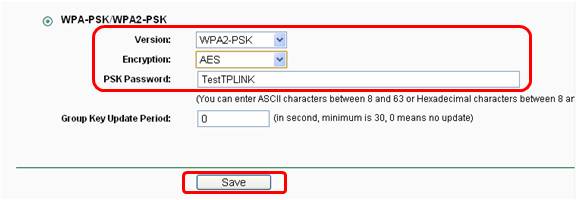
When you log into your router’s administrative portal to set or change your Wi-Fi password, you are often presented with a field labeled "WPA2 Pre-Shared Key." Here is the logical approach to selecting a secure password that meets these requirements:
- Avoid Predictability: Do not use personal information, birthdates, or common dictionary words.
- Aim for Length: Aim for a minimum of 20 to 30 characters. This length is sufficient to make the password computationally expensive to crack without exceeding the 63-character limit.
- Use Passphrases: Instead of random letters, consider a string of four or five unrelated words combined with numbers or symbols. This is known as a passphrase and is generally easier to remember while being cryptographically strong.
- Test Compatibility: If you have older devices (such as smart home sensors from a decade ago), test them immediately after changing the password. If they fail to connect, ensure you have not used obscure extended ASCII characters that the device’s firmware might not recognize.
Common Implementation Mistakes
A frequent mistake is assuming that "more is better" to the point of trying to exceed 63 characters. If you attempt to input a 65-character password, most modern router interfaces will either truncate the password to 63 characters or trigger an error message. If your router silently truncates, your actual password becomes the first 63 characters of the one you typed, creating a security risk if you are unaware of this behavior. Always verify the input field limitations of your specific router model via its technical manual.
Comparison Table: Password Security Tiers
The following table categorizes password strategies based on the 8 to 63 character requirement, focusing on resistance to cracking and user experience.
| Strategy | Length | Security Level | Memorability | Suitability |
|---|---|---|---|---|
| Minimum Bound | 8 Characters | Very Low | High | Not Recommended |
| Common Complex | 12-16 Characters | Moderate | Medium | Average Home User |
| Passphrase | 20-30 Characters | High | High | Best Practice |
| Maximum Entropy | 63 Characters | Very High | Low | Security Conscious |
Note: Security levels assume no use of dictionary-based patterns or personally identifiable information.
Troubleshooting Connection Issues
If you have set a password within the required 8 to 63 character range but devices are failing to connect, consider these common technical hurdles:
- SSID Mismatch: The WPA2 key is hashed using the SSID as a salt. If you change your SSID (the network name) while keeping the same password, you must "forget" the network on all devices and rejoin it. The change in salt effectively changes the encryption key.
- Character Encoding: If you copy and paste your password from a word processor, you may have accidentally included trailing spaces or smart quotes. Smart quotes (curly quotes) are often not interpreted correctly by network interface cards. Always type your password manually or use a plain-text editor to ensure compatibility.
- Firmware Limitations: Some older routers running legacy firmware may have bugs that misinterpret specific characters, such as the dollar sign ($) or the backslash (). If you suspect this, try changing your password to a string consisting only of alphanumeric characters and standard punctuation to rule out firmware parsing errors.
- Device Driver Issues: Some legacy wireless adapters in computers manufactured prior to 2015 may have issues with WPA2-PSK when paired with specific AES-CCMP encryption settings. Ensure your device drivers are updated to the latest versions provided by the manufacturer.
Frequently Asked Questions
Can I use spaces in my WPA2-PSK password?
Yes, spaces are valid characters within the 8 to 63 character limit. Using spaces can actually increase the strength of a passphrase by making it harder for automated tools to guess the structure of your password. Ensure that no leading or trailing spaces are included, as these are often unintentionally trimmed by user interfaces.
Does the password length affect network speed?
No, the password length does not affect the actual data throughput or connection speed of your Wi-Fi network. The password is only used during the initial authentication and key generation phase. Once the handshake is complete, the network uses a symmetric encryption key, which remains the same regardless of how complex or long your initial passphrase was.
Is it better to use 63 characters or a shorter, more complex one?
A 63-character passphrase is generally superior. Modern security experts emphasize that length is the primary factor in resisting brute-force attacks. A long, simple string is harder to crack than a short, complex one because the number of possible combinations grows exponentially with each additional character.
What happens if my password is less than 8 characters?
Most modern wireless routers will prevent you from saving a configuration with a PSK shorter than 8 characters. If you encounter a legacy device that allows it, the network will be highly susceptible to fast dictionary attacks. Avoid this configuration at all costs, as it leaves your local network wide open to unauthorized access.
Should I change my WPA2-PSK password periodically?
While changing your password is good practice, it is more important to ensure that the password is strong from the start. If you suspect an unauthorized device has joined your network, a password change is the correct response. If the network is secure, periodic changes are less critical than in other types of authentication systems, provided your original password meets the 20+ character length recommendation.
Final Recommendations for Network Security
To ensure your WPA2-PSK network remains secure, prioritize the use of a passphrase between 20 and 30 characters. This length is sufficiently long to thwart virtually all brute-force attempts while remaining manageable to input during device onboarding.
If you are currently using a password that is near the 8-character minimum, prioritize changing it to a longer, more robust passphrase today. Finally, ensure that your router’s firmware is updated, as manufacturers occasionally release patches that improve the handling of character sets and security handshakes. If your router does not support modern encryption standards or is no longer receiving security updates, consider upgrading to hardware that supports current security protocols.