Apple’s standard one-year limited warranty does not cover liquid damage, even if your device carries a high water-resistance rating like IP68. To receive coverage for spills or submersion, you must have an active AppleCare+ plan, which treats liquid exposure as accidental damage subject to a specific service fee. Without AppleCare+, liquid damage usually requires a costly out-of-warranty device replacement.
The Fundamental Conflict: Water Resistance vs. Warranty Coverage
For years, a central point of confusion for Apple users has been the gap between marketing and policy. While Apple highlights the "swim-proof" nature of the Apple Watch or the "submersion depth" of the latest iPhone 17 and iPhone 18 models, the legal language of the Apple One-Year Limited Warranty remains rigid. It explicitly excludes damage caused by liquid contact.
This exclusion exists because "water-resistant" is not synonymous with "waterproof." Water resistance is a temporary state achieved through gaskets, adhesives, and tight tolerances that degrade over time due to normal wear and tear, exposure to soaps, or physical impacts. Because Apple cannot verify how a device was handled—or if the seals were compromised by a prior drop—they do not guarantee the integrity of the water seals under the standard manufacturer's warranty.
If a technician finds evidence of liquid ingress, the warranty is effectively voided for that specific repair. This applies to all hardware, including iPhones, iPads, MacBooks, and AirPods. The only exception to this financial burden is if the user has invested in AppleCare+, which acts as an insurance policy rather than a performance guarantee.
How Apple Detects Liquid: The Liquid Contact Indicator (LCI)
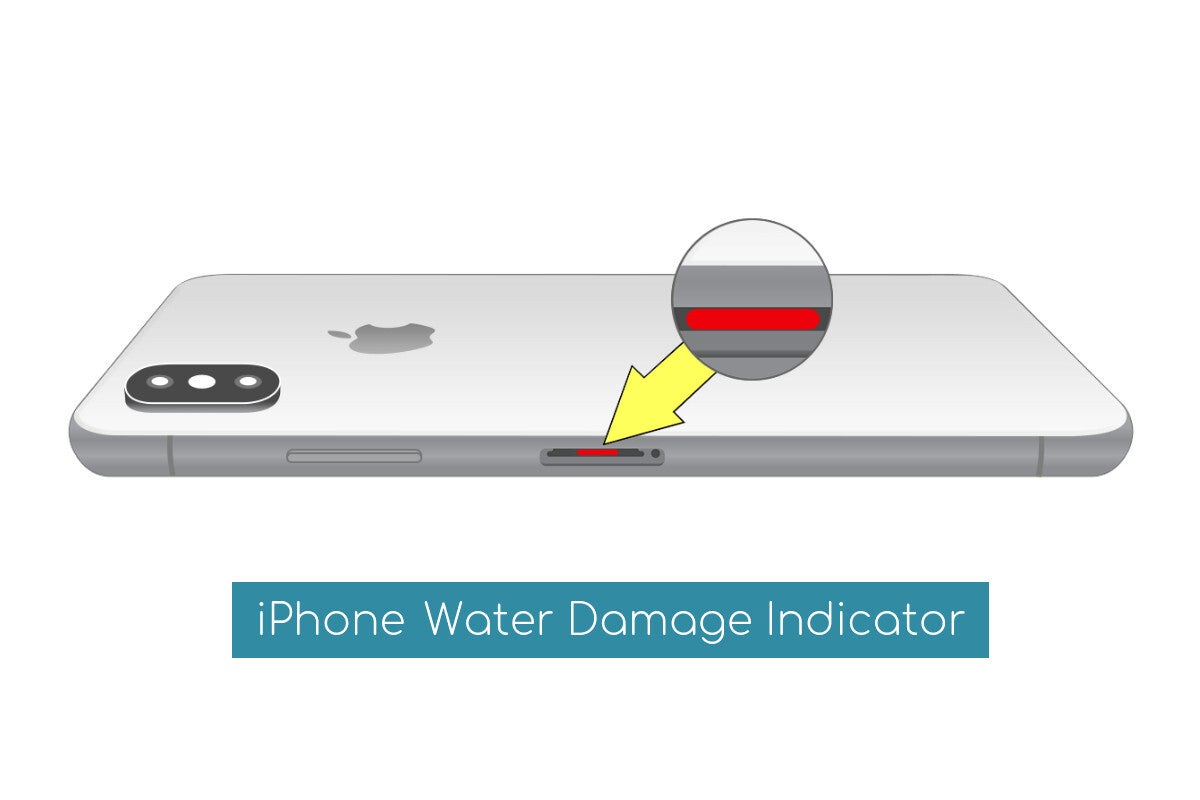
You might wonder how a technician knows your phone took a swim if it looks perfectly dry on the outside. Every iPhone, iPad, and MacBook manufactured through 2026 is equipped with multiple Liquid Contact Indicators (LCIs). These are small, white or silver tabs strategically placed near openings like the SIM tray, charging port, or internal logic board components.
When these indicators come into contact with water or a liquid containing water, they undergo a chemical reaction and turn bright red or pink. Once the LCI changes color, it cannot be reversed. Apple technicians are trained to check these indicators first during any "no-power" or "display failure" diagnostic.
Where to Find the LCI on Your Device
- iPhones (All models from iPhone 6 to iPhone 18): The LCI is typically located inside the SIM card slot. By removing the SIM tray and using a magnifying glass with a light, you can see the indicator. If it is red, the device has officially suffered liquid ingress.
- MacBooks: Apple places multiple LCIs across the logic board and under the keyboard. These are not user-accessible without opening the chassis, which can itself void certain consumer rights if not done by a professional.
- AirPods and Apple Watch: These devices have internal indicators that are checked during the mail-in repair process or at the "Genius Bar" during a teardown.
It is important to note that LCIs are designed not to trigger due to humidity or temperature changes that are within the product’s environmental specifications. They require actual liquid contact to flip to the red "fail" state.
AppleCare+ and the Water Damage Safety Net
For users concerned about liquid damage, AppleCare+ is the only official safeguard. Unlike the standard warranty, AppleCare+ includes coverage for "accidental damage from handling" (ADH). As of 2026, AppleCare+ policies generally allow for unlimited incidents of accidental damage, including liquid exposure, provided the plan is active.
However, "coverage" does not mean "free." Apple utilizes a tiered service fee (deductible) structure. For example, if you spill a latte on your MacBook Pro, the AppleCare+ service fee is significantly lower than the cost of a new logic board, but it still represents a notable out-of-pocket expense.
Estimated Repair Costs and Service Fees (2026 Pricing)
The following table outlines the approximate costs for liquid damage repairs under the standard warranty versus AppleCare+ coverage.
| Device Category | Standard Warranty (Out-of-Warranty) | AppleCare+ Service Fee |
|---|---|---|
| iPhone 17 / 18 Pro Max | $699 – $799 (Full Replacement) | $99 |
| iPhone 16 / 17 (Standard) | $549 – $649 (Full Replacement) | $99 |
| MacBook Pro (14" or 16") | $800 – $1,500+ (Logic Board/Display) | $299 |
| iPad Pro (M4/M5) | $499 – $899 (Full Replacement) | $49 |
| Apple Watch Ultra 2/3 | $499 (Full Replacement) | $79 |
| AirPods Pro / Max | $89 – $299 (Per Bud/Unit) | $29 |
Note: Out-of-warranty costs vary based on the specific extent of the damage. If liquid has only affected the display, the cost may be lower, but liquid often migrates to the logic board, necessitating a full unit replacement.
The Technical Reality of IP68 Ratings
Most modern iPhones are rated IP68 under IEC standard 60529. This rating technically means the device can withstand submersion in fresh water up to a certain depth (often 6 meters) for up to 30 minutes. However, there are several "limits" to this rating that users often overlook:
- Fresh Water Only: IP ratings are based on laboratory tests in pure, fresh water. They do not account for salt water (ocean), chlorinated water (pools), or liquids like soda, coffee, or juice. These substances are corrosive and can destroy internal circuits much faster than fresh water.
- Pressure vs. Depth: Dropping a phone into 2 meters of water is different from hitting the water at high speed (e.g., while jet skiing). High-pressure water can force its way past seals even if the depth is minimal.
- Steam and Heat: Using an iPhone in a hot shower or sauna is a common cause of "invisible" water damage. Steam consists of smaller molecules than liquid water and can bypass gaskets. Heat also causes the waterproof adhesive to soften and expand, creating gaps.
- Seal Degradation: If you have ever dropped your phone, even if the screen didn't crack, the frame may have suffered a microscopic deformation. This compromise is enough to let liquid in the next time the device gets wet.
Why Liquid Damage is Not "Repaired" by Apple
If you bring a water-damaged iPhone to an Apple Store, you will likely be told the device is "beyond economical repair" and offered a replacement. Apple rarely attempts to clean or repair a logic board that has been exposed to liquid.
The reason is corrosion and electrolysis. When a battery-powered device is exposed to liquid, the minerals in the water create bridges between electrical traces on the motherboard. This causes short circuits. Even if the device is dried out, the minerals remain. Over weeks or months, these minerals react with oxygen to form corrosion (the blue/green crust seen on old electronics). A device that works today after being wet may fail completely in three weeks due to creeping corrosion. To ensure the reliability of their repairs, Apple replaces the entire internal assembly or the entire device.
Common Mistakes: The "Rice Myth" and Beyond
When liquid damage occurs, many users turn to internet folklore to save their devices. Apple has updated its official guidance as of 2024–2026 to specifically warn against several of these methods:
- The Rice Method: Placing a phone in a bowl of rice is ineffective. Rice does not "pull" moisture from the deep recesses of a sealed device. Furthermore, small particles of rice dust can enter the charging port or speakers, causing further damage.
- Heat Sources: Never use a hairdryer, oven, or microwave to dry an Apple product. Excessive heat will melt the internal adhesives and destroy the Lithium-ion battery, potentially causing a fire or swelling.
- Compressed Air: While it might seem logical to "blow out" the water, compressed air often pushes the liquid deeper into the sensitive components like the camera sensor or the microphone mesh.
The Recommended Protocol for Liquid Exposure
If your device is exposed to liquid and you suspect ingress:
- Power it down immediately to prevent electrical shorts.
- Wipe the exterior with a soft, lint-free cloth.
- Tap the device gently against your hand with the charging port facing down to remove excess liquid.
- Leave it in a dry area with airflow (near an open window or a fan) for at least 24 hours.
- Do not charge it until you are certain the port is bone-dry. Modern iPhones will show a "Liquid Detected" alert if you try to plug them in while wet; heed this warning.
Frequently Asked Questions
Does AppleCare cover water damage for free?
No. While AppleCare+ covers liquid damage, it requires a service fee (deductible). For an iPhone, this is typically $99. This is significantly cheaper than the $600+ out-of-warranty cost, but it is not a free repair.
Can I buy AppleCare+ after I've dropped my phone in water?
Generally, no. To purchase AppleCare+ after the initial sale (usually within 60 days), Apple requires a remote or in-person diagnostic test. If the liquid has already triggered the internal sensors or caused a malfunction, the device will fail the diagnostic, and you will be ineligible for coverage.
Is salt water damage treated differently than fresh water?
In terms of warranty, no; both are excluded. However, salt water is much more destructive. If you drop your device in the ocean, Apple recommends rinsing it briefly with fresh water to remove salt crystals before following the drying protocol, as the salt will accelerate corrosion almost instantly.
Will a screen protector or case help with water resistance?
Standard cases and screen protectors do not provide water protection. Only specific "waterproof" rated cases (like those from LifeProof or Catalyst) provide an additional layer of gaskets. However, even with these cases, Apple’s warranty policy remains the same: liquid damage is not covered.
What if my device was wet but everything seems to work?
This is a "latent failure" risk. Liquid can sit under a chip for days before the first sign of corrosion causes a crash. If your LCIs are triggered, your warranty is technically void for future issues, even if the phone works now. It is often wise to back up your data immediately while the device is still functional.
Practical Recommendation
If you live an active lifestyle or work near liquids, the Apple One-Year Limited Warranty is insufficient protection. Because Apple adheres to a strict "no liquid coverage" policy for its standard warranty, the only way to avoid a $600 to $1,500 surprise is to maintain an active AppleCare+ subscription.
For those without AppleCare+, the best course of action upon liquid exposure is immediate power-down and a minimum 48-hour drying period before attempting to power the device back on. If the device fails to boot, your next step should be to book a Genius Bar appointment to discuss "Out-of-Warranty" replacement options, as third-party "ultrasonic cleaning" services offer inconsistent results and will permanently disqualify the device for any future official Apple support.