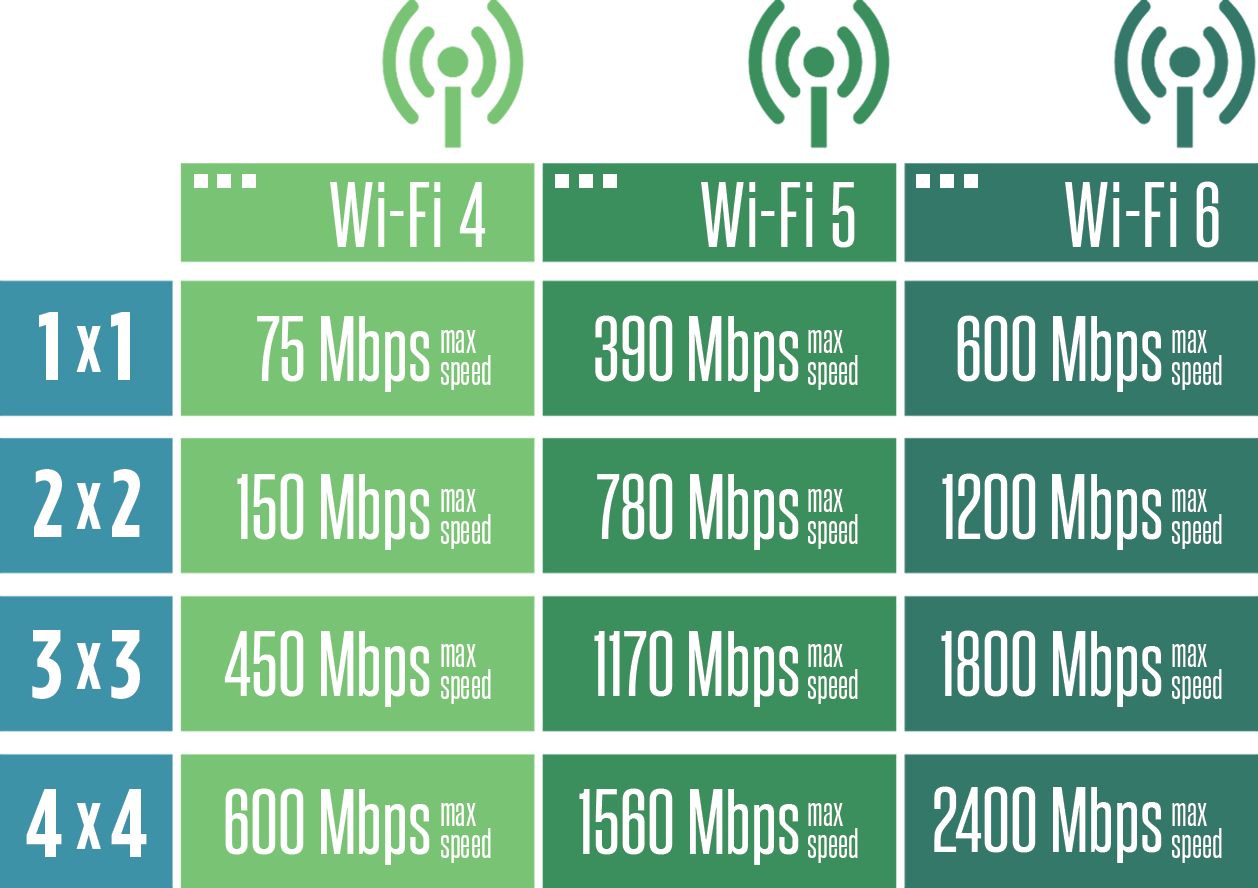
Wi-Fi 4, technically known as the IEEE 802.11n standard, provides a theoretical maximum speed of 600 Mbps using four spatial streams and 40 MHz channel bonding. While considered a legacy standard in 2026, it remains the foundation for many IoT devices and offers essential dual-band connectivity across both 2.4 GHz and 5 GHz frequencies.
For over a decade, Wi-Fi 4 was the gold standard for wireless networking. Even though we have moved through the eras of Wi-Fi 5 (802.11ac), Wi-Fi 6 (802.11ax), and the widespread adoption of Wi-Fi 7 (802.11be) in 2026, understanding Wi-Fi 4 is still critical for network administrators and smart-home enthusiasts. Most "legacy" support on modern routers is actually just a Wi-Fi 4 radio kept active to ensure that older hardware can still connect to the internet.
Below are the four fundamental speed facts regarding Wi-Fi 4, analyzed with the technical depth required to understand how this protocol functions in a modern landscape.
1. The Theoretical Maximum Speed is 600 Mbps (With Caveats)
One of the most cited facts about Wi-Fi 4 is its 600 Mbps speed ceiling. However, this number is a "link rate," not a throughput rate, and achieving it requires a specific hardware configuration that was rarely implemented in consumer-grade devices.
To reach 600 Mbps, a Wi-Fi 4 connection requires four spatial streams (4x4 MIMO) and the use of 40 MHz channel bonding. In the era when Wi-Fi 4 was dominant, most laptops and high-end smartphones only featured 2x2 MIMO antennas, capping their theoretical speed at 300 Mbps. Budget devices and early smartphones often utilized a 1x1 configuration, limiting them to 150 Mbps or even 72.2 Mbps depending on the guard interval used.
Understanding Modulation and Coding Schemes (MCS)
The speed of a Wi-Fi 4 connection is determined by the MCS index. Wi-Fi 4 utilizes 64-QAM (Quadrature Amplitude Modulation). QAM is a method of densifying the data packets sent over radio waves. While Wi-Fi 7 in 2026 uses 4096-QAM to pack massive amounts of data into every signal, Wi-Fi 4’s 64-QAM was a significant leap over the older 802.11g standard.
The "real-world" throughput of Wi-Fi 4 is typically 40% to 50% of the link rate. This means that even if your device reports a 300 Mbps connection, the actual data transfer speed—accounting for protocol overhead, interference, and distance—is likely closer to 120–150 Mbps.
2. Wi-Fi 4 Introduced MIMO (Multiple Input, Multiple Output)
The most transformative "speed fact" about Wi-Fi 4 was the introduction of MIMO technology. Before 802.11n, wireless standards used Single Input, Single Output (SISO), meaning the router and the device could only send and receive one data stream at a time.
MIMO allows a router to use multiple antennas to transmit multiple data streams simultaneously over the same radio channel. This is known as spatial multiplexing. By splitting the data into several parts and sending them through different paths, the throughput increases linearly with the number of antennas.
Spatial Streams and Performance
In 2026, we see 8x8 or even 16x16 MIMO in enterprise Wi-Fi 7 environments, but Wi-Fi 4 capped out at 4x4. The impact of MIMO on speed is twofold:
- Throughput Increase: Each stream adds a specific amount of bandwidth (e.g., 150 Mbps per stream at 40 MHz).
- Reliability: MIMO helps mitigate the effects of multipath fading. In an indoor environment, radio signals bounce off walls and furniture. MIMO systems use these reflections to actually strengthen the signal rather than letting them cause interference.
For a Wi-Fi 4 device to benefit from these speeds, both the transmitter (router) and the receiver (client device) must support the same number of spatial streams. If you have a 4x4 router but a 1x1 smartphone, the connection speed will revert to the lowest common denominator (1x1).
3. Dual-Band Capability and the 2.4 GHz vs. 5 GHz Trade-off
Wi-Fi 4 was the first standard to gain widespread adoption on both the 2.4 GHz and 5 GHz frequency bands. This dual-band capability is a primary factor in how users experience speed.
The 2.4 GHz Bottleneck
The 2.4 GHz band is notoriously crowded. In 2026, it is saturated by Bluetooth devices, microwave ovens, legacy smart-home sensors, and neighboring Wi-Fi networks. Because the 2.4 GHz band only has three non-overlapping channels (1, 6, and 11) at 20 MHz, interference is almost guaranteed. This interference forces Wi-Fi 4 to drop to lower MCS indexes, significantly reducing the speed below the theoretical maximums.
The 5 GHz Advantage
Wi-Fi 4 on the 5 GHz band offers much higher speeds because the spectrum is less congested and has more available channels. On 5 GHz, it is much easier to maintain a "clean" 40 MHz channel. However, 5 GHz signals have shorter wavelengths, meaning they do not penetrate walls as effectively as 2.4 GHz signals. Consequently, while Wi-Fi 4 can be fast on 5 GHz, that speed drops off sharply as you move away from the router.
4. Channel Bonding (40 MHz) Doubled the Bandwidth
Before Wi-Fi 4, standard Wi-Fi channels were 20 MHz wide. Wi-Fi 4 introduced "Channel Bonding," which allows two 20 MHz channels to be combined into a single 40 MHz channel.
Mathematically, doubling the channel width slightly more than doubles the speed. This is because the small "gap" (guard band) between the two 20 MHz channels can also be used for data transmission when they are bonded.
The Conflict with 2.4 GHz
While 40 MHz channels are essential for hitting the 300 Mbps or 600 Mbps milestones, they are problematic on the 2.4 GHz band. Using a 40 MHz channel in the 2.4 GHz spectrum takes up roughly 80% of the available usable space. In dense urban environments, most routers are configured to "Neighbor Friendly" mode, which automatically drops the channel width back to 20 MHz if it detects any other networks nearby. This is why many users in 2026 find that their legacy Wi-Fi 4 devices never seem to exceed 72 Mbps or 150 Mbps—the router is protecting the airwaves from total congestion.
Technical Comparison of Wi-Fi Standards (As of 2026)
The following table contextualizes Wi-Fi 4 speeds against subsequent generations to show why it remains a "legacy" or "IoT-tier" protocol today.
| Standard | Common Name | Max Theoretical Speed | Typical Channel Width | Primary Frequency |
|---|---|---|---|---|
| 802.11g | Wi-Fi 3 (Retro) | 54 Mbps | 20 MHz | 2.4 GHz |
| 802.11n | Wi-Fi 4 | 600 Mbps | 20 / 40 MHz | 2.4 / 5 GHz |
| 802.11ac | Wi-Fi 5 | 3.46 Gbps | 80 / 160 MHz | 5 GHz |
| 802.11ax | Wi-Fi 6 / 6E | 9.6 Gbps | 160 MHz | 2.4 / 5 / 6 GHz |
| 802.11be | Wi-Fi 7 | 46 Gbps | 320 MHz | 2.4 / 5 / 6 GHz |
Factors Limiting Wi-Fi 4 Speed in 2026
Even if you have a high-end Wi-Fi 4 router, several external factors will likely prevent you from reaching the speeds advertised on the box.
1. Legacy Device Drag
Wi-Fi is a shared medium. In a Wi-Fi 4 environment, if you have an extremely old 802.11b device (from the early 2000s) connected to your network, the router must use "protection mechanisms" to ensure the old device understands when the airwaves are busy. This introduces massive overhead, slowing down the entire network for every other device, including your faster Wi-Fi 4 hardware.
2. Guard Intervals (Short GI)
Speed is also influenced by the "Guard Interval"—the space between transmitted symbols intended to prevent inter-symbol interference. Wi-Fi 4 supports a "Short GI" of 400ns, compared to the standard 800ns. Using the Short GI increases the data rate by about 11%. However, in environments with many reflections (like a warehouse), Short GI can cause errors, forcing the system to retransmit data and effectively lowering the net speed.
3. Coexistence Interference
In 2026, the average household has dozens of wireless signals. Wi-Fi 4 lacks the sophisticated "BSS Coloring" found in Wi-Fi 6, which allows modern routers to ignore traffic from neighboring networks. For Wi-Fi 4, if a neighbor is using the same channel, your router must wait for a "clear to send" signal, creating latency and reducing effective speed.
The Role of Wi-Fi 4 in the 2026 Smart Home
You might wonder why Wi-Fi 4 is still relevant in 2026 when Wi-Fi 7 offers speeds 70 times faster. The answer lies in cost and power consumption.
A Wi-Fi 4 chipset is significantly cheaper to manufacture and consumes much less power than a Wi-Fi 6 or 7 chip. For a smart light bulb, a smart plug, or a temperature sensor, a 72 Mbps (1x1, 20 MHz) connection is more than enough to send a few kilobytes of data. Furthermore, because Wi-Fi 4 operates so well on the 2.4 GHz band, it provides the range necessary to reach devices in the garage or the far corners of a backyard—areas where 6 GHz Wi-Fi 7 signals might struggle to penetrate.
Troubleshooting Wi-Fi 4 Performance
If you are struggling with slow speeds on a device limited to Wi-Fi 4, consider the following technical adjustments:
- Force 20 MHz on 2.4 GHz: It sounds counterintuitive, but in a crowded area, a stable 20 MHz channel often provides better real-world throughput than a 40 MHz channel that is constantly suffering from interference and packet loss.
- Check for MIMO support: Ensure your router isn't defaulting to a "Legacy" mode that disables MIMO to support 802.11g devices.
- Placement: Because Wi-Fi 4 lacks the beamforming precision of modern standards, central placement of the router is much more critical for maintaining a high MCS index.
FAQs About Wi-Fi 4 Speed
Is Wi-Fi 4 fast enough for 4K streaming in 2026?
Technically, yes. A 4K stream typically requires between 25 Mbps and 50 Mbps. A solid Wi-Fi 4 connection (150 Mbps link rate) can handle this. However, if multiple people are using the network or if the signal is weak, the overhead and interference inherent in Wi-Fi 4 may cause buffering that wouldn't occur on Wi-Fi 6 or 7.
Why does my Wi-Fi 4 device only show a 144 Mbps connection?
This usually happens when your router is using a 20 MHz channel width with a 2x2 MIMO configuration and a Short Guard Interval. To see 300 Mbps or higher, you would need to enable 40 MHz channel bonding in your router's settings, assuming the 2.4 GHz environment isn't too crowded to support it.
Can I upgrade a Wi-Fi 4 device to Wi-Fi 6?
No, the Wi-Fi generation is tied to the physical hardware (the radio chipset and antennas). While you can connect a Wi-Fi 4 device to a Wi-Fi 6 or Wi-Fi 7 router (backward compatibility), the device will still communicate using Wi-Fi 4 protocols and will be limited by Wi-Fi 4 speed constraints.
Does Wi-Fi 4 support "Beamforming"?
While an optional part of the 802.11n specification, beamforming was not standardized in Wi-Fi 4 as it was in Wi-Fi 5 and 6. This meant that different manufacturers used proprietary beamforming techniques that rarely worked together. In practice, most Wi-Fi 4 gear does not benefit from standardized beamforming.
Is Wi-Fi 4 more secure than newer standards?
Speed and security are often linked through protocol overhead. Wi-Fi 4 originally used WPA2. While WPA2 is still common in 2026, it is susceptible to certain attacks that the newer WPA3 (standard on Wi-Fi 6/7) prevents. Some Wi-Fi 4 devices can support WPA3 via software updates, but many remain on WPA2, making them a weaker link in network security.
Summary of Next Actions
If you are managing a network in 2026 that still utilizes Wi-Fi 4 for legacy or IoT devices, the best course of action is to segment your network. Create a dedicated 2.4 GHz SSID specifically for these Wi-Fi 4 devices. This prevents older, slower protocols from interfering with the high-speed 5 GHz and 6 GHz traffic used by your modern phones, laptops, and VR headsets. Ensure that "Airtime Fairness" is enabled on your router settings to prevent a single slow Wi-Fi 4 device from monopolizing the wireless channel and dragging down the performance of the entire network.