AI for Scrum Masters in practice involves leveraging generative models, predictive analytics, and automated reporting tools to reduce administrative friction, enhance team retrospectives, and provide data-driven insights into sprint health. By automating routine documentation and sentiment analysis, Scrum Masters can pivot from tactical task management to high-level servant leadership and organizational coaching.
The Shift Toward AI-Augmented Scrum
The traditional Scrum Master role is heavily laden with facilitation, administrative maintenance, and the constant balancing of empirical process control. As of 2026, the integration of Artificial Intelligence into these workflows is not about replacing the human element—which remains vital for conflict resolution and emotional intelligence—but about offloading cognitive overhead.
When Scrum Masters spend less time manually updating Jira tickets, calculating velocity trends, or drafting meeting summaries, they gain capacity to focus on removing complex organizational impediments and fostering psychological safety within the team. AI tools act as a force multiplier, transforming raw data from development environments into actionable coaching insights.
Core Applications of AI in Scrum Ceremonies
Automated Documentation and Meeting Intelligence
The "Scribe" burden is a common pain point for many Scrum Masters. During Sprint Planning, Reviews, and Retrospectives, the Scrum Master is often caught between facilitating the conversation and capturing exhaustive notes.
Modern Large Language Models (LLMs) integrated into conferencing software can now transcribe, summarize, and—most importantly—extract action items with high precision. By using AI to synthesize a 60-minute Retrospective, the Scrum Master can immediately publish a clean list of "what went well" and "areas for improvement," allowing the team to focus on the conversation rather than the record-keeping.
Sentiment Analysis for Team Health
Quantitative metrics like velocity and cycle time often fail to capture the "soft" reality of a team’s burnout levels or engagement. AI-driven sentiment analysis tools can parse data from written updates, Slack channels, or survey responses to identify shifts in team morale.
In practice, a Scrum Master can use these tools as an "early warning system." If the AI detects a downward trend in sentiment over a two-week period, the Scrum Master can proactively initiate a 1-on-1 check-in or a team reset, rather than waiting for the performance of the team to degrade significantly.
Integrating Predictive Analytics into Sprint Planning
One of the most persistent challenges in Agile is the estimation process. Planning Poker and Story Pointing are inherently subjective. AI-assisted forecasting models now leverage historical data—such as past velocity, team availability, and seasonal disruptions—to provide a confidence range for the upcoming Sprint.
Rather than relying on "gut feel" for capacity planning, Scrum Masters can present their teams with data-backed scenarios. For example, if an AI model predicts a 70% probability of completing 30 story points based on the last six months of throughput, the team can engage in a more informed discussion about scope commitment and risk mitigation.
Table 1: Comparison of AI Integration Levels for Scrum Masters
| Feature | Manual Process | AI-Enhanced Process | Value Proposition |
|---|---|---|---|
| Meeting Minutes | Manual transcription/typing | Automated NLP extraction | Time saving; accuracy |
| Capacity Planning | Subjective estimation | Historical trend analysis | Higher commitment reliability |
| Team Health | Intuition-based check-ins | Pattern/Sentiment analysis | Early burnout detection |
| Impediment Tracking | Spreadsheet/Jira logging | Automated root-cause clustering | Faster resolution cycles |
| Report Generation | Multi-tool aggregation | Unified dashboard generation | Improved stakeholder transparency |
Navigating Requirements and Ethical Constraints
While the potential for efficiency is high, applying AI in a Scrum environment requires strict adherence to data privacy and organizational policies. As of 2026, many enterprise-grade AI solutions require specific configuration to ensure that proprietary code, customer PII (Personally Identifiable Information), or sensitive team discussions are not used to train public-facing models.
Prerequisites for Deployment
- Tool Integrity: Use enterprise-licensed versions of LLMs that guarantee data isolation and zero-training policies on input data.
- Transparency: Maintain full transparency with the team. Do not use AI to monitor individual productivity or perform "shadow tracking."
- Verification: Always treat AI-generated summaries or predictions as a draft. The Scrum Master retains the final accountability for the accuracy of information shared with stakeholders.
Addressing Common Mistakes
A frequent error in the adoption of AI for Scrum Masters is the "black box" trap. This occurs when a team blindly accepts an AI-generated velocity forecast or an automated meeting summary without verifying the underlying logic.
Mistake 1: Over-Reliance on Metrics. AI can generate charts at an alarming speed, but Scrum Masters must guard against "Vanity Metrics." If the AI identifies high velocity but the team feels the quality of the product is declining, the human Scrum Master must prioritize the qualitative feedback over the AI-generated data.
Mistake 2: Ignoring Team Consent. Implementing AI tools to track team communications or participation can backfire, causing team members to become guarded. Introduce AI as a tool to help the team, not to watch the team.
Mistake 3: Neglecting Context. AI lacks the nuance of organizational politics. An AI might suggest that an impediment is technical, while the actual, underlying issue is a lack of alignment between the Product Owner and a cross-functional stakeholder. Use AI to surface symptoms, but use human expertise to diagnose root causes.
Advanced Strategies: Coaching and Impediment Removal
The highest form of AI usage for a Scrum Master involves coaching. By feeding anonymized meeting transcripts into an AI, a Scrum Master can ask for feedback on their own facilitation style: "Did I dominate the conversation during this Retrospective?" or "Did I allow enough space for quieter team members to voice their concerns?"
This serves as a virtual mentor, helping the Scrum Master identify biases in their own leadership style. Furthermore, when dealing with complex impediments that span multiple teams, AI can help map dependencies that are too sprawling for a human to visualize, effectively identifying "bottleneck clusters" in the organization’s value stream.
Frequently Asked Questions
1. Does using AI to summarize meetings violate team privacy?
It depends on the tool and your internal policy. If you use an enterprise-managed, SOC2-compliant tool where data is siloed and not stored for training, it is generally acceptable. However, you should always notify the team that an AI assistant is present and offer an "opt-out" for sensitive topics.
2. Can AI replace the Scrum Master’s role in facilitation?
No. Facilitation is primarily about human dynamics, emotional intelligence, and empathy. AI can handle the logistical capture of information, but it cannot navigate the complex interpersonal conflicts or the nuanced cultural adjustments required to keep a team functioning effectively.
3. What is the most effective way to start using AI as a Scrum Master?
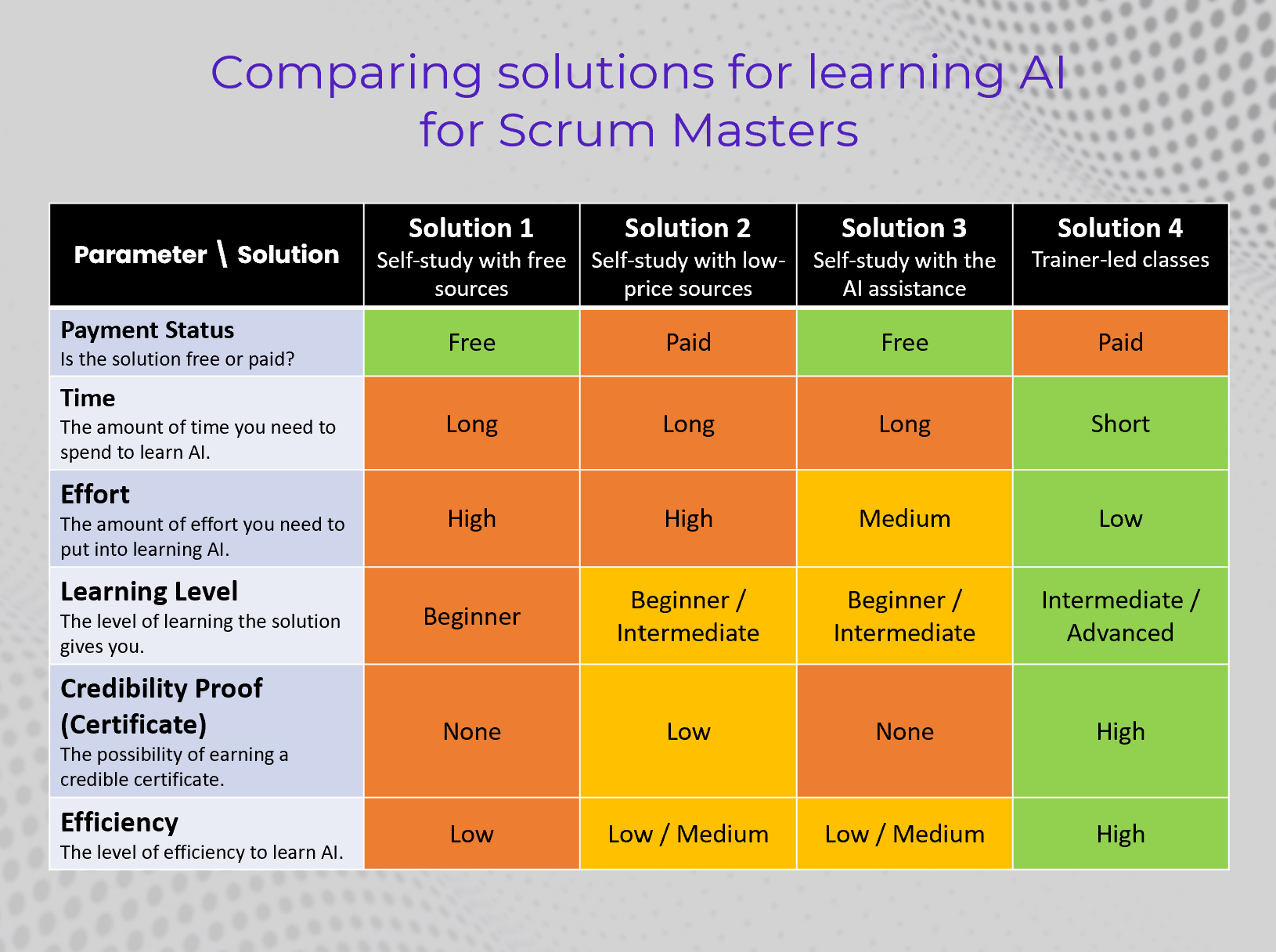
Start small. Begin by automating the transcription and summary of your Retrospective meetings. This provides an immediate, tangible benefit that saves time without interfering with the team’s core technical work. Once you are comfortable with that, move to using data-aggregation tools for sprint reporting.
4. How can I ensure my team trusts the AI tools I introduce?
Practice radical transparency. Demonstrate the tool’s capability, explain exactly what data is being accessed, and explicitly state that the tool is for the team’s convenience (e.g., to reduce note-taking) rather than for tracking performance or providing data to management.
5. Will AI make my Scrum Master certification less valuable?
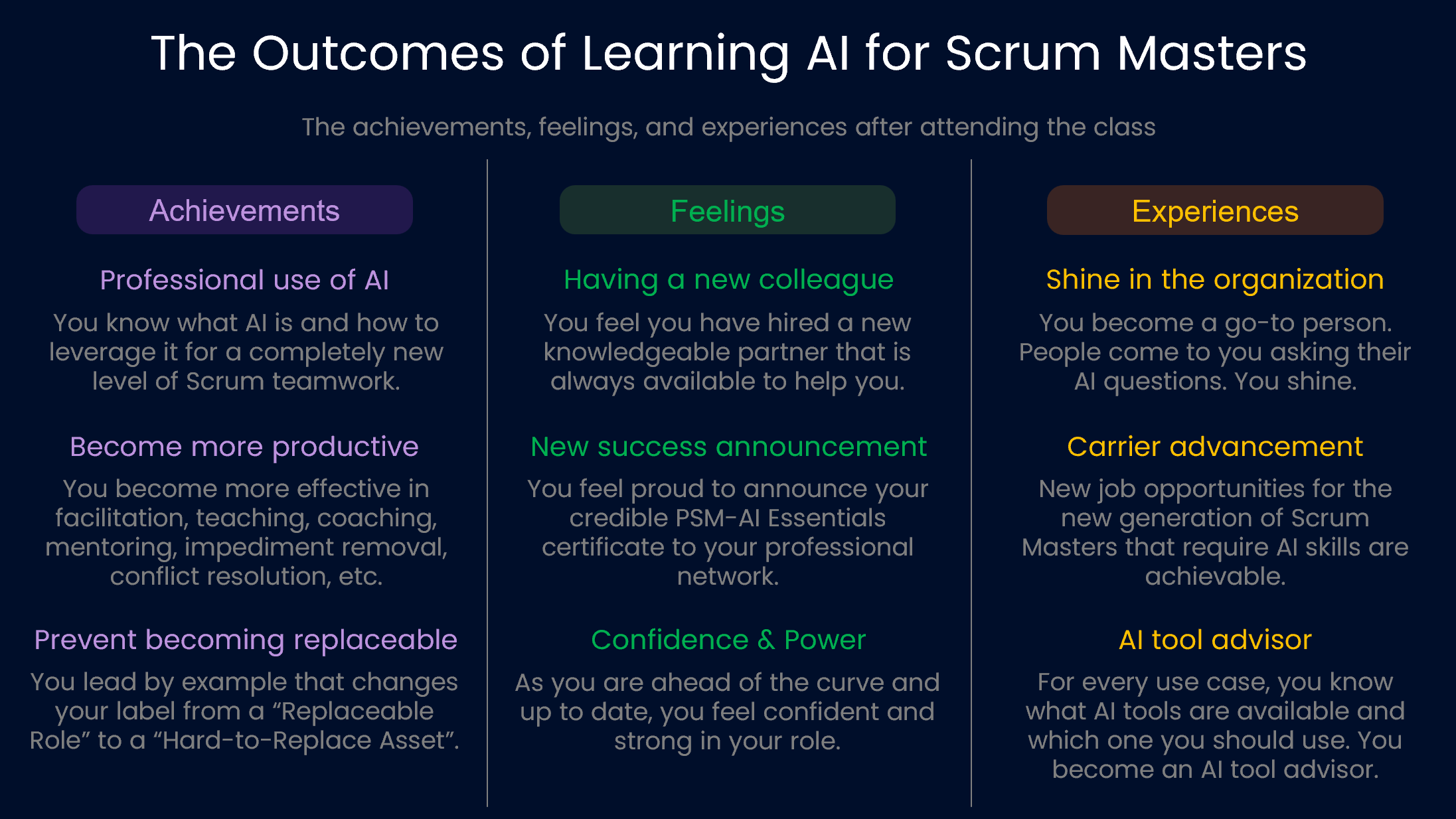
Quite the opposite. As administrative tasks become automated, the "human-centric" skills of a Scrum Master—coaching, teaching, mentoring, and conflict resolution—become more valuable. AI handles the "science" of Agile; your certification and experience manage the "art."
Next Steps for Scrum Masters
To begin integrating these practices, conduct an "Administrative Audit" of your current Sprint cycle. List every hour spent on documentation, data entry, and report creation. Once identified, select one of these tasks and pilot an AI tool for one Sprint.
Prioritize tools that integrate with your existing tech stack (such as Jira, Slack, or Microsoft Teams) to minimize context switching. Finally, schedule a 15-minute "AI Retrospective" with your team after the first month of using these tools to ensure that the automation is providing value and not creating new hurdles. As AI continues to evolve, your role remains grounded in the human capacity to adapt, learn, and guide teams toward sustainable, high-performing delivery.