The APA research paper title page format requires specific alignment, font choices, and content based on whether you are submitting a student paper or a professional manuscript. Both versions must be double-spaced, use 1-inch margins, and include a page number in the top-right corner. Student papers require the course name and instructor, while professional papers require a running head and author note.
The title page is the first impression of your scholarly work. In 2026, while automated citation tools and artificial intelligence have streamlined the drafting process, the American Psychological Association (APA) 7th Edition standards remain the rigorous benchmark for clarity, precision, and academic integrity. Adhering to these formatting rules ensures that your research is taken seriously by peer reviewers, instructors, and the wider scientific community.
The Evolution of APA Style: Why Formatting Matters in 2026
APA Style has long been the preferred formatting system for the social sciences, behavioral sciences, and nursing. The transition to the 7th Edition, which remains the active standard in 2026, marked a significant shift toward inclusivity and digital accessibility. The title page, often referred to as the "cover page," serves a dual purpose: it identifies the work and its creators while providing the necessary metadata for digital indexing and archival.
Consistency in formatting is not merely an aesthetic choice. In an era where research is frequently consumed via mobile devices and screen readers, the specific font choices and spacing requirements of APA Style facilitate better readability. For researchers, a correctly formatted title page signifies professional competence and attention to detail, which are foundational traits in empirical research.
Student vs. Professional: Choosing the Right Format
One of the most significant updates in the 7th Edition was the formalization of two distinct title page formats. Before you begin your layout, you must identify your target audience.
- Student Title Page: Used by students at the undergraduate and graduate levels for course assignments. It omits the running head and the author note, focusing instead on institutional and course-specific information to help instructors organize and grade submissions.
- Professional Title Page: Required for any manuscript being submitted for publication in a journal or for professional conferences. This version includes a shortened title in the header (the running head) and a detailed author note for contact and disclosure purposes.
If you are a graduate student working on a thesis or dissertation, you should consult your university’s specific guidelines, as they often require a hybrid approach or additional institutional pages.
Comprehensive Requirements for a Student Title Page
The student title page is designed for clarity within the classroom environment. Every element must be centered horizontally and placed in the top half of the page.
Page Numbering and Header
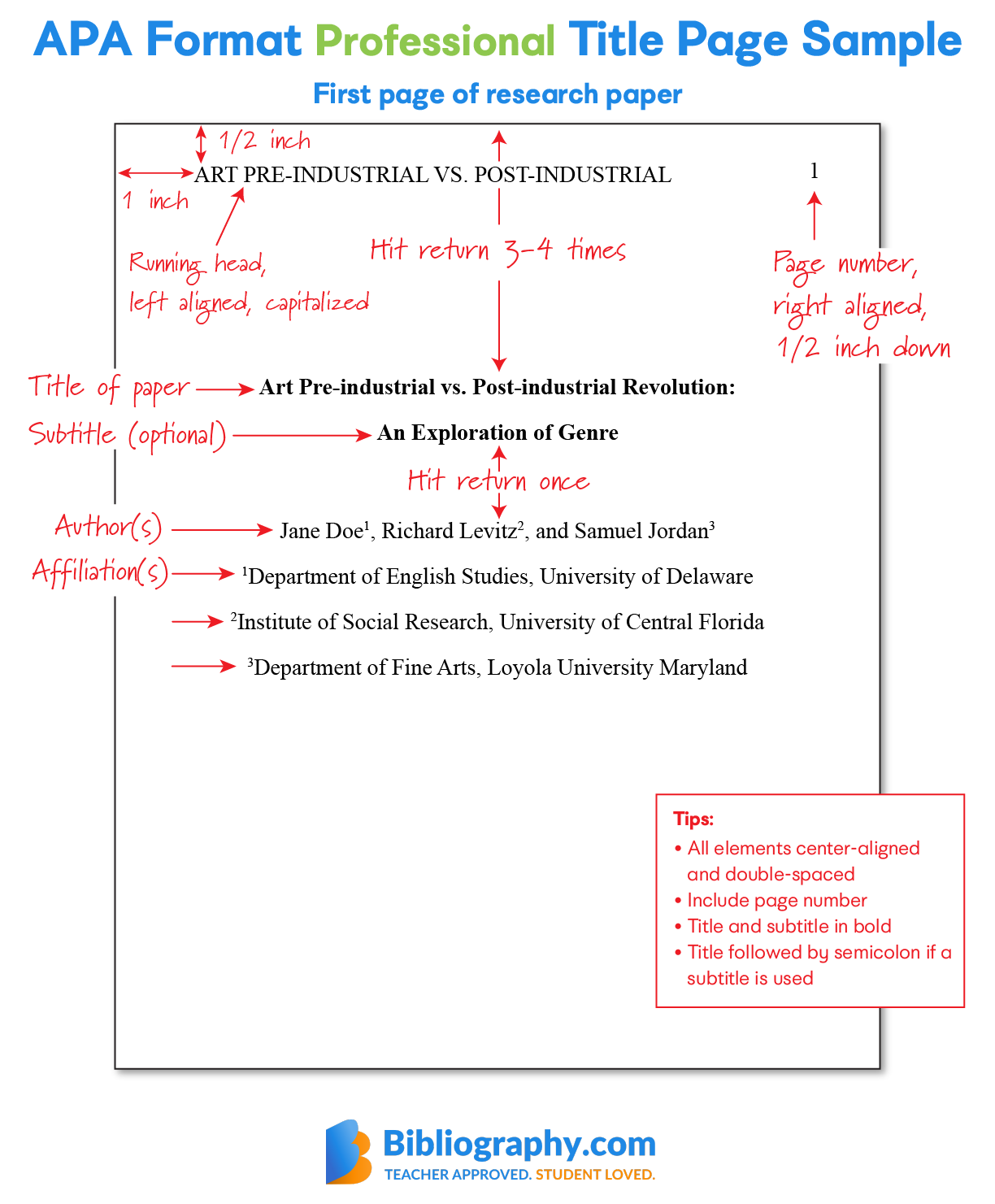
In the student format, the header is remarkably simple. You only need to include the page number, starting with "1," in the top right-hand corner of the page. Do not include your name or a shortened title in the header. Use the automatic page-numbering function in your word processor to ensure the number remains exactly one inch from the top and right edges.
The Paper Title
The title should be positioned three to four lines down from the top of the page. It must be bolded, centered, and written in title case (where major words are capitalized). There is no specific word count limit for an APA title, but it should be focused and descriptive. Avoid unnecessary words like "A Study of" or "An Investigation into." Instead, focus on the relationship between variables or the specific subject of the research.
Author Name
One double-spaced line should be left blank between the title and the author's name. The author's name (the "byline") should be centered and not bolded. If the paper has multiple authors, specific conjunctions are used:
- Two authors: Use the word "and" (e.g., Jane Doe and John Smith).
- Three or more: Use commas and "and" (e.g., Jane Doe, John Smith, and Sam Brown).
Institutional Affiliation
Directly below the author's name, list the department and the name of the college or university. For example: "Department of Psychology, University of Texas at Austin." This allows the instructor to verify the context of the submission.
Course Information
The course name and number are essential for administrative purposes. List the course number (e.g., PSY 101) followed by a colon and the full course name (e.g., Introduction to Psychology). This should be centered on the line immediately following the affiliation.
Instructor and Due Date
Finally, include the instructor’s name (using their preferred title, such as Dr. or Professor) and the assignment's due date. The date should be written in the format used in your country; in the United States, this is typically Month Day, Year (e.g., October 15, 2026).
Advanced Requirements for the Professional Title Page
The professional version is more complex because it is designed for a broader audience and long-term archival. It includes metadata that assists in the peer-review process and helps future researchers contact the authors.
The Running Head
Unlike the student version, the professional title page requires a running head. This is an abbreviated version of the paper's title, written in all capital letters, and placed in the top-left corner of the header. It should not exceed 50 characters, including spaces. In the 7th Edition, the label "Running head:" is no longer used; simply place the capitalized title in the header.
Author Note
The Author Note is placed in the bottom half of the professional title page. It consists of several paragraphs that provide additional context:
- ORCID iD: A link to the authors' digital identifiers.
- Changes in Affiliation: Mention if an author has moved institutions since the research was conducted.
- Disclosures and Acknowledgments: State any financial support, conflicts of interest, or thanks to colleagues.
- Contact Information: Provide a specific email address for the corresponding author.
General Formatting Standards for 2026
Regardless of the version you use, the following technical specifications apply to the entire title page and the subsequent paper.
Font Selection and Accessibility
APA Style now allows for a variety of accessible fonts. In 2026, the preference has shifted toward sans-serif fonts for digital reading, though serif fonts remain popular for print. Acceptable options include:
- Sans-Serif: Calibri (11 pt), Arial (11 pt), or Lucida Sans Unicode (10 pt).
- Serif: Times New Roman (12 pt), Georgia (11 pt), or Computer Modern (10 pt).
The key is to use the same font throughout the entire paper, including the page numbers and headers.
Spacing and Margins
The entire title page must be double-spaced. There should be no extra "blocks" of space between sections, with one notable exception: the student title page requires one extra double-spaced line between the title and the author's name. Margins must be exactly 1 inch (2.54 cm) on all four sides.
Line Alignment and Indentation
All text on the title page should be centered horizontally. Do not use the "justify" setting, which creates uneven spacing between words. Standard paragraph indentation (0.5 inches) is not used on the title page.
Comparison of Title Page Elements
The following table summarizes the requirements for both formats to help you verify your layout before submission.
| Element | Student Title Page | Professional Title Page |
|---|---|---|
| Page Number | Yes (Top Right) | Yes (Top Right) |
| Running Head | No | Yes (Top Left, All Caps) |
| Paper Title | Yes (Bold, Centered) | Yes (Bold, Centered) |
| Author Name(s) | Yes (Centered) | Yes (Centered) |
| Affiliation | Yes (University/Dept) | Yes (University/Dept) |
| Course Number/Name | Yes | No |
| Instructor Name | Yes | No |
| Due Date | Yes | No |
| Author Note | No | Yes (Bottom of Page) |
Common Pitfalls and Troubleshooting
Even experienced researchers can make mistakes when formatting an APA title page. Understanding these common errors can help you avoid losing points or facing delays in the publication process.
The "Running Head" Label
A frequent mistake is including the phrase "Running head:" on the first page. This was a requirement in the 6th Edition but was removed in the 7th Edition. For 2026, simply place the shortened title in the header without any introductory label.
Bold Versus Regular Type
Ensure only the paper title is bolded. The author's name, affiliation, course information, and date should all be in regular (non-bold) type. On the professional page, the "Author Note" label is bolded and centered.
Title Length and Precision
If your title is long, it may wrap to a second line. If this happens, ensure the break occurs at a logical point (e.g., after a colon or before a prepositional phrase) to maintain readability. The title should not be "widowed," where a single word sits alone on the second line.
Placement of the Title
A common error is placing the title too high or too low. It should be approximately three to four double-spaced lines from the top of the page. This "white space" is intentional, providing a clean, professional look that balances the page.
Software Tools and Template Usage
In 2026, most word processors like Microsoft Word, Google Docs, and LaTeX offer built-in APA 7th Edition templates. While these are helpful, they are not always perfect.
When using a template, double-check the following:
- Header Settings: Ensure the header font matches the body font. Many templates default to a different font for page numbers.
- Paragraph Spacing: Check that the "Space After" and "Space Before" settings in your paragraph menu are set to 0 points. Sometimes software adds hidden "padding" that ruins the double-spacing requirement.
- Automatic Date: If the template uses an "auto-date" feature, verify that it reflects the due date of the assignment, not necessarily the current date you are working on the file.
For researchers using APA Style official resources, it is recommended to download their sample papers to compare your layout against a verified source. Institutional libraries, such as the Purdue University Online Writing Lab (OWL), also provide updated visual maps for 2026.
FAQs
1. Does the title need to be in all capital letters?
No. The main title of the paper should be in Title Case, which means you capitalize the first letter of major words (nouns, verbs, adjectives). Only the Running Head on a professional title page is written in all capital letters.
2. What if I have no institutional affiliation?
If you are an independent researcher not currently affiliated with a university or organization, you should list your city and state (or city and country) of residence. This replaces the department and university line on the professional title page.
3. Should I include my middle initial in my name?
APA Style recommends including a middle initial to help distinguish researchers with similar names. Use the format: First Name, Middle Initial, Last Name (e.g., Maria A. Rodriguez). Consistency is key; use the same name format across all your professional publications to ensure your ORCID iD and citation metrics are tracked correctly.
4. Can I add a logo or image to my title page?
Generally, no. APA Style is designed for scientific clarity and does not allow for decorative elements, logos, or images on the title page. If your instructor or a specific conference specifically requests a logo, follow their unique guidelines, but be aware this is a departure from standard APA format.
5. How do I format multiple affiliations for one author?
If an author is affiliated with two institutions (e.g., a university and a research hospital), list both on separate lines immediately under the author's name. On a professional page, use superscript numbers next to the names and affiliations to clearly link which author belongs to which institution.
Final Recommendation for 2026 Submissions
Before finalizing your document, perform a "visual audit" of your title page. Print it out or view it at 100% scale on your screen. The text should appear balanced in the upper half of the page, the bolding should be limited only to the title, and the page number should be clearly visible in the corner. For professional submissions, double-check that your Running Head is under the 50-character limit. Following these steps ensures your work meets the high standards of APA Style and is ready for the academic rigors of 2026.