Android 8.0 (API Level 26) natively introduced support for a substantial subset of Java 8 standard library APIs, including java.time, java.util.stream, java.util.function, and CompletableFuture. Devices running API level 26 or higher execute these APIs natively via the Android Runtime (ART), while older Android versions require API desugaring through the D8/R8 compiler toolchain.
The Evolution of Java 8 API Support in Android
For many years, Android developers faced a significant discrepancy between the Java language features available during development and the standard Java APIs available at runtime. Because Android does not run a standard Java Virtual Machine (JVM) but rather its own custom execution engine—originally the Dalvik Virtual Machine and later the Android Runtime (ART)—updating standard library support required deep modifications to ART, the Android framework libraries, and the DEX compilation toolchain.
Prior to Android 8.0 (Oreo), developers could use certain Java 8 syntax features, such as lambda expressions and type annotations, through compiler transformations. However, accessing the underlying Java 8 standard library packages—such as the modern date-time framework (java.time) or streams (java.util.stream)—was impossible without third-party backport libraries or setting the application's minimum SDK version (minSdkVersion) to API level 26 or higher.
The release of Android 8.0 (API Level 26) marked a structural milestone in Android platform development. Google updated ART and the Android platform framework to natively include missing Java 8 standard library classes and introduced new DEX instructions, such as invoke-polymorphic and invoke-custom. These bytecode-level changes allowed native execution of method handles, invokedynamic-based lambdas, and modern utility classes directly on target devices without runtime wrappers.
Understanding how Java 8 APIs operate in Android 8.0 requires distinguishing between language features (syntax transformations handled at compile time) and library APIs (runtime classes residing in java.* packages provided by the operating system).
Core Java 8 APIs Introduced Natively in Android 8.0 (API Level 26)
When an application runs on Android 8.0 or higher, ART provides native implementations of key Java 8 packages. These APIs offer thread safety, improved performance, and cleaner functional programming patterns compared to legacy Android utilities.
| Java 8 Standard Library API | Description |
|---|---|
| java.time | Modern date/time handling (JSR-310) |
| java.util.stream | Functional sequence processing (Stream, etc.) |
| java.util.function | Functional interface contracts (Predicate, etc) |
| java.util.Optional | Null-safe container type |
| java.util.concurrent | CompletableFuture, LongAdder, StampedLock |
| java.lang.invoke | MethodHandle, MethodType, VarHandle (API 28+) |
Modern Date and Time API (java.time)
Before API level 26, date and time manipulation in Android relied on java.util.Date, java.util.Calendar, and java.text.SimpleDateFormat. These legacy classes suffered from critical architectural design flaws:
- Mutability: Objects like
java.util.Datewere mutable, leading to subtle concurrency bugs and accidental side effects when passed across thread boundaries. - Thread Safety:
SimpleDateFormatwas famously non-thread-safe, requiring expensive synchronization orThreadLocalwrappers. - Flawed Indexing: Months were zero-indexed (where January was
0), causing frequent off-by-one errors.
Android 8.0 incorporated the JSR-310 date-time framework under the java.time package. This framework provides immutable, thread-safe classes designed for clear domain modeling:
LocalDate: Represents a date without a time or time-zone (e.g.,2026-03-31).LocalTime: Represents a time without a date or time-zone (e.g.,14:30:00).LocalDateTime: Combines date and time without time-zone context.ZonedDateTime: Handles date and time with full time-zone offsets and daylight saving time rules.Instant: Represents an instantaneous point on the time-line in UTC, ideal for database timestamps and logging.DurationandPeriod: Quantify time intervals in time-based units (nanoseconds to days) and date-based units (years, months, days), respectively.
Streams API (java.util.stream)
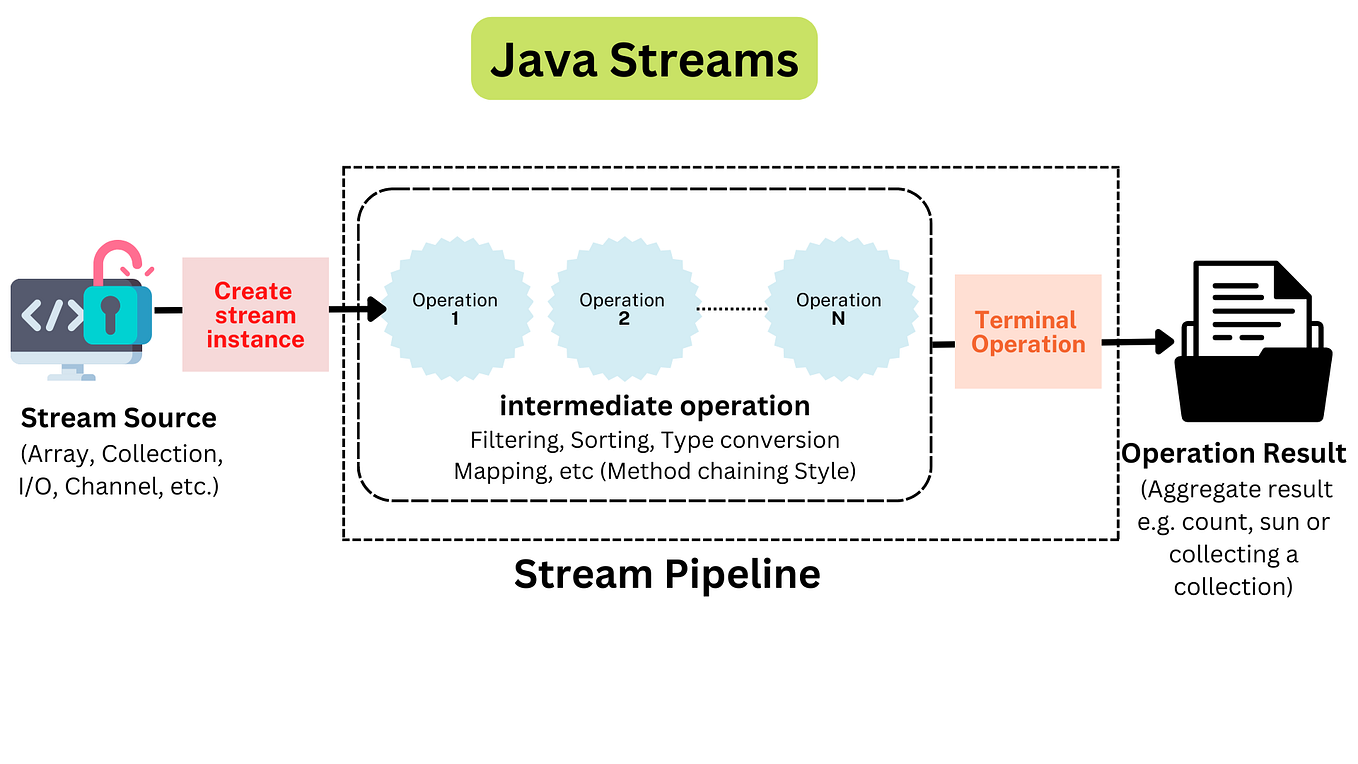
The Streams API revolutionized collection processing by allowing declarative transformations over sequences of elements. Instead of writing nested for loops and managing temporary collections manually, developers can express operations through pipeline stages:
- Source: Collections, arrays, or generator functions that produce data.
- Intermediate Operations: Lazy, transformational steps such as
filter(),map(),flatMap(),distinct(), andsorted(). - Terminal Operations: Eager execution triggers that produce side effects or reduce data, such as
collect(),forEach(),reduce(),count(), andfindFirst().
Android 8.0 native streams support primitive variations (IntStream, LongStream, DoubleStream) to avoid boxing and unboxing overhead when operating on primitive collections.
Functional Interfaces (java.util.function)
To support functional programming patterns and streams, Android 8.0 integrated the standardized target interfaces in java.util.function. Key interfaces include:
Predicate: Accepts a single argument and returns a boolean (T -> boolean).Function: Accepts one argument and produces a result (T -> R).Consumer: Accepts an argument and performs an operation with no return value (T -> void).Supplier: Accepts no arguments and yields a value (() -> T).BiFunction: Accepts two arguments and returns a computed result.
Container Type (java.util.Optional)
Null pointer exceptions historically accounted for a significant percentage of Android application crashes. java.util.Optional introduced a single-value container that explicitizes the presence or absence of a non-null value. Native inclusion in Android 8.0 provided explicit API contracts for returning optional results from database queries or network parsers without relying on @Nullable annotations alone.
Concurrency Enhancements (CompletableFuture)
Android application UI responsiveness relies on keeping the main thread free from blocking execution. Native support for java.util.concurrent.CompletableFuture in API level 26 enabled composable, asynchronous task pipelines. Developers could chain dependent asynchronous stages using methods like thenApply(), thenCompose(), and exceptionally() without nesting callbacks or relying heavily on custom AsyncTask mechanisms.
In addition to CompletableFuture, API level 26 added high-performance atomic counters and locks to java.util.concurrent.atomic and java.util.concurrent.locks, including LongAdder, LongAccumulator, and StampedLock.
Native Support vs. Desugaring: Running Java 8 APIs on Older Devices
Although Android 8.0 (API Level 26) provided native platform support for these APIs, Android's fragmented ecosystem meant that many active devices ran earlier operating system versions (such as Android 6.0 Marshmallow or Android 7.0 Nougat). If an app targeted a minSdkVersion lower than 26, invoking java.time directly on a pre-26 device would cause a runtime crash with a NoClassDefFoundError or NoSuchMethodError.
To bridge this gap without forcing developers to drop support for older Android versions, Google introduced API Desugaring through the D8/R8 compiler toolchain in Android Gradle Plugin (AGP) 4.0.0 and later.
API Desugaring Compilation Process
- Source Code (
java.time/ Streams) - Java Compiler (
javac) Bytecode (.class) - D8/R8 Compiler with Desugaring Enabled
- If device API >= 26: Use native framework
java.*calls - If device API < 26: Rewrite bytecodes to
j$.*companion libs
- If device API >= 26: Use native framework
- DEX File + Bundled Companion Library (
desugar_jdk_libs)
How API Desugaring Works
Desugaring is a compile-time transformation process. When building an application targeting a minSdkVersion lower than 26:
- Bytecode Inspection: The D8/R8 compiler scans compiled Java bytecode for calls to unsupported system APIs (such as
java.time.LocalDate). - Namespace Rewriting: The toolchain replaces references to system
java.*classes with calls to a backported library namespace, typically prefixed withj$.*(e.g.,j$.time.LocalDate). - Library Inlining: The build system automatically bundles a lightweight companion library (
desugar_jdk_libs) into the final APK or Android App Bundle (AAB). - Conditional Delegation: On devices running API level 26 or higher, execution can bypass the companion library and call the native platform implementation directly, preserving system efficiency.
For further details on setting up compiler configurations across Android Studio versions, refer to the Android Developer guide on Java 8 API desugaring.
Technical Comparison: Native Android 8.0 APIs vs. Alternatives
Choosing how to handle Java 8 features across different API levels involves balancing APK size, runtime execution overhead, build speed, and API completeness.
| Implementation Approach | Minimum API Level Required | Modern API Support (java.time, Streams) |
APK Size Overhead | Execution Performance | Setup Complexity |
|---|---|---|---|---|---|
| Native Android 8.0 (API 26+) | API Level 26 | Fully Native | 0 KB | Maximum (Hardware/ART native) | Zero configuration |
| D8/R8 Core Library Desugaring | API Level 21+ (or lower) | High (rewritten via j$.*) |
~200 KB – 500 KB | Fast (Optimized bytecode) | Single Gradle line |
| ThreeTenABP (Legacy Backport) | API Level 14+ | Partial (org.threeten.bp) |
~300 KB | Moderate | Manual library migration |
| Legacy Java Utilities | API Level 1 | None (java.util.Date only) |
0 KB | Slow / Error-prone | High bug risk |
Step-by-Step Configuration for Java 8 APIs and Desugaring
To utilize Java 8 APIs in an Android project—whether targeting Android 8.0 natively or supporting older Android versions through API desugaring—the application's build files must be configured correctly.
1. Configure Java Language Compatibility
In the module-level build.gradle or build.gradle.kts file, specify Java 8 compatibility inside the android compile options block:
Using Groovy (build.gradle):
android { compileSdkVersion 34 defaultConfig { applicationId "com.example.app" minSdkVersion 21 targetSdkVersion 34 multiDexEnabled true } compileOptions { // Enable Java 8 language features and API support sourceCompatibility JavaVersion.VERSION_1_8 targetCompatibility JavaVersion.VERSION_1_8 // Enable API desugaring for devices running below API 26 coreLibraryDesugaringEnabled true } kotlinOptions { jvmTarget = "1.8" } } dependencies { // Include the core library desugaring dependency coreLibraryDesugaring 'com.android.tools:desugar_jdk_libs:2.0.4' }
Using Kotlin DSL (build.gradle.kts):
android { compileSdk = 34 defaultConfig { applicationId = "com.example.app" minSdk = 21 targetSdk = 34 multiDexEnabled = true } compileOptions { sourceCompatibility = JavaVersion.VERSION_1_8 targetCompatibility = JavaVersion.VERSION_1_8 isCoreLibraryDesugaringEnabled = true } kotlinOptions { jvmTarget = "1.8" } } dependencies { coreLibraryDesugaring("com.android.tools:desugar_jdk_libs:2.0.4") }
2. MultiDex Requirements
When enabling core library desugaring on projects supporting API levels below 21, multiDexEnabled true must be enabled. The desugared companion library adds method signatures to the application, which can cause apps targeting older platform versions to exceed the single DEX 64K method limit.
Architectural and Runtime Details in Android 8.0
Android 8.0 (Oreo) introduced structural updates to how the operating system executes code. Reviewing the platform changes helps explain why native API level 26 support performs better than older runtime configurations.
For a full list of system behavior changes introduced in this release, see the Android 8.0 Oreo API level 26 documentation.
| Bytecode Instruction | Functionality in ART (API Level 26) |
|---|---|
| invoke-polymorphic | Executes MethodHandle targets directly in ART |
| invoke-custom | Dynamically resolves call sites (Lambdas/Concat) |
| VarHandle (API 28+) | Atomic memory ordering operations |
Opcode Additions: invoke-polymorphic and invoke-custom
Before Android 8.0, the DEX file format supported four primary invocation opcodes: invoke-virtual, invoke-direct, invoke-static, and invoke-interface.
To support Java 8 features natively, the DEX specification was expanded in API level 26 to include:
invoke-polymorphic: Used specifically to call method handles (java.lang.invoke.MethodHandle). This allows dynamically typed call site invocations directly in ART with near-native call performance.invoke-custom: Allows the DEX runtime to defer call site resolution to a bootstrap method at runtime. This instruction underlies modern lambda compilation strategies and string concatenation optimizations.
Memory and Execution Overhead Comparisons
Using native Java 8 APIs on Android 8.0 reduces allocation pressure on the Garbage Collector (GC):
- Immutable Date-Time Arithmetic: While creating new instances of
LocalDategenerates objects,java.timeavoids the heavy internal synchronization overhead present injava.util.Calendar. - Lambda Memory Footprint: Non-capturing lambdas compiled with
invoke-customor modern D8 desugaring are instantiated as singletons rather than creating new anonymous class instances on every execution, preventing unnecessary heap allocation.
Interoperability: Java 8 APIs and Kotlin
Most modern Android development uses Kotlin. Understanding how Kotlin interacts with native Java 8 APIs in Android 8.0 helps prevent redundant dependencies and performance bottlenecks.
Standard Library Extensions vs. Java 8 APIs
Kotlin provides its own extension functions for collection processing (map, filter, fold) and time handling (kotlinx-datetime). However, underlying type conversions frequently occur at interoperability boundaries:
- Streams vs. Kotlin Sequences:
Kotlin Sequences (
Sequence) offer lazy collection evaluation similar to JavaStream. However, JavaStreamoperations can leverage parallel processing (parallelStream()) on multi-core processors. On Android 8.0 (API 26), Java streams execute natively, but Kotlin sequences remain the standard idiom for non-parallel Kotlin code. - Date-Time Interop:
Kotlin projects targeting API level 26+ can call
java.timetypes directly. When targeting lower API levels with desugaring enabled, Kotlin seamlessly calls rewrittenjava.timetypes without requiring external conversion bridges. - SAM Conversions:
Kotlin automatically converts lambdas to Java 8 functional interfaces (
java.util.function.Function,Predicate, etc.) when calling Java methods expecting those parameters.
Common Pitfalls and Troubleshooting
While Java 8 APIs in Android 8.0 offer significant code quality improvements, developers frequently encounter build errors and runtime issues if configurations are mismatched.
1. NoClassDefFoundError on Pre-API 26 Devices
Symptom: The application runs smoothly on Android 8.0+ test devices but crashes immediately on Android 7.0 (API level 24) devices with:
java.lang.NoClassDefFoundError: Failed resolution of: Ljava/time/LocalDate;
Cause: The application uses java.time APIs directly while minSdkVersion is set below 26, but coreLibraryDesugaringEnabled was omitted or misconfigured in build.gradle.
Solution: Ensure isCoreLibraryDesugaringEnabled = true is declared in compileOptions and the desugar_jdk_libs dependency is included in the build script. Clean and rebuild the project.
2. Reflection Failure on Desugared APIs
Symptom: A JSON serialization library (such as Gson or Jackson) fails to parse objects containing java.time.LocalDate fields on pre-API 26 devices.
Cause: Reflection over desugared packages (j$.time.*) can fail because reflection inspection libraries attempt to locate canonical system java.time.* class definitions.
Solution: Register explicit, custom type adapters or serializers for date-time objects within your JSON parsing engine, or update to modern serialization solutions (such as kotlinx.serialization or Moshi with modern adapters) that handle desugared types explicitly.
3. ProGuard / R8 Overspecification
Symptom: Build failures or missing class errors during release builds when R8 shrinker is active.
Cause: Custom ProGuard rules manually attempting to keep or re-path java.time or j$.* namespaces interfere with R8's automated desugaring rules.
Solution: Remove legacy manual ProGuard rules written for old backports like ThreeTenABP. AGP and R8 automatically inject necessary keep rules for desugar_jdk_libs.
Frequently Asked Questions
What are the main Java 8 APIs available in Android 8.0?
Android 8.0 (API level 26) introduced native platform support for java.time (JSR-310 date and time framework), java.util.stream (Streams API), java.util.function (functional interfaces), java.util.Optional, CompletableFuture, and java.lang.invoke (method handles).
Can Java 8 APIs be used if the app's minSdkVersion is below 26?
Yes. By enabling core library desugaring (isCoreLibraryDesugaringEnabled = true) in Android Gradle Plugin 4.0+, the D8/R8 compiler rewrites calls to Java 8 APIs so they function on older Android versions down to API level 21 or lower.
What is the difference between Java 8 language features and Java 8 APIs?
Java 8 language features (such as lambda syntax, default interface methods, and try-with-resources) are syntactic structures converted into compatible bytecode at compile time. Java 8 APIs (such as java.time.LocalDate or java.util.stream.Stream) are standard library runtime classes provided by the Java Runtime Environment or the underlying Android platform.
Does using desugared Java 8 APIs increase APK size?
Yes, but the increase is minimal. Enabling desugar_jdk_libs adds approximately 200 KB to 500 KB to the final APK size after R8 code shrinking, as only the desugared classes actually referenced by your application are kept in the final DEX binary.
Is ThreeTenABP still required for date and time handling on Android?
No. ThreeTenABP was an effective third-party backport for java.time, but it is deprecated. Modern Android development uses native java.time for apps targeting API level 26+, or AGP core library desugaring when supporting older versions.
Key Takeaways and Recommended Actions
- Target Native Support Where Possible: If your application's
minSdkVersionis 26 or higher, usejava.time,java.util.stream, andjava.util.concurrentnatively without additional build plugins or runtime dependencies. - Enable Desugaring for Legacy Support: If supporting devices below API level 26, enable
isCoreLibraryDesugaringEnabled = truein your Gradle build scripts alongsidecom.android.tools:desugar_jdk_libs. - Deprecate Legacy Date Libraries: Migrate existing code bases off
java.util.Date,java.util.Calendar,SimpleDateFormat, andThreeTenABPin favor ofjava.time. - Use Explicit Adapters for Serialization: When using reflection-based JSON parsers on desugared builds, configure custom adapters for date and time fields to ensure cross-API compatibility.