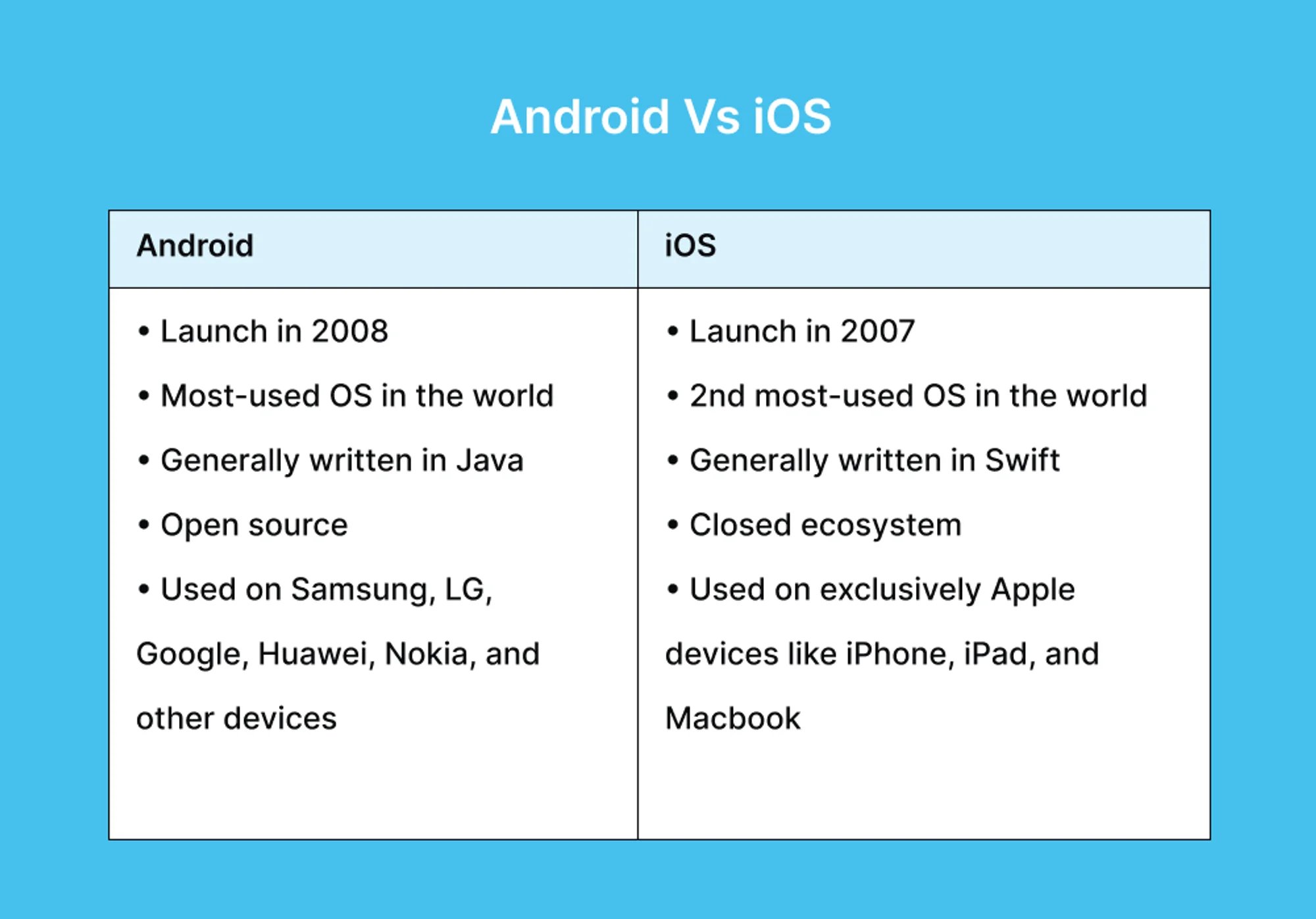
Apple devices do not use Android; they run on iOS, a proprietary mobile operating system developed exclusively by Apple for the iPhone. Android is an entirely different operating system developed by Google, utilized by a wide variety of hardware manufacturers. These two platforms represent the primary software ecosystems for modern smartphones, each built on distinct foundations with different approaches to user experience, hardware integration, and software management.
The Distinction Between Hardware and Software
To understand why this confusion occurs, it is essential to distinguish between the physical device (hardware) and the operating system (software). The confusion often stems from the fact that "Apple" refers to the manufacturer of the hardware, while "iOS" refers to the software platform that makes the device function.
Apple designs its own hardware—the iPhone—and develops its own software—iOS—to run specifically on that hardware. This is known as a "closed ecosystem." Because Apple controls both the design of the silicon (the A-series chips) and the code of the operating system, the hardware and software are tightly optimized to work together.
Android, conversely, is an open-source operating system maintained by Google. It is licensed to various hardware manufacturers, including Samsung, Google (for the Pixel line), Motorola, and others. If you see a phone that is not an iPhone, it is almost certainly running Android. Because Android must support thousands of different hardware configurations, it operates with a different philosophy than iOS.
What is iOS?
iOS is the mobile operating system that powers the iPhone. It is derived from macOS, the operating system used on Apple’s computers. Since its initial release in 2007, iOS has focused on a highly curated, user-friendly interface.
The core philosophy of iOS is consistency and security. Because Apple maintains strict control over the platform, the user experience is largely uniform across all iPhone models. Developers who create applications for iOS must adhere to Apple’s stringent guidelines, which ensures that apps are generally well-optimized for the hardware. When you update your iPhone in 2026, you are updating iOS, which dictates how your apps function, how your data is synced via iCloud, and how your hardware features—such as the camera or biometric sensors—interact with the system.
What is Android?
Android is a mobile operating system based on the Linux kernel. Unlike iOS, Android is designed to be highly customizable and is used across a vast spectrum of devices, from budget smartphones to premium folding tablets.
The primary advantage of Android is its flexibility. Manufacturers can take the base Android code and customize it with their own "skins" or user interfaces, such as Samsung’s One UI. This allows for features that may not exist on an iPhone, such as advanced multitasking, deeper file system access, and more aggressive hardware customization. For many users, the choice between Android and iOS comes down to whether they prefer the "walled garden" reliability of Apple or the open, customizable nature of the Android ecosystem.
Key Differences Between the Ecosystems
| Feature | Apple iOS | Android |
|---|---|---|
| Developer | Apple | |
| Hardware Exclusivity | Only on Apple devices | Used by many manufacturers |
| Customization | Controlled, standardized | High level of user/OEM control |
| App Source | App Store (Exclusive) | Google Play & third-party stores |
| System Updates | Uniform and immediate | Varies by manufacturer |
Why the Misconception Persists
The question of whether Apple is Android or iOS often arises because consumers equate "smartphones" with "apps." Since most modern apps exist on both platforms, the user experience of browsing, social media, and messaging often feels identical.
Additionally, market shifts have led to the blurring of lines in terms of features. Historically, features like home screen widgets, file management, and third-party keyboard support were exclusive to Android. Over the years, Apple has integrated many of these concepts into iOS. As iOS has adopted more "power user" features, the gap in functionality between the two has narrowed, making it easier for casual observers to conflate the two systems. However, under the hood, the architecture remains fundamentally incompatible. You cannot install an Android app on an iPhone, nor can you install iOS on a non-Apple phone.
Prerequisites for Choosing Your Platform
If you are currently deciding between an iPhone (iOS) and an Android device, your choice should be based on your specific requirements rather than the naming of the operating system.
- Device Integration: If you already own other Apple products, such as a Mac, iPad, or Apple Watch, iOS provides a seamless experience through features like Handoff, AirDrop, and universal clipboard.
- Budget Flexibility: Android offers a wider range of price points. If you require a high-end device with specific hardware capabilities, or a very budget-friendly device, Android caters to a broader market segment.
- Security Preferences: If you prefer a platform where the software and hardware are locked down by a single entity to ensure privacy and security, iOS is typically favored. If you prefer to have granular control over your software and background processes, Android provides that autonomy.
- Software Availability: While most major apps are available on both, specific professional workflows—such as video editing or music production—may have different strengths on each platform.
Troubleshooting Common Platform Confusion
Many users find themselves asking this question when they encounter issues with app compatibility. If you are trying to download an app and find that it is not available, it is often because you are looking at the wrong store.
- iPhone/iPad Users: Always use the Apple App Store. If an app is described as an "Android App," it will not work on your device.
- Android Users: Use the Google Play Store. Do not attempt to download files labeled as
.ipaor "iOS-specific" installers, as these are incompatible with your operating system.
If you are switching from one to the other, understand that you cannot simply transfer your operating system. You must migrate your data—such as contacts, photos, and messages—through dedicated migration tools provided by both Apple and Google, such as the "Move to iOS" app or similar cloud-based synchronization services.
Frequently Asked Questions
Can I put Android on my iPhone? No. iOS and Android are built on different codebases and are optimized for specific hardware architectures. Attempting to force an alternative operating system onto an iPhone would likely brick the device, as it is locked to Apple’s software through cryptographic signatures.
Are there any phones made by Apple that run Android? No. Apple has never released a smartphone that runs Android. All Apple mobile hardware is exclusively designed to run iOS.
Do all apps work on both iOS and Android? Most mainstream applications (such as WhatsApp, Spotify, and Instagram) have versions for both. However, some niche or utility applications are developed exclusively for one platform, and performance can vary based on how well the developer optimized the app for the specific hardware constraints of each system.
Is one system objectively better than the other? "Better" is subjective. iOS is often praised for its simplicity, longevity of software updates, and high resale value. Android is often praised for its diversity of hardware options, file system transparency, and integration with Google services. The "best" system is the one that fits your personal workflow and hardware preferences.
How often does Apple update iOS? Apple typically releases major updates to iOS once every year, usually in the autumn, with smaller security and feature updates released periodically throughout the year. These updates are pushed to all compatible iPhones simultaneously, ensuring that the majority of the user base is on the most current version.
Final Recommendation
If you are looking to purchase a new device, identify your priorities first. If you value a unified ecosystem where your phone, tablet, and computer communicate effortlessly, stick with Apple’s iOS. If you prefer hardware variety, the ability to customize your interface, and a wider range of price options, explore the Android marketplace. Remember that once you commit to a platform, migrating your ecosystem of purchased apps and specific cloud data can be a significant undertaking, so consider your long-term preferences before making your final selection.