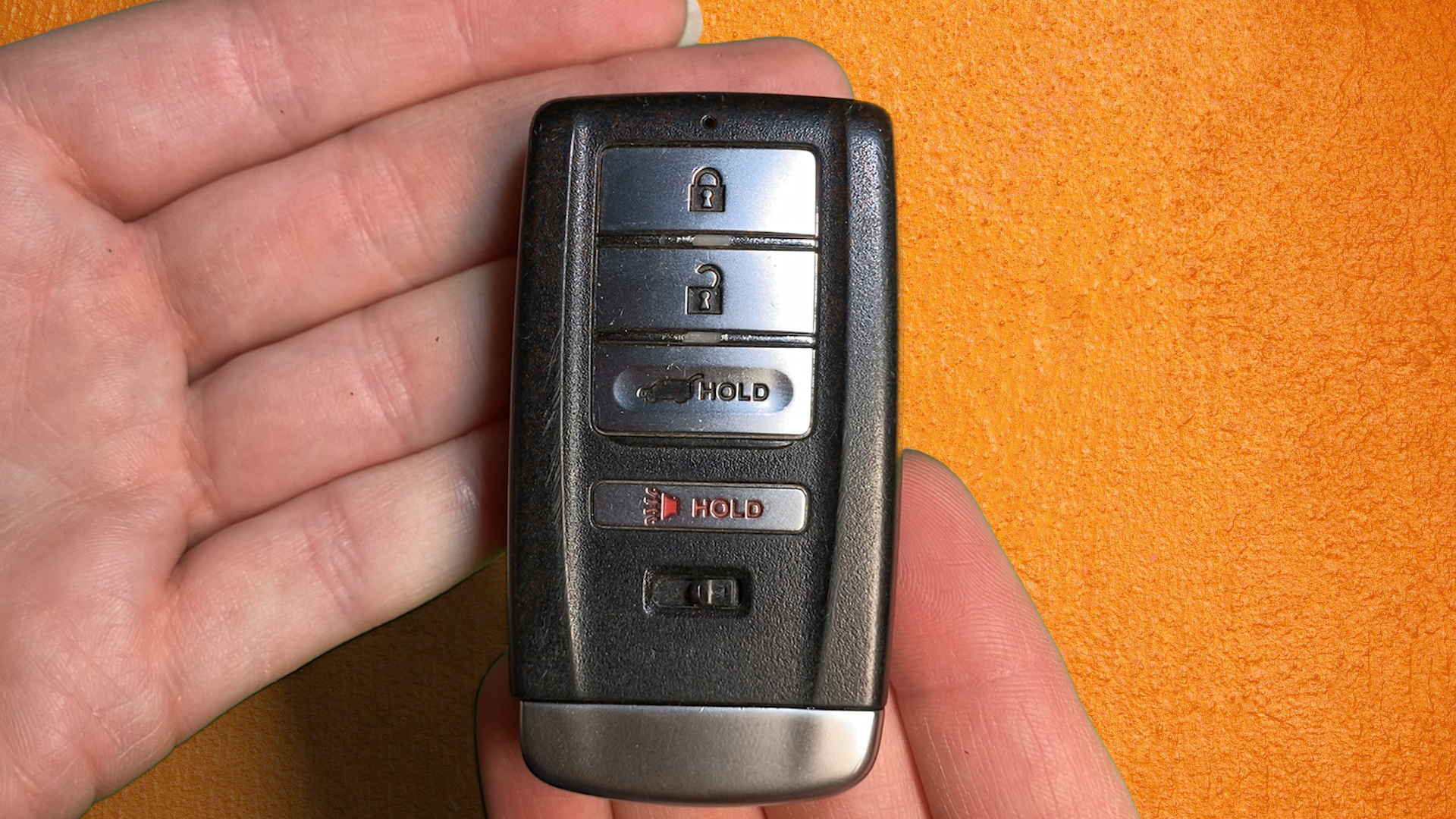
Replacing the key fob battery in a 2014 Acura MDX requires a single CR2032 3-volt lithium coin cell, a small flathead screwdriver, and five minutes of your time. Slide the mechanical release on the back of the fob to pull out the emergency key, insert a cloth-wrapped screwdriver into the notch, twist to open the casing, swap the battery positive-side (+) up, and snap the halves back together.
Understanding the 2014 Acura MDX Smart Key System
The 2014 Acura MDX marked the launch of the luxury crossover's third generation. With this redesign came an updated Keyless Access System featuring push-button ignition, proximity unlock functionality, power tailgate operation, and automatic memory profile recognition for Driver 1 and Driver 2.
Because the key fob continuously broadcasts radio frequency (RF) signals to communicate with the vehicle’s receiver network, its internal battery experiences a constant, low-level drain—even when sitting on your kitchen counter. On average, a standard key fob battery lasts between two and four years, depending on daily usage patterns, environmental temperature fluctuations, and proximity to signal-disrupting electronic equipment.
- 2014 Acura MDX Smart Key Architecture
- Active RF Transmitter / Keyless Access Receiver Module
- Passive Entry (Door Handle Touch Sensors)
- Push-Button Engine Start (Immobilizer Verification)
- Driver 1 / Driver 2 Memory Seat & Climate Profile Activation
- Remote Power Tailgate & Panic Alarm
- Active RF Transmitter / Keyless Access Receiver Module
Key Signs Your Battery Is Failing
Before your key fob stops working entirely, your 2014 Acura MDX will provide clear warnings indicating that power levels are dropping:
- Dashboard Warning Message: The Multi-Information Display (MID) located on the instrument panel will display a KEY BATT (Key Battery) warning icon or a pop-up text alert reading KEY FOB BATTERY LOW.
- Reduced Operating Range: You must stand significantly closer to the vehicle for the remote lock, unlock, or tailgate control buttons to register.
- Intermittent Touch Response: The Smart Entry door handle sensors require multiple physical touches or close proximity before unlocking the doors.
- Red LED Indicator Dimming: The small red light emitting diode (LED) indicator located at the top edge of the key fob flashes faintly or fails to illuminate when buttons are pressed.
Addressing these warnings promptly prevents the inconvenience of getting locked out or relying on emergency mechanical entry procedures.
Required Battery Specifications and Tools
Performing a key fob battery replacement yourself requires no specialized mechanical skills or dealer programming equipment. However, using the correct tools and battery chemistry is critical to avoid damaging the internal circuit board or plastic housing.
Battery Specifications
- Battery Size: CR2032
- Voltage: 3 Volts (DC)
- Chemistry: Lithium Coin Cell
- Recommended Brands: Panasonic, Sony/Murata, Energizer, Duracell, Maxell
While similar coin cells like the CR2025 or CR2016 share the same 20mm diameter, they differ in thickness (2.5mm and 1.6mm respectively). Using an incorrect thickness will cause improper electrical contact with the internal prongs, leading to intermittent signal loss or failure to power the transmitter. Always select a fresh CR2032 cell from a reputable manufacturer.
Recommended Tools and Supplies
| Tool / Item | Purpose | Recommended Type / Notes |
|---|---|---|
| CR2032 Battery | Replacement power source | Standard 3V lithium coin cell (verify fresh expiration date) |
| Small Flathead Screwdriver | Separating outer fob casing | Precision screwdriver (2.0mm to 3.0mm tip) |
| Painter's Tape or Microfiber Cloth | Scratch prevention | Wrap around the screwdriver tip to protect plastic edges |
| Non-Conductive Pry Tool (Optional) | Battery extraction | Plastic spudger or wooden toothpick to lift the cell |
| Digital Multimeter (Optional) | Testing battery voltage | Verifies if fresh cell outputs ~3.2V to 3.3V |
Step-by-Step Replacement Guide
Follow this standard procedure to replace the CR2032 battery in a 2014 Acura MDX key fob safely without scratching the decorative plastic housing or damaging internal electronics.
Replacement Steps at a Glance
- Step 1: Release Metal Emergency Key
- Step 2: Insert Screwdriver into Internal Key Slot Notch
- Step 3: Twist Tool Gently to Separate Casing Halves
- Step 4: Remove Old CR2032 Cell & Insert New Battery (+ Side Facing UP)
- Step 5: Snap Shell Halves Together & Reinsert Mechanical Key
Step 1: Remove the Emergency Mechanical Key
- Turn the key fob over so the back side (featuring the Acura logo and slide release lever) faces upward.
- Locate the small release latch at the bottom edge or lower back section of the key fob.
- Slide and hold the release latch in the direction of its arrow using your thumb.
- Pull the top key ring loop outward to slide the metal emergency mechanical key completely out of the fob body.
- Set the mechanical key aside.
Step 2: Open the Key Fob Casing
- Inspect the open slot where the metal emergency key was previously seated.
- Locate the small rectangular notch positioned along the interior seam line separating the front and rear halves of the fob shell.
- Wrap the flat tip of your precision screwdriver in a thin layer of painter’s tape or a microfiber cloth to protect the plastic finish from gouges.
- Insert the wrapped tip of the flathead screwdriver directly into the notch.
- Twist the screwdriver handle gently (like turning a key). Avoid prying or levering up and down, as this can snap the plastic retaining tabs.
- As the two halves unlatch, move around the perimeter of the casing with your fingers to separate the front cover from the back housing completely.
Step 3: Extract the Depleted CR2032 Battery
- Lay the opened fob flat on a clean surface with the exposed circuit board and battery compartment facing up.
- Take note of the battery orientation: the positive terminal (+) marked with a plus sign and text should be facing UP toward you.
- Gently pry the old battery out of its retaining recess using your fingernail, a wooden toothpick, or a plastic spudger.
- Caution: Avoid using uninsulated metal tools across both sides of the battery simultaneously, as short-circuiting the cell can cause rapid discharge or damage tiny circuit components.
Step 4: Install the New CR2032 Battery
- Remove the fresh CR2032 battery from its blister packaging. Handle the battery by its outer edges rather than flat top and bottom surfaces to avoid transferring skin oils that can increase electrical contact resistance.
- Wipe the battery surfaces with a clean, dry cloth if any residue is present.
- Insert the new battery into the housing slot at an angle, sliding one edge beneath the plastic retaining tabs.
- Press down firmly until the battery sits flat inside the recess with the positive (+) side facing UP.
- Ensure the gold metal contact tabs inside the casing press firmly against the sides and bottom of the battery.
Step 5: Reassemble the Key Fob
- Align the front faceplate and back housing of the key fob, ensuring the soft rubber button membrane is properly seated inside the front half.
- Press the two halves together starting at the top edge, working your way down around the sides.
- Apply firm pressure along the perimeter until you hear and feel distinct snapping sounds along all sides.
- Reinsert the emergency metal key into its slot until the mechanical release latch clicks securely into place.
Quick Reference & Technical Comparison Table
| Feature / Detail | Specification / Detail |
|---|---|
| Vehicle Compatibility | 2014 Acura MDX (All Trims: Base, Technology, SH-AWD, Advance) |
| Key Fob Battery Type | CR2032 (3V Lithium Coin Cell) |
| Estimated Battery Life | 2 to 4 Years (depending on usage and signal exposure) |
| Required Tools | Precision flathead screwdriver, protective cloth/tape |
| Reprogramming Needed? | No (Key memory settings remain stored in vehicle module) |
| Emergency Start Feature | Supported via direct fob-to-button contact |
| Dashboard Low Warning | MID displays "KEY BATT" or "KEY FOB BATTERY LOW" |
| Estimated DIY Cost | $2.00 – $6.00 (Cost of coin cell battery) |
| Dealer Replacement Cost | $15.00 – $35.00 (Parts and service labor) |
How to Start Your 2014 Acura MDX with a Dead Key Fob Battery
If your key fob battery dies completely before you can replace it, you can still unlock, enter, and start your 2014 Acura MDX using built-in backup systems designed by Acura engineers.
Emergency Keyless Engine Start Steps
- Unlock Driver Door: Use physical metal key in door cylinder
- Enter Vehicle: System alarm may chirp briefly
- Touch Key Fob: Hold Acura emblem directly against START button
- Start Engine: Depress brake pedal and press ENGINE START/STOP
Unlocking the Vehicle
- Remove the mechanical key from the back of your key fob as described in Step 1 of the replacement guide.
- Insert the metal blade into the mechanical key hole hidden on the driver-side exterior door handle.
- Turn the key clockwise to unlock the driver's door manually.
Starting the Engine (Passive RFID Bypass)
The 2014 Acura MDX key fob contains an unpowered passive Radio Frequency Identification (RFID) chip that functions even when the CR2032 battery is dead.
- Get into the driver's seat and shut the doors.
- Depress the brake pedal firmly with your foot.
- Touch the back side of the key fob (the side displaying the Acura logo) directly against the ENGINE START/STOP button on the dashboard.
- You will hear a series of beeps, and the Start button light will turn green or flash to indicate that the vehicle's immobilizer system has recognized the internal transponder chip.
- While holding the fob against the button, press the ENGINE START/STOP button firmly to start the engine normally.
Troubleshooting Common Post-Replacement Issues
If your key fob fails to operate after installing a new battery, perform these systematic troubleshooting checks to resolve the issue:
1. The Fob Signal LED Does Not Light Up
- Incorrect Polarity: Reopen the key fob casing and ensure the CR2032 battery is installed with the positive (+) side facing up. Installing the battery upside down prevents contact with the circuit board terminals.
- Dead "New" Battery: New batteries stored improperly or past their shelf expiration date can fall below the minimum operating voltage threshold (~2.8V). Test the battery with a digital multimeter to confirm voltage measures between 3.0V and 3.3V DC.
- Protective Film Remaining: Many coin cell manufacturers apply a clear protective plastic sticker or bitterant coating over the negative terminal to prevent accidental discharge or ingestion by children. Peel off all protective tape before installation.
2. Button Range Is Weak or Signal Is Intermittent
- Dirty Contact Tabs: Inspect the internal gold-plated or silver metal spring tabs inside the fob battery tray. If finger oils or corrosion are present, clean them gently using a cotton swab lightly dampened with high-percentage isopropyl alcohol (91% or higher).
- Bent Contact Tabs: If the metal tabs were pressed down forcefully during battery removal, they may not apply adequate tension against the battery surface. Use a plastic toothpick or small jewelers screwdriver to bend the tabs up slightly to restore spring tension.
3. Dashboard "KEY BATT" Warning Message Persists
- Vehicle System Reset Time: In many 2014 Acura MDX vehicles, the instrument cluster clearing routine requires a few ignition cycles before removing the low battery alert. Drive the vehicle through two or three complete engine start-stop cycles to allow the control module to refresh its status.
- Second Fob Detection: If both Driver 1 and Driver 2 key fobs are inside or near the car, and the second key fob has a low battery, the dashboard warning will continue to trigger until both fobs receive fresh CR2032 batteries.
4. Key Fob Fails to Signal the Car Entirely
- Desynchronization (Rare): If the battery was removed for an extended period while buttons were continuously depressed, the rolling security code cycle between the fob and the car may become temporarily desynchronized. Stand next to your MDX, press the unlock button repeatedly 5 to 10 times, or start the car using the emergency contact procedure to re-establish synchronization.
Best Practices for Maximizing Key Fob Battery Life
Taking a few precautionary steps can double the operational life of your key fob batteries:
- Maintain Distance from Household Electronics: Avoid storing your key fobs near smart TVs, laptops, Wi-Fi routers, or wireless chargers when at home. Strong electro-magnetic fields trigger the key fob's active listening state, accelerating battery consumption.
- Store Fobs in Signal-Blocking Pouches (Optional): Using a metallic Faraday pouch or shielded key box blocks continuous radio polling when parked in residential garages close to indoor living spaces.
- Replace Both Fobs Simultaneously: Most vehicle owners leave their secondary key fob in a drawer or spare hook. Because the spare fob continually broadcasts passive signals, its battery drains at a similar rate. Replace CR2032 batteries in both primary and secondary fobs at the same time to ensure reliability.
- Avoid Extreme Temperature Exposures: Sub-zero winter temperatures and extreme cabin heat during summer temporarily lower lithium battery voltage output. Avoid leaving keys inside hot vehicles or unheated garages during extreme weather events.
Frequently Asked Questions
What size battery does a 2014 Acura MDX key fob use?
The 2014 Acura MDX smart key fob uses a single CR2032 3V lithium coin cell battery. This coin cell standard is widely available at supermarkets, auto parts stores, and electronic retailers.
Do I need to reprogram my 2014 Acura MDX key fob after replacing the battery?
No, replacing the key fob battery does not erase key programming or immobilizer coding. The key fob retains its paired security codes and memory settings (Driver 1 / Driver 2) in non-volatile memory even when power is completely removed.
Can I use a CR2025 battery instead of a CR2032 in my Acura key fob?
While a CR2025 has the same 3V voltage rating and 20mm diameter, it is 2.5mm thick compared to the 3.2mm thickness of a CR2032. Using a CR2025 can result in loose contact with internal electrical prongs, causing intermittent remote failure. It is recommended to use only standard CR2032 batteries.
How do I clear the "KEY BATT" warning light on my Acura MDX dash?
The "KEY BATT" warning light clears automatically once the vehicle detects a strong signal from a key fob containing a fresh battery. Cycle the ignition system on and off twice, or drive the vehicle briefly. If the message persists, check if your secondary key fob inside the vehicle also has a low battery.
Why is my key fob light blinking red after replacing the battery?
A quick red LED flash when pressing a button indicates that the key fob is transmitting an RF signal normally. However, continuous rapid flashing without pressing any buttons may indicate a stuck button or a short circuit caused by misaligned internal rubber membrane pads.
Recommended Next Steps
Keep a spare, fresh CR2032 lithium coin cell battery inside your vehicle’s glove box or center console alongside a small wrapped precision screwdriver. Having these supplies on hand ensures that you can execute a quick 5-minute swap anywhere, keeping your 2014 Acura MDX Keyless Access System running smoothly without unexpected lockouts or service visits.