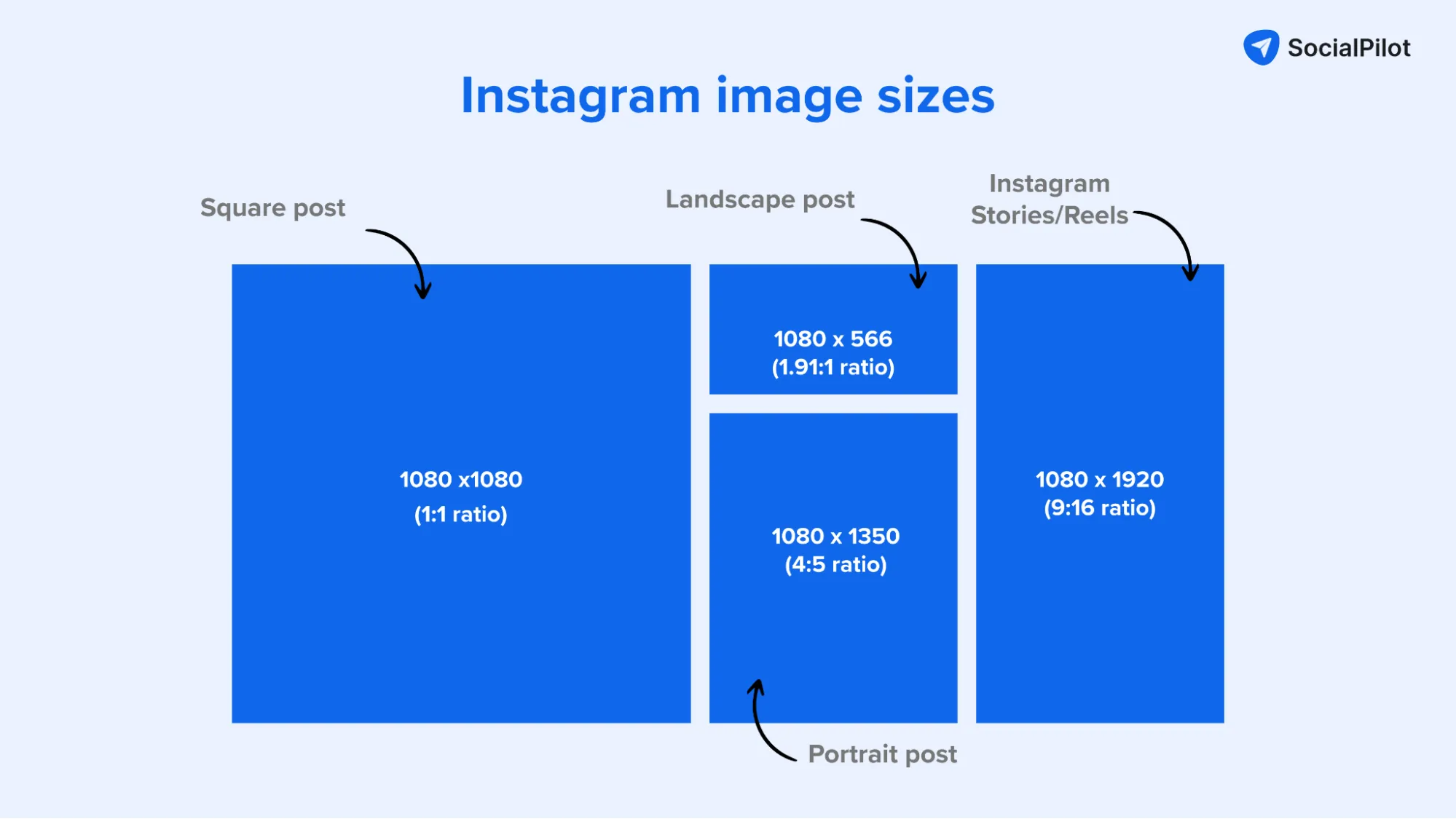
The ideal aspect ratio for an Instagram post depends on its format: 4:5 (1080 x 1350 px) is recommended for standard portrait feed posts to maximize screen real estate, while 1:1 (1080 x 1080 px) remains the standard for square posts. For Reels and Stories, a 9:16 ratio (1080 x 1920 px) is required for full-screen immersion.
As of 2026, Instagram’s interface remains heavily optimized for mobile-first consumption. While the platform has experimented with various display algorithms, the core physics of the smartphone screen dictate how users interact with content. Understanding aspect ratios—the proportional relationship between the width and height of an image or video—is no longer just a technical requirement for photographers; it is a fundamental pillar of social media strategy. When you select the correct ratio, you ensure your content is not subject to awkward auto-cropping or loss of resolution, both of which can significantly diminish engagement metrics.
Understanding Aspect Ratio vs. Resolution
Before diving into specific Instagram dimensions, it is critical to distinguish between aspect ratio and resolution. These two terms are often used interchangeably but serve different purposes in the digital ecosystem.
Aspect ratio refers to the shape of the content. A 1:1 ratio means the width and height are equal, forming a perfect square. A 16:9 ratio means the width is significantly larger than the height, creating a wide rectangle typical of television screens. This ratio is expressed as a simplified fraction ($x:y$).
Resolution, on the other hand, refers to the total number of pixels that make up the image. For example, while a 1:1 ratio defines a square, the resolution could be 1080 x 1080 pixels or 2000 x 2000 pixels. On Instagram, resolution is capped to maintain platform speed and reduce data consumption. Even if you upload a 50-megapixel photo, Instagram’s internal processing engine will downscale it to a maximum width of 1080 pixels.
By mastering the relationship between these two, you prevent the platform from making arbitrary decisions about which parts of your image to cut or how much compression to apply.
Standard Feed Posts: The Three Primary Ratios
The Instagram feed remains the primary hub for evergreen content. Although Reels have taken center stage in the discovery algorithm, feed posts (photos and carousels) provide the aesthetic backbone of a profile. There are three supported aspect ratios for feed content.
1. The Portrait Ratio (4:5)
The 4:5 aspect ratio is widely considered the gold standard for Instagram feed posts in 2026. With a recommended resolution of 1080 x 1350 pixels, this format occupies the maximum amount of vertical space allowed in the home feed.
- Why it works: Because users scroll vertically, a taller image stays on the screen longer than a square or horizontal one. This "screen real estate" is valuable because it forces the user to scroll more to get past your content, increasing the likelihood of a "stop" and an interaction.
- Best use cases: Fashion photography, portraiture, infographics, and detailed product shots.
- Strategic Tip: When using 4:5, remember that your image will still be cropped to a 1:1 square in your profile grid. Ensure that the most important elements of the image (like a subject’s face) are centered vertically so they aren't cut off when someone views your main profile page.
2. The Square Ratio (1:1)
The square format is the legacy of Instagram's original design. In 2026, it remains the most stable and predictable format, with a standard resolution of 1080 x 1080 pixels.
- Why it works: It offers perfect symmetry and aligns exactly with the profile grid view. There are no surprises regarding how the content will look on the home feed versus the grid.
- Best use cases: Minimalist photography, centered compositions, and quotes.
- Strategic Tip: While 1:1 is safe, it provides approximately 20% less vertical coverage than a 4:5 post. Use this only when the composition demands a square frame or when you want a perfectly consistent look across your profile grid.
3. The Landscape/Horizontal Ratio (1.91:1)
Landscape posts are the least common on Instagram, supporting a maximum ratio of 1.91:1, usually rendered at 1080 x 566 pixels.
- Why it works: It captures wide vistas and cinematic shots that simply cannot fit into a square or vertical frame without losing their context.
- Best use cases: Landscape photography, group photos with many people, and architectural wide shots.
- Strategic Tip: Avoid using 16:9 (the standard video ratio) for feed photos if possible, as Instagram will often add white borders or crop it to 1.91:1. Because landscape posts occupy very little vertical space, they are often overlooked by fast-scrolling users. Use them sparingly.
Full-Screen Content: Reels and Stories (9:16)
Instagram Stories and Reels utilize a 9:16 aspect ratio, with a recommended resolution of 1080 x 1920 pixels. This is the inverse of the traditional 16:9 widescreen format, designed specifically for the way people hold their phones.
The "Safe Zone" Requirement
While the aspect ratio is 9:16, content creators must account for the user interface (UI) elements that Instagram overlays on top of the video. These include your profile picture and username at the bottom, the "Like" and "Comment" icons on the right, and the status bar at the top.
The Safe Zone is generally considered to be the central 1080 x 1420 pixel area. If you place text or crucial visual information in the top 250 pixels or the bottom 250 pixels, it will likely be obscured by the Instagram UI. In 2026, the algorithm may actually de-prioritize Reels where text is covered by UI elements, as it creates a poor user experience.
Reels in the Main Feed
When a Reel appears in the main feed (not the dedicated Reels tab), Instagram crops it to a 4:5 ratio. This is a critical technical detail. If your Reel relies on text at the very top or bottom of the 9:16 frame, that text will vanish when viewed from the home feed. Always preview your Reels in the "Feed View" to ensure your primary message remains visible during the crop.
Technical Specifications for Instagram Content (2026)
| Format | Aspect Ratio | Resolution (px) | Primary Purpose |
|---|---|---|---|
| Portrait Feed | 4:5 | 1080 x 1350 | General content, maximized engagement |
| Square Feed | 1:1 | 1080 x 1080 | Grid consistency, simple graphics |
| Landscape Feed | 1.91:1 | 1080 x 566 | Wide-angle photography, group shots |
| Stories | 9:16 | 1080 x 1920 | Real-time updates, vertical video |
| Reels | 9:16 | 1080 x 1920 | Short-form video, discovery |
| Profile Photo | 1:1 | 320 x 320 | Brand identity (circular crop) |
The Impact of the Profile Grid Crop
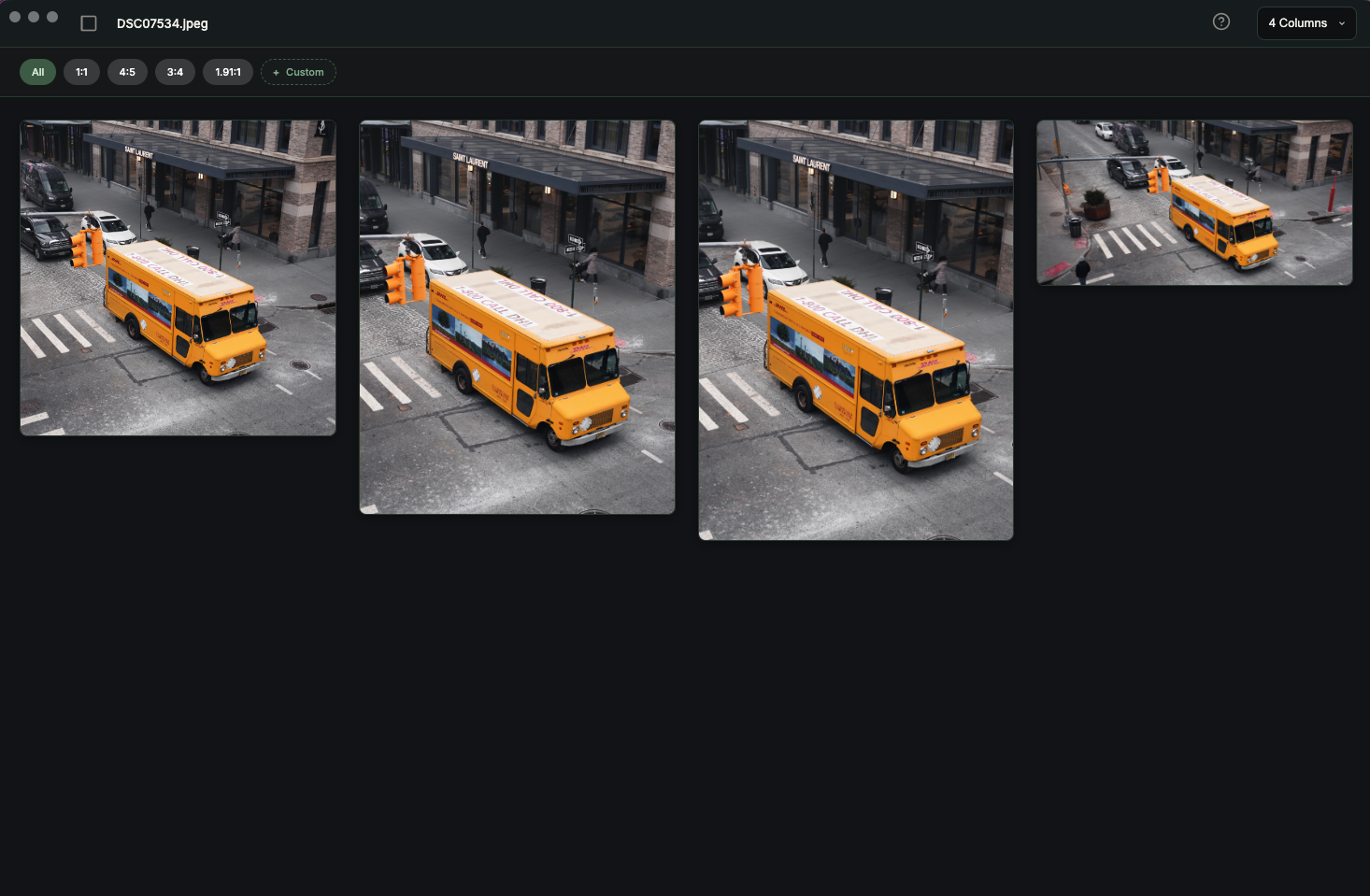
A common mistake for new creators is failing to account for the Grid Preview. Regardless of whether you upload a 4:5 portrait or a 1.91:1 landscape, the thumbnail on your profile page will always be a 1:1 square.
To maintain a professional aesthetic, you must ensure your subject is centered. If you are uploading a 4:5 portrait of a person, and their head is in the top 10% of the frame, the profile grid will likely crop their head off. Most modern editing tools, including Adobe Lightroom and Canva, offer a "Grid Overlay" or "Instagram Safe Zone" feature to help you visualize this crop before you export your file.
Why Technical Precision Matters
You may wonder why Instagram doesn't just allow any ratio. The platform prioritizes a unified user experience. By enforcing specific aspect ratios, Instagram ensures that the scrolling experience remains fluid.
If you upload an image with an unsupported aspect ratio, one of two things happens:
- Auto-Cropping: Instagram will automatically cut the edges of your photo to make it fit a 4:5 or 1:1 frame. This often ruins the composition.
- Compression Artifacting: When Instagram has to force a resize, it uses its own compression algorithms, which are optimized for speed, not quality. This results in "blocking" or "noise," making high-quality photography look amateurish.
By resizing and cropping your content in a dedicated editor before uploading, you retain control over the sharpening, color grading, and framing.
Strategic Recommendation: The "Vertical-First" Approach
As we move through 2026, the dominance of vertical consumption is absolute. My primary recommendation for any brand or creator is to adopt a Vertical-First content strategy.
- Shoot in 4:5 or 9:16: If you are using a professional camera, stop shooting exclusively in horizontal 3:2. Many modern mirrorless cameras allow you to overlay 4:5 guides on the viewfinder. Use them.
- Optimize for the Feed: Use 4:5 for every single feed post unless there is a structural reason not to. The extra 270 pixels of height compared to a square post are too valuable to ignore.
- Respect the Safe Zones: Use templates for your Reels and Stories to ensure your captions and CTA (Call to Action) buttons are never buried under the UI.
Frequently Asked Questions
Why does Instagram crop my 16:9 video in the feed?
Instagram's feed does not natively support the 16:9 widescreen ratio used by YouTube or traditional cinema. If you upload a 16:9 video, the platform will either add a blurred background/border or crop it to 1.91:1. To avoid this, it is best to re-edit your video into a 4:5 or 1:1 format for the feed, or 9:16 for Reels.
What is the maximum file size for an Instagram post in 2026?
While Instagram does not explicitly state a file size limit for photos, they are heavily compressed upon upload. For videos (Reels), the limit is generally 4GB, though it is highly recommended to keep files under 500MB to ensure smooth playback for users on slower mobile networks. Use H.264 or H.265 (HEVC) codecs for the best balance of quality and file size.
Does the aspect ratio affect the Instagram algorithm?
Indirectly, yes. The algorithm prioritizes content that generates "watch time" and "engagement." Because 4:5 and 9:16 ratios take up more of the screen, they naturally capture more attention and lead to higher interaction rates. Content that is correctly formatted is also seen as higher quality, which can lead to better placement in the "Explore" tab.
Can I change the aspect ratio after I have posted?
No. Once a post is live, the aspect ratio and resolution are permanent. You can edit the caption, location tag, and alt text, but you cannot swap the media file. If you realize you have made a cropping error, your only option is to delete the post and re-upload the corrected version.
What color space should I use for Instagram posts?
You should always use sRGB. While many modern cameras and monitors can display wider gamuts like Adobe RGB or ProPhoto RGB, most mobile screens and web browsers are tuned to sRGB. Uploading in a wider gamut often results in colors looking "washed out" or overly saturated once Instagram's processing is applied.
Practical Next Steps
To ensure your Instagram presence looks professional in 2026, start by updating your export presets in your favorite editing software. Set your "Portrait" export to 1080 x 1350 px at 72 or 96 DPI, and your "Video" export for Reels to 1080 x 1920 px with a bitrate between 10-15 Mbps. By standardizing your workflow to these specific aspect ratios, you eliminate technical guesswork and allow your creative vision to take center stage without platform interference.