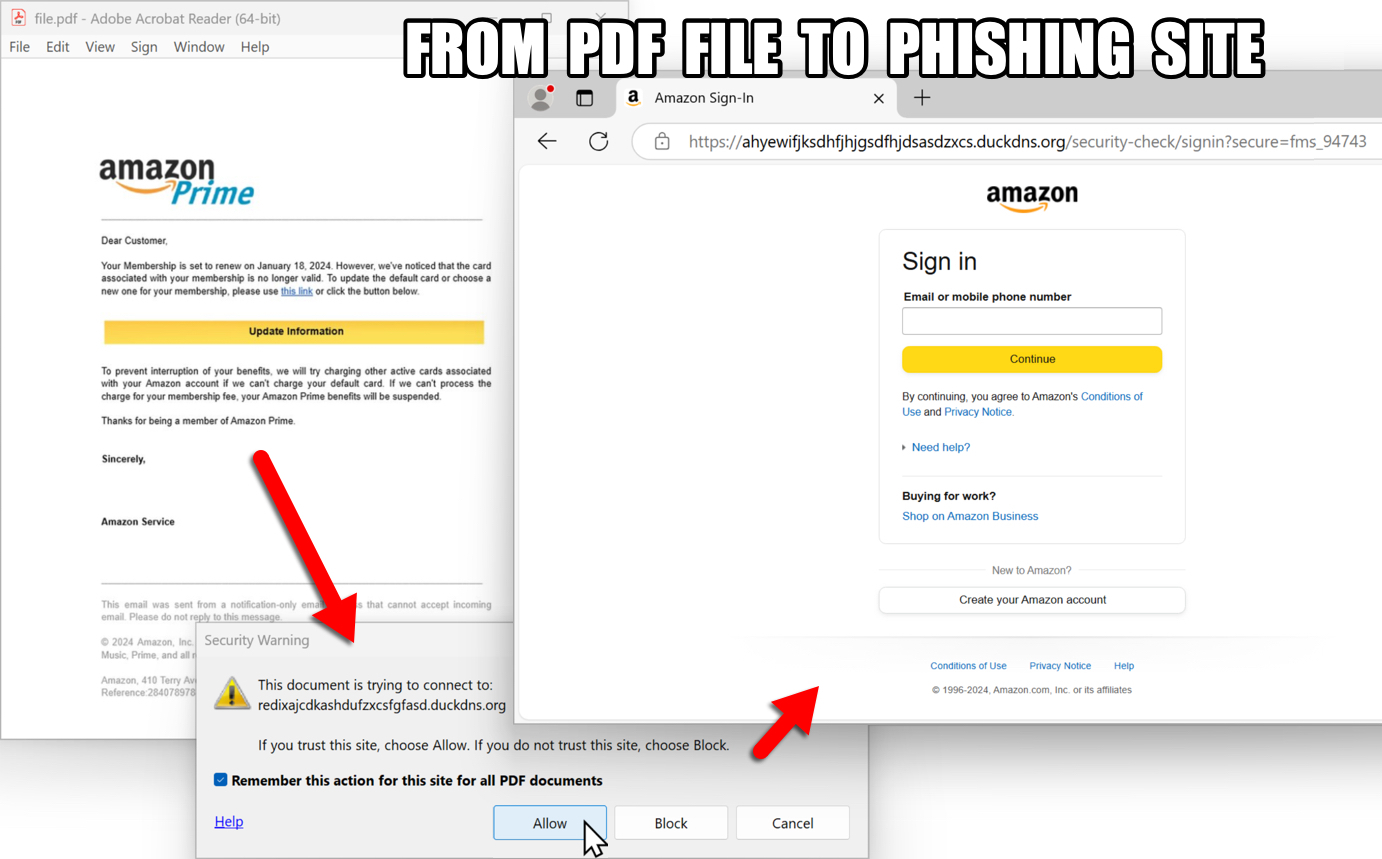
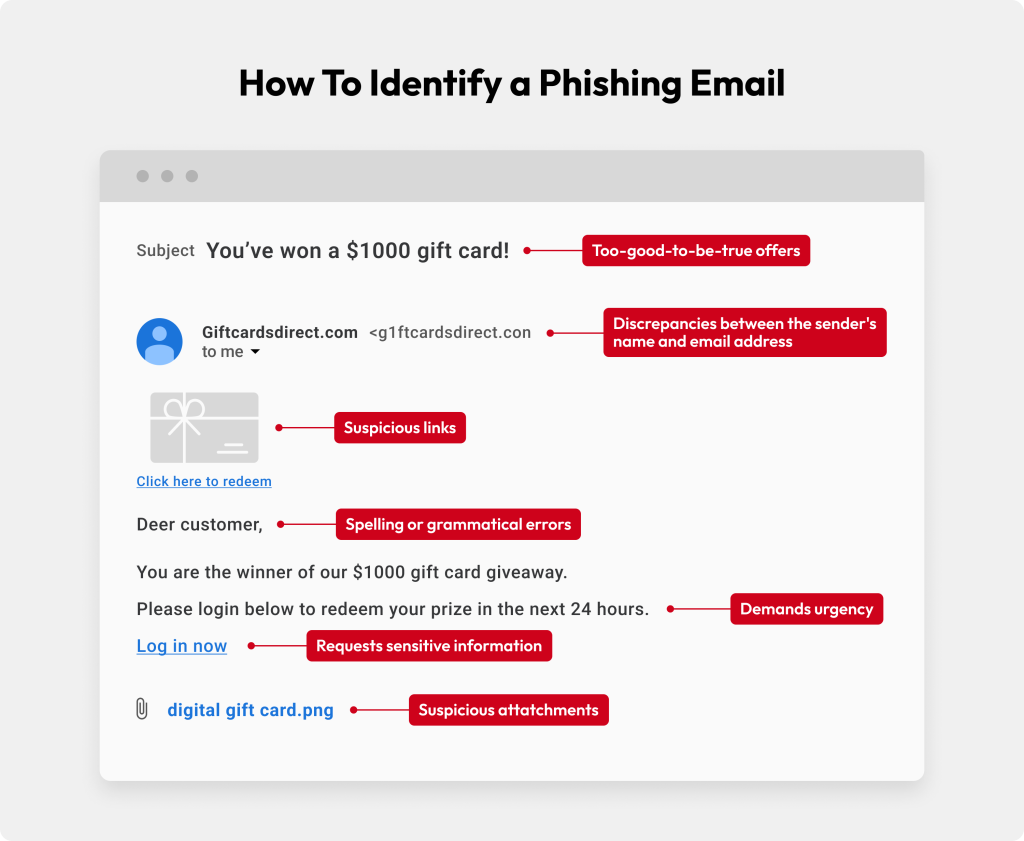
Amazon email spoofing is a fraudulent technique where cybercriminals forge the email header details of a message to make it appear as though it originated directly from Amazon. Attackers use spoofing to manipulate recipient trust, tricking users into revealing sensitive credentials, making unauthorized payments, or installing malicious software. authenticating emails via domain alignment and checking Amazon's internal Message Center are the most reliable methods to verify legitimacy.
What Is Amazon Email Spoofing?
Email spoofing is a form of cyber deception that exploits fundamental design traits of internet messaging. When standard email architecture was designed under the Simple Mail Transfer Protocol (SMTP), authentication mechanisms were not built into the protocol. As a result, an outbound server can theoretically insert any arbitrary address into the sender field of an email header.
Because Amazon processes millions of customer transactions daily, cybercriminals frequently choose the brand as a primary target for spoofing campaigns. An spoofed Amazon email attempts to impersonate order receipts, account alerts, shipping updates, or subscription billing notices. The malicious goal is rarely cosmetic; spoofed emails serve as the delivery vector for phishing attacks, credential harvesting, malware deployment, or social engineering schemes designed to steal money or compromise personal identity.
Understanding how email spoofing operates requires distinguishing between visual fraud and technical manipulation. A spoofed message may display authentic Amazon logos, match corporate typography, and feature believable order numbers. However, looking under the surface reveals structural inconsistencies in how the message was routed across the internet.
The Mechanics Behind Email Spoofing: How Attackers Fake the Sender Address
To comprehend how an attacker successfully disguises a fake email as an authentic Amazon notification, one must understand how email protocols process sender information. Every standard email contains two distinct sender addresses:
The Envelope Sender (Return-Path / Mail From): This address is used by mail transfer agents (MTAs) to route the message and handle non-delivery reports (bounces). It is hidden from standard mail view unless you inspect the raw headers.
The Header Sender (From / Display Name): This address is rendered by the user's desktop or mobile email client (e.g., Gmail, Outlook, Apple Mail). It shows the display name (e.g., "Amazon Customer Support") and the visible email address (e.g.,
shipment-tracking@amazon.com).SENDER MAIL SERVER (Attacker)
- Sends SMTP Command:
MAIL FROM: - Sends Data Header:
From: "Amazon.com Customer Service"
- Sends SMTP Command:
RECIPIENT MAIL CLIENT (User View)
- Displays:
"Amazon.com Customer Service"
- Displays:
In basic SMTP transmission, the email client displays the Header Sender to the end user. If an attacker's mail server sends a message specifying From: seller-notification@amazon.com, the recipient client will faithfully display that address in the inbox line unless strict authentication checks intervene.
Display Name Spoofing vs. Domain Spoofing
Attackers employ different levels of sophistication when engineering spoofed emails:
- Display Name Spoofing: The attacker registers an arbitrary address (such as
amazon-support-team-9842@gmail.comornotice@security-check-update.com) but sets the human-readable display name to "Amazon Order Desk." On mobile screens where raw email addresses are often hidden, users only see the legitimate-sounding label. - Exact Domain Spoofing: The attacker explicitly alters the visible header address to end in
@amazon.com. Without email security protocols like SPF, DKIM, and DMARC enforced on the receiving mail server, this exact domain forgery passes directly into the inbox. - Lookalike (Typosquatting) Spoofing: The attacker registers domains that visually resemble Amazon's official domain name, utilizing character substitution or common misspellings (e.g.,
amzon-support.com,amazon-security-alert.net, orarrrnazon.com). While technically sent from an authentic domain registered by the attacker, the domain itself is fraudulent.
Technical Email Authentication: How Amazon Defends Its Domain
Modern mail infrastructure relies on a trio of cryptographic and domain verification standards to stop spoofing. Understanding these protocols helps clarify why some fake emails bypass junk filters while others are immediately rejected.
1. Sender Policy Framework (SPF)
SPF allows a domain owner (like amazon.com) to publish a public record in the Domain Name System (DNS) listing every IP address and third-party mail server authorized to send email on behalf of that domain. When a mail server receives an email claiming to originate from amazon.com, it queries Amazon's DNS records. If the sending server's IP address is not listed in the SPF record, the check fails.
2. DomainKeys Identified Mail (DKIM)
DKIM adds a cryptographic signature to outbound messages. The sender's server holds a private key used to generate a digital signature embedded in the email header. The receiving mail server uses the sender's public key—published in DNS—to verify the signature. If the email contents were tampered with during transit, or if the key does not match, the DKIM signature becomes invalid.
3. Domain-based Message Authentication, Reporting, and Conformance (DMARC)
While SPF and DKIM perform crucial validation, neither protocol alone dictates what the recipient's mail provider should do if verification fails. DMARC bridges this gap. A DMARC policy allows domain owners to instruct receiving servers on how to handle failures using three primary policy levels:
p=none: The receiver monitors traffic and generates reports, but allows unauthenticated emails through to the inbox.p=quarantine: The receiver routes unauthenticated emails directly to the user's Spam/Junk folder.p=reject: The receiver blocks unauthenticated emails completely at the gateway level.
Amazon aggressively publishes strict DMARC policies for its primary domains to instruct major mailbox providers (like Google, Microsoft, and Yahoo) to reject or quarantine forged messages. However, attackers bypass these protections by leveraging lookalike domains with valid SPF/DKIM records of their own, or by targeting email providers that fail to enforce strict DMARC validation.
Common Amazon Email Spoofing Scams
Spoofed Amazon emails generally leverage high-pressure psychological triggers—urgency, fear, or unexpected financial reward—to manipulate victims before they have time to evaluate the technical authenticity of the message.
- ATTACKER'S PSYCHOLOGICAL TRIPS
- FEAR
- "Account Locked"
- "Suspicious Act"
- URGENCY
- "Order Ships In 2 Hours—Cancel?"
- FINANCIAL GAIN
- "Gift Card Bonus Claim $100 Now"
- FEAR
1. The High-Value Order Confirmation
- The Hook: The email presents an invoice or order confirmation for an expensive item—such as a high-end laptop, gaming console, or television—that the recipient never purchased.
- The Mechanism: The email includes a prominent "Cancel Order" button or a customer support telephone number. Clicking the link takes the recipient to a credential-harvesting site, while calling the phone number connects them to a fraudulent call center that attempts to gain remote access to their computer or request direct payment details.
2. Account Suspension or Security Alert
- The Hook: An urgent message claims that your Amazon account has been locked due to "unauthorized access," "unverified billing details," or "violating terms of service."
- The Mechanism: The victim is instructed to click a link to verify their identity within 24 to 48 hours to avoid permanent account termination. The link directs to a counterfeit login interface that steals the victim's account password, multi-factor authentication (MFA) codes, and linked credit card details.
3. Fake Prime Membership Renewal
- The Hook: A notice alerts the recipient that their Amazon Prime membership is renewing automatically at an inflated cost (e.g., $399/year), or that their credit card was declined for renewal.
- The Mechanism: The message plays on financial panic, urging the user to sign in to correct their billing credentials or request an immediate refund.
4. Shipping and Logistics Tracking Alerts
- The Hook: An email claims a package could not be delivered due to an incorrect physical address, missing apartment number, or unpaid customs fee.
- The Mechanism: The message asks the recipient to click a link to update their address details and submit a nominal fee (e.g., $1.50). This micro-transaction scheme captures sensitive credit card numbers for fraudulent re-use.
How to Identify a Spoofed Amazon Email
Differentiating an authentic Amazon communication from a spoofed email requires inspecting visual cues, technical headers, and official account portals.
1. Check the Official Sender Domain
Authentic Amazon emails always originate from an email address ending in a valid Amazon domain. Official global communications typically end with:
@amazon.com@amazon.co.uk@amazon.de@sellercentral.amazon.com@payments.amazon.com@primevideo.com
If the email address ends in a domain such as @amazon-support-service.com, @security-amazon.net, or @gmail.com, the message is fraudulent.
2. Inspect Embedded Links (Hover Test)
Before clicking any link in a suspicious email, hover your mouse cursor over the button or text link (or long-press the link on a mobile device without opening it). Inspect the destination URL shown in the preview bar:
- Authentic: Directs explicitly to
https://www.amazon.com/...or an equivalent regional domain (e.g.,https://www.amazon.co.uk/...). - Spoofed: Points to shortened URLs (e.g.,
bit.ly,tinyurl.com), IP addresses (e.g.,http://192.168.1.1/login), or completely unrelated domain names.
3. Cross-Check with the Amazon Message Center
The single most definitive way to verify any account notice or order update is to use Amazon’s built-in Message Center:
- Open a browser window independently and log into your official Amazon account.
- Navigate to Your Account.
- Scroll to the Communication and content section and click Message Center.
- Review the Buyer/Seller Messages and Official Messages tabs.
If an email claiming to be from Amazon does not appear in your account’s Message Center, the email is fake.
- VERIFICATION DECISION TREE
- Recieve Suspicious Email
- Is it in Amazon's Message Center?
- YES: Authentic Email (Safe to process)
- NO: SPOOFED / PHISHING (Report and Delete)
4. Analyze Raw Email Headers
For advanced users, analyzing the raw header of an email reveals explicit routing metadata and SPF/DKIM/DMARC pass/fail flags.
- In Gmail: Open the email, click the three vertical dots (More) in the top-right corner, and select Show original.
- In Outlook Desktop: Double-click the email to open it, go to File > Properties, and examine the Internet headers box.
- In Apple Mail: Open the message, select View > Message > Raw Source.
Look for the authentication result header block:
Authentication-Results: mx.google.com; spf=pass (google.com: domain of bounces@bounces.amazon.com designates 54.240.0.1 as permitted sender) smtp.mailfrom=bounces@bounces.amazon.com; dkim=pass header.i=@amazon.com; dmarc=pass (p=REJECT sp=REJECT dis=NONE) header.from=amazon.com;
If the spf, dkim, or dmarc fields indicate fail or show domains unrelated to Amazon, the message is spoofed.
Authentic vs. Spoofed Amazon Communications
The following table summarizes key operational differences between genuine Amazon emails and spoofed phishing attempts.
| Verification Point | Authentic Amazon Email | Spoofed / Fake Amazon Email |
|---|---|---|
Header From Address |
Ends strictly with official domain (@amazon.com, @payments.amazon.com). |
Uses lookalike domains, free email providers (@gmail.com), or misspellings. |
| Account Message Center | Exact duplicate appears in your Amazon account Message Center. | Message is completely absent from the official Message Center. |
| Link Destinations | Directs exclusively to https://www.amazon.com or official country TLDs. |
Directs to third-party domains, IP addresses, or URL shorteners. |
| Requested Actions | Directs you to log into your account securely to manage payments or updates. | Demands sensitive data via email reply, external forms, or phone numbers. |
| Payment Instructions | Billing updates occur strictly within account settings; accepts credit cards/official methods. | Demands payment via gift cards, bank wires, crypto, or remote access software. |
| Attachments | Almost never includes order invoices as .pdf, .exe, .zip, or .doc attachments. |
Frequently includes malicious attachments containing macros or malware executables. |
| Language & Formatting | Professional grammar, personalized greetings (matches account name). | Generic greetings ("Dear Customer"), urgent threats, poor spelling/grammar. |
Step-by-Step: What to Do If You Receive or Click a Spoofed Email
If you receive a suspicious message claiming to be from Amazon, follow these mitigation steps based on your level of interaction.
Scenario A: You Received a Suspicious Email (No Links Clicked)
- Do not click any links or download attachments.
- Do not reply to the sender or call any telephone numbers listed in the message body.
- Report the email directly to Amazon (see reporting instructions below).
- Delete the message from your inbox and clear your deleted items folder.
Scenario B: You Clicked a Link or Entered Login Credentials
If you interacted with a spoofed email and entered account credentials, take immediate defensive action:
- Change Your Amazon Password Immediately:
- Log into your authentic Amazon account via a fresh browser window.
- Go to Your Account > Login & Security.
- Update your password to a strong, unique passphrase.
- Enable Two-Step Verification (2SV):
- Under Login & Security, enable Two-Step Verification using an authenticator app (e.g., Google Authenticator, Microsoft Authenticator) or security key.
- Sign Out of All Active Sessions:
- In your Amazon security settings, terminate all active browser and device sessions to force fraudulent sign-ins to disconnect.
- Review Recent Orders and Billing Information:
- Inspect your order history for unauthorized purchases or archived orders.
- Check saved credit cards, digital gift card balances, and shipping addresses for unauthorized alterations.
- Contact Your Financial Institution:
- If you entered credit card details or bank account information on a fraudulent site, contact your bank immediately to freeze the compromised card and dispute fraudulent charges.
Scenario C: You Downloaded an Attachment or Installed Software
- Disconnect from the Network: Immediately turn off Wi-Fi or unplug your Ethernet cable to prevent malware from transmitting stolen data to a command-and-control server.
- Run a Comprehensive Antivirus Scan: Scan your operating system using updated antimalware software to detect and remove keyloggers, Trojans, or remote-access tools.
- Revoke Remote Access Permissions: If a fake support representative instructed you to install remote access tools (such as AnyDesk, TeamViewer, or Quick Assist), uninstall these applications completely.
How to Report Spoofed Emails
Reporting spoofed communications helps cloud providers, security researchers, and corporate security teams take down malicious infrastructure and train automated spam filters.
Reporting to Amazon
Amazon maintains dedicated channels for reporting phishing and spoofing attempts:
- Email Reporting: Forward suspicious emails as an attachment to
stop-spoofing@amazon.com. Forwarding as an attachment preserves the original header metadata required for technical investigations. - Web Reporting: Submit details through Amazon’s official reporting portal at amazon.com/reportascam.
Reporting to Government Agencies and Security Authorities
If you suffered financial loss or identity theft due to an email spoofing scam, report the incident to relevant regulatory bodies:
- United States: File a report with the Federal Trade Commission at reportfraud.ftc.gov and the FBI Internet Crime Complaint Center (IC3) at ic3.gov.
- United Kingdom: Report scams to Action Fraud via actionfraud.police.uk.
- Canada: Contact the Canadian Anti-Fraud Centre at antifraudcentre-centreantifraude.ca.
Frequently Asked Questions
Why do fake Amazon emails appear in my primary inbox instead of Spam?
Fake emails can bypass spam filters if the attacker uses display name spoofing on a domain with valid SPF/DKIM records, or if your email provider does not strictly enforce DMARC validation rules. Attackers also routinely alter layout code and wording to evade automated content filters.
Can an attacker spoof an email so perfectly that the sender address looks identical to @amazon.com?
Yes. If receiving email servers fail to enforce DMARC validation checks, an attacker can forge the visible From header to display an exact @amazon.com address. However, inspecting the raw message headers will reveal that the underlying IP address and routing path do not belong to Amazon's authorized mail infrastructure.
Does Amazon ever ask for account confirmation or payment details over email?
No. Amazon will never ask you to disclose your account password, Social Security number, credit card security code (CVV), or bank details via email. All sensitive account management and payment updates must be completed directly within your secured account dashboard on Amazon's official website or mobile app.
What should I do if an email claims an expensive order was placed on my account?
Do not click any links or call numbers listed inside the email. Open a separate browser tab, log into your Amazon account, and check your Returns & Orders page. If the order does not appear in your official order history, the email is spoofed and can be safely ignored and reported.
Are emails containing a phone number for Amazon customer service real?
Amazon rarely provides direct inbound telephone numbers in transactional notification emails. Scammers frequently place fake phone numbers in spoofed emails to lure victims into phone-based scams (vishing), where callers pretend to be support agents to extract remote device access or financial details. Always initiate support requests directly through the official Amazon website or app.
Practical Recommendations
To permanently minimize your risk from Amazon email spoofing:
- Default to the Message Center: Never act on order changes or account alerts directly from an email notification. Bookmark Amazon's home page and navigate to the Message Center to confirm any legitimate alerts.
- Deploy Password Managers: Modern password managers automatically correlate stored credentials with specific web domains. If an email link leads to a spoofed landing page (e.g.,
amazon-login-update.com), your password manager will refuse to auto-fill your credentials, alerting you to the fake page. - Enforce Hardware or App-Based Multi-Factor Authentication: Secure your Amazon account using an authenticator app or hardware security key rather than SMS-based verification, protecting your account even if credentials are exposed.
- Forward Suspicious Messages: Formally submit suspicious communications to
stop-spoofing@amazon.comto assist security infrastructure in suppressing active spoofing campaigns globally.