Choosing between AT&T Fiber and Comcast Xfinity comes down to network architecture, speed symmetry, data limits, and pricing transparency. AT&T Fiber utilizes a direct fiber-to-the-home (FTTH) connection offering equal download and upload speeds with no data caps, while Comcast Xfinity primarily operates a Hybrid Fiber-Coaxial (HFC) cable network with fast downloads, asymmetrical uploads, and data caps in most regions.
Understanding the Core Technologies: Fiber Optic vs. Cable (HFC)
To understand why AT&T Fiber and Comcast Xfinity perform differently under heavy internet traffic, you must first look at the physical infrastructure each service uses to transport data to your residential wall outlet.
AT&T FIBER (FTTH): [Internet Backbone] === (100% Fiber Optic Cable) ===> [ONT / Gateway] ===> [Your Devices] * Result: Symmetrical Uploads & Downloads, Low Latency, High Reliability COMCAST XFINITY (HFC Cable): [Internet Backbone] === (Fiber Core) ===> [Neighborhood Node] --- (Coaxial Copper Cable) ---> [Cable Modem] ===> [Your Devices] * Result: Fast Downloads, Limited Uploads, Shared Neighborhood Bandwidth
AT&T Fiber Architecture: Fiber-to-the-Home (FTTH)
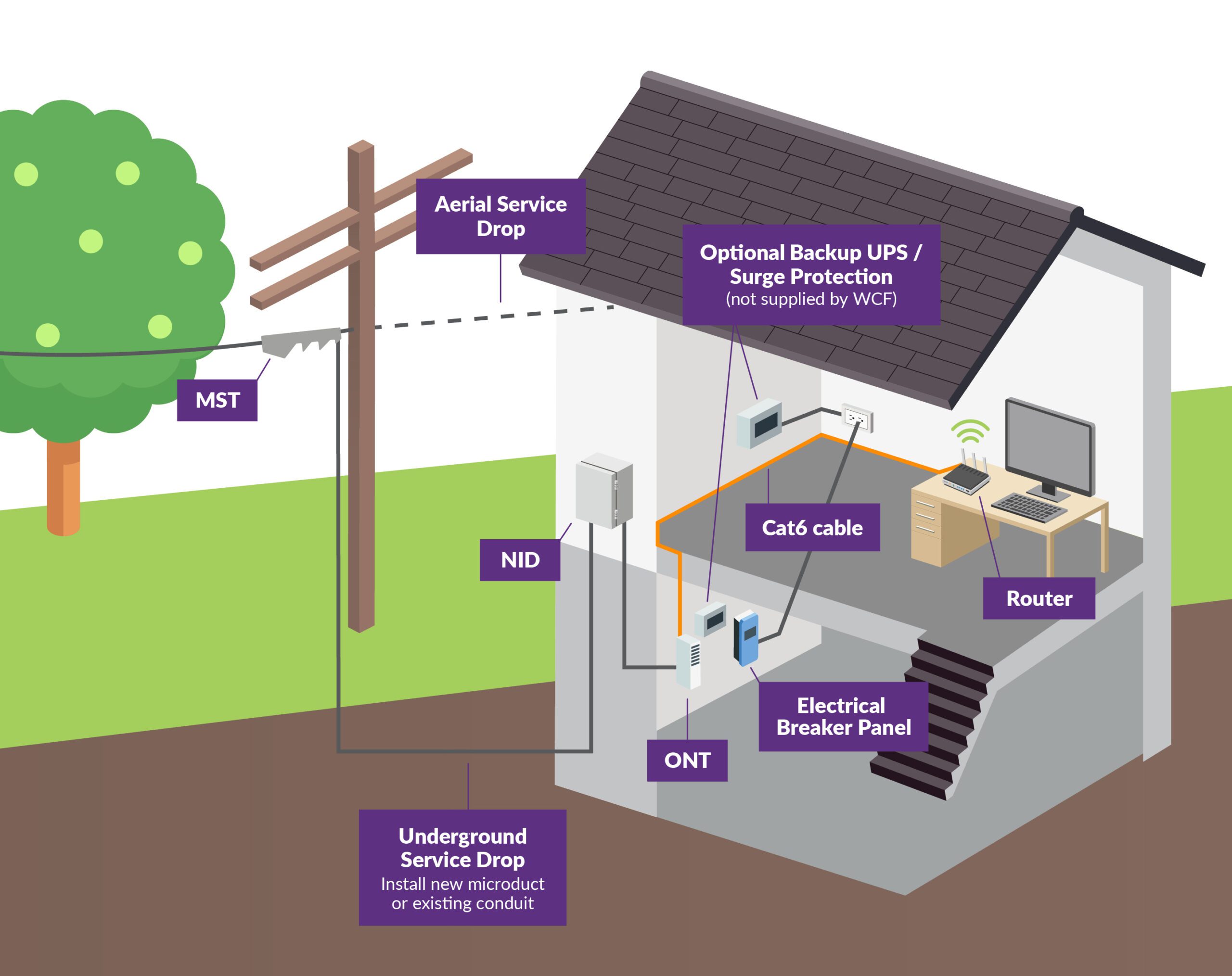
AT&T Fiber delivers internet data using pulses of light transmitted through flexible glass fibers. This network relies on a pure Fiber-to-the-Home (FTTH) infrastructure. Fiber optic strands run directly from AT&T's central switching offices into local splitters, and straight into an Optical Network Terminal (ONT) installed at your home.
Because light travels through glass with minimal signal degradation across long distances, fiber optic technology is largely immune to electromagnetic interference, electrical noise, and radio frequency disruptions. It also supports massive bandwidth capacity over a single strand, allowing AT&T to deliver identical, high-speed upload and download throughput simultaneously across GPON (Gigabit Passive Optical Network) and newer XGS-PON architectures.
Comcast Xfinity Architecture: Hybrid Fiber-Coaxial (HFC)
Comcast Xfinity delivers its primary broadband service over a Hybrid Fiber-Coaxial (HFC) network governed by Data Over Cable Service Interface Specification (DOCSIS) standards, predominantly DOCSIS 3.1. In an HFC system, Comcast routes high-capacity fiber optic lines from its headend facilities to optical nodes located throughout neighborhoods. From those local nodes, the signal converts from light pulses into radio frequency (RF) electrical signals, which travel over traditional copper coaxial cables into individual residences.
While coaxial cable is capable of delivering fast downstream internet speeds, the shared copper line between the neighborhood node and your home presents physical bottlenecks:
- Asymmetrical Bandwidth Allocation: Cable networks allocate the vast majority of available frequency channels to downstream traffic, leaving a narrow spectrum frequency for upstream traffic.
- Neighborhood Congestion: Because multiple homes share the bandwidth capacity of a single coaxial node, heavy usage by neighbors during peak hours (typically 7:00 PM to 11:00 PM) can lead to localized network congestion.
- Electrical Vulnerability: Copper coaxial cables are vulnerable to signal degradation caused by weather, corrosion at connector joints, electrical surges, and ambient radio interference.
(Note: Comcast offers a niche pure-fiber service named Gigabit x6, formerly Gigabit Pro, but it requires custom infrastructure builds, specialized optical equipment, and high installation costs, making it unavailable to the overwhelming majority of residential consumers.)
Speed and Bandwidth: Download vs. Upload Performance
Internet performance is defined by two primary numbers: download speed (how fast data reaches your device) and upload speed (how fast data leaves your device).
TYPICAL SPEED COMPARISON: 1 GIGABIT PLAN AT&T Fiber (100% Symmetrical): Download: [====================] 1,000 Mbps Upload: [====================] 1,000 Mbps Comcast Xfinity Cable (Asymmetrical): Download: [====================] 1,200 Mbps Upload: [=] 35 to 200 Mbps
The Power of Symmetrical Speeds on AT&T Fiber
AT&T Fiber standardizes symmetrical bandwidth across all its residential plans. If you subscribe to a 300 Mbps, 500 Mbps, or 1,000 Mbps (1 Gig) plan, your connection delivers that exact speed in both directions.
Symmetrical bandwidth is increasingly important for modern home networks due to evolving internet habits:
- Remote Work and Cloud Backups: Uploading large presentation files, CAD projects, RAW photography collections, or video edits to services like Google Drive, Dropbox, or corporate VPNs happens in seconds rather than hours.
- Video Conferencing: High-definition video calls via Zoom, Microsoft Teams, or Google Meet require steady upload channels to prevent pixelation, audio dropped packets, and screen-sharing delays.
- Live Streaming and Content Creation: Broadcasting 1080p or 4K video feeds to platforms like Twitch, YouTube, or Kick requires consistent, uncompressed upload streams.
For power users, AT&T Fiber also offers multi-gigabit tiers (2 Gig and 5 Gig) in markets upgraded with XGS-PON technology, providing future-proof bandwidth for dense households running multiple 4K/8K streams and high-end home servers.
Asymmetrical Limits on Comcast Xfinity Cable
Comcast Xfinity provides competitive download speeds, ranging from entry-level 75 Mbps tiers up to 1.2 Gbps (Gigabit Extra) on its standard HFC network. However, upstream performance on Xfinity cable is strictly constrained.
On standard Xfinity cable plans:
- A 300 Mbps download plan typically offers only 10 Mbps to 20 Mbps upload speeds.
- A 1,200 Mbps download plan typically caps upload speeds between 35 Mbps and 40 Mbps.
Comcast has begun rolling out DOCSIS 3.1 mid-split upgrades and preparing for DOCSIS 4.0 across select metro markets. In these upgraded "Next-Gen Work" neighborhoods, Xfinity customers using compatible gateways (such as the xFi XB7 or XB8) can achieve upload speeds between 100 Mbps and 200 Mbps. However, until DOCSIS 4.0 achieves universal adoption, standard Comcast cable connections remain asymmetrical compared to pure fiber options.
Latency, Ping, and Network Reliability
While speed tiers measure how much data your line transfers per second, latency (measured in milliseconds) dictates how quickly a packet of data travels from your home router to a remote server and back.
AVERAGE NETWORK LATENCY (LOWER IS BETTER) AT&T Fiber: [===] 5ms - 15ms Xfinity Cable: [========] 15ms - 35ms+
Why Fiber Delivers Lower Latency
AT&T Fiber offers consistently lower ping times than cable connections, typically averaging between 5 ms and 15 ms to major regional servers. Light signals travel through glass strands with negligible resistance and zero requirement for constant signal amplification along the drop wire.
Lower latency translates to:
- Competitive Online Gaming: Reduced delay between player inputs and server responsiveness in fast-paced titles like Valorant, Call of Duty, or Counter-Strike.
- Seamless Voice over IP (VoIP): Elimination of audio delay, jitter, and overlapping conversational interruptions during voice calls.
- Instant Web Responsiveness: Webpages load elements near-instantaneously because DNS queries and initial server handshakes resolve without copper-line latency buffers.
Cable Latency and Signal Degradation
Comcast Xfinity cable connections generally exhibit latency ranges between 15 ms and 35 ms, with occasional latency spikes during peak neighborhood usage periods.
Because coaxial cable transmits electrical signals across copper wire, latency increases when signals pass through active line amplifiers stationed along utility poles. Furthermore, external factors such as hot outdoor temperatures expanding copper joints, water entering damaged splitters, or loose coaxial wall plates can introduce packet loss and connection dropouts.
Pricing Models, Contracts, and Data Caps
The long-term value of an internet service depends heavily on contract terms, hardware rental charges, promotional discount expirations, and monthly data allowances.
MONTHLY DATA ALLOWANCE COMPARISON AT&T Fiber: [UNLIMITED DATA INCLUDED ON ALL PLANS] Comcast Cable: [1.2 TB CAP] + ($30/mo or xFi add-on for unlimited data in many regions)
AT&T Fiber Pricing and Terms
AT&T Fiber operates under a consumer-friendly pricing model known as "Straightforward Pricing":
- No Annual Contracts: Residential fiber plans are billed month-to-month without early termination fees (ETFs).
- Equipment Included: AT&T includes the monthly rental cost of its Wi-Fi gateway device inside the advertised base price on standard fiber tiers.
- Unlimited Data: All AT&T Fiber tiers come with uncapped, unlimited data usage. Users can download and upload terabytes of media monthly without overage penalties or artificial speed throttling.
- Transparent Rate Increases: While base plan rates can adjust periodically over time, AT&T Fiber avoids the steep "promo jump" contracts common to traditional cable providers.
Comcast Xfinity Pricing and Terms
Comcast Xfinity relies on a traditional cable pricing strategy that requires close attention to contract details and fine print:
- Promotional Discounts & Contracts: Xfinity frequently advertises low introductory monthly rates locked in for 12 or 24 months. However, these plans often require a 1-year contract commitment. Once the promotional window expires, regular non-promotional rates apply, which can increase the monthly bill by $20 to $40 or more unless re-negotiated.
- Equipment Rental Charges: Unless you supply your own compatible cable modem and Wi-Fi router, renting an Xfinity xFi Gateway adds a monthly fee (typically around $15/month).
- Data Caps (1.2 Terabyte Limit): In many operating regions (particularly Central and Western US divisions), Comcast enforces a 1.2 TB monthly data allowance on standard internet plans. Exceeding this limit results in automatic overage charges of $10 for every additional 50 GB of data, capped at a maximum fee of $100 per month.
- Unlimited Data Add-ons: Customers who want to remove the 1.2 TB data cap must either pay a standalone fee (approximately $30/month) or subscribe to Comcast’s xFi Complete package (approximately $25/month), which bundles gateway rental, unlimited data, and security features.
Detailed Specifications Comparison Table
The following matrix compares key technical, operational, and commercial features of AT&T Fiber and Comcast Xfinity cable plans:
| Feature / Metric | AT&T Fiber | Comcast Xfinity (Cable / HFC) |
|---|---|---|
| Primary Technology | 100% Fiber-to-the-Home (FTTH) | Hybrid Fiber-Coaxial (HFC / DOCSIS 3.1) |
| Download Speeds | 300 Mbps – 5,000 Mbps (5 Gbps) | 75 Mbps – 1,200 Mbps (1.2 Gbps) |
| Upload Speeds | 300 Mbps – 5,000 Mbps (Symmetrical) | 10 Mbps – 35 Mbps (Up to 200 Mbps in select mid-split areas) |
| Average Latency | Very Low (5 ms – 15 ms) | Moderate (15 ms – 35 ms+) |
| Data Allowance | Unlimited (No data caps on any fiber plan) | 1.2 TB Cap (Regional exceptions apply; unlimited requires add-on) |
| Annual Contracts | None (Month-to-month billing) | Optional 1–2 Year Promo Contracts (Varies by region and tier) |
| Equipment Rental Fees | Included in base price | Monthly gateway fee applies (or bring your own modem) |
| Customer Equipment Rights | Gateway mandatory (Pass-through mode supported) | Customer-owned modems allowed (DOCSIS 3.1 compatible) |
| Peak-Hour Congestion | Extremely Low (Dedicated light spectrum) | Moderate to High (Shared neighborhood coaxial nodes) |
| Overall Value Focus | Symmetrical speeds, clear pricing, no caps | Wide availability, bundle deals, promo pricing |
Hardware, Gateways, and Wi-Fi Capabilities
Both providers supply combination modem-router gateways designed to manage home Wi-Fi networks, but their hardware ecosystems operate under different deployment rules.
HARDWARE ARCHITECTURE & BYOM OPTIONS AT&T FIBER SETUP: [Fiber Drop] ---> [AT&T Gateway (BGW320)] ---> (Optional IP Passthrough) ---> [Third-Party Mesh Router] * Note: AT&T Gateway is mandatory to authenticate the fiber line. COMCAST XFINITY SETUP: Option A: [Coax Drop] ---> [Xfinity xFi Gateway (XB7/XB8)] ---> [Home Devices] Option B: [Coax Drop] ---> [Owned DOCSIS 3.1 Modem] ---------> [Third-Party Mesh Router] * Note: Bring-Your-Own-Modem (BYOM) is fully supported on Xfinity.
AT&T Gateway Ecosystem (BGW320 Series)
AT&T installs an integrated Optical Network Terminal and Gateway—most commonly the BGW320—for new fiber installations.
- Wireless Standards: The BGW320 supports Wi-Fi 6 (802.11ax) technology, tri-band radios, and auto-band steering to push high speeds to mobile devices. For 2 Gig and 5 Gig tiers, AT&T equips gateways capable of supporting high-throughput local devices via 5 Gbps Ethernet LAN ports.
- Mandatory Gateway Requirement: AT&T Fiber requires its proprietary gateway to stay connected to the wall outlet because the hardware handles digital certificate authentication with AT&T's optical line terminals (OLTs).
- Using Custom Mesh Routers: You cannot completely bypass the AT&T gateway with your own router. However, you can easily configure the AT&T gateway into IP Passthrough mode, disabling its built-in Wi-Fi radios and routing all traffic cleanly into a third-party mesh system (such as Asus, Netgear Orbi, Google Nest Wi-Fi, or Eero).
Comcast xFi Gateways and BYOM Support
Comcast offers its proprietary xFi Advanced Gateways (such as the XB7 and XB8 models), which support Wi-Fi 6 and Wi-Fi 6E standards.
- xFi Complete Integration: Renting an xFi gateway unlocks the xFi Complete package, which includes automated network security, remote device management through the Xfinity app, and optional Wi-Fi Extender Pods if Comcast’s network audit detects dead zones in your house.
- Bring Your Own Modem (BYOM): Unlike AT&T Fiber, Comcast Xfinity fully permits customers to purchase and use their own third-party cable modems (such as an Arris SURFboard or Netgear Nighthawk DOCSIS 3.1 modem) paired with a standalone Wi-Fi router. Buying your own modem saves on monthly rental fees, though it means forfeiting xFi security software and bundled unlimited data discounts.
Customer Satisfaction and Service Reliability
Independent customer survey data consistently reflects the operational differences between fiber optic lines and legacy copper coaxial networks.
In independent broadband metrics, such as the American Customer Satisfaction Index (ACSI):
- AT&T Fiber regularly ranks at or near the top of the Telecommunications category among Fiber Internet Service Providers. Customers frequently cite predictable billing, fast real-world upload throughput, and high uptime during severe weather as primary satisfaction drivers.
- Comcast Xfinity maintains respectable scores within the traditional Cable ISP group, often outperforming competing regional cable operators. However, lower overall satisfaction scores in cable categories stem primarily from post-promotional bill increases, data cap overage charges, and customer service resolution friction.
Decision Framework: Which ISP Fits Your Household?
Because network coverage varies street by street, your first step is verifying exact address availability. If both AT&T Fiber and Comcast Xfinity serve your residence, use this framework to select the right provider.
/--- YES ---> [CHOOSE AT&T FIBER] / - Symmetrical Uploads [Is AT&T FIBER Available at Address?] - Zero Data Caps \ - Included Gateway \--- NO ----> [CHOOSE COMCAST XFINITY] - Fast Downloads - Broad Regional Coverage - Promotional Cable Bundles
Choose AT&T Fiber If:
- You Work from Home or Upload Large Files: The 1:1 symmetrical upload ratio ensures video conferences remain clear while background backups, cloud syncs, and large file transfers execute without slowing down your network.
- You Play Online Video Games: Lower latency (ping) and reduced packet loss deliver a smoother online gaming experience free from peak-hour network spikes.
- You Stream 4K Content and Download Terabytes of Data: Unlimited data with zero monthly overages allows multi-user households to stream 4K video, update game libraries, and back up devices without watching a data meter.
- You Want Transparent Monthly Costs: Included equipment rentals and a lack of mandatory annual contracts make long-term household budgeting straightforward.
Choose Comcast Xfinity If:
- AT&T Fiber Is Not Deployed at Your Physical Address: In neighborhoods where AT&T only offers legacy copper DSL (which tops out at 10 Mbps to 100 Mbps), Comcast Xfinity cable is the superior choice for high-speed download performance.
- You Seek Low Introductory Pricing: If you plan to move within 12 to 24 months, taking advantage of Xfinity’s initial promo pricing can yield lower immediate upfront costs.
- You Prefer Traditional Cable TV Bundles: Xfinity integrates its high-speed internet directly with X1 cable TV packages, DVR hardware, and voice services on a single consolidated bill.
- You Want to Own Your Cable Hardware: If you already own a high-end DOCSIS 3.1 cable modem and Wi-Fi router, using your own equipment with Xfinity avoids monthly hardware rental fees.
Frequently Asked Questions
Is AT&T Fiber better than Comcast Xfinity for online gaming?
Yes. AT&T Fiber is generally superior for online gaming because fiber optic architecture provides significantly lower ping (latency) and lower packet loss compared to coaxial cable networks. Furthermore, AT&T Fiber's symmetrical upload speeds handle player-to-server data transmission more efficiently during intense multiplayer sessions.
Why are Comcast's upload speeds so much slower than its download speeds?
Comcast Xfinity's standard service uses Hybrid Fiber-Coaxial (HFC) cable technology built on legacy DOCSIS standards. Cable networks allocate the vast majority of their electrical frequency spectrum to downstream data (downloads) to support television channels and video streaming, leaving a limited frequency band for upstream data (uploads).
Does AT&T Fiber have a monthly data cap?
No. All AT&T Fiber plans come with uncapped, unlimited data usage. You can download and upload as much data as needed each month without incurring overage fees, speed throttling, or data tracking penalties.
Does Comcast Xfinity charge extra for unlimited data?
In most market divisions outside the Northeast, Comcast Xfinity limits standard plans to 1.2 Terabytes (1,200 GB) of monthly data. Exceeding this limit incurs overage fees of $10 per 50 GB. To get unlimited data on Xfinity, you must either purchase an unlimited data add-on (around $30/month) or bundle their xFi Complete hardware service (around $25/month).
Can I use my own Wi-Fi router with AT&T Fiber?
Yes, but you must keep the AT&T-provided gateway connected to the fiber line. The AT&T gateway is required to authenticate your connection to the optical network. You can connect your own third-party router or mesh system by enabling "IP Passthrough" mode on the AT&T gateway and turning off its built-in Wi-Fi signals.
What should I do if AT&T Fiber is not available at my address?
If AT&T Fiber has not reached your home yet, Comcast Xfinity cable is almost always a better choice than legacy copper connections like AT&T Internet (DSL). Xfinity's cable infrastructure easily handles multi-device 4K streaming and high-speed downloads that legacy copper DSL lines cannot support.
Summary Recommendation
When choosing between these two broadband giants, AT&T Fiber is the superior technical and commercial service wherever it is available. Its 100% fiber-to-the-home network delivers 1:1 symmetrical speeds, ultra-low latency, unlimited monthly data, and predictable pricing without long-term contracts.
However, because pure fiber networks require complete physical installation across municipalities, AT&T Fiber is not universally accessible. If your location only has access to legacy AT&T copper DSL alongside Comcast Xfinity, Xfinity's high-speed cable network is the recommended choice for fast downloads and high-bandwidth family usage.