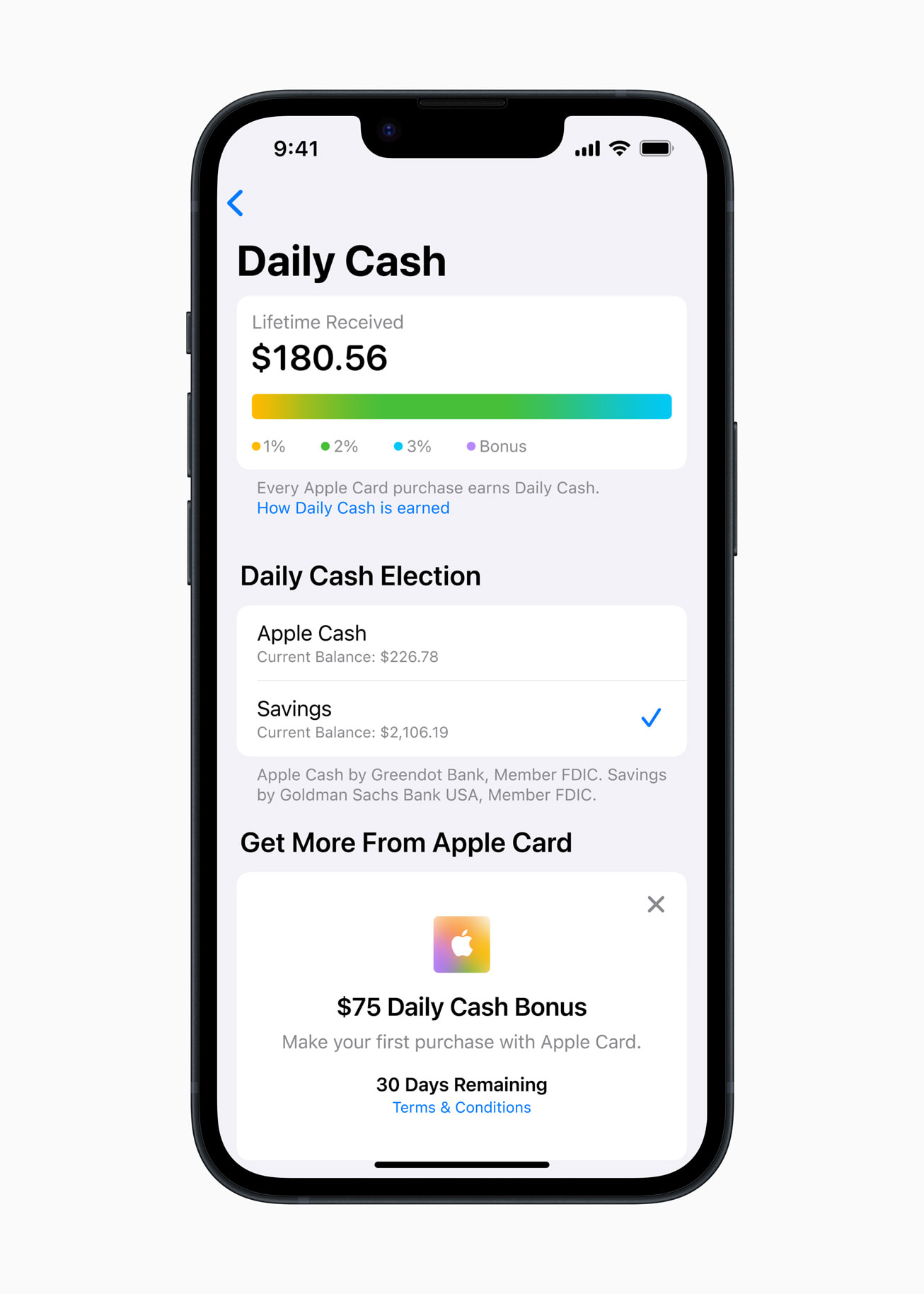
Apple Cash offers a streamlined, secure way to handle everyday transactions by enabling peer-to-peer money transfers via Messages, direct spending anywhere Apple Pay is accepted, and seamless collection of Apple Card Daily Cash rewards. Backed by Green Dot Bank, it eliminates monthly fees while providing instant access to digital funds across Apple devices.
Understanding Apple Cash and How It Operates
Apple Cash is a digital card situated inside the Apple Wallet app on iOS, watchOS, iPadOS, and macOS. Functioning primarily as a stored-value account, it allows users to store, send, receive, and spend digital money without carrying a physical debit or credit card. The backend financial infrastructure for Apple Cash is provided by Green Dot Bank, an FDIC member institution, which handles transaction clearing, regulatory oversight, and card issuance.
Unlike traditional bank accounts that require navigating separate mobile applications, Apple Cash is built directly into the operating system of Apple devices. When someone sends you money through iMessage or when you earn cash back from an Apple Card purchase, those funds instantly land in your Apple Cash balance. From there, the money is available immediately to pay a friend back for dinner, buy groceries using Apple Pay, or transfer to an external bank account.
To use Apple Cash, account holders must meet specific structural eligibility requirements:
- Be at least 18 years old (or be part of an Apple Cash Family setup under a parent or guardian).
- Reside legally within the United States.
- Possess a compatible Apple device running an updated version of iOS, watchOS, or iPadOS.
- Set up two-factor authentication on their primary Apple ID.
- Link an eligible U.S. debit card or bank account inside the Wallet app to fund transactions or transfer balances out.
Primary Benefits of Apple Cash for Daily Payments
Everyday transactions require convenience, speed, low operational overhead, and security. Apple Cash addresses these needs across several core categories, making it a powerful daily cash management tool.
- Apple Cash Ecosystem
- Peer-to-Peer (Messages/Siri - Zero P2P Fees)
- Apple Pay (Stores/Web/Apps & Virtual Card)
- Apple Card (Daily Cash Deposits)
- Green Dot Bank / FDIC Protection
1. Instant Peer-to-Peer Transfers via Messages and Siri
Sending money to family, friends, or local service providers often involves downloading third-party payment platforms, creating unique handles, and navigating multi-step transfers. Apple Cash streamlines peer-to-peer (P2P) payments by integrating directly into the native Messages app and Siri voice control.
To send funds, users open a conversation thread in Messages, tap the Apple Cash icon, input the desired dollar amount, and authenticate using Face ID, Touch ID, or a device passcode. Alternatively, users can speak directly to Siri—asking to "Send $20 to Alex for coffee"—to initiate a transaction. Money sent through this channel transfers instantly without transaction fees when funded by Apple Cash balance or a linked debit card.
2. Direct Apple Pay Spending Capabilities
Received funds do not remain trapped in a passive ledger. The moment money lands on an Apple Cash card, it functions as a digital debit card ready for immediate use.
Users can pay for everyday goods and services by choosing Apple Cash at checkout wherever Apple Pay is supported:
- Retail Stores: Double-click the side button on an iPhone or Apple Watch and tap the device against a contactless point-of-sale terminal at grocery stores, pharmacies, coffee shops, and gas stations.
- In-App Purchases: Select Apple Pay during checkout in mobile applications for ride-sharing, food delivery, or e-commerce purchases, selecting Apple Cash as the funding source.
- Web Checkout: Complete purchases on Safari-compatible websites with one-touch biometric verification.
- Virtual Card Numbers: Modern iOS features allow Apple Cash users to generate a virtual debit card number complete with an expiration date and security code (CVV). This enables spending Apple Cash funds on websites and digital services that accept Visa debit cards but do not feature an explicit Apple Pay button.
3. Central Hub for Apple Card Daily Cash Rewards
For users who hold an Apple Card, Apple Cash serves as the default destination for accrued cash-back rewards, known as Daily Cash. Unlike legacy credit cards that force cardholders to accumulate minimum cash-back balances (such as $25 thresholds) or wait for monthly billing cycles to issue statement credits, Apple Card credits cash back on a daily basis.
Earned Daily Cash—ranging from 1% to 3% depending on merchant categories and purchase methods—is automatically deposited into the user's Apple Cash card balance every morning. These funds become spendable cash right away, allowing users to apply yesterday's rewards toward today's morning coffee or public transit fare.
4. Family Account Management and Youth Allowance
Apple Cash Family extends transaction tools to households. Family Sharing organizers can create Apple Cash accounts for children and teenagers under the age of 18 linked directly to the adult's primary account.
This structure allows parents to:
- Send recurring allowance payments or immediate emergency funds directly through Messages.
- Monitor transaction history and daily expenditures in real time.
- Restrict who children can send money to or lock account features if necessary.
- Help teenagers build financial literacy by managing daily spending within a controlled, digital debit framework without opening traditional bank accounts prematurely.
Security, Privacy, and Financial Protection Features
Everyday digital financial transactions require robust protection against unauthorized access, identity theft, and fraudulent merchant charges. Apple Cash combines physical device security with back-end banking protections.
- Apple Cash Security Stack
- Hardware Layer: Secure Enclave & Device Biometrics
- Tokenization: Dynamic Security Codes per Transaction
- Banking Layer: Green Dot Bank & FDIC Insurance ($250k)
- Privacy Layer: Encrypted History, No Data Monetization
Hardware-Level Biometric Authentication
Transactions cannot be initiated from an Apple Cash balance without explicit local authentication. Every peer-to-peer transfer, online checkout, or point-of-sale purchase requires Face ID (facial recognition), Touch ID (fingerprint scan), or the device's secure passcode. If a phone is lost or stolen, third parties cannot spend funds because the primary cryptographic keys are anchored in the device's Secure Enclave hardware module.
Dynamic Tokenization
When making purchases in stores or online via Apple Pay using Apple Cash, the actual account number is never transmitted to the merchant. Instead, Apple Pay uses a device-specific Account Number paired with a unique, dynamic security code generated for that specific transaction. This prevents credit card skimming and ensures merchant database breaches do not compromise the underlying account details.
FDIC Insurance and Banking Regulatory Standards
While Apple provides the user interface and operating system integration, Green Dot Bank acts as the regulated financial institution behind Apple Cash. Once users verify their identity by providing standard details such as their legal name, address, and Social Security Number (SSN), the funds stored within their Apple Cash balance are covered by FDIC deposit insurance up to the standard statutory limit of $250,000 per depositor.
Privacy Safeguards
Unlike traditional payment processors and social payment apps that track, aggregate, or publicize financial transactions into public social feeds, Apple Cash preserves user privacy. Apple does not store detailed purchase histories linked to identifiable users for marketing or advertising profile generation. Transaction data required for customer support or regulatory compliance is handled securely by Green Dot Bank and bound by federal banking privacy regulations.
Feature Comparison: Apple Cash vs. Alternative Digital Payment Platforms
To understand where Apple Cash excels for everyday transactions, it helps to compare it against prominent alternative payment platforms operating in the United States market, including Venmo, Cash App, and Zelle.
| Feature / Capability | Apple Cash | Venmo | Cash App | Zelle |
|---|---|---|---|---|
| Primary Platform Network | iOS / Wallet Native | Mobile App (iOS/Android) | Mobile App (iOS/Android) | Bank Apps / Standalone |
| In-Store Contactless Payment | Yes (Via Apple Pay) | Limited (QR Code / Debit) | Limited (Cash Card / QR) | No |
| Instant Peer-to-Peer Transfer | Yes (Free via debit/balance) | Yes (Free via bank/debit) | Yes (Free via bank/debit) | Yes (Direct bank-to-bank) |
| Virtual Debit Card Capability | Yes (Visa network) | Yes (Venmo Card) | Yes (Cash Card) | No |
| Instant Cash-Out Fee | 1.5% (Min $0.25, Max $15) | 1.75% (Min $0.25, Max $25) | 0.5%–1.75% (Min $0.25) | N/A (Directly in bank) |
| Standard Bank Transfer Fee | Free (1–3 Business Days) | Free (1–3 Business Days) | Free (1–3 Business Days) | Free (Instant to bank) |
| FDIC Coverage Status | Included (Upon Verification) | Pass-Through (If opted in) | Pass-Through (If card held) | Direct Bank FDIC |
| Social Feed / Public Visibility | None (Private by default) | Optional Public Feed | None | None |
Step-by-Step Guide: Setting Up and Managing Apple Cash
Setting up Apple Cash takes just a few minutes within the Wallet app. Follow these detailed instructions to configure, fund, and manage your account.
Step 1: Enabling Apple Cash on Your Device
- Open the Wallet app on your iPhone.
- Tap the + (Add) icon in the top right corner, or select the Apple Cash card option if it appears in your card list.
- Tap Continue and follow the on-screen prompts to accept the Terms and Conditions.
- Authenticate using your Apple ID password, Face ID, or Touch ID.
Setup Flow Workflow:
- Open Wallet App: Tap '+' or Select Apple Cash
- Accept Terms & Conditions: Authenticate Apple ID
- Verify Identity: Input Name, Address, SSN via Settings
- Add Debit Card: Fund Account or Use for Instant P2P Payments
Step 2: Complete Identity Verification
To unlock full funding limits, high transfer thresholds, and FDIC insurance protection, you must verify your identity with Green Dot Bank:
- Tap your Apple Cash card inside the Wallet app.
- Tap the More (...) button, then select Card Details.
- Scroll down to Verify Identity.
- Enter your full legal name, residential address, date of birth, and the last four digits of your Social Security Number (SSN).
- If prompted, take a clear photo of your driver's license or state-issued photo ID card.
Step 3: Funding Your Apple Cash Balance
You can add money to your Apple Cash card to ensure you always have funds for everyday spending:
- Tap your Apple Cash card in the Wallet app.
- Select Add Money.
- Enter the dollar amount you wish to transfer (minimum $10).
- Select the linked U.S. debit card you want to pull funds from.
- Confirm the transaction using Face ID, Touch ID, or passcode.
Step 4: Transferring Apple Cash to Your Bank Account
When you want to transfer accumulated balance off your Apple Cash card and into a standard checking or savings account, choose between two methods:
- Standard ACH Transfer (Free):
- Open your Apple Cash card details.
- Tap Transfer to Bank.
- Enter the amount and tap Next.
- Select your routing and account number (or add them if not previously configured).
- Confirm with biometric authentication. Funds arrive within 1 to 3 business days.
- Instant Transfer (Fee-Based):
- Select Transfer to Bank and enter the desired transfer amount.
- Choose Instant Transfer.
- Select an eligible linked U.S. debit card.
- Review the 1.5% fee breakdown (minimum $0.25, maximum $15).
- Authenticate to send funds to your bank debit account within 30 minutes.
Fees, Account Limits, and Operational Rules
While Apple Cash is largely free of charge for daily domestic usage, understanding key rules and transaction caps helps prevent unexpected declines or transfer delays.
| Account Action | Cost / Limit Specification |
|---|---|
| Monthly Maintenance Fee | $0.00 |
| Standard P2P Send / Receive | $0.00 |
| In-Store / Online Apple Pay Spend | $0.00 |
| Standard Bank Transfer (ACH) | $0.00 (1-3 Business Days) |
| Instant Transfer to Debit Card | 1.5% (Min $0.25 / Max $15) |
| Minimum Single Add/Transfer | $10.00 |
| Maximum Daily P2P Limit | Up to $10,000 per transaction |
| 7-Day Rolling P2P Transfer Limit | Up to $10,000 per 7-day period |
Detailed Fee Structure
- Monthly Account Fees: $0. There are no maintenance fees, inactive fees, or minimum balance requirements.
- Peer-to-Peer Payments: $0 when sending money using your Apple Cash balance or a verified debit card. (Credit cards cannot be used to fund peer-to-peer payments via Apple Cash).
- Point-of-Sale / Online Purchases: $0 payment processing fees charged to the consumer.
- Instant Cash-Out: A fee equal to 1.5% of the total transfer amount is deducted directly from the transfer. The minimum fee is $0.25, and the maximum cap is $15.00.
Transaction and Balance Limits
For fully verified accounts, standard operational limits include:
- Maximum Account Balance: Unverified accounts are capped at low thresholds ($500), while verified accounts can hold balances up to $20,000.
- Adding Cash: Minimum single transaction of $10; maximum daily add limit up to $10,000 (subject to a maximum of $10,000 within any 7-day rolling window).
- Sending / Receiving P2P: Minimum of $1 per transaction; maximum send/receive up to $10,000 per individual transaction, capped at $10,000 across any 7-day rolling period.
- Bank Transfers Out: Up to $10,000 per single transfer, with a total rolling 7-day outbound limit of $20,000.
Practical Everyday Use Cases and Workflows
Integrating Apple Cash into daily routine management solves common micro-financial challenges efficiently.
| Scenario | Workflow Action |
|---|---|
| Dining Out | One person pays bill; friends send Apple Cash in Messages instantly. |
| Commute & Transit | Tap Apple Cash via Apple Pay at subway gates or contactless ticket terminals. |
| E-Commerce Purchase | Use Virtual Card Number to shop online even where Apple Pay isn't supported. |
| Household Allowance | Parents schedule instant weekly transfers to teens via Apple Cash Family. |
1. Splitting Restaurant Bills and Group Expenses
When dining out with coworkers or splitting household utilities with roommates, one person can pay the main bill using a credit card to collect primary rewards points. Other participants can immediately send their exact shares to the payer via Messages using Apple Cash. The host receives the funds instantly, offseting their credit card charge without management delays.
2. Contactless Daily Commuting and Micro-Purchases
For consumers using public transit systems equipped with open-loop contactless payments (such as OMNY in New York City or similar systems nationwide), Apple Cash functions as a fast transit payment card. Tapping an iPhone or Apple Watch at turnstiles processes payments immediately from the stored Apple Cash balance. The same tap-to-pay mechanism applies to morning coffee runs, newsstands, and vending machines.
3. Online Shopping Without Exposing Main Bank Accounts
By using Apple Cash's generated Virtual Card Number for online purchases, shoppers isolate their main personal checking accounts from third-party e-commerce platforms. If a merchant experiences a security vulnerability, the virtual card details can be regenerated instantly in Wallet settings without needing to cancel hardware debit cards issued by your primary bank.
4. Directing Daily Cash Rewards into Daily Budgets
Instead of letting cash-back rewards accumulate passively on credit card statements, combining the Apple Card with Apple Cash turns cash back into active purchasing power. Daily Cash deposited every morning can be set aside to fund minor discretionary items like afternoon lunches, streaming media rentals, or small impulse buys, effectively isolating spending money from core account reserves.
Troubleshooting Common Apple Cash Issues
Even within optimized software platforms, users occasionally encounter operational issues. Here is how to handle common edge cases.
Account Verification Stuck or Failed
If identity verification fails during setup, ensure that the legal name provided matches the information on file with the Social Security Administration exactly (avoid using unverified nicknames). If you have recently moved, Green Dot Bank may require uploading a clear, un-cropped document image of a government-issued photo ID alongside utility bills reflecting your updated physical address.
Declined Payment at Merchant POS
If an Apple Pay payment using Apple Cash is declined at checkout, check the following potential causes:
- Insufficient Balance: Ensure your card balance covers the total sale amount, including local taxes and tip allocations.
- Merchant Card Restrictions: Certain merchants (such as rental car agencies, hotel check-in desks, or specific gas station pumps that require pre-authorization holds) restrict the use of prepaid or virtual debit accounts.
- Restricted Account Status: Check if your account has been temporarily locked due to unusual transaction volume or multiple failed passcode verification attempts.
Sent Money to the Wrong Contact
Because peer-to-peer transfers are sent directly to another individual's Apple ID, payments sent to an incorrect person can present challenges:
- Unaccepted Transactions: If the recipient has not yet accepted the payment (or does not have Apple Cash set up), open the transaction in Messages, tap the payment bubble, and select Cancel Payment.
- Completed Transactions: If the recipient's account has already accepted the payment, the funds are legally transferred. You must tap the recipient's contact bubble to request the funds back, or contact Apple Support to initiate a formal dispute if fraud or mistaken identity occurred.
Final Guidance: Optimizing Apple Cash for Everyday Financial Management
Apple Cash provides an accessible, low-friction framework for managing everyday personal finances. It offers zero monthly maintenance costs, direct OS-level integration, robust hardware security protections, and flexibility across both digital and physical retail channels.
To maximize the benefits of Apple Cash for daily spending:
- Complete Identity Verification Early: Do not wait for an emergency transfer to verify your Social Security Number. Fully verifying your account unlocks max account balance limits ($20,000) and ensures FDIC deposit protection.
- Use Free ACH Transfers for Non-Urgent Offloading: Avoid unnecessary 1.5% instant cash-out fees on large sums by planning routine transfers to your primary bank account 1 to 3 days in advance.
- Leverage Virtual Card Numbers: Expand your card's versatility by activating virtual card details inside Wallet settings, allowing you to use Apple Cash on e-commerce sites that lack native Apple Pay support.
- Pair with Apple Card: If you use an Apple Card, leave Daily Cash deposits inside your Apple Cash account to build a accessible buffer for day-to-day spending without drawing from primary checking reserves.
Frequently Asked Questions
Can I use Apple Cash online if a website does not display the Apple Pay button?
Yes. Apple Cash features a Virtual Card Number capability accessible within the Apple Wallet app. You can view a generated 16-digit card number, expiration date, and CVV security code to manual enter payment details on websites that accept Visa debit cards, even if they lack an explicit Apple Pay checkout button.
Does sending money with Apple Cash incur credit card interest or cash-advance fees?
No. Peer-to-peer transactions using Apple Cash can only be funded using your existing Apple Cash balance or a linked bank debit card. Apple Cash does not permit funding peer-to-peer payments with standard credit cards, preventing cash-advance fees or unexpected interest charges.
Is Apple Cash safe, and are my funds FDIC-insured?
Apple Cash uses hardware-level biometric authentication (Face ID/Touch ID) and dynamic transaction tokenization to protect purchases. Funds stored on your Apple Cash card are held by Green Dot Bank and are FDIC-insured up to $250,000 per account once you complete the identity verification process.
How do Apple Cash and Apple Card work together?
Apple Card is a credit card product, while Apple Cash functions as a digital debit balance. When you earn Daily Cash rewards using your Apple Card, those funds are automatically deposited into your Apple Cash balance every morning, where they can be spent immediately, sent to friends, or transferred to an external bank.
What happens if I send Apple Cash to someone who does not use an Apple device?
Apple Cash peer-to-peer transfers require the recipient to have an active Apple ID and a compatible Apple device capable of running Apple Wallet. If you attempt to send money via Messages to a non-Apple user (such as an Android user), the option to send Apple Cash will not be available in the conversation thread.
Disclaimer: Apple Cash services are provided by Green Dot Bank, Member FDIC. This article is intended for informational and educational purposes only and does not constitute formal financial, legal, or investment advice.