Wi-Fi calling allows users to make voice calls and send text messages over an existing wireless internet connection rather than relying solely on a cellular network. By utilizing high-speed internet infrastructure, this technology ensures consistent mobile connectivity in areas with weak cellular signals, significantly reducing dropped calls and enhancing overall communication reliability.
The Operational Mechanics of Wi-Fi Calling
At its core, Wi-Fi calling functions by treating your voice and text data as internet traffic. When you initiate a call, your smartphone checks for available cellular signals. If the signal is weak or non-existent, and you have Wi-Fi calling enabled, the device routes the call through your local internet connection. This data is transmitted to the carrier’s core network—specifically, an evolved packet core—via a secure IPsec tunnel.
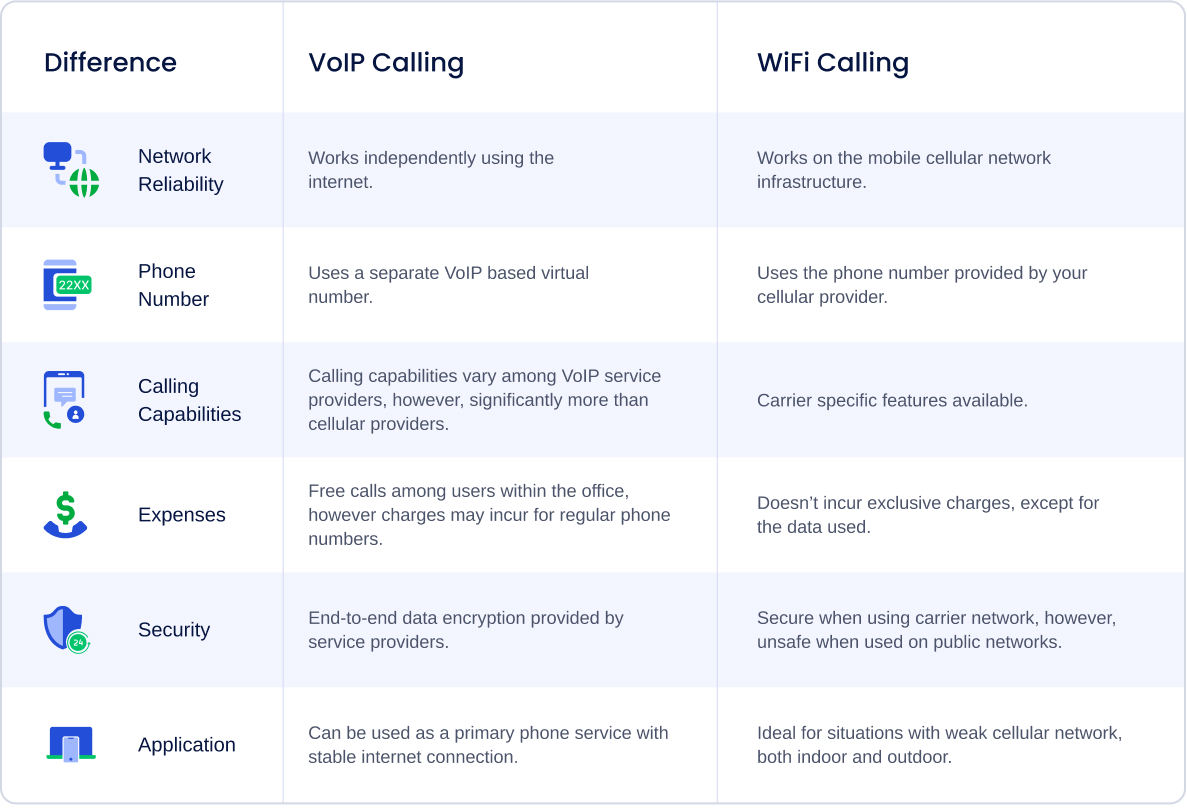
Unlike Voice over IP (VoIP) applications such as Skype or WhatsApp, which require both parties to use the same app, native Wi-Fi calling is integrated directly into your phone’s dialer. The person receiving your call does not need to know that you are using a Wi-Fi connection; to them, it appears as a standard cellular phone call. This integration is essential for providing a seamless user experience that does not require the maintenance of secondary accounts or friend lists.
Primary Advantages of Utilizing Wi-Fi Calling
The most immediate benefit of Wi-Fi calling is the expansion of reachable service areas. Many users encounter "dead zones" in basements, older buildings with thick concrete or steel walls, or remote rural locations. Wi-Fi calling effectively turns your home, office, or local coffee shop into your personal cellular tower, provided there is a stable internet connection available.
Improved Call Quality
When cellular signals are weak, phones often struggle to maintain a high-quality audio stream, leading to metallic sounds, delay, or garbled speech. Wi-Fi networks, especially those utilizing 5GHz bands or Wi-Fi 6 technology, often provide higher bandwidth and lower jitter compared to a distant cellular tower. This environment allows for the use of high-definition (HD) voice codecs, resulting in clearer audio quality during everyday conversations.
Cost Efficiency and Global Roaming
For international travelers, Wi-Fi calling can be a significant cost-saving tool. Historically, international roaming fees for voice and text could be exorbitant. With Wi-Fi calling, if you are connected to a hotel or cafe Wi-Fi network abroad, your device treats the call as if you were back in your home country. Many carriers now include Wi-Fi calling as a standard feature, meaning that calls made to domestic numbers while abroad via Wi-Fi may be billed at domestic rates, or not charged as international roaming at all. It is essential, however, to verify your specific carrier’s roaming policy, as some providers apply different rules to international Wi-Fi usage.
Battery Longevity in Weak Signal Areas
It is a common misconception that Wi-Fi calling drains battery life more quickly. In reality, the opposite is often true. When a phone struggles to maintain a connection to a distant or obstructed cellular tower, the device’s radio transmitter increases power output to search for a stronger signal. This "constant searching" is a major contributor to battery depletion. By shifting that load to the Wi-Fi radio, which is typically more efficient at managing local connections, you can actually conserve battery life in areas with poor cellular reception.
Comparison of Connectivity Technologies
Understanding how Wi-Fi calling fits into the broader ecosystem of mobile connectivity helps clarify when and why you should use it.
| Feature | Cellular (LTE/5G) | Wi-Fi Calling | Third-Party VoIP Apps |
|---|---|---|---|
| Integration | Native (System Level) | Native (System Level) | App-Dependent |
| Hardware | Cellular Antenna | Wi-Fi Radio | Wi-Fi or Cellular Data |
| Coverage | Cell Tower Proximity | Any Wi-Fi Hotspot | Any Internet Access |
| Interoperability | Universal | Universal | App-to-App Only |
| Signal Stability | Variable (Distance/Walls) | High (Local LAN) | Dependent on App QoS |
Requirements for Successful Implementation
To benefit from Wi-Fi calling, both your device and your service provider must support the technology. As of 2026, most mid-range and premium smartphones released in the last several years include this capability natively.
Carrier and Device Compatibility
Your carrier must provision your account for Wi-Fi calling. While most major providers have enabled this by default, some budget or prepaid Mobile Virtual Network Operators (MVNOs) may have limitations. You can typically verify this in your phone’s Settings menu under the "Cellular" or "Connections" tab. If the "Wi-Fi Calling" toggle is present and active, your device is ready to use the feature.
Network Quality and Latency
While Wi-Fi is generally stable, it is not immune to issues. Wi-Fi calling requires a stable internet connection with sufficient upload and download speeds. If your network is heavily congested—for example, if multiple users are streaming high-definition video on the same connection—you may experience packet loss. This results in voice cut-outs or dropped calls. If you find your Wi-Fi calling is underperforming, ensure that your router is positioned correctly and that your internet service plan provides adequate bandwidth for real-time traffic.
Troubleshooting Common Issues
If you experience problems, the solution is often found in the synchronization between your device and the carrier's servers.
- Re-register E911 Address: Carriers are legally required to know your physical location for emergency services when you initiate a Wi-Fi call. If you have moved or changed addresses, you must update your E911 location settings in your carrier portal. An outdated address is the most common reason for Wi-Fi calling failure.
- Toggle Airplane Mode: Sometimes the phone’s radio stack needs to be refreshed. Switching the phone into Airplane Mode, waiting ten seconds, and turning it off forces the device to re-handshake with the cellular and Wi-Fi network gateways.
- Router Configuration: If you are at home and Wi-Fi calling refuses to connect, check your router’s firewall settings. Wi-Fi calling relies on specific ports (typically UDP 500 and 4500) to create a secure tunnel. If these ports are blocked by your router's security configuration, the service will not initialize.
- Restart the Device: Much like a computer, mobile devices can experience software glitches where the Wi-Fi calling service becomes hung in the background. A simple power cycle clears the cache and forces the device to re-verify its credentials with the carrier network.
Emergency Services and Jurisdictional Limitations
It is critical to understand the relationship between Wi-Fi calling and E911 services. Because the network cannot automatically determine your location through GPS or cell tower triangulation during a Wi-Fi call, it relies entirely on the address you have registered with your carrier. In an emergency, always attempt to make a voice call via cellular if possible. If you must use Wi-Fi, ensure your registered address is accurate. If you are in a jurisdiction that requires specific regional compliance, check your carrier's terms of service to see if your device is fully supported for emergency routing in your current location.
Future-Proofing Your Mobile Experience
As we move through 2026, the reliance on heterogeneous networks—networks that seamlessly switch between 5G and Wi-Fi—is increasing. Technologies like Voice over Wi-Fi (VoWiFi) are becoming more robust, with hand-off protocols that allow a call to transition from a cellular tower to a Wi-Fi access point without dropping the connection. To ensure the best experience, keep your phone’s operating system updated, as manufacturers frequently include radio firmware updates that improve the stability and performance of Wi-Fi calling features.
If you frequently find yourself struggling with dropped calls or poor audio, the most practical next step is to perform a signal test in your primary environment. By toggling Wi-Fi calling on and off while monitoring your call quality, you can determine if your home or office Wi-Fi provides the necessary consistency to serve as your primary connection method. For most users, enabling this feature is a "set it and forget it" improvement that provides immediate, tangible benefits to communication reliability.