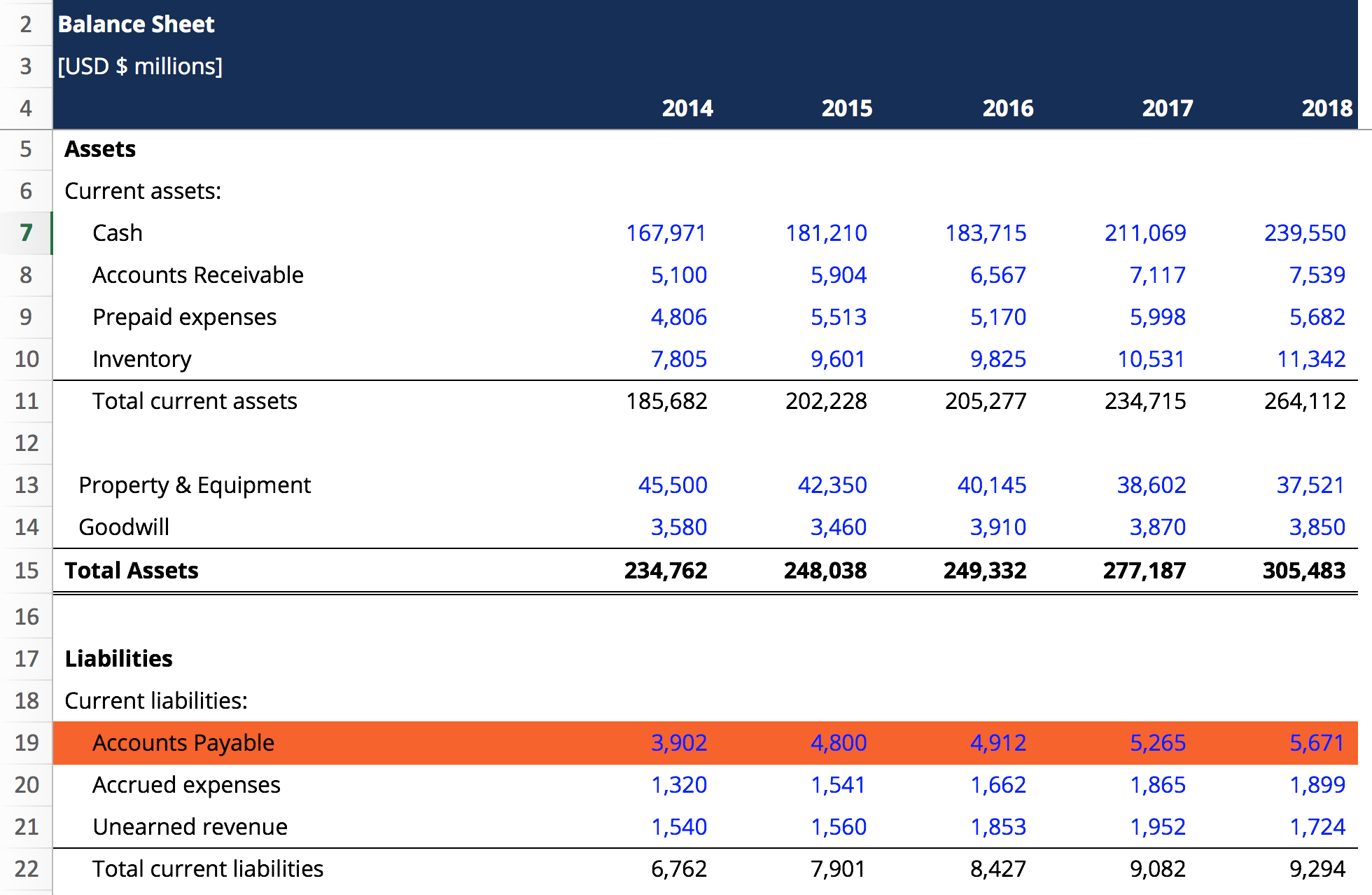
An accounts payable report is a critical financial document that tracks a company's outstanding obligations to its suppliers and creditors. It provides a detailed breakdown of short-term liabilities, payment due dates, and vendor-specific data, enabling businesses to manage cash flow effectively, maintain healthy vendor relationships, and ensure the accuracy of financial statements.
In 2026, accounts payable (AP) reporting has evolved from simple list-keeping into a sophisticated strategic tool. While the primary goal remains ensuring that debts are paid on time, the modern AP report serves as a diagnostic instrument for the entire supply chain and liquidity strategy of an organization. Understanding how to interpret these reports is essential for controllers, CFOs, and business owners who need to balance capital preservation with operational stability.
The Strategic Importance of Accounts Payable Reporting
Managing accounts payable is often viewed as a defensive task—preventing late fees and avoiding service interruptions. However, a robust reporting framework transforms AP into a proactive function. In the current 2026 fiscal environment, where interest rates and credit availability fluctuate, the ability to see exactly where cash is committed is a competitive advantage.
Cash Flow Forecasting and Liquidity Management
The most immediate benefit of a detailed AP report is the ability to forecast cash outflows accurately. By analyzing payment terms and due dates across the entire vendor base, the finance department can coordinate with the treasury to ensure sufficient liquidity. This prevents "cash crunches" where a company might have high revenue on paper but lacks the liquid funds to meet immediate obligations.
Vendor Relationship Management
Vendors are essentially short-term lenders. When a business pays on time, it builds trust and may earn preferential pricing or priority service. Conversely, consistently late payments reflected in AP reports can lead to "credit holds," where suppliers refuse to ship new goods until old debts are settled. Detailed reporting allows businesses to identify which vendors are most critical and ensure their payments are prioritized.
Fraud Prevention and Internal Controls
AP reports are a primary defense against occupational fraud, such as duplicate payments or "ghost" vendors. By reviewing activity reports and vendor summaries, auditors and managers can spot anomalies—such as multiple payments for the same invoice number or payments to entities with incomplete tax documentation—before they result in significant losses.
Core Types of Accounts Payable Reports
To manage a business effectively, one cannot rely on a single report. Different stakeholders require different views of the data. As of 2026, the following report types are considered standard in most Enterprise Resource Planning (ERP) and accounting systems.
1. The AP Aging Report
The AP Aging Report is the cornerstone of payable management. It categorizes unpaid invoices based on how long they have been outstanding. Typically, these are divided into "buckets":
- Current: Invoices not yet due.
- 1–30 Days Past Due: Recently missed payments.
- 31–60 Days Past Due: Payments that may trigger credit warnings.
- 61–90 Days Past Due: High-risk debt that often results in service interruptions.
- Over 90 Days: Severely delinquent accounts that may involve legal action or collections.
Analyzing the aging report helps a controller see if the company is becoming "top-heavy" with old debt, which is a red flag for insolvency or poor administrative oversight.
2. Vendor Summary Report
This report aggregates all activity for a specific vendor over a set period. It is used to evaluate how much business is being conducted with a particular supplier. In 2026, procurement teams use these reports to negotiate volume discounts. If a vendor summary shows $500,000 in annual spend, the business has significant leverage to ask for better payment terms (e.g., moving from Net 30 to Net 60) or a price reduction.
3. Cash Requirements Report
While the aging report looks at the past and present, the Cash Requirements Report looks at the future. It lists all invoices due within a specific upcoming window (e.g., the next 7, 14, or 30 days). This allows the finance team to set aside the necessary funds to cover the "payment run." It is an essential tool for avoiding overdraft fees and managing short-term investment vehicles.
4. Voucher Activity Report
This provides a chronological log of all invoices (vouchers) entered into the system. It is primarily used for auditing and troubleshooting. If there is a discrepancy in the General Ledger (GL), the voucher activity report allows an accountant to trace the entry back to the specific clerk, date, and source document.
5. Purchase Order (PO) Matching Report
In modern 2026 workflows, "three-way matching" is the gold standard. This report flags discrepancies between the Purchase Order (what was ordered), the Receiving Report (what was delivered), and the Invoice (what was billed). Discrepancies in this report indicate potential overbilling or errors in the warehouse receiving process.
Summary of Key AP Report Metrics
| Report Name | Primary Audience | Key Metric | Strategic Use Case |
|---|---|---|---|
| AP Aging | Controller / CFO | Days Payable Outstanding (DPO) | Assessing liquidity and credit health. |
| Cash Requirements | Treasurer | Total Outflow (Next 14 Days) | Short-term cash positioning and funding. |
| Vendor Summary | Procurement | Total Annual Spend | Negotiating discounts and contract terms. |
| PO Matching | AP Manager | Discrepancy Rate | Identifying billing errors or shipping issues. |
| Voucher Activity | Auditor | Entry Volume / Error Rate | Internal controls and audit trail verification. |
Technical Components of an Effective AP Report
For an accounts payable report to be actionable, it must contain specific data fields that allow for granular filtering. In the 2026 technological landscape, static PDFs are being replaced by dynamic, drill-down dashboards, but the underlying data requirements remain consistent.
Essential Data Fields
- Vendor Name and ID: Unique identifiers to prevent confusion between similar company names.
- Invoice Number: The primary reference for communication with the supplier.
- Invoice Date vs. Posting Date: The invoice date determines the aging, while the posting date determines which fiscal month the expense hits the books.
- Due Date: Calculated based on the agreed-upon payment terms (e.g., Net 30).
- General Ledger (GL) Code: Indicates which department or cost center is responsible for the expense.
- Payment Status: Whether the invoice is "Open," "Pending Approval," "In Dispute," or "Scheduled for Payment."
The Role of Accrual vs. Cash Basis
The way an AP report is generated depends heavily on the company's accounting method. Under accrual accounting, the liability is recorded as soon as the invoice is received and matched, regardless of when the cash leaves the bank. This provides a more accurate picture of total debt. Under cash-basis accounting, payables aren't officially "realized" until the check is cut or the ACH is sent, which can lead to a dangerous "blind spot" regarding future obligations.
Analyzing the AP Aging Report: Red Flags and Benchmarks
A senior technical SEO editor or financial analyst looks for patterns in the aging report to diagnose the "health" of the business.
High Concentration in the 61-90 Day Bucket
If a significant percentage of debt is sitting in the 61-90 day range, it suggests one of three things:
- Cash Flow Crisis: The company simply doesn't have the money to pay.
- Process Breakdown: Invoices are getting "lost" in the approval workflow.
- Dispute Management: There are unresolved issues with the quality of goods received, and the finance team is withholding payment as leverage.
Days Payable Outstanding (DPO)
DPO is a key performance indicator (KPI) derived from AP data. It measures the average number of days it takes a company to pay its invoices.
- A high DPO means the company is holding onto its cash longer, which is good for liquidity but can strain vendor relationships.
- A low DPO means the company pays very quickly, perhaps missing out on the opportunity to use that cash for other investments, though it may be capturing "early payment discounts" (e.g., 2% off if paid within 10 days).
Modern Enhancements in 2026: AI and Automation
As of 2026, accounts payable reporting has been transformed by Artificial Intelligence (AI) and Machine Learning (ML). These technologies have moved beyond simple data entry into the realm of predictive analytics.
Predictive Aging
Modern systems no longer just tell you what is late; they predict what will be late. By analyzing historical payment patterns and current cash inflows, AI can flag invoices that are at risk of missing their due dates. This allows the AP team to intervene early, perhaps by requesting a short-term extension from the vendor.
Automated Dispute Resolution
AI-powered PO matching reports can now automatically identify the reason for a discrepancy. Instead of an AP clerk manually comparing a packing slip to an invoice, the system identifies that "Vendor X consistently overcharges for shipping by 5%" and flags those specific line items for bulk negotiation.
Real-Time Dashboards
The "month-end report" is becoming a relic. In 2026, stakeholders use real-time dashboards that refresh every time an invoice is scanned via OCR (Optical Character Recognition). This immediacy allows for much tighter control over the "burn rate" of the company's cash.
Common Pitfalls in AP Reporting
Even with the best software, the "garbage in, garbage out" rule applies. Common errors can render an AP report useless or, worse, misleading.
- Unapplied Credits: If a vendor issues a credit memo for returned goods but the AP clerk doesn't "apply" it to an open invoice, the report will show a higher liability than actually exists.
- Duplicate Vendors: If "Global Supplies Inc." and "Global Supplies, LLC" both exist in the system, debt will be split between two profiles, making it impossible to see the true total spend with that entity.
- Stale Invoices: Sometimes invoices stay on the aging report for years because they were paid via a different method (like a corporate credit card) but never cleared from the AP module. These "ghost liabilities" distort the balance sheet.
Troubleshooting Discrepancies
When the AP report does not match the General Ledger (GL) balance for the Accounts Payable account, a reconciliation is required. The most common causes for this include:
- Journal Entries: Manual entries made directly to the GL account that do not pass through the AP sub-ledger.
- Date Mismatches: An invoice dated in December but posted in January will cause the year-end report to be off if not handled correctly.
- Currency Fluctuations: For companies dealing with international vendors, changes in exchange rates between the time an invoice is received and the time the report is run can cause minor variances.
Frequently Asked Questions
What is the difference between an AP report and an AR report?
While an Accounts Payable (AP) report tracks money your company owes to others (liabilities), an Accounts Receivable (AR) report tracks money that customers owe to your company (assets). AP represents cash outflow, whereas AR represents future cash inflow. Together, they provide the basis for a net cash flow analysis.
How often should a business run an AP aging report?
At a minimum, the AP aging report should be reviewed weekly. For larger organizations with high transaction volumes, daily reviews are standard practice to ensure that early payment discounts are captured and that no critical "stop-ship" notices are triggered by late payments.
Can an AP report help in detecting fraud?
Yes. By reviewing vendor summary reports and looking for "even dollar" amounts, duplicate invoice numbers, or vendors with addresses that match employee home addresses, the AP report serves as a vital internal control. Most 2026 ERP systems include "anomaly detection" that flags these issues automatically.
What are "Net 30" or "Net 60" terms in an AP report?
These are standard payment terms. "Net 30" means the full amount of the invoice is due 30 days after the invoice date. These terms dictate how the aging buckets are calculated. If you have "2/10 Net 30," you get a 2% discount if paid in 10 days; otherwise, the full amount is due in 30.
Why is my AP aging report "top-heavy"?
A "top-heavy" report means a large percentage of your debt is in the older categories (60+ or 90+ days). This is usually a sign of severe cash flow problems, a breakdown in the approval process, or significant disputes with major suppliers that need immediate executive attention.
Final Recommendations for 2026 AP Management
To maintain a healthy financial position in 2026, businesses should move toward centralized, automated reporting. Relying on manual spreadsheets is no longer viable given the speed of modern commerce. Organizations should prioritize:
- Implementing Three-Way Matching: Ensure that every invoice on your AP report is backed by a purchase order and a receipt of goods.
- Auditing the Vendor Master File: Regularly clean up duplicate vendors and verify tax IDs (TINs) to ensure reporting accuracy.
- Leveraging Dynamic Discounting: Use your AP report to identify which vendors offer the best ROI for early payment, effectively turning your AP department into a profit center.
- Integrating with Cash Management: Ensure your AP reports feed directly into your treasury management system for real-time liquidity visibility.
By treating the accounts payable report as a strategic asset rather than a clerical burden, businesses can protect their credit reputation, optimize their working capital, and build more resilient supply chains.