Reaching the one-year mark following the formal cessation of software and security support for a legacy smartphone like the iPhone 6 brings distinct challenges, notably regarding application compatibility, persistent security vulnerabilities, and declining hardware performance.
The iPhone 6, originally released by Apple in September 2014, experienced a remarkably long commercial and operational lifespan. However, when Apple officially moved the device and its larger sibling, the iPhone 6 Plus, into the vintage and obsolete product categories, it marked the absolute conclusion of official operating system updates. Looking back at the landscape one year after that official support cutoff date reveals a device transitioning from a functional secondary tool into a museum piece, shaped by strict software limitations, declining third-party application support, and hardware degradation.
The Lifecycle Context: When and Why Support Ended
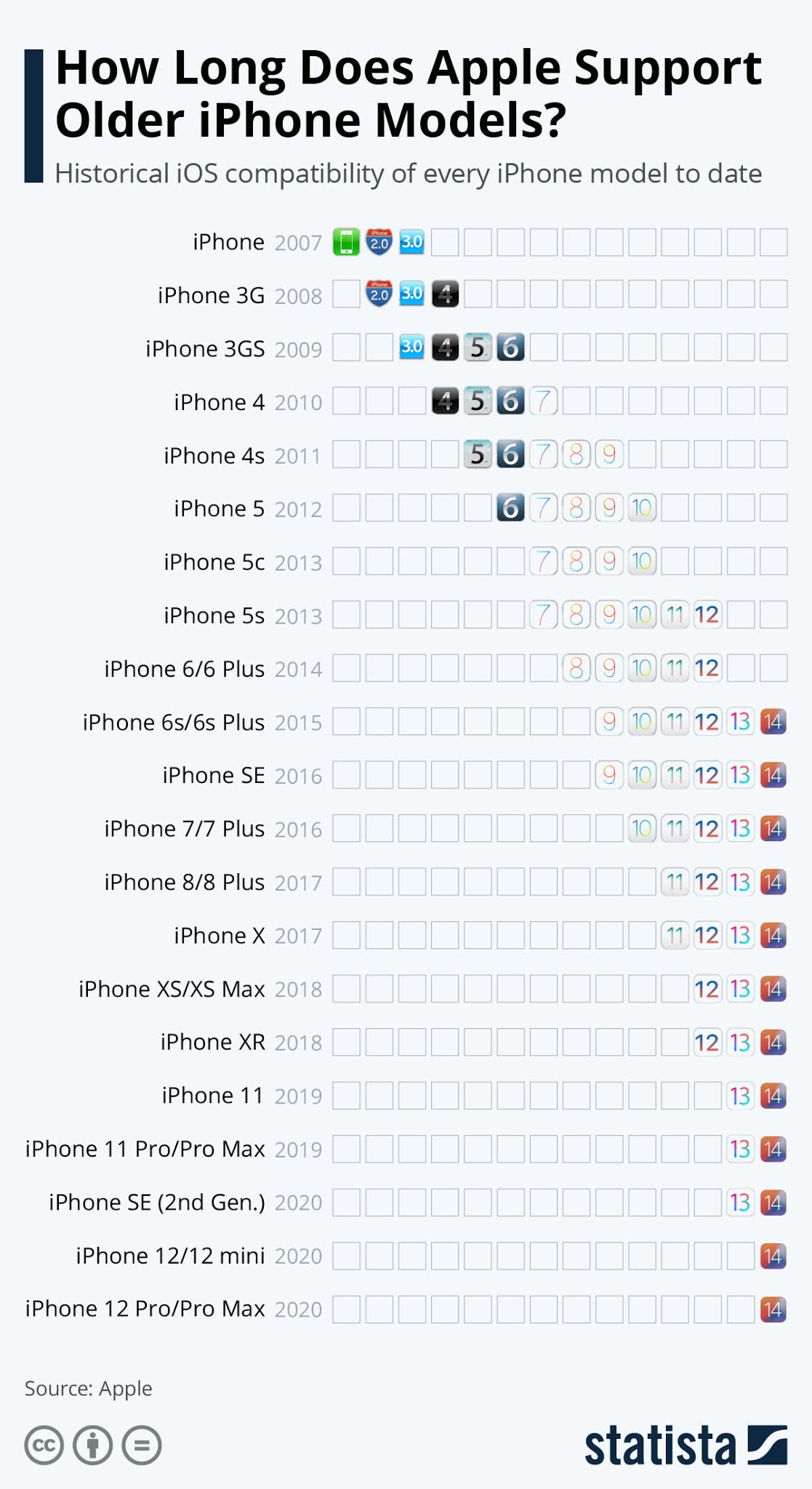
To understand the state of an iPhone 6 one year post-support, it is necessary to contextualize the timeline of its obsolescence. Apple dropped support for the iPhone 6 and 6 Plus with the release of iOS 13 in 2019, meaning the devices were restricted to iOS 12. For several years following that major OS cutoff, Apple continued to issue critical security patches for iOS 12 to protect older hardware still active in the wild.
However, the definitive end date for these legacy security updates arrived when Apple ceased patching critical vulnerabilities for iOS 12 entirely. Looking at the device one full year after that final safety net was removed exposes the cumulative effects of operating without foundational software defenses. Without ongoing security patches, any discovered kernel flaws, web-rendering vulnerabilities, or network protocols remain permanently open to exploitation.
Software Architecture Limitations
The primary barrier preventing the iPhone 6 from running modern versions of iOS is hardware architecture—specifically, its processing power and memory capacity.
- The A8 Chip: The 64-bit Apple A8 system-on-chip was revolutionary in 2014, but its dual-core 1.4 GHz architecture lacks the efficiency and neural processing capabilities required for modern machine learning frameworks, advanced augmented reality APIs, and complex graphics rendering.
- RAM Constraints: Equipped with only 1GB of LPDDR3 RAM, the iPhone 6 struggles immensely with modern multitasking. Contemporary mobile applications frequently demand 4GB to 8GB of RAM to maintain background states, process high-resolution images, and execute complex JavaScript routines.
App Compatibility Landscape One Year Later
One of the most noticeable impacts for anyone attempting to use an iPhone 6 one year after the absolute end of support is the precipitous drop in third-party application availability. App developers rarely maintain backward compatibility for operating systems that are multiple generations old, as doing so requires maintaining separate codebases and testing against legacy APIs.
The App Store Ecosystem
Navigating the App Store on an iOS 12 device presents a frustrating user experience:
- Incompatible Downloads: Trying to install popular modern applications—such as banking utilities, messaging clients, and streaming services—often triggers an error message stating that the app requires a newer version of iOS.
- The "Download Older Version" Workaround: Apple’s App Store occasionally allows users to download the last compatible version of an app if they have previously purchased or downloaded it. However, this workaround fails when developers deprecate server-side support for older API endpoints.
- Web-Based Alternatives: With native apps failing, users are forced to rely on mobile web browsers. Unfortunately, Safari on iOS 12 is also outdated, failing to render modern CSS grids, WebGL elements, and JavaScript frameworks correctly, leading to broken layouts and frequent browser crashes.
| Application Category | iPhone 6 Compatibility Status (1 Year Post-Support) | Primary Limitation |
|---|---|---|
| Mobile Banking | Severely Restricted | Security protocols and TLS requirements demand iOS 15+. |
| Social Media | Mostly Incompatible | Modern frameworks require advanced rendering APIs found in iOS 14+. |
| Messaging & Chat | Partially Compatible | Older app versions may function temporarily, but lack end-to-end encryption updates. |
| Web Browsing | Compromised | Safari and third-party browsers lack current web standards and security certificates. |
Security Realities and Vulnerabilities
Operating a smartphone one year after it stops receiving security updates introduces significant digital risks. Security updates are not merely feature drops; they patch zero-day exploits, memory corruption bugs, and wireless protocol flaws that malicious actors actively scan for.
Web-Based Threats
Without a modern web browser and a current WebKit engine, an iPhone 6 is highly susceptible to drive-by downloads and phishing attacks. Modern websites utilize advanced encryption standards and security headers that outdated mobile browsers cannot properly interpret or verify. Consequently, visiting standard HTTPS websites can result in certificate warnings or complete connection failures.
Data Privacy Concerns
Because the device lacks modern sandbox isolation protocols and secure enclave updates, any malware that successfully breaches the operating system can potentially access stored credentials, locally cached photos, and personal messages. For these reasons, financial institutions and corporate mobile device management (MDM) policies universally block unpatched devices from accessing secure networks.
Hardware Degradation and Battery Health
Software obsolescence is only half the equation; physical wear and tear heavily dictate the usability of an iPhone 6 one year past its support horizon. Lithium-ion batteries degrade chemically over time, regardless of whether the phone is actively used or left sitting in a drawer.
Chemical Aging of the Battery
- Reduced Capacity: An original iPhone 6 battery that has not been replaced will typically hold less than 60% of its original design capacity. This results in standby times measured in hours rather than days.
- Voltage Sag: Under heavy loads, a degraded battery experiences voltage sag, prompting the iOS power management system to artificially throttle the CPU clock speed to prevent unexpected shutdowns. This throttling makes an already slow device feel sluggish and unresponsive.
Component Wear
Beyond the battery, physical components show signs of age. The Lightning port accumulates lint and experiences microscopic metal wear, leading to intermittent charging or data transfer failure. Furthermore, the physical Home button—relying on the first-generation Touch ID sensor—may exhibit responsiveness degradation due to mechanical fatigue.
Practical Alternatives and Next Actions
Persisting with an unsupported iPhone 6 as a daily driver is no longer viable due to security risks and application incompatibilities. Transitioning away from the device requires evaluating several practical alternatives depending on budget and technical needs.
Upgrading Within the iOS Ecosystem
Users wishing to remain within the Apple ecosystem without spending heavily on a flagship device have several viable upgrade paths:
- Budget-Friendly SE Models: Purchasing a later-generation iPhone SE (such as the second or third generation) provides modern processing power, full iOS support, and familiar form factors at a fraction of the cost of a flagship device.
- Refurbished Recent Models: Refurbished iPhone 11 or iPhone 12 units offer extended software longevity, improved camera systems, and OLED or high-grade LCD displays while remaining budget-conscious.
Repurposing the iPhone 6
For those who prefer not to recycle their device, an unsupported iPhone 6 can still serve restricted, offline functions:
- Dedicated Audio Player: Loaded with local MP3 files or used with legacy music streaming apps (if an older version still connects), it can function as a dedicated media player.
- Smart Home Control Panel: Mounted on a wall and connected to local Wi-Fi, it can run basic local home automation dashboards, provided they do not require up-to-date cloud security certificates.
Frequently Asked Questions
Can I still make phone calls and send text messages on an iPhone 6?
Yes, basic cellular functionality—voice calls, SMS, and MMS—continues to work normally provided your carrier still supports 4G LTE networks. However, carrier reliance on Voice over LTE (VoLTE) means that regional network shutdowns of legacy frequency bands may eventually impact voice connectivity.
Is it safe to use public Wi-Fi on an unsupported iPhone 6?
It is strongly discouraged. Because the device lacks modern security patches, connecting to public Wi-Fi networks exposes the phone to man-in-the-middle attacks, packet sniffing, and exploits targeting outdated network stack implementations.
Why do apps crash immediately upon opening on my iPhone 6?
Apps crash because they attempt to call system APIs or software libraries that do not exist in iOS 12. When the app encounters an unsupported framework, it triggers a fatal exception, causing the operating system to force-close the application instantly.
Can I install a custom ROM or newer version of iOS on an iPhone 6?
Unlike the Android ecosystem, iOS is tightly controlled by Apple's cryptographic signature verification. There are no stable, secure custom ROMs or unofficial methods to install modern versions of iOS on an iPhone 6 due to hardware and bootloader limitations.
Final Recommendation
One year after the official support end date, the iPhone 6 is strictly a legacy device unsuitable for daily communication, mobile banking, or secure web browsing. Users still holding onto the hardware should back up any remaining local photos or notes, securely wipe the device, and transition to a modern smartphone that receives active security updates to ensure personal data safety and full application compatibility.