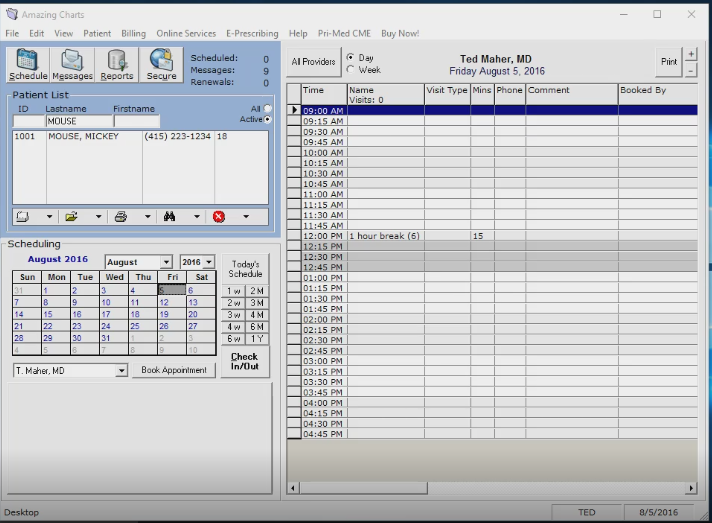
Amazing Charts is a prominent Electronic Health Record (EHR) and Practice Management solution designed specifically for independent medical practices. It prioritizes a "one-screen" charting philosophy to reduce administrative burden. The platform offers integrated tools for clinical documentation, medical billing, revenue cycle management, and patient engagement to streamline small-office workflows.
The Evolution and Market Position of Amazing Charts
Originally founded in 2001 by Dr. Jonathan Bertman, a family physician, Amazing Charts was born out of a necessity for a simple, affordable, and clinical-centric alternative to the overly complex EHR systems of the time. For over two decades, it has maintained a reputation for being one of the most user-friendly platforms for small-to-midsized independent practices.
Following its acquisition by Harris Healthcare in 2017, the company has expanded its technical resources while attempting to preserve the "physician-first" interface that defined its early success. In 2026, the software remains a staple for practitioners who prefer a localized or hybrid cloud environment rather than a purely browser-based, multi-tenant SaaS model. This distinction is vital for practices in areas with inconsistent internet connectivity or those who demand higher levels of control over their local data environment.
The primary appeal of the platform at amazingcharts.com is its rejection of the "click-heavy" architecture found in enterprise-level systems. Instead, it utilizes a layout that mimics a traditional paper chart, allowing clinicians to view the majority of a patient’s relevant clinical data on a single screen. This focus on "usability" consistently places the software at the top of independent surveys regarding physician satisfaction.
Core Software Modules and Functionality
Amazing Charts is not merely a digital filing cabinet; it is a suite of tools intended to handle the entire lifecycle of a patient encounter. The software is generally divided into several key modules that work in tandem to support clinical and administrative staff.
Electronic Health Records (EHR)
The EHR module is the flagship component. Its primary goal is to facilitate rapid charting. Practitioners can use "Chart Seeds" or templates to pre-populate notes based on common diagnoses, significantly reducing the time spent on repetitive typing. The system supports e-Prescribing (eRx), including Controlled Substances (EPCS), which is a regulatory requirement in most jurisdictions by 2026.
Key clinical features include:
- The Summary Sheet: A comprehensive view of allergies, medications, problems, and vitals.
- Health Maintenance Reminders: Automated alerts for screenings, vaccinations, and follow-ups based on age and gender protocols.
- Order Tracking: A centralized hub to monitor the status of laboratory and imaging orders, ensuring that results are reviewed and signed off by the provider before being filed.
Practice Management (PM)
While the EHR handles the clinical side, the Practice Management module manages the "front office." This includes scheduling, patient registration, and insurance verification. The scheduler is designed for high-volume environments, allowing for color-coded appointment types and multi-provider views.
In the 2026 healthcare landscape, administrative efficiency is paramount. The PM system integrates real-time eligibility (RTE) checks, which allow front-desk staff to verify a patient's insurance coverage before the patient even walks through the door. This reduces claim denials and improves the collection of co-pays at the point of service.
Revenue Cycle Management (RCM) and Billing
For many practices, the transition from clinical note to paid claim is where the most friction occurs. Amazing Charts provides two paths for financial management:
- Integrated Billing Software: A built-in module for practices that manage their own billing. It generates CMS-1500 and UB-04 forms and facilitates electronic claims submission via a clearinghouse.
- Full RCM Services: For practices that wish to outsource their billing, Amazing Charts offers a service where their internal team handles coding, claim scrubbing, denials management, and patient statements.
Technical Infrastructure and Deployment Options
One of the most significant decisions a practice makes when visiting amazingcharts.com is choosing between a local (On-Premise) or Hosted (Cloud) deployment. As of 2026, both options remain supported to cater to different technical needs.
On-Premise Deployment
This traditional model requires a local server at the medical office. It uses a Microsoft SQL Server database to store patient records.
- Pros: Data is physically located on-site; the system functions even if the office internet goes down; no monthly hosting fees.
- Cons: The practice is responsible for server maintenance, hardware upgrades, and manual data backups. It also requires a robust local network infrastructure.
Cloud/Hosted Deployment
In this model, the software and data are hosted in a secure, HIPAA-compliant data center managed by Amazing Charts.
- Pros: Lower upfront hardware costs; automatic backups; accessibility from any location with an internet connection; simplified remote work capabilities.
- Cons: Requires a stable, high-speed internet connection; involves a recurring monthly hosting fee per user.
System Requirements for 2026
For offices choosing the local installation, the hardware must meet specific benchmarks to ensure the software remains responsive.
- Server: Windows Server 2022 or higher, with at least 32GB of RAM and SSD storage.
- Workstations: Windows 11 Pro, Intel i5/i7 (or equivalent) processors, and a minimum of 16GB of RAM.
- Network: A Gigabit Ethernet backbone is highly recommended to handle the transfer of high-resolution medical images and large PDF attachments within the chart.
Pricing Structures and Total Cost of Ownership
Amazing Charts has historically been known for its transparent pricing, though the "low-cost" label has evolved into a "value-driven" model as regulatory requirements (like MIPS and MACRA) have increased development costs.
| Component | Estimated Cost (2026) | Billing Frequency |
|---|---|---|
| EHR Licensing (Per Provider) | $2,000 - $2,500 | One-time (Initial) |
| Annual Support & Updates | $1,200 - $1,500 | Annually |
| Practice Management (PM) | $500 - $700 | One-time (Initial) |
| Cloud Hosting (Optional) | $100 - $200 | Monthly (Per User) |
| e-Prescribing (EPCS) | $200 - $400 | Annually |
| Patient Portal | Included in Support | N/A |
Note: These figures are estimates based on standard 2026 market rates for Harris Healthcare products and may vary based on specific practice size and contract terms.
When calculating the Total Cost of Ownership (TCO), practices must also account for the "hidden" costs of implementation. These include data migration fees (moving records from an old EHR), staff training hours, and potential hardware upgrades. Most practices should budget an additional $3,000 to $7,000 for the first year of implementation to cover these contingencies.
Interoperability, Compliance, and Data Security
In 2026, an EHR is only as good as its ability to communicate with other systems. Amazing Charts utilizes the HL7 and FHIR (Fast Healthcare Interoperability Resources) standards to exchange data with external laboratories, imaging centers, and state immunization registries.
MIPS and MACRA Participation
The platform is a Certified Health IT product. This certification is essential for providers participating in the Quality Payment Program (QPP) under MACRA. The software includes built-in dashboards that track a provider’s performance on MIPS (Merit-based Incentive Payment System) measures, such as "Promoting Interoperability" and "Quality." This allows practices to monitor their scores throughout the year to avoid negative payment adjustments from Medicare.
Data Security and HIPAA
Security is handled through multi-layered protocols. For cloud users, data is encrypted both at rest and in transit. Local users are provided with tools to manage user permissions, ensuring that staff members only have access to the information necessary for their specific roles (Minimum Necessary Rule). Audit logs are maintained automatically, recording every instance of a patient record being opened, edited, or printed.
Step-by-Step Guide to Implementation
Adopting Amazing Charts involves a structured process to minimize clinical downtime. Small practices should allow for a 60-to-90-day window for a full transition.
- Readiness Assessment: Evaluate the current hardware and network. Determine if the practice will use a local server or the hosted cloud version.
- Data Extraction: If moving from another EHR, the "old" vendor must provide a data export (usually in SQL, CSV, or CCDA format). Amazing Charts technicians evaluate this data for "mappability."
- Software Installation and Configuration: The core database is set up. Templates are customized to the specific specialty (e.g., specific workflows for Pediatrics vs. Internal Medicine).
- Staff Training: This is the most critical step. Training should be split into "Administrative" (scheduling/billing) and "Clinical" (charting/eRx) tracks.
- Go-Live Support: During the first week of use, many practices reduce their patient volume by 50% to allow staff to acclimate to the new digital workflow without the pressure of a full waiting room.
- Post-Implementation Audit: After 30 days, the practice should review its billing cycles and MIPS dashboards to ensure all data is flowing correctly.
Comparison with Market Competitors
Choosing an EHR requires a balanced look at the competition. Amazing Charts competes primarily with Practice Fusion, eClinicalWorks, and Athenahealth.
- Amazing Charts vs. Practice Fusion: Practice Fusion is a pure-SaaS, web-based model. It is often cited as easier to start but less customizable than Amazing Charts. Amazing Charts offers better support for those who want a local database.
- Amazing Charts vs. eClinicalWorks: eClinicalWorks is a massive, feature-rich enterprise system. While more powerful, it has a significantly steeper learning curve and can feel overwhelming for a solo practitioner. Amazing Charts is generally considered more "nimble."
- Amazing Charts vs. Athenahealth: Athenahealth operates on a percentage-of-collections model. It is very hands-off for billing but much more expensive for high-revenue practices compared to the flat-fee structure of Amazing Charts.
Common Challenges and Troubleshooting
Despite its user-friendly reputation, users often encounter specific hurdles.
- Data Migration Quality: No data migration is 100% perfect. Often, scanned documents or older "free-text" notes may not map into the correct discrete data fields in the new system. Practices should keep their old system in "read-only" mode for at least a year for reference.
- Hardware Bottlenecks: On-premise users often complain about software "lag." This is almost always due to an underpowered server or a slow Wi-Fi connection. Hard-wiring workstations with Ethernet cables is the standard recommendation for solving performance issues.
- Template Fatigue: While templates save time, over-reliance on them can lead to "clonotyped" notes that insurance auditors may flag. Providers must ensure they add patient-specific details to every encounter.
Frequently Asked Questions
Is Amazing Charts compatible with Mac computers?
Amazing Charts is a native Windows application. To run it on a Mac, you must use a virtual environment like Parallels or Apple’s Boot Camp (on Intel-based Macs), or access the Hosted version via a Remote Desktop Protocol (RDP) client. There is no native macOS installation file.
How does the software handle pediatric growth charts?
The system includes specialized modules for pediatrics, including automatic percentile calculations for height, weight, and head circumference based on CDC and WHO datasets. These charts are updated automatically within the software as part of the annual support contract.
Can patients schedule their own appointments?
Yes, through the integrated Patient Portal. Practices can choose which time slots to make available online. Once a patient requests a slot, the front desk can either auto-confirm it or review it before it is officially added to the schedule.
What happens to my data if I decide to leave Amazing Charts?
Under HIPAA and various 21st Century Cures Act regulations regarding "Information Blocking," you own your data. Amazing Charts provides tools to export your patient records in a standard format (such as CCDA), though there may be technical service fees if you require their staff to perform a full SQL database extraction.
Does the software support telehealth?
Yes, as of 2026, Amazing Charts has a fully integrated telehealth module. It allows providers to launch a HIPAA-compliant video session directly from the patient’s chart, allowing the clinician to document the visit in real-time while viewing the patient.
Final Recommendation for Medical Practices
Amazing Charts remains an ideal choice for the independent physician who values a straightforward, clinical-first interface and wants to avoid the complexity of enterprise systems. It is particularly well-suited for family medicine, internal medicine, and pediatrics.
If your practice prioritizes local data control and a one-screen charting workflow, you should start by requesting a live demo at amazingcharts.com. However, before signing a contract, ensure you have a clear understanding of your data migration needs and verify that your local hardware meets the 2026 specifications to ensure a smooth transition.