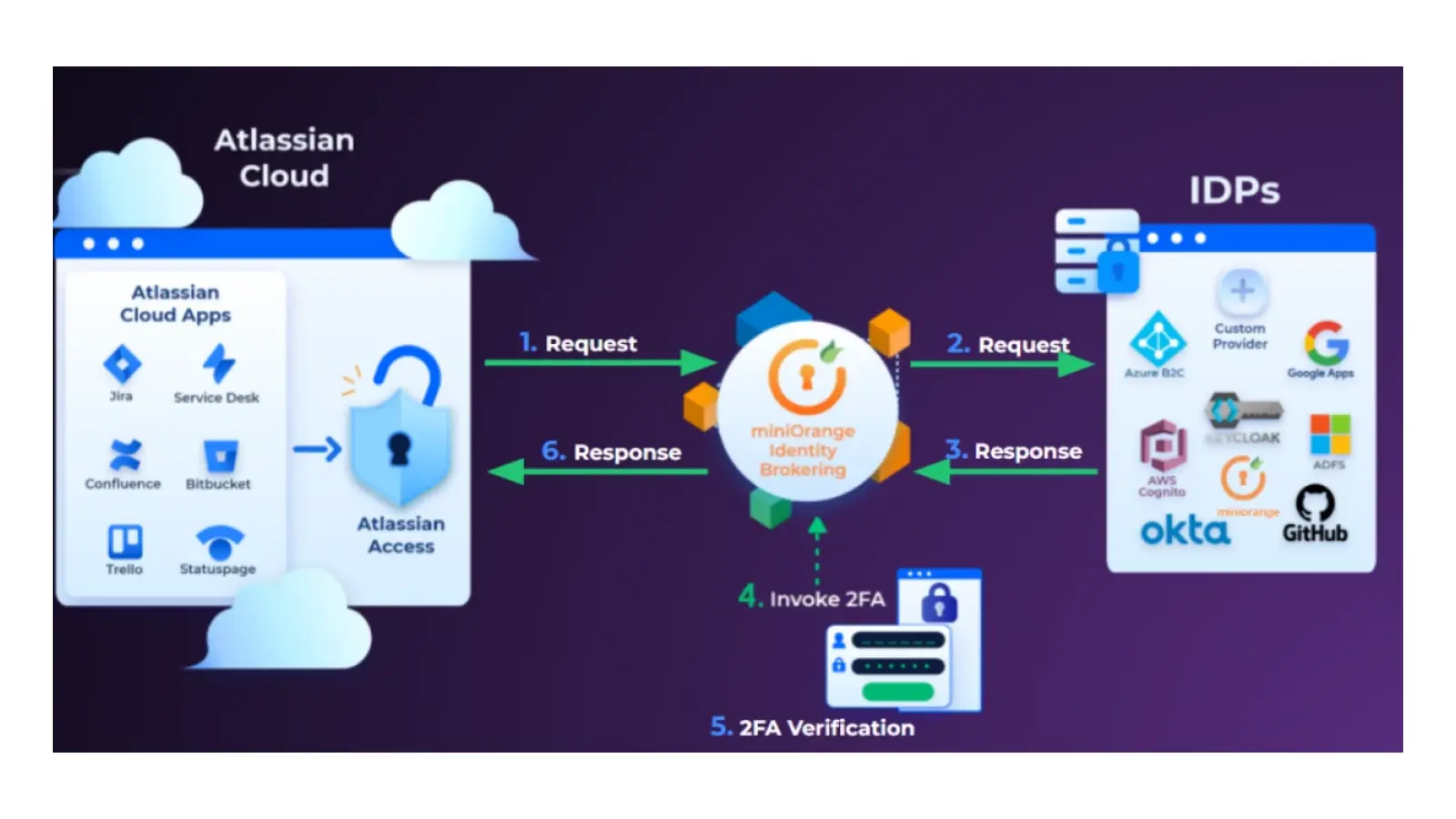
Atlassian cloud security is a multi-layered protection framework designed to secure data across Jira, Confluence, Bitbucket, and Trello. It utilizes a shared responsibility model where Atlassian manages infrastructure-level security—including encryption, tenant isolation, and physical data center protection—while customers control identity management, permissions, and third-party app integration through tools like Atlassian Guard.
As organizations move more of their mission-critical workflows to the cloud, the perimeter of cybersecurity has shifted from the corporate network to the identity and application layers. In 2026, securing an Atlassian environment requires more than just a strong password; it demands a sophisticated understanding of how data flows through the Atlassian platform, how encryption keys are managed, and how global compliance standards are met. This article provides an in-depth exploration of the current Atlassian cloud security architecture, the tools available for administrators, and the strategic steps necessary to maintain a hardened posture.
The Shared Responsibility Model in 2026
The cornerstone of Atlassian cloud security is the Shared Responsibility Model. This framework clarifies the division of duties between the service provider (Atlassian) and the user (the customer). Understanding this distinction is vital for avoiding security gaps that often lead to data exposure.
Atlassian’s Responsibilities: Security "Of" the Cloud
Atlassian is responsible for the security of the infrastructure that runs all of the services offered in the Atlassian Cloud. This includes the physical security of the servers (primarily hosted on Amazon Web Services), the host operating systems, and the virtualization layer. Atlassian manages:
- Physical and Network Security: Protecting the data centers against unauthorized physical access and ensuring the network architecture is resilient against Distributed Denial of Service (DDoS) attacks.
- Platform Isolation: Ensuring that one customer’s data is logically separated from another’s through robust tenant isolation mechanisms.
- Vulnerability Management: Continuous scanning, third-party penetration testing, and the management of a global Bug Bounty program to identify and remediate flaws in the platform code.
- Encryption at Rest and in Transit: Maintaining the underlying protocols (such as TLS 1.2+ and AES-256) that protect data as it moves or sits within their databases.
Customer Responsibilities: Security "In" the Cloud
Customers retain ownership and responsibility for how they use the platform. This means that even if Atlassian’s servers are impenetrable, a customer can still be compromised through poor internal practices. Customer duties include:
- Identity and Access Management (IAM): Provisioning users, enforcing Multi-Factor Authentication (MFA), and ensuring that only the right people have access to specific projects.
- Information Governance: Classifying data and ensuring that sensitive information is not placed in public-facing Confluence pages or Jira tickets.
- App Security: Vetting third-party Marketplace apps to ensure they meet the organization’s security standards.
- Client-Side Security: Ensuring that the devices used to access Atlassian products are secure and free of malware.
Atlassian Guard: The Centralized Security Hub
By 2026, the tool formerly known as Atlassian Access has evolved into Atlassian Guard. This evolved service provides a unified identity and security command center for all Atlassian cloud products. For enterprise-level security, Atlassian Guard is no longer optional; it is the primary mechanism for enforcing organizational policies across a distributed workforce.
Single Sign-On (SSO) and SCIM
Atlassian Guard allows organizations to connect their Atlassian site to an external identity provider (IdP) like Okta, Microsoft Azure AD (Entra ID), or Google Workspace. This ensures that users sign in using their corporate credentials, which can be protected by the organization's existing MFA policies. Furthermore, System for Cross-domain Identity Management (SCIM) provisioning automates the process of adding or removing users. When an employee leaves the company and is deactivated in the central IdP, their access to Jira and Confluence is revoked instantly, eliminating the risk of "ghost accounts."
Threat Detection and Activity Monitoring
Advanced tiers of Atlassian Guard now include proactive threat detection. This functionality uses machine learning to identify anomalous behavior, such as a user downloading an unusually high volume of Confluence pages or a login attempt from an unrecognized geographic location. These alerts allow security teams to intervene before a potential data exfiltration event occurs.
Data Loss Prevention (DLP)
Atlassian Guard integrates with DLP strategies by allowing administrators to scan for sensitive content—such as credit card numbers or API keys—within Jira issues and Confluence pages. In 2026, these capabilities have become more automated, providing real-time flagging of content that violates internal compliance policies.
Infrastructure Security and Tenant Isolation
Atlassian’s cloud infrastructure is built on AWS, leveraging a microservices architecture that prioritizes high availability and security. One of the most common questions regarding cloud security is how Atlassian prevents "data leakage" between different customers.
Logical Isolation
Atlassian uses a concept known as "logical isolation." Each customer’s data is tagged with a unique Tenant ID. Every request made to the database must be authenticated and authorized against this ID. This ensures that even though data from multiple customers may reside on the same physical hardware, a user from "Company A" can never see the data belonging to "Company B."
Encryption Standards
Data is encrypted in two distinct states:
- In Transit: All data moving between the user's browser and Atlassian's servers, or between Atlassian's internal microservices, is encrypted using Transport Layer Security (TLS) 1.2 or higher with Perfect Forward Secrecy (PFS).
- At Rest: Data stored in Atlassian’s databases and file storage is encrypted using the Advanced Encryption Standard (AES-256). In 2026, more organizations are utilizing Bring Your Own Key (BYOK) encryption, which allows enterprises to manage their own encryption keys via AWS Key Management Service (KMS), giving them the ability to "pull the plug" on their data access if they detect a breach.
Data Residency and Global Compliance
For companies operating in regulated industries (finance, healthcare, government), where data lives is just as important as how it is secured. Atlassian has significantly expanded its data residency options to meet these demands.
Regional Data Hosting
Administrators can choose to "pin" their data to specific geographic regions. This is critical for complying with laws like the GDPR (Europe), LGPD (Brazil), or specific Australian and Canadian privacy requirements. As of 2026, Atlassian offers residency in a vast array of regions, including the US, EU, Australia, Germany, Japan, Singapore, Canada, and the UK.
Compliance Certifications
Atlassian maintains a rigorous audit schedule to verify its security claims. Their compliance portfolio includes:
- ISO/IEC 27001 and 27018: Standards for information security management and the protection of personal data in the cloud.
- SOC 2 Type II and SOC 3: Independent reports on the fairness of the presentation and the suitability of the design of controls.
- HIPAA and BaA: Enabling healthcare organizations to use Atlassian products while maintaining patient data privacy.
- FedRAMP: Meeting the strict security requirements for US government agencies.
| Feature | Standard Cloud | Atlassian Guard (Premium) |
|---|---|---|
| Encryption | AES-256 (Atlassian Managed) | AES-256 + BYOK Options |
| Identity | Basic Atlassian Account | SSO, SCIM, & Org-wide MFA |
| Threat Detection | Not Included | AI-driven Anomalous Activity Alerts |
| Data Residency | Default (Global) | Region-specific Pinning |
| Audit Logs | Limited Product Logs | Comprehensive Org-level Audit Trails |
| Content Scanning | Manual | Automated Data Loss Prevention (DLP) |
Security Best Practices for Administrators
Achieving a high level of Atlassian cloud security requires active management. Below are the steps administrators should take to secure their environment in 2026.
1. Audit Third-Party Marketplace Apps
The Atlassian Marketplace offers thousands of apps that extend the functionality of Jira and Confluence. However, these apps often require permissions to read or write data. Administrators should prioritize apps that have the "Cloud Fortified" badge, which indicates the developer meets higher standards for security, reliability, and support. Always review the scopes requested by an app before installation.
2. Implement the Principle of Least Privilege
Users should only have the minimum level of access necessary to perform their job. Regularly review project permissions and global permissions to ensure that "Anonymous Access" is disabled and that sensitive projects are restricted to specific user groups.
3. Use Sandbox Environments for Testing
Before deploying new security configurations or third-party apps, test them in a Sandbox. This is a mirrored environment that allows you to observe the impact of changes without risking the integrity or security of your production data.
4. Enable Atlassian Intelligence (AI) Controls
By 2026, Atlassian Intelligence is deeply integrated into the platform. Security administrators must configure AI settings to ensure that data used for large language models remains within the organization's boundary and is not used to train models in a way that could leak proprietary information.
5. Monitor Audit Logs Regularly
Audit logs are essential for forensic investigations. Atlassian provides logs for site access, permission changes, and user activity. Integrating these logs into a Security Information and Event Management (SIEM) tool, such as Splunk or Microsoft Sentinel, allows for centralized monitoring and faster incident response.
Vulnerability Management and the Bug Bounty Program
Atlassian does not just rely on internal teams to find security flaws. They operate one of the industry's most successful Bug Bounty programs through platforms like Bugcrowd. This involves thousands of independent security researchers testing the products for vulnerabilities.
Furthermore, Atlassian follows a Secure Software Development Lifecycle (SSDLC). This means that security is not an afterthought; it is integrated into the coding process. Every code change is scanned for vulnerabilities and reviewed by security engineers before it is deployed to the cloud environment. This proactive approach significantly reduces the "window of exposure" for new exploits.
Frequently Asked Questions
Is Atlassian Cloud more secure than On-Premise?
In most cases, yes. Atlassian Cloud provides enterprise-grade security features—such as DDoS protection, 24/7 SOC monitoring, and automatic patching—that are difficult and expensive for most organizations to maintain on their own. By moving to the cloud, organizations offload the burden of infrastructure security to Atlassian’s dedicated security experts.
How does Atlassian handle data breaches?
Atlassian has a formal incident response plan. In the event of a confirmed breach, they are committed to notifying affected customers without undue delay, typically within the timeframes mandated by global regulations like GDPR. Their Trust Center provides real-time updates on system status and security advisories.
Can I control where my data is stored?
Yes, through data residency controls. Organizations on Enterprise or Premium plans can choose specific geographic locations for their Jira and Confluence data. This helps meet legal and regulatory requirements regarding data sovereignty.
What is the role of Atlassian Guard in security?
Atlassian Guard is the primary tool for identity and security at the organizational level. It enables SAML SSO, automated user provisioning (SCIM), and advanced security features like threat detection and data loss prevention. It acts as the bridge between your corporate identity provider and your Atlassian products.
Does Atlassian encrypt my data?
Yes, all customer data is encrypted at rest using AES-256 and in transit using TLS 1.2+. Additionally, Atlassian provides options for Bring Your Own Key (BYOK) for organizations that require more control over their encryption infrastructure.
Moving Forward with Atlassian Cloud Security
Securing an Atlassian environment in 2026 is a continuous process of refinement. The platform provides a robust foundation, but the ultimate security of the data resides in the hands of the administrators. By leveraging Atlassian Guard, enforcing the principle of least privilege, and maintaining a strict oversight of the Marketplace ecosystem, organizations can confidently utilize these tools for their most sensitive projects.
For those just beginning their cloud journey or looking to harden their existing instances, the first step should be a thorough audit of current user permissions and the implementation of SSO. As the threat landscape evolves, staying informed through the Atlassian Trust Center and adhering to the Cloud Security Alliance (CSA) guidelines will ensure your organization remains resilient against emerging cyber threats.