Seeing the message "ATM unable to process transaction" usually indicates a communication failure between the machine and your bank, a physical issue with your card’s chip, or an active security block on your account. To resolve this, verify your account balance via a mobile app, ensure your card is clean, or try a different ATM.
The Automated Teller Machine (ATM) remains a cornerstone of the financial ecosystem in 2026, serving as a vital bridge between physical currency and digital ledgers. However, the complexity of these machines—which involve hardware, local software, regional network switches, and international banking protocols—means that "unable to process" is a frequent, if frustrating, occurrence. Understanding the underlying causes of this error can help you navigate the situation without compromising your financial security or wasting time at a malfunctioning terminal.
Decoding the "Unable to Process" Message
When an ATM displays a generic "unable to process" notification, it is often a sanitized error message designed to protect the user's privacy and the machine's security. Unlike internal diagnostic codes used by technicians, public-facing messages are intentionally vague to prevent "social engineering" or "skimming" tactics where a bad actor might try to determine if an account is merely overdrawn or if a specific security protocol is active.
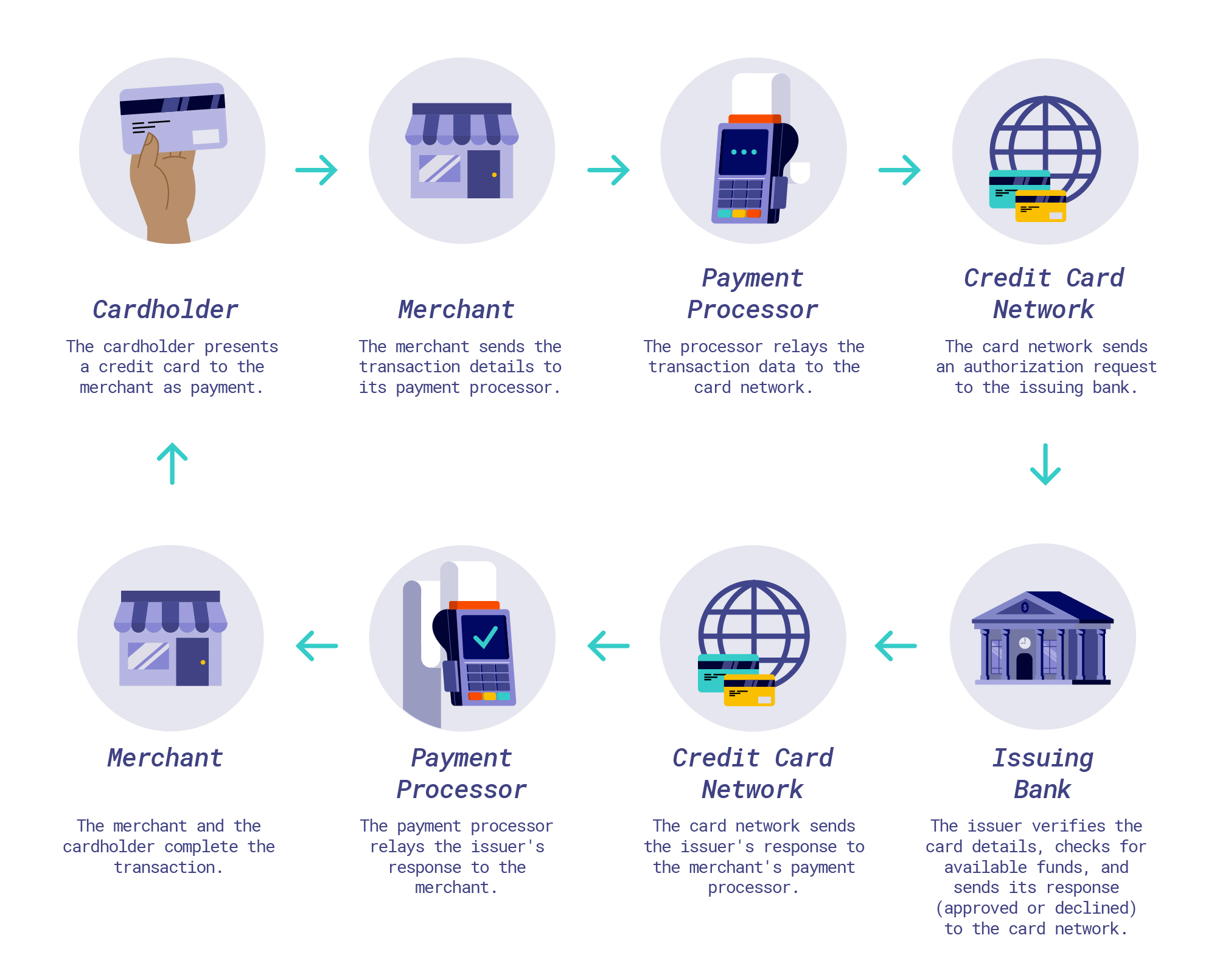
Typically, this message signifies that the transaction lifecycle was interrupted. A standard transaction involves the ATM reading your card data, verifying your PIN locally or via the network, sending an authorization request to your bank (the "issuer"), receiving an approval or denial, and finally dispensing cash. If any link in this chain breaks, the "unable to process" message appears.
Hardware vs. Software: Identifying Machine Failures
The physical condition of the ATM is the most common external reason for a failed transaction. Despite advancements in self-diagnostic software, hardware components can and do fail.
Mechanical Failures and Cash Depletion
ATMs are mechanical devices. They use rubber rollers and vacuum-sealed belts to pull currency from "cassettes" and move them to the delivery slot. Over time, these parts wear down.
- Currency Jams: If a bill is slightly crumpled or damp, it can jam the internal transport mechanism. If the ATM detects a jam, it will immediately halt all pending transactions to prevent incorrect dispensing.
- Cash Depletion: In high-traffic areas or during holiday weekends, machines may run out of specific denominations or all cash entirely. While modern machines usually display a "No Cash Available" warning on the home screen, some older or third-party models may only trigger the error once you attempt a specific withdrawal amount.
Sensor and Reader Issues
The card reader is the primary point of failure for many users. By 2026, the transition to EMV chip technology and NFC (Near Field Communication) for contactless withdrawals has reduced wear on magnetic stripes, but chips are still susceptible to dirt and oils. If the internal pins of the card reader cannot establish a clean electrical connection with your card’s chip, the machine will fail to initiate the "handshake" required to process the data.
The Role of the Banking Network and Interoperability
Your transaction does not move directly from the ATM to your bank. It travels through a series of "switches"—intermediary networks such as Plus, Cirrus, or STAR.
Network Timeouts
A network timeout occurs when the ATM sends a request but does not receive a response within a predefined window (usually 15 to 30 seconds). This can be caused by:
- Local Connectivity Issues: The ATM’s cellular or landline connection is unstable.
- Processor Downtime: The network switch handling the request is undergoing maintenance.
- Bank System Maintenance: Your specific bank may be performing backend updates, which often occur during low-traffic hours (typically 1:00 AM to 4:00 AM EST).
Interoperability Conflicts
If you are using an "off-network" ATM—one not owned by your bank—there are more points of failure. The machine must communicate with the ATM owner’s processor, which then contacts your bank. If the agreements between these entities have changed or if there is a regional service outage, the transaction will be blocked.
Account Restrictions and Security Blocks
Sometimes the problem isn't with the machine at all, but with the digital status of your account. Banks utilize sophisticated AI-driven fraud detection systems that analyze your spending patterns in real-time.
Velocity Checks and Limits
Banks impose "velocity checks" to prevent fraud. If you have made several withdrawals in a short period or have reached your daily ATM withdrawal limit (often ranging from $300 to $1,000 depending on your account tier), subsequent attempts will result in an "unable to process" error.
Geographic and Behavioral Triggers
If you are traveling and attempt to use an ATM in a new city or country without setting a travel notice, your bank may freeze the card immediately. In 2026, while many banks use GPS data from your mobile banking app to verify your location, discrepancies can still lead to automatic blocks. For more information on how banks handle these security measures, you can consult resources like the Office of the Comptroller of the Currency (OCC).
Card Expiration and Dormancy
Ensure your card has not expired. Even if the card worked for an online purchase yesterday, an ATM might reject it if the physical expiration date has passed. Additionally, if an account has been dormant (inactive) for an extended period, the bank may place a "status block" on the card, requiring a phone call to reactivate it.
Troubleshooting Steps: What to Do at the Machine
If you encounter a transaction failure, follow these steps systematically to identify the cause and protect your funds.
- Check the Receipt: If the machine provides a receipt, keep it. Look for a specific "Response Code" (such as 05, 51, or 61). These codes are the technical language for why the transaction failed.
- Inspect the Card: Look at the chip. If it is dirty, wipe it gently with a dry cloth. Do not use water or cleaning chemicals, which can damage the sensitive contact points.
- Verify via Mobile App: Open your bank’s app immediately. Check your balance to ensure you have sufficient funds (accounting for any "pending" transactions). Also, check for "Card Controls" or "Freeze Card" settings that might have been accidentally toggled on.
- Lower the Amount: If you requested a large sum, try a smaller withdrawal (e.g., $20). This can help determine if the issue is a machine cash-limit problem or an account-limit problem.
- Try a Different Machine: If possible, use an ATM physically located at a bank branch. These machines are maintained more frequently than those in convenience stores and have more robust network connections.
Common ATM Response Codes and Meanings
The following table outlines the most common technical response codes that may appear on a receipt or an internal bank log when a transaction fails.
| Code | Common Meaning | Recommended Action |
|---|---|---|
| 05 | Do Not Honor | General denial; contact your bank to clear a security flag. |
| 51 | Insufficient Funds | Check your balance; account for pending holds or "uncleared" deposits. |
| 54 | Expired Card | Check the date on your card; request a replacement if necessary. |
| 61 | Withdrawal Limit Exceeded | Wait 24 hours or call the bank to temporarily increase your limit. |
| 62 | Restricted Card | The card has been flagged for fraud or reported lost/stolen. |
| 91 | Issuer Unavailable | Your bank's network is down; try again in 30–60 minutes. |
| 96 | System Error | The ATM has a hardware or software malfunction; find another machine. |
Understanding Your Rights and Dispute Resolutions
In the event that an ATM claims it is "unable to process" but your bank account shows that the funds were still deducted, you are protected by federal regulations. In the United States, Regulation E (Electronic Fund Transfers) dictates the process for resolving such errors.
Filing a Dispute
If a "phantom withdrawal" occurs (where the machine fails to dispense cash but the money leaves your account), you must notify your bank immediately. You typically have 60 days from the date of the statement on which the error appeared to file a formal dispute.
The Investigation Process
The bank is required to investigate the claim. They will contact the ATM owner and request a "balance report." If the machine's physical cash count is higher than its digital record (meaning it has "extra" money because it failed to dispense your cash), the error is confirmed, and your funds will be returned. Under the Consumer Financial Protection Bureau (CFPB) guidelines, banks often provide a "provisional credit" while the investigation is ongoing.
The Future of ATM Technology in 2026
As we move through 2026, the technology behind ATMs continues to evolve to reduce these errors. Biometric ATMs—using palm vein scanning or facial recognition—are becoming more common, bypassing the physical card reader altogether. These systems eliminate failures caused by dirty chips or magnetic stripe wear.
Furthermore, Real-Time API Integration between banks and independent ATM operators is reducing the frequency of "Issuer Unavailable" errors. Instead of relying on legacy batch processing, modern ATMs use cloud-native infrastructure to ensure that even if one network node goes down, the transaction can be rerouted instantly.
FAQ
Why does the ATM say "unable to process" but my card works at stores?
Point-of-sale (POS) terminals in stores often use different authorization paths than ATMs. A store might process a transaction as "Credit" (not requiring a PIN), which follows a different network route. Additionally, ATMs require a "real-time" balance check, whereas some stores may have a "floor limit" that allows small purchases to be authorized offline.
Can a damaged ATM card reader steal my information?
While a simple malfunction won't steal your data, a "skimmer" or "shimmer" (a device placed over or inside the reader) can cause the machine to struggle with processing while simultaneously copying your data. If the reader feels loose or if there is unusual resistance when inserting your card, do not use the machine.
How long does a "security block" last on my card?
Most automatic security blocks are permanent until you verify the transaction with your bank. This is usually done via a text message alert, an in-app notification, or a phone call to the bank's fraud department. Once verified, the block is typically removed within seconds.
Is there a fee if the transaction fails?
Generally, you are not charged an ATM fee if the transaction is not completed. However, some international or third-party ATMs may still attempt to process a "Balance Inquiry" fee if you checked your balance before the withdrawal failed. Monitor your statement for any "Declined Transaction Fees," which some banks still charge, and ask for a waiver if the failure was due to a machine error.
What should I do if the ATM keeps my card?
If the machine "swallows" your card after an "unable to process" error, it is usually a sign that the card was flagged as "captured" by the bank (due to multiple wrong PIN attempts or being reported stolen) or the machine has a severe mechanical failure. Call the number on the ATM immediately to report the capture and then call your bank to deactivate the card and order a replacement.
Practical Recommendations
When faced with an ATM that is unable to process your transaction, do not keep trying the same card and PIN repeatedly. Most machines will lock your card or account after three failed attempts to prevent brute-force attacks.
Instead, perform a quick "triage": check your mobile app for alerts, wipe your card's chip, and if the error persists, move to a different machine located inside a reputable bank branch. For those traveling, always carry a backup payment method, such as a different card or a digital wallet (Apple Pay, Google Pay), as many 2026-model ATMs now support cardless withdrawals via NFC. If you suspect a machine malfunction has resulted in a loss of funds, document the machine's ID number, the time, and the location to facilitate a faster dispute process with your financial institution.