To program your Audi Q7 garage door opener, you must navigate the MMI (Multi Media Interface) to the "Garage Door Opener" settings, select a memory slot, and sync your handheld remote with the vehicle’s sensor. For most modern rolling-code systems, a final synchronization step using the "Learn" button on the garage motor is required to complete the handshake.
The Audi Q7 is a pinnacle of automotive engineering, combining luxury with highly integrated technology. One of the most convenient features found in the Q7 is the HomeLink® wireless control system. This system allows you to consolidate up to three radio-frequency (RF) devices—such as garage doors, estate gates, and home lighting—directly into your vehicle’s interface. However, because the Q7 has evolved through multiple generations, specifically the 4L (2006–2015) and the 4M (2016–Present), the programming process can vary. In 2026, most Q7s on the road utilize the MMI touch response system, which has moved physical buttons to digital menus.
Understanding the nuances of your specific garage door motor and your vehicle’s software version is essential for a successful setup. This guide provides a comprehensive, 7-step walkthrough designed for the modern Audi Q7, while also addressing the technical hurdles common to rolling-code security systems.
Prerequisites and Preparation
Before beginning the 7-step programming sequence, you must ensure that the environment and hardware are ready. Failure to perform these preliminary checks is the leading cause of programming failure.
Hardware Compatibility
Most garage door openers manufactured after 1996 use "rolling code" technology. This is a security feature that changes the access code every time the remote is pressed, preventing "code grabbing" by potential intruders. The Audi Q7 HomeLink system is compatible with the vast majority of these systems, including Security+ 2.0. If you are using an extremely old opener (pre-1996) or a very specific specialized gate system, you may require a HomeLink Compatibility Bridge.
Safety First
Always program your garage door with the vehicle parked outside the garage. The programming process requires the ignition to be on, and in some cases, the engine may need to be running to provide consistent voltage to the transmitter. Operating a vehicle inside a closed garage poses a severe risk of carbon monoxide poisoning. Additionally, the garage door will likely open and close several times during the process; ensure the path of the door is clear of children, pets, or obstructions.
Signal Interference
Electronic interference can disrupt the "handshake" between the remote and the Audi. Ensure that your handheld remote has a fresh battery. Even if the remote still opens the door, a weak battery may not emit a signal strong enough for the Audi's on-board receiver to "learn" the frequency during the calibration phase. Furthermore, high-output LED or CFL light bulbs in the garage door motor itself can sometimes emit RF interference; if you encounter repeated failures, try temporarily removing the bulbs from the motor unit.
The 7-Step Programming Guide for Audi Q7
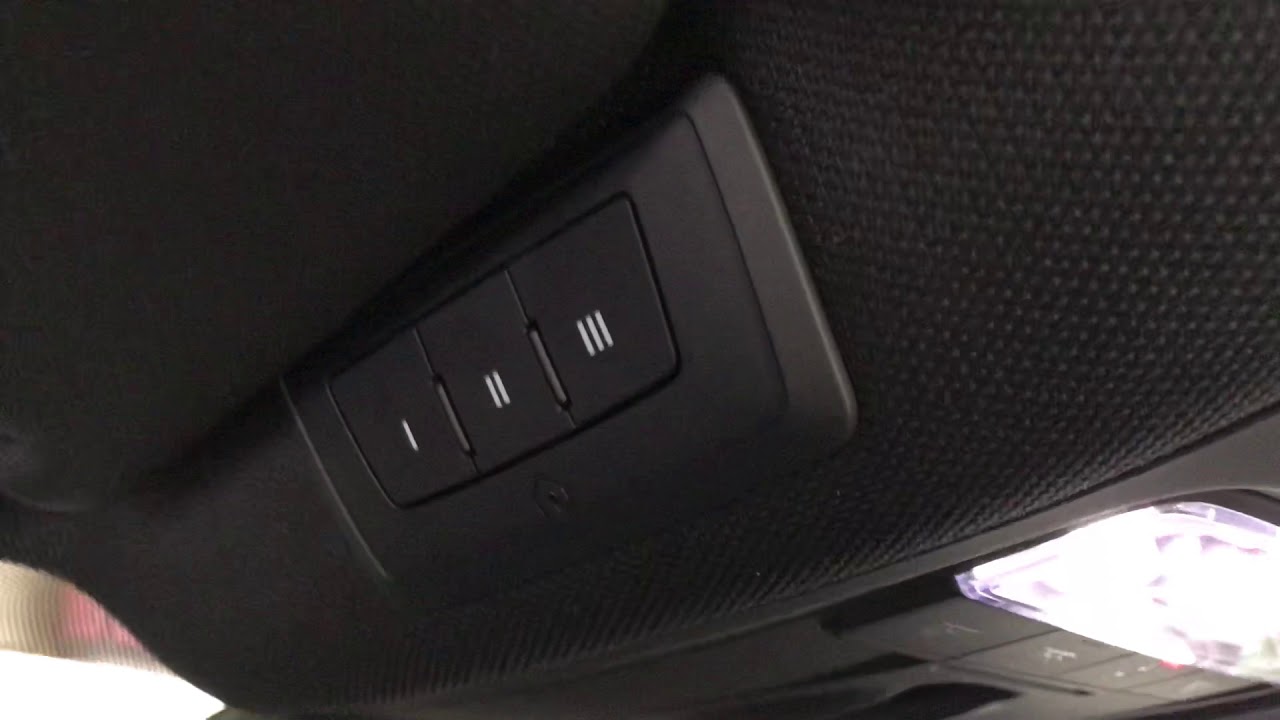
The following steps apply to the Audi Q7 models equipped with the MMI touch-screen interface (typically 2020–2026 models). If you have an older Q7 with physical buttons on the overhead console, the logic remains the same, but the "Select" actions will involve physical button presses.
Step 1: Initialize the MMI HomeLink Menu
Sit in the driver’s seat with all doors closed. Switch on the ignition (press the Start button without depressing the brake, or start the engine if battery levels are low). On the primary MMI touchscreen, select Vehicle, then navigate to Settings & Service. From this menu, locate and select Garage Door Opener.
If this is the first time you are programming the vehicle, the screen will likely be empty. If you are replacing an old code, you may see existing profiles. Select Program Garage Door Opener or the "+" icon to start a new assignment.
Step 2: Select the Memory Slot
The Audi Q7 allows for three different programmed buttons (often referred to as Button I, II, and III). Select the slot you wish to use. If your Q7 is a newer model with the digital "short-cut" bar, you can eventually assign this programmed action to the lower screen for quick access. Once you select a slot, the MMI will display a prompt: "Do you want to start the programming process now?" Select Yes.
Step 3: Clearing Existing Codes (If Necessary)
If you are buying a pre-owned Audi Q7, it is vital to clear the previous owner's codes for security and to prevent signal overlap. To do this, hold down the two outer buttons on the overhead console (if equipped) for 20 seconds until the LED flashes rapidly. On MMI-only systems, selecting "Delete All" in the settings menu accomplishes this. If you are simply adding a second or third door to an already programmed vehicle, do not perform a master reset, as it will wipe your existing working buttons.
Step 4: Synchronizing the Handheld Remote
The MMI will instruct you to take your handheld garage door remote and point it toward the rearview mirror or the front bumper, depending on the specific sensor location for your model year. For most 4M generation Q7s, the receiver is located near the rearview mirror or integrated into the front grille area.
Hold the handheld remote 1 to 3 inches away from the designated area and press and hold the "Open" button on the remote. Keep the button depressed until the Audi’s emergency flashers (turn signals) flash three times or the MMI screen displays a message stating "Signal Recognized." This confirms the car has successfully mirrored the frequency and fixed-code portion of your remote.
Step 5: Handling the Rolling Code Prompt
Once the signal is recognized, the MMI will ask: "Is the garage door moving?"
- If the door moves: The programming is complete (this usually only happens with older, fixed-code systems).
- If the door does not move: The MMI will recognize that the system uses a rolling code. It will then prompt you to perform a synchronization at the motor unit. This leads to the most critical part of the process.
Step 6: The "Learn" Button Handshake
Exit the vehicle and enter your garage. You will need a ladder to reach the garage door motor unit attached to the ceiling. Locate the Learn or Smart button on the back or side of the motor. It is often a colored button (purple, yellow, orange, or green) near the antenna wire.
Press and release the Learn button. A small LED near the button will begin to glow or blink. You now have a 30-second window to return to your Audi Q7. Return to the driver's seat and press the programmed HomeLink button on the MMI screen (or the physical button you selected) two or three times, holding it for two seconds each time. You should hear the garage door motor "click," or the lights on the motor will flash, signaling that the handshake is complete.
Step 7: Testing and Final Calibration
Once the synchronization is successful, the MMI will confirm the setup. Test the operation by pressing the button on the screen. The door should respond immediately. If the range seems poor—meaning the door only opens when the Q7 is directly in front of the driveway—ensure that the antenna wire on the garage motor is hanging straight down and is not wrapped around the housing, as this can drastically reduce the reception distance.
Comparison of Garage Door Opener Technologies
Understanding the technology behind your garage door can help explain why certain steps are necessary. In 2026, most homeowners deal with one of the following three standards:
| Technology Type | Security Level | Programming Difficulty | Audi Q7 Requirement |
|---|---|---|---|
| Fixed Code (Pre-1996) | Low | Easy | Step 4 only (Remote Sync) |
| Rolling Code (1996–Present) | High | Moderate | Steps 4 & 6 (Remote + Learn Button) |
| Security+ 2.0 (MyQ/Modern) | Very High | Moderate/Complex | Steps 4 & 6; may need a Bridge for older Q7s |
| Smart/Wi-Fi Integrated | Extreme | App-Based | Integrated via Audi Connect/Smartphone |
Troubleshooting Common Issues
Even with the correct 7 steps, users often encounter technical roadblocks. Here are the most common solutions for the Audi Q7:
The Turn Signals Never Flash
If the vehicle fails to recognize the handheld remote in Step 4, it is usually a distance or battery issue. Try moving the remote closer or further away from the sensor. For Audi Q7 models with the receiver in the front bumper, you may actually need to stand outside the car, in front of the Audi rings, and point the remote at the grille while an assistant watches the MMI screen.
Interference from Side Assist
In some Audi Q7 models, the Side Assist (blind-spot monitoring) system uses radar frequencies that can interfere with HomeLink programming. If you are having consistent trouble getting the car to "see" your remote, try turning off Side Assist in the MMI driver assistance menu temporarily while you program the garage door.
The "Two-Person" Requirement
While the 30-second window to hit the Learn button is usually sufficient for one person, the size of the Audi Q7 and the distance to the garage motor can make this tight. Having a second person stay in the car to press the MMI button as soon as you hit the "Learn" button on the ladder can significantly increase the success rate.
LED Bulb Interference
As mentioned in the preparation, modern LED bulbs are a frequent culprit. If your Audi programs successfully but refuses to open the door when the garage lights are on, the electromagnetic interference from the LED bulbs is likely "blinding" the garage motor's receiver. Switching to "Chamberlain/LiftMaster" branded LED bulbs, which are shielded against RF interference, usually solves this.
Frequently Asked Questions
1. Do I need my original garage remote to program my Audi Q7?
Yes, in almost all cases, the Audi needs to "sniff" the frequency and code format from an existing, working remote to begin the process. If you have lost all remotes, you must purchase a universal remote, program it to your garage motor first, and then use that remote to train the Audi.
2. Can I program my Audi Q7 to open my neighborhood gate?
Yes, the process is identical. However, many community gates use high-security frequencies that require the gate's property manager to put the gate controller into "Learn Mode," similar to how you use the "Learn" button on your home garage motor.
3. Why does my Audi Q7 lose its garage door programming after a battery change?
The HomeLink memory in the Audi Q7 is non-volatile, meaning it should survive a battery disconnection. However, if the battery voltage was extremely low for an extended period, the MMI may reset certain settings. If this happens, you will need to repeat the 7-step process.
4. How many different doors can I program to my Audi Q7?
The Audi Q7 supports up to three separate devices. These can be three different garage doors, or a combination of doors, gates, and HomeLink-compatible lighting systems.
5. What is a HomeLink Bridge, and do I need one for my Q7?
A HomeLink Bridge (or Compatibility Bridge) is a small device that plugs into an outlet in your garage. It acts as a translator between older HomeLink versions (found in older Q7s) and newer Security+ 2.0 garage motors (like those from LiftMaster or Chamberlain with yellow learn buttons). If your Q7 is a 2020–2026 model, you likely do not need one unless you are using a very specific industrial gate system.
6. Can I program the garage door using my smartphone instead?
If your Audi Q7 is equipped with the latest Audi Connect features and your garage door is a "Smart" opener (like those using the MyQ app), you may be able to link them via the Audi MMI’s integrated apps or through Apple CarPlay/Android Auto. However, the native HomeLink RF programming (the 7 steps) is generally preferred because it does not rely on a cellular data connection to function.
Final Recommendation
After successfully programming your Audi Q7, take a moment to set up the GPS-based automation if your vehicle is equipped with the latest MMI software. Modern Q7s can use GPS coordinates to recognize when you are approaching your home. When you reach a predefined distance (e.g., 50 feet from your driveway), the MMI will automatically display the garage door button on the screen, or even prompt you to open it, saving you from having to navigate through menus while driving. This small extra step in the settings menu transforms a simple remote into a truly integrated luxury experience.