While salt water pools are often described as "chlorine-free," this is a common misconception. In reality, a salt water chlorine generator (SWCG) produces chlorine on-site through electrolysis. However, there are specific instances—such as startup, heavy bather loads, or system malfunctions—where adding external chlorine to a salt water pool becomes a necessary maintenance task to ensure water safety and clarity.
Understanding the interaction between your salt water generator and supplemental chlorine is essential for pool longevity. When your system cannot keep up with the demand for sanitizer, or when you face an algae bloom, manual addition of chlorine is required. This process must be performed carefully to avoid damaging your equipment, particularly the salt cell, while maintaining the delicate chemical balance of your pool water.
Understanding the Salt Water Chlorine Generation Process
To understand why you might need to add manual chlorine, you must first understand what the salt water generator does. The SWCG system uses a low-voltage electrical current to pass dissolved salt (sodium chloride) through a series of titanium plates coated in precious metals. Through the process of electrolysis, this converts the chloride ions into hypochlorous acid—the same active sanitizing agent found in traditional liquid or tablet chlorine.
This system is designed for continuous, steady-state production. Because the generation happens in the plumbing line, the chlorine enters the pool gradually. Issues arise when the "chlorine demand" of the pool exceeds the maximum production rate of the cell. This often occurs in hot weather, following heavy rainfall, or during peak usage by large groups of swimmers. In these cases, the pool's chemistry can shift, and the system may struggle to return the Free Chlorine (FC) levels to the recommended range of 1.0 to 3.0 parts per million (ppm).
Prerequisites for Adding Supplemental Chlorine
Before you add any chemicals to your salt water pool, you must conduct a thorough water analysis. Never add chlorine blindly, as high levels of sanitizer can cause corrosion on metal pool components or irritate skin and eyes.
1. Test Your Water Chemistry
Use a high-quality DPD test kit or a digital photometer to measure the current levels of:
- Free Chlorine (FC): Ensure you know the current level to avoid over-chlorination.
- pH: The efficacy of chlorine is highly dependent on pH. If your pH is above 7.8, chlorine becomes significantly less effective at killing bacteria and algae.
- Cyanuric Acid (CYA): Often called "sunscreen for chlorine," CYA prevents the sun from burning off your sanitizer. For salt water pools, the ideal range is typically between 60 and 80 ppm.
- Total Alkalinity: Keeping this in the 80–120 ppm range helps buffer the pH against rapid fluctuations.
2. Choose the Right Chlorine Product
When adding chlorine to a salt water pool, the choice of product matters. It is highly recommended to use liquid chlorine (sodium hypochlorite) or calcium hypochlorite (cal-hypo) shock. Avoid using stabilized pucks or tablets (trichlor) if possible, as they add unnecessary stabilizer (CYA) to the pool. Over-stabilization can lead to "chlorine lock," where the sanitizer remains in the water but is rendered ineffective.
Step-by-Step Procedure for Manual Addition
If you have confirmed that your salt system is running at 100% and the water still requires a boost, follow this procedure to add chlorine safely.
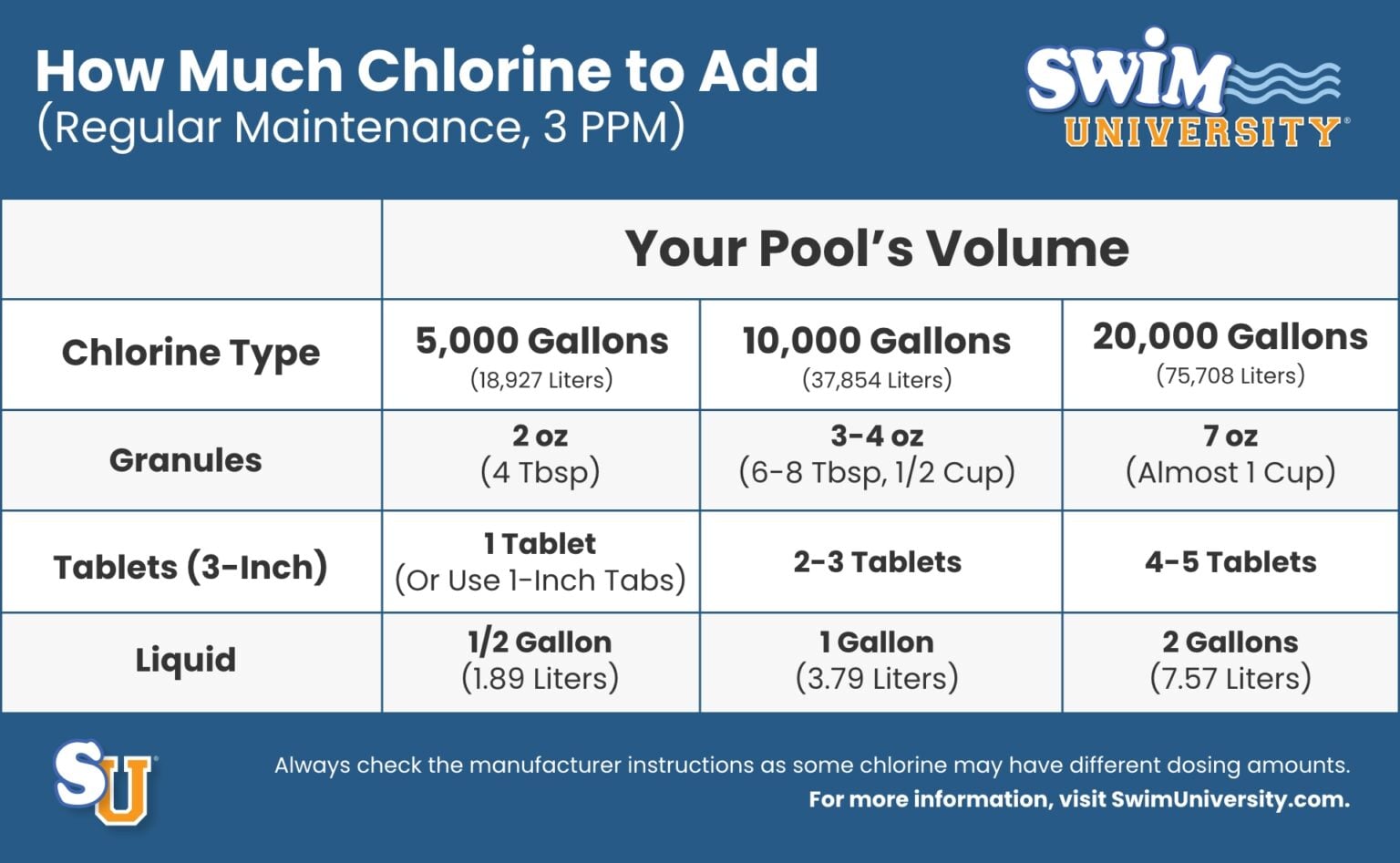
- Calculate the Required Dose: Use a reliable online pool volume calculator based on your pool’s dimensions. Determine the exact amount of chemical needed to reach your target chlorine level based on the product’s concentration.
- Dilute if Necessary: If using liquid chlorine, it is safer to pre-dilute it in a clean bucket of pool water. Never mix chemicals together in a bucket, as this can cause dangerous reactions.
- Distribute Evenly: With the pool pump running, walk around the perimeter of the pool and pour the diluted chlorine into the water. Aim for deep areas away from the pool walls and skimmer intakes. This ensures even distribution and prevents localized bleaching of vinyl liners.
- Monitor the Salt Cell: If you are "shocking" the pool (adding a very high dose of chlorine to treat an outbreak), turn the salt water generator off. High levels of chlorine can sometimes interfere with the sensors in the salt cell.
- Run the Pump: Keep the pool filtration system running for at least 4–8 hours after adding the chemical to ensure complete circulation throughout the entire volume of the pool.
Comparison of Sanitization Methods
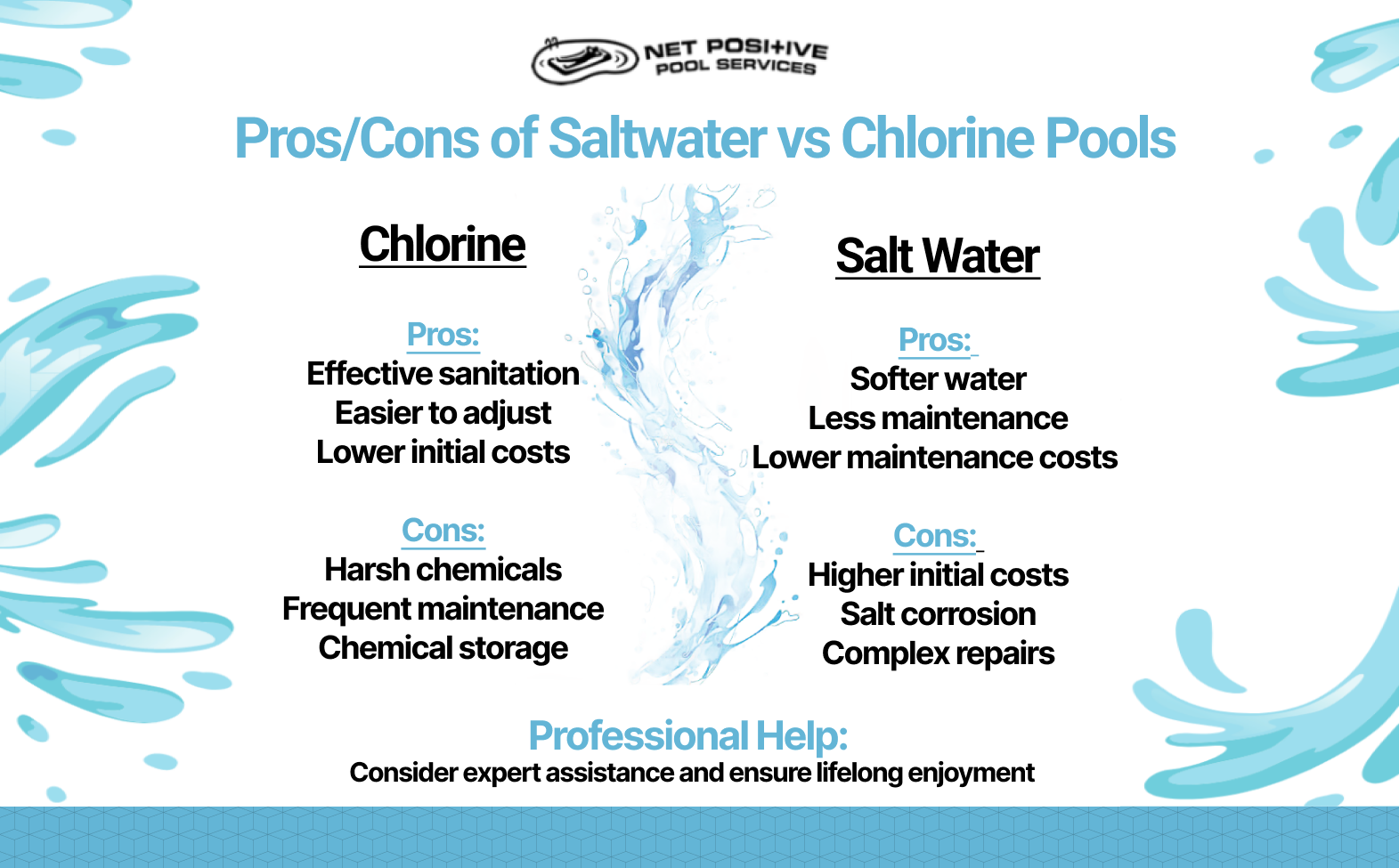
The following table compares the typical approach to managing chlorine in a salt water environment versus a traditional pool.
| Feature | Salt Water Pool | Traditional Chlorine Pool |
|---|---|---|
| Primary Source | Electrolysis (Salt Cell) | Liquid/Tablet/Granular Chlorine |
| Chlorine Delivery | Constant, low-level production | Periodic manual addition |
| pH Tendency | Tends to rise due to aeration | Varies by product type |
| Shocking Frequency | Rarely needed (if balanced) | Regularly scheduled |
| Key Maintenance | Cleaning salt cell electrodes | Monitoring stabilizer levels |
Common Mistakes and How to Avoid Them
Even experienced pool owners can fall into traps when managing salt water systems. One of the most frequent errors is "over-correction." When a pool looks slightly cloudy, owners often add large amounts of shock. In a salt water system, if the salt cell is functioning, you may only need to increase the "percentage output" on your control panel for 24 hours rather than adding external chemicals.
Another mistake is ignoring the salt cell maintenance. Over time, calcium scale buildup on the cell plates prevents the electricity from converting salt to chlorine. If your salt levels are correct but your chlorine levels are consistently low, the cell may need to be inspected and cleaned with a diluted muriatic acid solution. Ignoring this leads to a "false" demand for more chlorine, causing owners to add unnecessary chemicals.
Troubleshooting: Why Is My Chlorine Level Low?
If you find yourself constantly adding liquid chlorine, your SWCG system is likely not performing optimally. Run through this checklist:
- Salt Level: Is the salinity within the manufacturer’s recommended range (usually 2,700–3,400 ppm)? If the salt is too low, the system stops producing chlorine to protect the cell.
- Water Temperature: Salt cells become significantly less efficient in very cold water. If the water temperature drops below 60°F (15°C), most systems will stop producing chlorine entirely.
- Flow Rate: Is the water moving through the cell fast enough? A dirty filter or a closed valve can restrict flow, triggering a "no flow" error on the control unit.
- Cell Age: Most salt cells have a lifespan of 3 to 7 years. Once the titanium plates have exhausted their coating, the unit will stop producing chlorine regardless of salt levels.
FAQ: Frequently Asked Questions
Is it safe to swim after adding chlorine to a salt water pool?
You should wait at least one full filtration cycle (usually 4–8 hours) after adding chemicals. If you are shocking the pool with high levels of chlorine, wait until the levels return to a safe range (1.0–5.0 ppm) before re-entering the water.
Will liquid chlorine damage my salt cell?
No, liquid chlorine is effectively the same substance the cell produces. However, if you pour a massive amount of chemical directly into the skimmer, the high concentration passing through the cell could theoretically cause damage. Always distribute it around the pool, away from the intake.
How often should I test the salt level?
While most modern 2026-model controllers have a digital salt display, these sensors can drift. Test your salt levels manually once a month using salt-specific test strips or a conductivity meter to ensure your digital reading is accurate.
Can I use granular shock in a salt water pool?
Yes, but check the label. Calcium hypochlorite is standard. Avoid Dichlor or Trichlor shocks unless you intentionally want to raise your stabilizer levels, as these products will increase the CYA levels in your pool every time they are used.
Should I turn off the salt generator while adding chlorine?
Yes. If you are adding a high dose (shocking), turning the unit off prevents the internal electronics from reading an artificially high chlorine spike, which can cause the controller to shut down or trigger unnecessary error codes.
Next Actions for Pool Owners
If your pool is currently struggling with low chlorine, perform a comprehensive test first. If the salt level is within the manufacturer’s range and your CYA is not too high, clean your salt cell plates using a professional-grade cell cleaner or a mild acid solution. Once the hardware is verified as clean and functional, adjust your control panel settings to a higher output percentage. Only utilize manual chlorine as a secondary measure to address specific issues, rather than as a permanent replacement for your salt system’s operation.