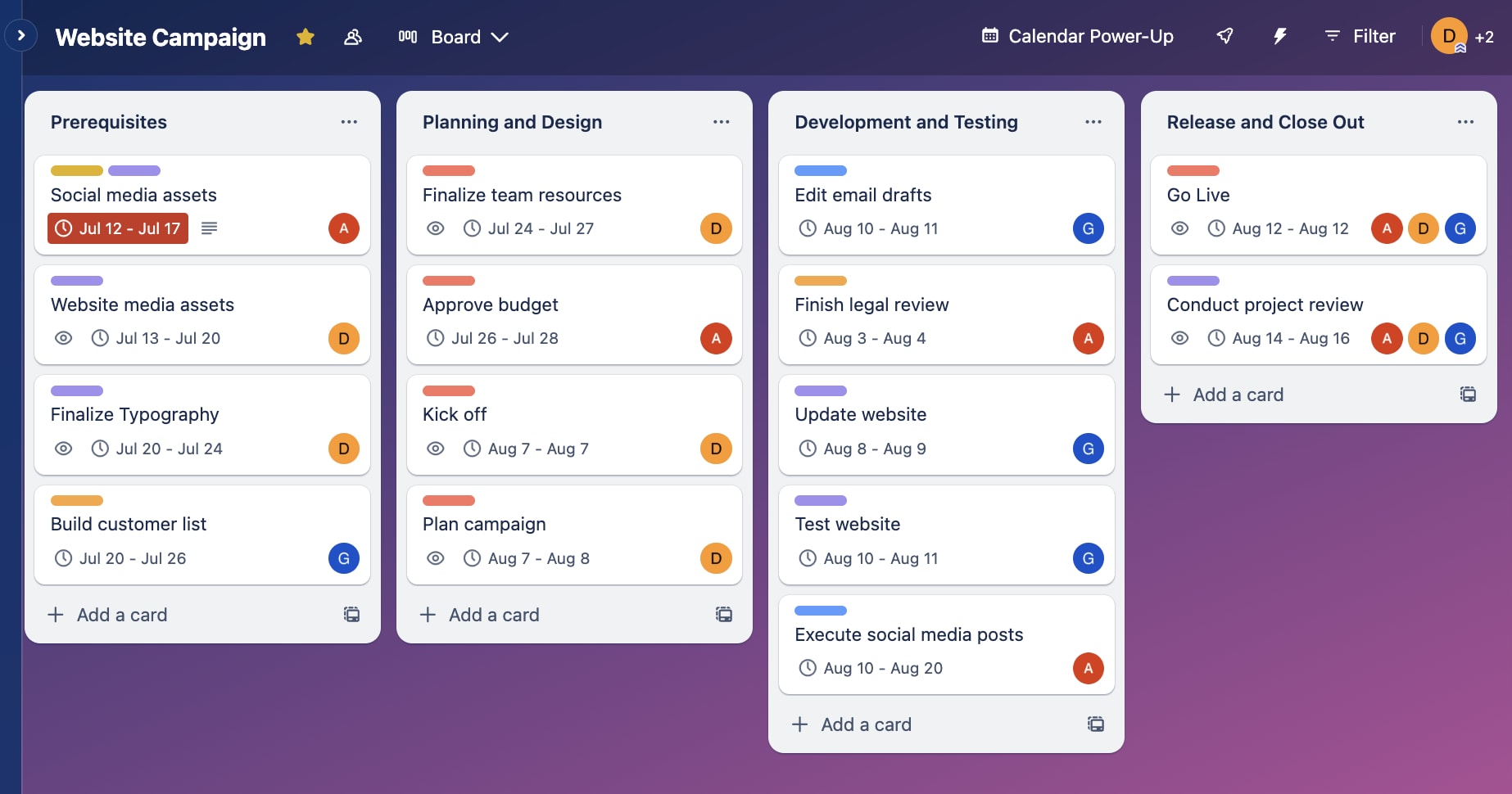
Asana is a cloud-based work management platform designed to help teams orchestrate complex workflows, manage task dependencies, and maintain transparency across organizational projects. By centralizing communication, resource allocation, and tracking, the platform enables teams to visualize progress through various formats—such as boards, lists, and Gantt-style timelines—ensuring that strategic objectives align with daily execution.
Understanding the Core Functionality of Asana
Asana operates on a foundation of work management principles that prioritize clarity and accountability. At its most fundamental level, the system is built around tasks, which are assigned to specific team members, given due dates, and nested within projects. This hierarchical structure allows for granular control over project components while maintaining a high-level view of progress for managers and stakeholders.
Unlike simple to-do list applications, Asana incorporates robust metadata for every task. Users can attach files, leave comments, tag colleagues, and create subtasks that track the breakdown of larger initiatives. This interconnectedness ensures that information silos are minimized. When a team member updates a task, the platform automatically pushes notifications to relevant stakeholders, reducing the need for status-update meetings and email threads.
The platform's versatility is its primary value proposition. Whether a team is managing a software development sprint, a marketing campaign, or an ongoing operational process, Asana provides the necessary tools to standardize these workflows. By using templates, teams can establish repeatable processes, ensuring consistency and reducing the cognitive load associated with project setup.
Evaluating Key Features for Professional Teams
For teams assessing Asana in 2026, the feature set is extensive. The platform’s ability to pivot between different views is particularly beneficial for cross-functional teams where different roles may require different perspectives on the same project.
Visualization Tools
- List View: Ideal for teams that thrive on structured, linear task management. It functions similarly to a spreadsheet but with deeper interactivity.
- Board View: Uses a Kanban-style interface that is highly effective for visual workflow management, especially in agile environments where task movement through stages (e.g., To-Do, In Progress, Review, Done) is critical.
- Timeline View: A dynamic Gantt chart that allows managers to map out project schedules, identify dependencies between tasks, and adjust timelines in real-time as constraints change.
- Calendar View: Provides a bird’s-eye perspective of upcoming deadlines, which is essential for editorial teams or campaign managers needing to coordinate across long-term cycles.
Automation and Integration
Asana’s "Rules" engine is a standout feature for teams looking to minimize manual busywork. By creating custom triggers—such as "when a task is moved to the 'Completed' column, automatically assign a follow-up task to the manager"—teams can reduce the risk of human error and ensure that administrative gaps are closed automatically.
Furthermore, the platform offers deep integrations with common professional software. By connecting with file storage services like Google Drive or Dropbox, communication platforms like Slack or Microsoft Teams, and development tools like GitHub, Asana becomes a centralized "source of truth." This reduces the friction of switching between applications, as files and updates from integrated tools are synced directly into the Asana project dashboard.
Comparative Overview: Asana vs. Project Management Alternatives
Choosing a project management tool requires an honest assessment of a team’s current operational maturity. The following table provides a high-level comparison of how Asana compares to other prevalent enterprise tools based on core organizational needs.
| Feature | Asana | Monday.com | Jira | Trello |
|---|---|---|---|---|
| Best For | General Work/Marketing | Process Automation | Software Development | Personal/Small Teams |
| Complexity | Moderate | High | Very High | Low |
| Visualization | Versatile (Lists, Boards, Timelines) | Data-Heavy Dashboards | Sprint/Backlog Focused | Basic Kanban Only |
| Learning Curve | Gentle | Moderate | Steep | Negligible |
While Jira is technically superior for technical software engineering teams using complex Scrum or Kanban frameworks, Asana often serves as a superior choice for marketing, operations, and creative teams that require high-level aesthetic clarity and easier onboarding for non-technical staff. Monday.com provides more robust custom data columns, whereas Asana excels at the fluidity and ease of task management.
Strategic Implementation for Teams
Successfully deploying Asana requires more than just creating an account; it requires a commitment to a unified process. Teams that struggle with adoption typically do so because they fail to establish a clear taxonomy for how the platform should be used.
Establishing Standards
Before rolling out the software to the entire team, leadership should establish clear guidelines:
- Naming Conventions: Ensure all project and task names follow a consistent format to make searching and reporting efficient.
- Notification Management: Encourage team members to adjust their notification settings early to prevent "inbox fatigue," which is a common complaint in high-volume environments.
- Task Ownership: Adhere to a "one task, one owner" rule. If a task is a group effort, utilize the collaborator feature rather than assigning multiple owners, as this prevents confusion regarding accountability.
- Defined Workflow Stages: If using Board View, ensure every team member understands what each column represents to maintain data integrity in reports.
Leveraging Portfolios and Reporting
For team leads and managers, the "Portfolios" feature is vital for monitoring multiple projects simultaneously. Portfolios allow users to group projects together to monitor the overall health of a department or initiative. Within these views, managers can see status updates, budget utilization, and progress percentages at a glance. This high-level visibility is critical for identifying bottlenecks before they escalate into project-threatening delays.
Common Challenges and Troubleshooting
No project management tool is without its limitations. As teams scale, they often encounter specific hurdles that require adjustment.
- Complexity Overload: As projects grow in size, the volume of subtasks and custom fields can become overwhelming. If the UI feels cluttered, pivot to a more streamlined approach by archiving completed projects and hiding unused custom fields.
- The "Double Work" Problem: A frequent mistake is using Asana to track work while simultaneously using a separate tool for status updates. Ensure that Asana serves as the primary repository for work progress; if it isn't in Asana, it effectively doesn't exist for the purpose of team reporting.
- Onboarding Resistance: When team members are hesitant, focus on the "what’s in it for me" aspect. Emphasize that Asana is meant to reduce the number of check-in meetings they have to attend, effectively reclaiming their time for deep work.
If a specific integration stops working, verify that the API connection in your organization’s administrative console is still authorized. Frequently, permission changes in third-party apps can disconnect these bridges, requiring a simple re-authentication through the Asana integration menu.
Frequently Asked Questions
Is Asana suitable for large-scale enterprise organizations?
Yes, Asana includes enterprise-grade features such as SAML-based single sign-on (SSO), advanced audit logs, and data governance controls. It is designed to handle thousands of users while maintaining performance, provided the organization implements a centralized administration policy to manage access and project creation.
Can Asana be used to track project budgets?
Asana offers custom fields that allow for the input of numerical data, which can be used to track budgets. However, it is not a dedicated financial accounting tool. It serves best as a tracker for budget consumption rather than a tool for complex financial forecasting or invoicing.
How does Asana handle task dependencies?
Asana allows users to mark tasks as "Waiting on" or "Blocking" other tasks. In Timeline view, these dependencies are visually represented by lines connecting the tasks. If a predecessor task is delayed, the system can automatically adjust the start and due dates of subsequent tasks, maintaining the integrity of the project schedule.
Is the free version of Asana sufficient for small teams?
The free tier is generous for small teams (typically up to 15 users), offering basic task, list, and board views. However, if your team requires advanced reporting, timeline views, or extensive automation rules, you will likely need to upgrade to a paid tier to unlock the full potential of these workflows.
What is the best way to handle recurring tasks in Asana?
Asana has a native "Due Date" feature that allows users to set tasks to repeat on specific cadences (e.g., daily, weekly, monthly). This is ideal for recurring administrative duties or operational maintenance tasks, ensuring they are never missed and don't require manual recreation.
Final Recommendation
Asana is an industry-leading platform that balances power with user experience. It is particularly well-suited for teams that prioritize visibility, collaboration, and the reduction of administrative friction. To succeed, prioritize a standardized team taxonomy and focus on integrating the tool into your existing communication habits. If your team is currently struggling with disjointed workflows or fragmented status updates, migrating to a centralized Asana environment can provide the structure necessary to scale your operations effectively throughout 2026.