Packet loss in Dota 2 causes input registration failure, visual "rubberbanding," disrupted mechanical timing, and broken team communication. Because Dota 2 relies on real-time synchronization between your client and Valve’s servers, losing even 1% of data packets results in missed spell casts, stuttering hero movement, and a significant competitive disadvantage during high-intensity matches.
In the competitive landscape of 2026, where network infrastructure has advanced significantly, packet loss remains one of the most frustrating obstacles for Dota 2 players. Unlike high latency (ping), which merely delays your actions, packet loss represents a total breakdown in communication. Information simply vanishes. Whether you are climbing the MMR ranks or playing a casual Turbo match, understanding why this network phenomenon degrades the experience is the first step toward mitigating its effects.
The Technical Reality of Packet Loss in Source 2
Dota 2 operates on the Source 2 engine, which utilizes a client-server architecture. For the game to function, your computer (the client) must constantly exchange small bundles of data (packets) with the game server. These packets contain every instruction: your hero’s movement coordinates, the exact millisecond you pressed your "Black King Bar" (BKB), and the current health of every creep on the map.
Most modern gaming protocols, including those used by Steam, utilize User Datagram Protocol (UDP). UDP is preferred over Transmission Control Protocol (TCP) because it is faster; it does not require a "handshake" or verification for every single packet. However, the downside is that if a packet is lost in transit due to network congestion or hardware interference, it is not resent. The game engine must then "guess" what happened during that missing gap or wait for the next successful packet to synchronize the state of the game.
1. Input Registration Failure and Command Dropping
The most immediate and devastating impact of packet loss is the failure of the server to recognize player inputs. In Dota 2, every action is a command sent to the server. When packet loss occurs, the packet containing your command may never reach the destination.
The "Ghost Click" Phenomenon
Have you ever been in a life-or-death situation, mashed your ultimate key, and watched your hero die anyway—only to see the ability was never on cooldown? This is a direct result of packet loss. If the packet containing the "Cast Ravage" instruction is dropped, the server remains unaware that you ever pressed the button. By the time you realize the command failed and press it again, the window of opportunity has usually closed.
Movement Interruption
Movement in Dota 2 is processed via "pathfinding" requests. When you right-click to move, your client sends the destination to the server. If these packets are lost, your hero may stand still despite your repeated clicking. This creates a "stuttering" effect where the hero moves a few units, stops, and then moves again once a successful packet is received. In a game where positioning is the difference between a successful gank and a total team wipe, this inconsistency is lethal.
2. Visual Desynchronization and Rubberbanding
Dota 2 uses a process called interpolation to make hero movements look smooth. The client looks at the last known position of a hero and the current position, then draws a smooth path between them. When packets are lost, the client loses the data points needed for this smoothing.
Rubberbanding Explained
"Rubberbanding" occurs when your client thinks your hero is in one location, but the server—the ultimate authority on the game state—disagrees. When a new, successful packet finally arrives, the client is forced to "snap" your hero back to the server-validated position. To the player, it looks like their hero teleported backward or forward. This makes it nearly impossible to dodge skillshots, such as a Pudge Hook or a Mirana Arrow, because the projectile’s visual position on your screen does not match its actual position on the server.
Fog of War and Information Gaps
Packet loss also affects the "Fog of War." Information about enemy heroes appearing on the map is sent via packets. If you lose the packet that informs your client an enemy has stepped out of the trees, you might not see them until they are already on top of you. This delay in visual information removes your ability to react to incoming threats, making the game feel unfair and unpredictable.
3. Disruption of Micro-Mechanics and Frame-Perfect Timing
Dota 2 is a game of millimeters and milliseconds. High-level play requires "frame-perfect" execution of certain abilities and items. Packet loss introduces an element of RNG (randomness) into your mechanical skill that no amount of practice can overcome.
Last-Hitting and Denying
The laning phase is the foundation of a Dota 2 match. To successfully last-hit a creep, you must time your attack animation to land exactly when the creep's health is low enough. Packet loss causes the health bars to update in "chunks" rather than a smooth decline. You might see a creep at 20% health, and in the next "tick" (after a lost packet), it is already dead. This makes consistent farming a nightmare and can lead to a significant gold deficit by the ten-minute mark.
Chaining Abilities (Combos)
Heroes like Invoker, Earth Spirit, or Tinker require rapid-fire sequences of button presses. For an Invoker player, a "Tornado-EMP-Meteor" combo requires precise timing. If the packet for the "EMP" is lost, the entire sequence breaks. Similarly, attempting to use a "Blink Dagger" immediately after taking damage requires hitting the window before the item is disabled. Packet loss often causes the "Blink" command to arrive at the server a fraction of a second too late, leaving the player stranded in the middle of an enemy team.
4. Breakdown of Team Coordination and Tactical Awareness
Dota 2 is a social, team-based game. While we often focus on the mechanical impact of network issues, the strategic impact of packet loss on communication is equally damaging.
Voice and Ping Latency
Valve’s in-game Voice over IP (VoIP) system and the "Ping" system are also subject to packet loss. When packets are dropped:
- Voice Chat: Teammates may sound robotic, or their sentences may cut out entirely. In a 2026 meta where complex rotations are the norm, missing a single call like "Go now!" can result in a lost game.
- Pings: Pings are vital for non-verbal communication. Packet loss can delay a "Danger" ping or prevent it from appearing on the map at all, leaving your teammates blind to threats you’ve already spotted.
The Psychological Toll
Beyond the technical failures, packet loss has a profound psychological effect on the player. Known as "tilt," the frustration of losing control over one's hero leads to poor decision-making. When a player feels they cannot trust their internet connection, they tend to play more passively, miss aggressive openings, and lose the "flow state" necessary for high-level performance.
Comparison of Network Issues in Dota 2
To better understand how packet loss differs from other common network problems, refer to the table below.
| Issue | Manifestation in Game | Primary Cause | Impact Level |
|---|---|---|---|
| High Latency (Ping) | Actions happen after a consistent delay. | Geographical distance to server. | Moderate (Playable with adjustment) |
| Packet Loss | Actions are skipped or ignored; "teleporting." | Unstable Wi-Fi, ISP congestion, faulty cables. | Critical (Game-breaking) |
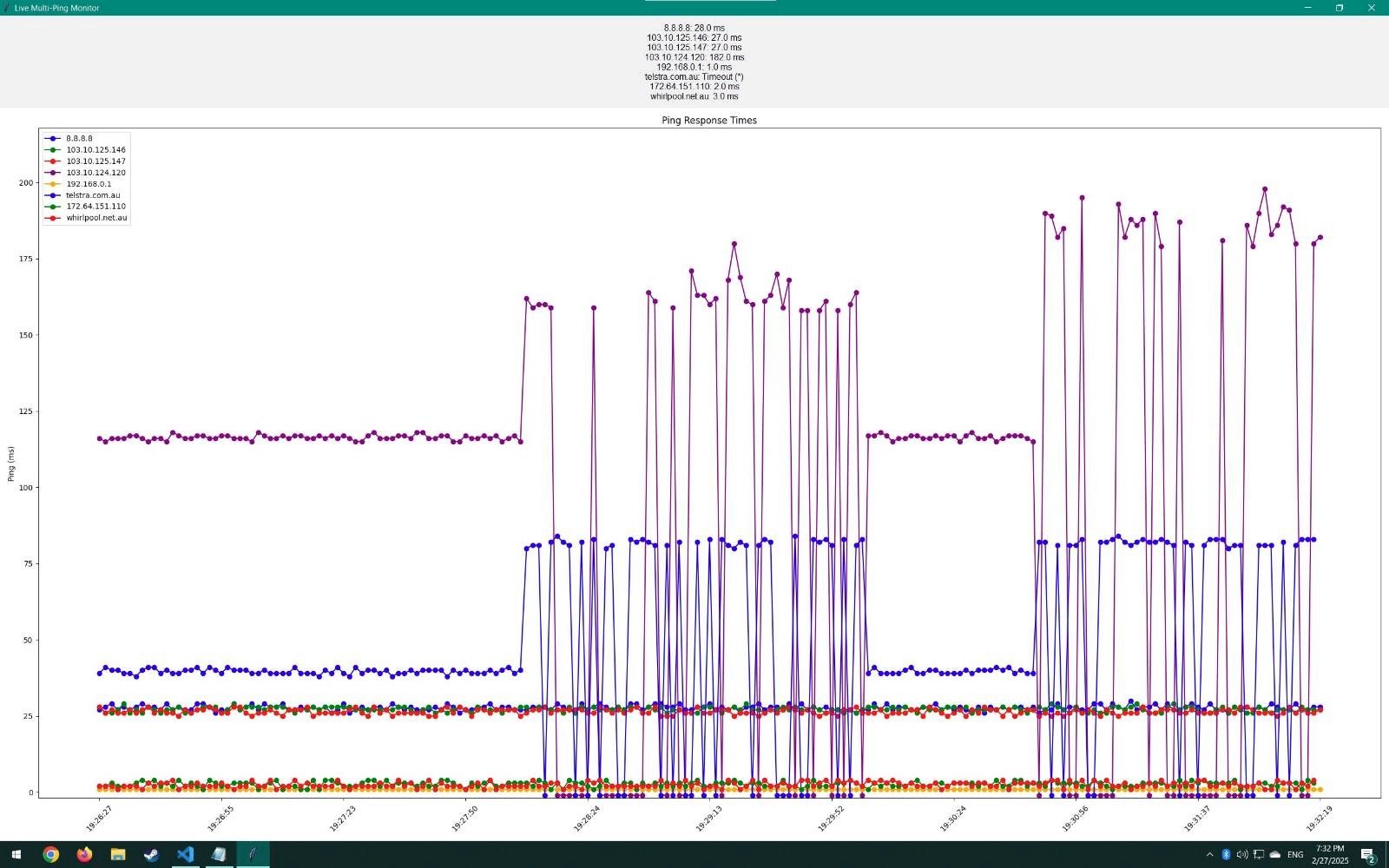
| Jitter | Latency fluctuates rapidly (e.g., 40ms to 200ms). | Network congestion or background downloads. | High (Inconsistent feel) |
| Server Lag | All players in the match experience the same delay. | Valve server overload or DDoS attacks. | High (Affects everyone equally) |
Troubleshooting Packet Loss in 2026
If you are experiencing packet loss in Dota 2, follow these steps to identify and resolve the issue.
Verify the Connection Method
Despite the prevalence of high-speed wireless standards in 2026, Ethernet remains the gold standard for Dota 2. Wi-Fi is prone to "packet collisions" and interference from other household devices. If you must use Wi-Fi, ensure you are on a 6GHz or 7GHz band with minimal physical obstructions.
Use the Steam Datagram Relay (SDR)
Valve uses the Steam Datagram Relay to route traffic through their private network backbones. You can monitor how this is performing by opening the Dota 2 console (typically the ~ key) and typing net_graph 1 (or using the modern 2026 UI toggle for "Network Information"). If you see packet loss, try changing your "Network Quality" setting in the game options to "I have a High-end Connection," which forces the game to use more optimized packet clusters.
Check for Background Interference
Ensure that no other applications are hogging your upload bandwidth. Cloud syncing services, Windows updates, or high-definition streams on the same network can cause "Bufferbloat," leading to dropped packets. Many modern routers in 2026 include "Gaming QoS" (Quality of Service) settings that prioritize Dota 2 traffic over other types of data.
Contact Your ISP
Sometimes the issue lies with your Internet Service Provider (ISP). Packet loss often occurs at a "hop" between your home and the Valve server. You can use a tool like "WinMTR" to trace the route of your packets and identify exactly where the loss is occurring. If the loss starts at your ISP’s gateway, you will need to provide them with these logs to get the routing fixed.
Frequently Asked Questions
Can I play Dota 2 with 1% or 2% packet loss?
While technically possible, even 1% packet loss is highly detrimental. In a 40-minute game, 1% loss means hundreds of data points are missing. You will experience "ghost clicks" and stuttering. For a competitive experience, your packet loss should ideally be 0%.
Does packet loss affect my MMR?
Indirectly, yes. Packet loss reduces your mechanical reliability. If you cannot reliably use items like Black King Bar or Aegis of the Immortal because of network drops, your win rate will statistically decrease over time.
Is packet loss caused by my graphics card?
No. Packet loss is strictly a networking issue. While a slow GPU can cause "stuttering" (low FPS), this is different from the "rubberbanding" caused by network packet loss. If your FPS is high but your hero is teleporting, the issue is your connection, not your hardware.
Why do I have packet loss but my ping is low?
Ping measures the speed of a round trip for data, while packet loss measures the success rate of those trips. You can have a very fast connection (low ping) that is "leaky" (dropping packets). This is often caused by a failing router, a damaged Ethernet cable, or electrical interference.
How do I see my packet loss in-game?
In the Dota 2 settings menu, go to Options > To Advanced Options. Look for the "Network" section and check the box for "Display Network Information." This will show your Ping and Packet Loss (In/Out) in the top-right corner of your screen during matches.
Summary and Next Actions
Packet loss is a silent performance killer in Dota 2. By causing input failure, visual desync, mechanical errors, and communication breakdowns, it fundamentally changes the nature of the game from a test of skill to a test of patience.
If you are currently struggling with these issues:
- Switch to a wired Ethernet connection immediately to rule out local interference.
- Monitor your network stats in-game to see if the loss is constant or comes in "bursts."
- Audit your network hardware, including cables and your modem, as these are the most common points of failure in 2026.
Ensuring a stable, packet-loss-free connection is just as important as mastering your favorite hero's mechanics if you intend to succeed in the lanes of Dota 2.