A primary example of security working with cloud computing is the Identity and Access Management (IAM) framework operating within a Shared Responsibility Model. This system ensures that only authorized users can access specific cloud resources—such as databases or virtual servers—by verifying identities and enforcing granular permissions, thereby protecting sensitive data from unauthorized exposure.
In the 2026 technological landscape, cloud computing is no longer a peripheral utility but the backbone of global enterprise infrastructure. As organizations migrate increasingly complex workloads to the cloud, the "perimeters" of traditional networking have dissolved. Consequently, security is no longer a static wall but a dynamic, integrated process. To understand how security works with cloud computing, one must look at the synergy between the provider’s infrastructure and the customer’s configuration.
The Foundation: The Shared Responsibility Model
Before examining specific tools, it is essential to understand the structural framework of cloud security: the Shared Responsibility Model. This model defines the division of labor between the Cloud Service Provider (CSP)—such as Amazon Web Services (AWS), Microsoft Azure, or Google Cloud Platform (GCP)—and the consumer.
Security OF the Cloud vs. Security IN the Cloud
The CSP is responsible for the "Security of the Cloud." This includes the physical security of data centers (fences, guards, biometric access), the hardware (servers, storage devices), and the virtualization layer that allows multiple customers to share the same physical resources securely. By 2026, CSPs have integrated advanced robotics and AI-driven environmental monitoring to ensure these facilities are virtually impenetrable to physical threats.
The customer is responsible for "Security in the Cloud." This encompasses the data stored in the cloud, the operating systems of virtual machines, the configuration of network firewalls, and, most importantly, the management of user identities. An example of security working with cloud computing occurs when a customer correctly configures their side of the model to prevent data leaks, even if the underlying infrastructure is robustly defended by the provider.
Why the Model Matters
Failure to understand this division is the leading cause of cloud security breaches. When a storage bucket is left "publicly readable," it is not a failure of the CSP’s security; it is a failure of the customer’s responsibility within the model. Therefore, security works with cloud computing only when both parties fulfill their specific mandates.
Identity and Access Management (IAM): The Practical Example
The most prominent example of security functioning within the cloud is Identity and Access Management (IAM). In a cloud environment, "Identity" is the new perimeter. Because cloud resources are accessible over the internet, traditional IP-based firewalls are often insufficient. IAM provides the mechanism to control who can do what, and from where.
The Principle of Least Privilege (PoLP)
A core component of effective IAM is the Principle of Least Privilege. This security concept dictates that a user, program, or process should have only the minimum permissions necessary to perform its function.
For example, a marketing analyst may need to read data from a cloud-based storage folder (like an S3 bucket or Azure Blob) to generate a report. Through IAM, the administrator grants "Read-Only" access to that specific folder. The analyst cannot delete the data, modify the settings, or access the company’s financial records in a different folder. This granular control is a quintessential example of security working with cloud computing to mitigate the "blast radius" of a potential credential theft.
Multi-Factor Authentication (MFA) and FIDO2
As of 2026, standard passwords are considered obsolete for high-value cloud accounts. Security works with the cloud here through Multi-Factor Authentication (MFA). Modern cloud environments often mandate FIDO2-compliant hardware keys or biometric verification.
When a developer attempts to log into the cloud console, they provide a password (something they know) and a physical security key tap or a fingerprint scan (something they are/have). Even if an attacker steals the developer's password through a phishing campaign, the cloud security system blocks the login because the second factor is missing.
Data Encryption: Protecting Information at Rest and in Transit
Another vital example of security working with cloud computing is Encryption. Encryption transforms readable data into a format that is unreadable without a specific cryptographic key.
Encryption in Transit
When data moves from an on-premises office to a cloud server, it travels across the public internet. Security protocols such as Transport Layer Security (TLS) ensure that this data is encrypted during its journey. If a malicious actor intercepts the data packets, they see only encrypted gibberish rather than sensitive customer information or proprietary code.
Encryption at Rest
Once data arrives at the cloud provider’s data center, it must be protected while it sits on a disk. Cloud providers offer Key Management Services (KMS) that allow customers to manage the keys used to encrypt their data. In 2026, many organizations use "Bring Your Own Key" (BYOK) models, ensuring that not even the cloud provider’s employees can view the data without the customer’s explicit key.
| Security Layer | Primary Function | Example Tool/Protocol | Responsibility |
|---|---|---|---|
| IAM | Access control and identity verification | AWS IAM, Azure AD, Okta | Customer |
| Encryption | Scrambling data to prevent unauthorized reading | AES-256, TLS 1.3, KMS | Shared |
| Network Security | Isolating cloud resources | Virtual Private Cloud (VPC), WAF | Customer |
| Physical Security | Protecting hardware and data centers | Biometrics, CCTV, Shielded Racks | Provider |
| Monitoring | Detecting and responding to threats | Amazon GuardDuty, Azure Sentinel | Shared |
Network Security and Virtual Private Clouds (VPCs)
Security also works with cloud computing through the creation of Virtual Private Clouds (VPCs). A VPC is a private, isolated section of a public cloud where a customer can launch resources in a virtual network they define.
Micro-segmentation
Within a VPC, security is enhanced through micro-segmentation. Instead of having one large network where every server can talk to every other server, administrators create small "subnets." For instance, a web server that faces the public internet is placed in a public subnet, while the database containing sensitive user info is placed in a private subnet with no direct internet access.
The security mechanism here is the Security Group or Network Access Control List (NACL). These act as virtual firewalls that only allow traffic on specific ports (e.g., Port 443 for HTTPS) from specific sources. If an attacker compromises the web server, the security configuration prevents them from "jumping" to the database server, as the internal rules block that specific traffic path.
Monitoring and Automated Threat Detection
By 2026, the volume of data in the cloud is so vast that manual security monitoring is impossible. Security works with cloud computing through automated threat detection powered by artificial intelligence and machine learning.
Services like Amazon GuardDuty or Google Chronicle Security Operations constantly analyze billions of events across a cloud environment. These systems look for anomalies that deviate from established baselines.
- Example: If a user account that normally logs in from New York suddenly attempts to download a massive database from an IP address in a different country at 3:00 AM, the security system automatically triggers an alert.
- Response: In advanced setups, the system can autonomously revoke the user’s permissions or isolate the affected virtual machine until a human security analyst can investigate. This proactive, automated response is a hallmark of modern cloud security integration.
Compliance and Data Sovereignty
For many industries, security in the cloud is also a matter of legal compliance. Regulations such as the General Data Protection Regulation (GDPR) and the California Consumer Privacy Act (CCPA) require strict data handling practices.
Cloud providers help satisfy these requirements through Data Sovereignty controls. An example of this is a European company using a US-based cloud provider but selecting a "Region" located specifically in Frankfurt, Germany. The cloud security tools ensure that the data physically resides on servers within the European Union, meeting legal mandates while still benefiting from global cloud scalability.
Common Pitfalls: When Security and Cloud Fail to Sync
Despite the robust tools available, security only "works" if it is implemented correctly. Several common mistakes can undermine the entire system:
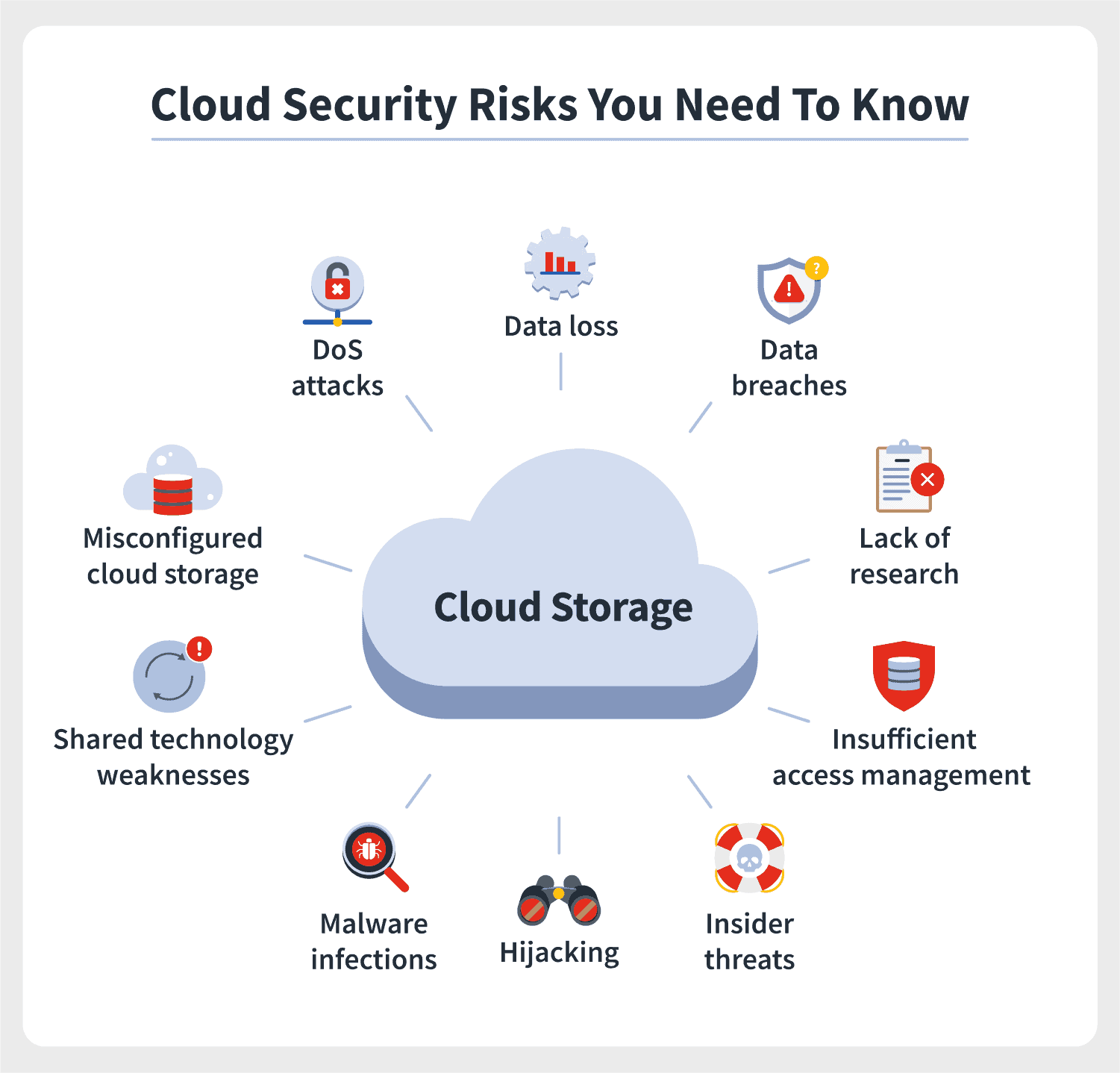
- Over-privileged Accounts: Granting "Administrator" access to too many users. If one account is compromised, the entire cloud environment is at risk.
- Misconfigured Storage: Leaving cloud storage buckets open to the public internet, often due to a misunderstanding of default settings.
- Shadow IT: Employees using unauthorized cloud services (e.g., personal Dropbox accounts for company files) that bypass corporate security controls.
- Logging Failures: Not enabling logging or monitoring. If a breach occurs, the organization has no "black box" recording to understand how the attacker got in or what they stole.
To avoid these, organizations in 2026 utilize Infrastructure as Code (IaC). By defining their security settings in code templates (like Terraform or AWS CloudFormation), they can ensure that every new resource launched in the cloud is automatically configured with the correct security parameters, eliminating human error.
Frequently Asked Questions
What is the most important part of cloud security?
Identity and Access Management (IAM) is generally considered the most critical component. Because cloud resources are accessible via the web, verifying the identity of the person or machine requesting access is the primary line of defense. Without strong IAM, other security measures like encryption can often be bypassed if an attacker gains high-level credentials.
Does cloud computing make data more or less secure?
Cloud computing can be significantly more secure than traditional on-premises data centers because major providers invest billions in security infrastructure that most small-to-medium businesses could never afford. However, the security of the data ultimately depends on the customer’s ability to configure the services correctly under the Shared Responsibility Model.
Is cloud security expensive to implement?
While some advanced security tools carry a cost, many foundational features—like MFA, IAM, and basic encryption—are included at no extra charge by major CSPs. In the long run, the cost of implementing these security measures is far lower than the potential financial and reputational damage of a data breach or a ransomware attack.
How does Zero Trust apply to cloud computing?
Zero Trust is a security philosophy that assumes no user or device is trustworthy by default, even if they are already inside the network. In the cloud, this means every single request for data must be authenticated, authorized, and encrypted. Security works with the cloud in a Zero Trust model by constantly re-verifying identities throughout a session, rather than just at the initial login.
Can cloud providers see my data?
Technically, the provider manages the hardware where your data sits. However, if you use Encryption at Rest with keys that you manage (using a Key Management Service), the data is unreadable to the provider. Leading CSPs also undergo third-party audits (like SOC 2 Type II) to prove they have strict internal controls preventing their employees from accessing customer data.
Final Recommendation for Securing Your Cloud Environment
To ensure security works effectively with your cloud computing strategy, the first step is to perform a Security Audit based on the CIS Benchmarks. These are industry-standard best practices for securing cloud environments.
Begin by enabling Multi-Factor Authentication on all accounts, especially those with administrative privileges. Next, implement the Principle of Least Privilege by reviewing and tightening IAM roles. Finally, ensure that Logging and Monitoring are active across all regions; you cannot defend against what you cannot see. By treating security as an integrated part of your cloud architecture—rather than an afterthought—you can leverage the full power of the cloud while maintaining a robust defense posture in 2026 and beyond.