The Apple Music student plan provides eligible higher education students with a discounted monthly subscription, which includes full access to the Apple Music catalog and Apple TV+ at no additional cost. To access this rate, users must attend a degree-granting university or college and undergo a periodic verification process through UNiDAYS to confirm their active enrollment status.
Understanding Apple Music Student Eligibility
The Apple Music student plan is designed specifically for individuals enrolled in post-secondary education. Availability is not based on age, but rather on academic status. To qualify, you must be a student currently enrolled at a degree-granting university or college.
This includes students pursuing bachelor's, master's, or doctoral degrees. In many regions, students enrolled in equivalent higher education institutions—such as certain vocational or technical schools—may also qualify, provided the institution is recognized by the verification partner. It is important to note that high school students and those enrolled in non-degree certificate programs are generally ineligible for the student-specific pricing tier.
The Role of UNiDAYS in Verification
Apple partners with UNiDAYS, a third-party student verification service, to manage the enrollment status of subscribers. This system ensures that the discounted rate remains exclusive to the academic community. When you sign up for the student plan, you are redirected to the UNiDAYS portal. Here, you must provide proof of your enrollment, which usually involves signing into your institution’s student portal using your university-issued email address or credentials.
The verification process is not a one-time event. Apple and UNiDAYS require re-verification periodically—typically every 12 months—to ensure you remain an active student. If your status changes (for example, if you graduate or leave your institution), you will no longer meet the criteria for the student plan. At that point, the subscription will automatically transition to an Individual plan at the standard monthly rate, unless you cancel the service.
Cost and Plan Benefits
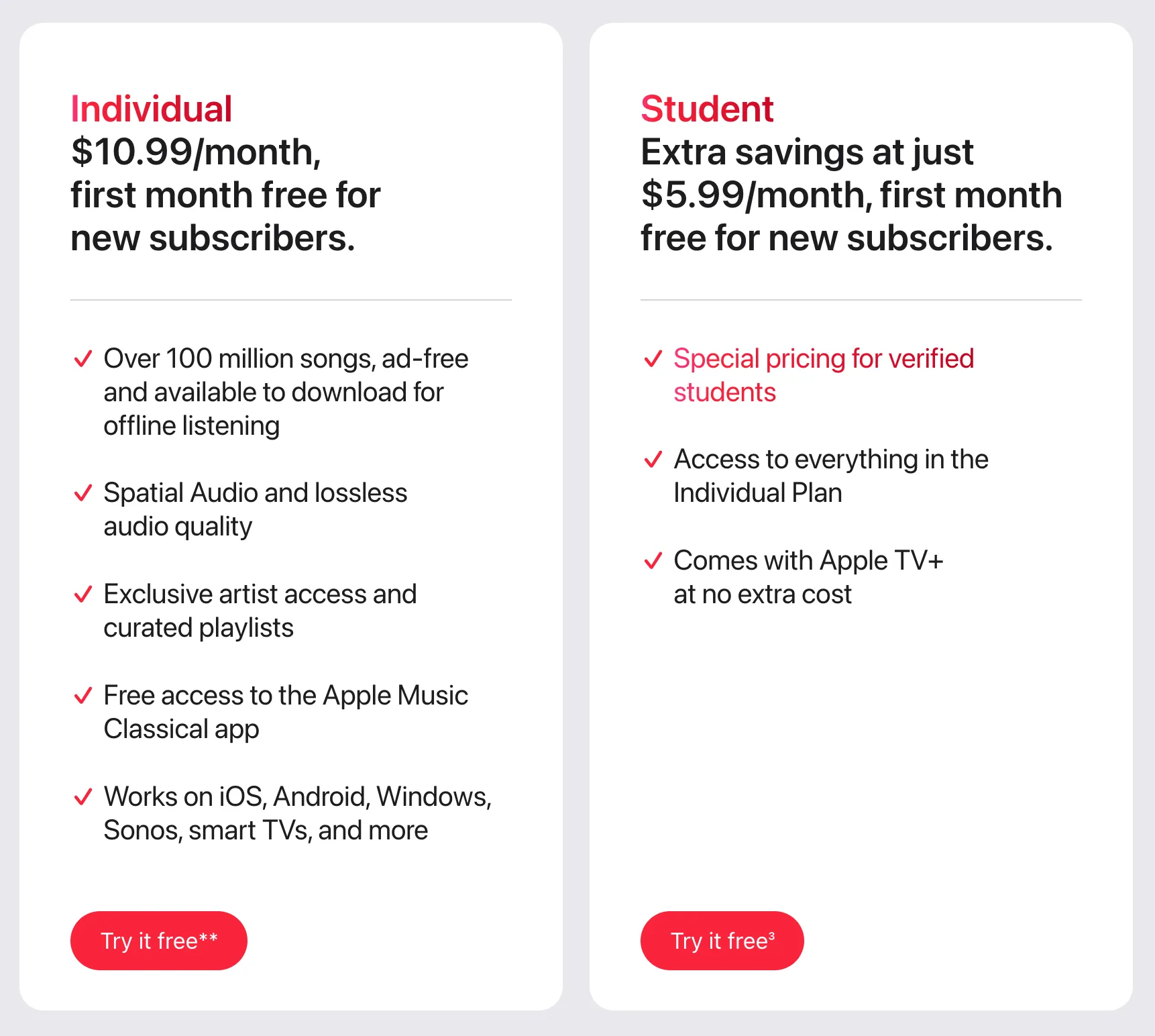
The student plan serves as a premium tier of service that is significantly more affordable than the standard Individual plan. By maintaining this subscription, users receive access to the same library, audio quality, and offline listening capabilities as standard subscribers.
Beyond music, the most notable value-add is the inclusion of an Apple TV+ subscription for as long as you maintain your verified student status. This bundle effectively provides two streaming services under a single discounted price point.
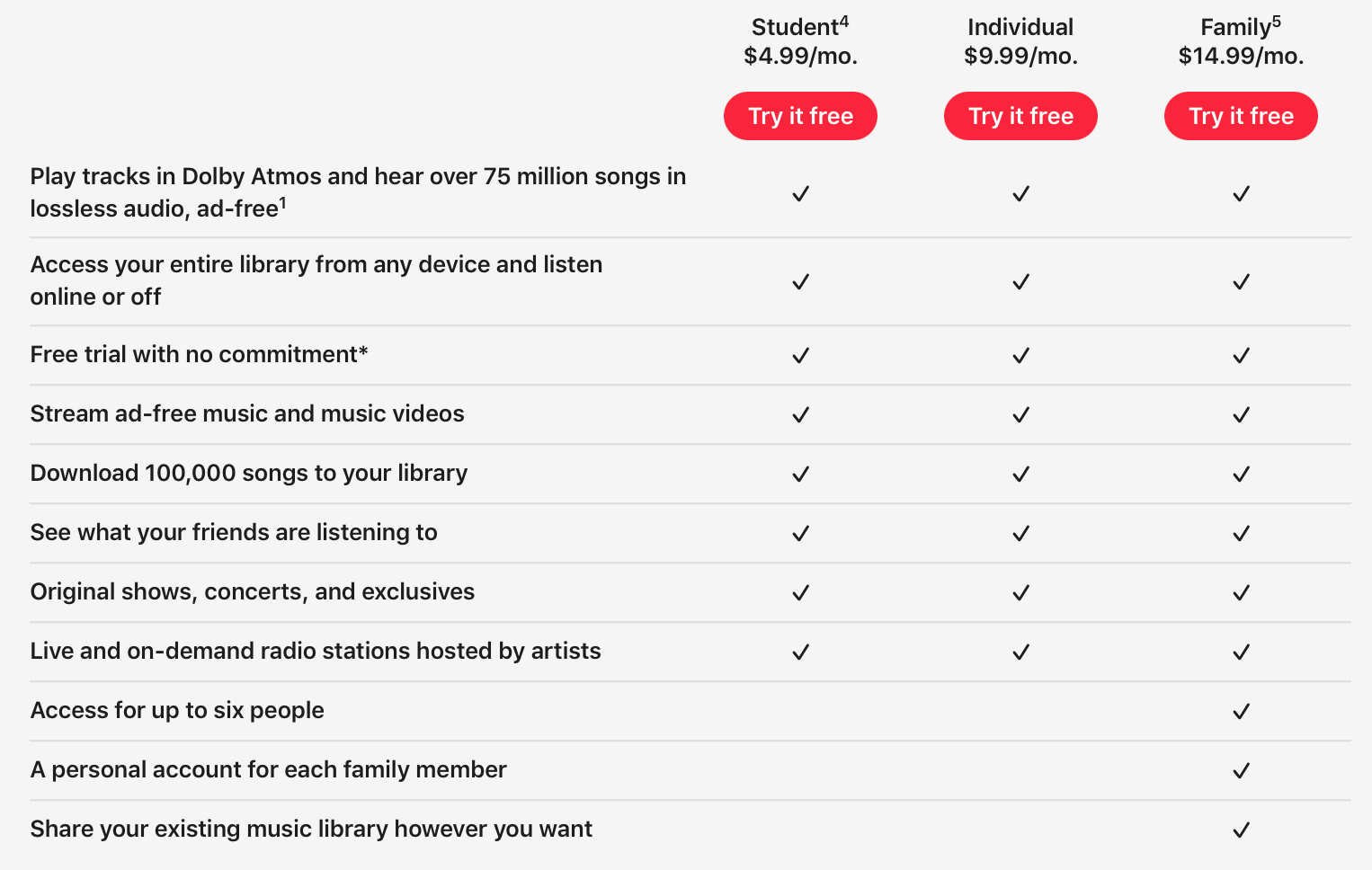
| Feature | Student Plan | Individual Plan | Family Plan |
|---|---|---|---|
| Monthly Cost | Discounted | Standard | Higher |
| Apple Music Access | Full Catalog | Full Catalog | Full Catalog |
| Apple TV+ | Included | Not Included | Not Included |
| Verification | Required (UNiDAYS) | None | None |
| User Limit | 1 Person | 1 Person | Up to 6 People |
Step-by-Step Enrollment Guide
To sign up for the student plan, ensure you have an active Apple ID and access to your school-provided email or student portal credentials.
- Initiate the Subscription: Open the Apple Music app on your device or navigate to the Apple Music website.
- Select the Plan: Choose the student plan option during the signup process.
- Verify via UNiDAYS: You will be prompted to verify your eligibility. Follow the on-screen instructions to sign in to your institution’s portal via the UNiDAYS interface.
- Finalize Payment: Once verification is confirmed, provide your payment method. The discounted rate will be applied immediately.
- Set Up Recurring Payments: Ensure your payment method is kept up to date to prevent any interruption in service during the annual re-verification window.
Common Obstacles and Troubleshooting
While the registration process is generally straightforward, users occasionally encounter hurdles that prevent them from accessing the discount.
Verification Failures
If UNiDAYS cannot verify your status, double-check that you are using your official university-issued email address. If your school does not provide one, you may need to reach out to the UNiDAYS support team to provide manual documentation, such as a dated student ID card or a current transcript.
Misidentification of Institution
Sometimes a specific campus or department might not be recognized by the database. If your institution is missing, verify that your university is a degree-granting entity. If you are certain of your eligibility, contact UNiDAYS support directly to request an institutional update.
Transition Issues
When you reach the end of your 12-month eligibility period, you will receive notifications via email or the Apple Music app. Failure to complete the re-verification process within the given timeframe will result in the account defaulting to the standard Individual plan rate. If you have graduated and are no longer a student, you must manually manage your subscription through your Apple ID settings to avoid unintended charges.
Managing Your Subscription
As a subscriber, you retain full control over your billing cycle. You can view your current plan details and verify the next renewal date through your account settings in the App Store or Apple Music app. If you decide to pause or cancel, you can do so at any time without penalty, though you will lose the student-rate benefit and the complimentary access to Apple TV+.
Always ensure that your payment information is current. If a charge fails during the re-verification month, the account may be suspended. Should this happen, you can usually restore the status by logging back into the UNiDAYS portal and repeating the verification steps, provided you are still enrolled.
Frequently Asked Questions
Does the student plan include a free trial?
Yes, new subscribers to the Apple Music student plan are often eligible for a brief introductory trial period. However, this depends on current regional promotions and your history with Apple Music. After the trial ends, the discounted student rate begins automatically.
Can I share the student plan with family members?
No. The student plan is strictly for one individual. If you wish to share a subscription with family members, you must subscribe to the Apple Music Family plan. The Family plan does not currently offer a student-specific discount, though it allows up to six users to access the library independently.
What happens to my library if I graduate?
Your music library, playlists, and saved tracks are saved to your Apple ID. If you graduate and your student status expires, your subscription will switch to the standard Individual plan, but your music library remains intact and accessible. You do not lose your content when you transition between tiers.
Can I use the student plan while studying abroad?
Generally, yes, but the verification process and the specific availability of the student plan are tied to the region in which your Apple ID is registered. If you are an international student, you must ensure your billing information and Apple ID store location match the country where your university is located.
How do I check if my school is eligible?
During the verification step on the UNiDAYS website, you will be prompted to search for your institution. If your university or college appears in the search dropdown, it is eligible for the program. If it does not appear, you may be unable to secure the student discount at this time.
Next Steps for Prospective Subscribers
If you are currently enrolled in a qualifying degree program, the first step is to confirm your credentials are ready for the verification portal. Navigate to the Apple Music signup page or settings menu on your device to initiate the request. If you encounter errors, gather documentation such as a student ID or enrollment letter before contacting the UNiDAYS support team to expedite your verification. By maintaining your account status through the yearly prompts, you can continue to enjoy the full suite of Apple Music and Apple TV+ services at the reduced student price throughout your academic career.