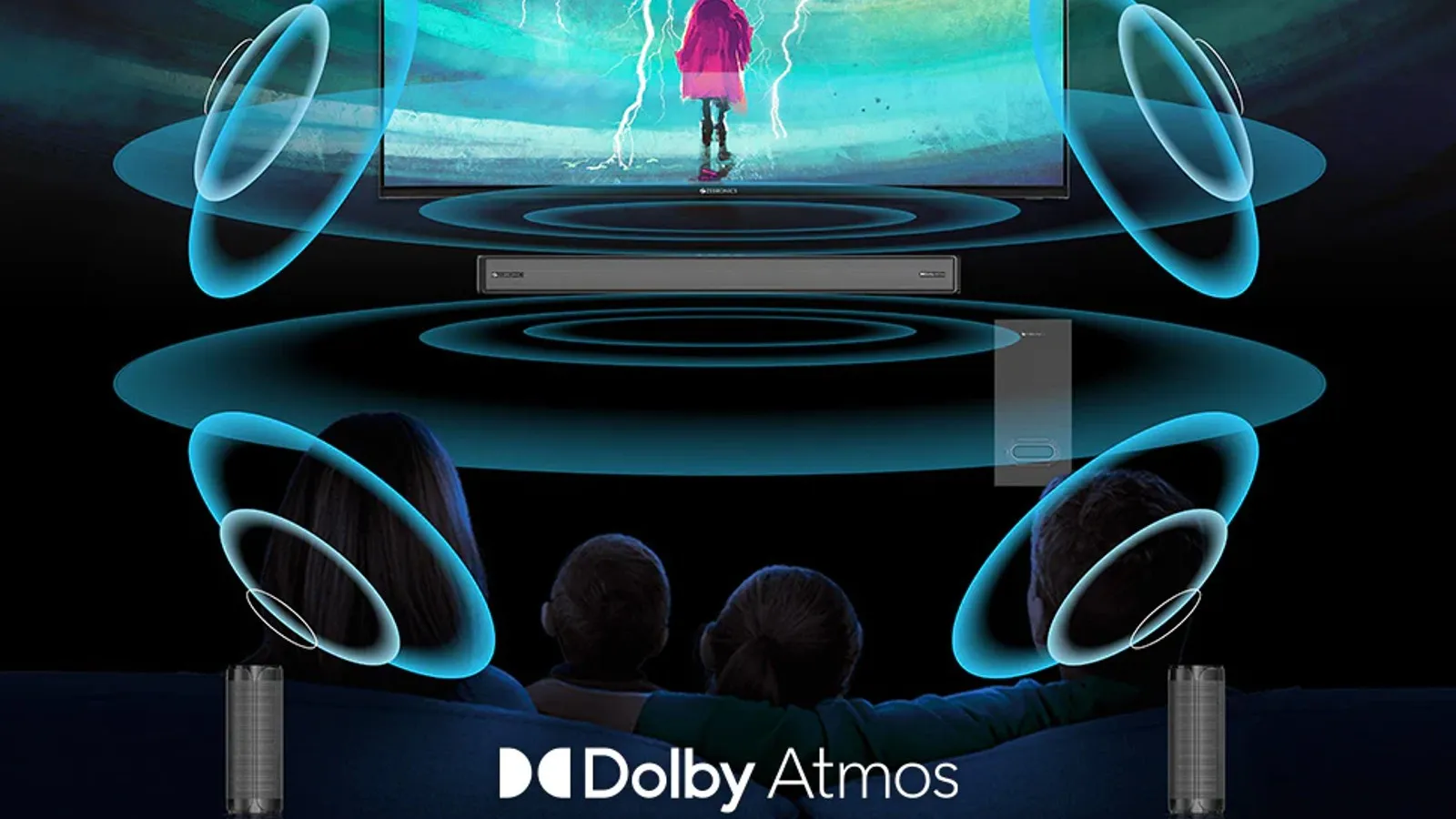
Apple Dolby Atmos—integrated into Apple Music, the Apple TV app, and system-wide Spatial Audio—is an object-based audio technology that creates a three-dimensional sound field over headphones, built-in speakers, and home theater equipment. By placing individual audio elements in virtual 3D space rather than traditional two-channel stereo panning, it delivers an immersive listening experience across supported Apple hardware.
Understanding Dolby Atmos in the Apple Ecosystem
Traditional sound reproduction relies on channel-based audio. In standard stereo setups, audio engineers pan sound between left and right channels. In surround sound formats like 5.1 or 7.1, audio is assigned to specific physical speakers arranged around the listener.
Dolby Atmos breaks away from channel-based restrictions by introducing object-based audio. In an object-based format, individual sounds—such as a vocalist, an acoustic guitar, or ambient sound effects—are isolated as audio objects. Each object is packaged with precise three-dimensional spatial metadata that dictates where the sound should exist in space (height, depth, and direction) relative to the listener.
- Traditional Stereo (2.0):
- Left Channel
- Right Channel
- Dolby Atmos Object-Based Audio (Height, Depth, Distance & Position Metadata):
- Vocal Object
- Overhead FX Object
- Guitar Object
- Drum Object
- Listener
Within Apple's software architecture, two distinct terms are often used together: Dolby Atmos and Spatial Audio. Understanding the difference between them clarifies how Apple processes sound:
- Dolby Atmos: The underlying audio format and encoding protocol created by Dolby Laboratories. It contains the multidimensional audio track and spatial metadata.
- Apple Spatial Audio: Apple's proprietary directional audio rendering engine. Spatial Audio takes multi-channel or Dolby Atmos streams and applies directional audio filters, adjusting the frequencies delivered to each ear to simulate sounds coming from anywhere in a 3D sphere. Spatial Audio also encompasses hardware-level features like dynamic head tracking.
When you listen to a Dolby Atmos track on Apple Music using compatible headphones, Apple Spatial Audio acts as the rendering pipe that converts the Dolby Atmos object metadata into a realistic binaural experience tuned specifically for your ears.
Technical Mechanics: How Apple Renders 3D Sound
Converting a complex 3D Dolby Atmos session into an immersive experience on standard two-driver headphones requires sophisticated Digital Signal Processing (DSP).
1. Binaural Rendering and HRTF
Human ears determine the direction of a sound source through slight differences in arrival time, volume, and frequency spectrum between the left and right ears. These subtle auditory cues are modeled mathematically using a Head-Related Transfer Function (HRTF).
When rendering Dolby Atmos over headphones, Apple’s Spatial Audio engine runs the multi-channel spatial data through an HRTF model. By altering the time delay (interaural time difference) and frequency curve (interaural level difference) of each sound object, the system tricks the human brain into perceiving sound as originating outside the head—from above, behind, or far off to the side.
2. Dynamic Head Tracking
For supported headphones, Apple enhances spatial binaural rendering with dynamic head tracking. Using micro-electro-mechanical gyroscopes and accelerometers embedded within the headphones (such as the AirPods Pro or AirPods Max), the system tracks the precise movement of your head in real time.
If an instrument is panned to sound like it is coming from your Mac screen in front of you, and you turn your head 90 degrees to the right, dynamic head tracking recalculates the HRTF in real time. The instrument’s virtual position shifts to your left ear, retaining its fixed position in physical space relative to the display device.
- Device Screen (Fixed Sound Stage)
- Sound anchored front
- Head Facing Front
- Left Ear (Equal L/R Audio Balance)
- Right Ear (Equal L/R Audio Balance)
- User turns head 90° Right
- Head Facing Right
- Left Ear (Receives Front Audio)
- Right Ear (Receives Rear Audio)
3. Audio Codecs and Delivery Formats
Apple streams Dolby Atmos content using two primary delivery codecs depending on the bandwidth and connection type:
- Dolby Digital Plus with JOC (Joint Object Coding): Used for video streaming services (Apple TV app, Netflix) and home theater outputs over HDMI. It carries high-density channel bed data along with embedded object metadata at manageable bitrates.
- Spatial Binaural Audio (AAC / Spatial Streams): When streaming over cellular or Wi-Fi to mobile hardware and outputting via Bluetooth to AirPods, Apple Music delivers a pre-rendered or real-time spatial stream optimized for minimal latency and maximum battery efficiency.
Hardware and Device Compatibility
To experience Dolby Atmos within the Apple ecosystem, hardware requirements vary depending on whether you are listening over headphones, built-in device speakers, or a dedicated home theater system.
Headphones
Any stereo headphones can play Dolby Atmos tracks from Apple Music if the playback setting is configured to "Always On." However, automatic detection and dynamic head tracking require Apple-designed silicon chips (such as the H1, H2, or W1 processors).
Built-in Speakers
Apple integrates spatially optimized speaker arrays into modern hardware. These devices use acoustic beamforming and spatial rendering algorithms to project sound outward, creating a soundstage wider than the physical dimensions of the device itself.
Home Theater and External Speakers
For full multi-speaker surround reproduction, the Apple TV 4K serves as the main host device, outputting uncompressed Dolby Atmos via an HDMI eARC/ARC connection to compatible audio video receivers (AVRs) or soundbars. HomePod speakers (1st and 2nd generation) also support native Dolby Atmos rendering when connected as default TV speakers.
| Hardware Type | Hardware Model / Family | Dolby Atmos Playback | Dynamic Head Tracking Support | Output Connection Type |
|---|---|---|---|---|
| Headphones | AirPods Pro (1st & 2nd Gen), AirPods Max | Yes (Automatic) | Yes | Bluetooth (AAC / Apple Proprietary) |
| Headphones | AirPods (3rd Gen), Beats Fit Pro, Beats Studio Pro | Yes (Automatic) | Yes | Bluetooth (AAC / Apple Proprietary) |
| Headphones | Standard 3rd-Party Headphones (Wired or Wireless) | Yes (Requires "Always On") | No | 3.5mm Aux / Standard Bluetooth |
| Mobile Speakers | iPhone 11 series and newer | Yes (Built-in Speakers) | No | Integrated Beamforming Speakers |
| Tablet Speakers | iPad Pro 11-inch (all gens), iPad Pro 12.9-inch (3rd gen+) | Yes (Built-in Speakers) | No | Integrated Quad-Speaker System |
| Mac Speakers | MacBook Pro (2018+), iMac (24-inch) | Yes (Built-in Speakers) | No | Integrated Multi-Speaker Array |
| Home Audio | Apple TV 4K + AVR / Dolby Atmos Soundbar | Yes | No (Over AVR) / Yes (Via connected AirPods) | HDMI 2.1 (eARC / Passthrough) |
| Smart Speakers | Apple HomePod (1st & 2nd Gen) | Yes | No | Wi-Fi (AirPlay / Native tvOS) |
| Smart Speakers | Apple HomePod mini | Spatial Stereo Pair | No | Wi-Fi (AirPlay / Native tvOS) |
Step-by-Step Configuration Guide
Configuring Dolby Atmos requires adjusting settings within specific operating systems to match your hardware configuration.
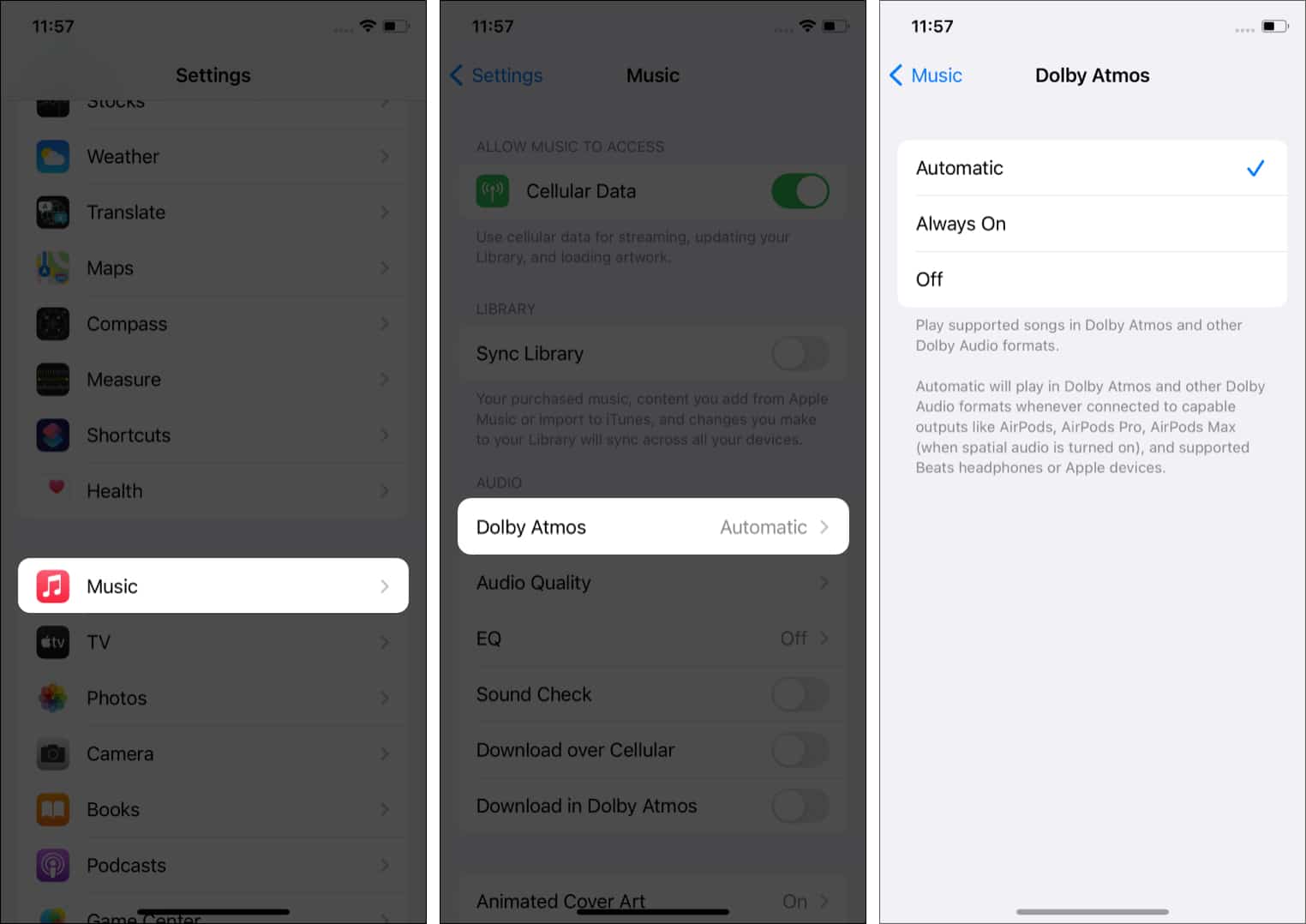
1. Enabling Dolby Atmos on iOS and iPadOS (iPhones & iPads)
To set up Dolby Atmos for Apple Music on an iPhone or iPad running modern OS software:
- Open Settings.
- Scroll down and select Music.
- Under the Audio section, tap Dolby Atmos.
- Choose your preferred operational mode:
- Automatic: Plays Dolby Atmos whenever supported Apple or Beats headphones, or built-in supported speakers, are connected.
- Always On: Forces Apple Music to stream the Dolby Atmos version of a track on any connected output, including third-party wired or Bluetooth headphones.
- Off: Forces all tracks to play in standard two-channel stereo.
- Settings
- Music
- Audio: Dolby Atmos
- Automatic
- Always On
- Off
- Audio: Dolby Atmos
- Music
Important Note on Streaming Quality: Ensure that Audio Quality settings in the same menu are set appropriately. Downloading Dolby Atmos tracks requires additional storage space. If storage is limited, you can disable Download in Dolby Atmos while leaving streaming enabled.
2. Setting Up Personalised Spatial Audio (iOS 16+)
To tune the binaural HRTF renderer to your personal anatomical structure:
- Wear your supported AirPods or Beats headphones paired to your iPhone.
- Go to Settings and tap the name of your connected headphones near the top of the menu.
- Select Personalised Spatial Audio and tap Personalise Spatial Audio...
- Follow the on-screen instructions using the TrueDepth front camera to capture images of your face and left/right ear anatomy.
This scan builds a customized spatial acoustic profile that syncs across all your Apple devices via iCloud.
3. Configuring macOS (Mac Desktops & Laptops)
- Launch the Apple Music application.
- In the menu bar, click Music > Settings (or Preferences).
- Click the Playback tab.
- Locate the Dolby Atmos drop-down menu and select Automatic, Always On, or Off.
To adjust spatial settings for system video playback or media apps on macOS:
- Open the Control Center icon in the menu bar while audio is playing.
- Click Sound (or the headphone icon).
- Select between Spatialize Stereo, Fixed, or Head Tracked.
4. Configuring tvOS (Apple TV 4K)
- Open Settings on Apple TV.
- Select Video and Audio > Audio Format.
- Under Immersive Audio, select Dolby Atmos and verify it is turned On.
Note: If your TV or AV Receiver does not support Dolby Atmos, tvOS will gray out this option or downmix the audio signal to 5.1 or uncompressed PCM stereo.
Content Ecosystem: Music, Movies, and Production
Apple has deeply integrated Dolby Atmos support across both consumer consumption platforms and professional creation tools.
Apple Music Catalogue
Apple Music hosts millions of tracks mixed in Dolby Atmos across genres ranging from classical to contemporary pop. Tracks available in the format display a distinct Dolby Atmos badge on the album art page and inside the Now Playing interface.
When a Dolby Atmos track plays, Apple Music automatically handles playback transitions. If a user loses internet bandwidth or connects an incompatible output, the service seamlessly falls back to high-resolution stereo or lossless AAC streams without audio dropout.
- Track Requests
- Apple Music Servers
- Dolby Atmos Stream (AAC Binaural / Spatial)
- Spatial Audio Engine
- Headphones
- Spatial Audio Engine
- Stereo Stream (ALAC Lossless / AAC 256)
- Direct Stereo DAC
- Headphones
- Direct Stereo DAC
- Dolby Atmos Stream (AAC Binaural / Spatial)
- Apple Music Servers
Video Services and Streaming
The Apple TV app, alongside major third-party applications like Disney+, Netflix, Max, and Amazon Prime Video, supports Dolby Atmos audio tracks on tvOS, iOS, iPadOS, and macOS.
For cinematic media, Dolby Atmos provides discrete height effects—such as rain overhead, flying aircraft, or environmental reverberation—creating an immersive theater environment over compatible surround setups or AirPods using Head Tracked Spatial Audio.
Music Production in Logic Pro
Apple integrated native Dolby Atmos authoring directly into its professional Digital Audio Workstation (DAW), Logic Pro.
Mix engineers can author spatial tracks natively without requiring external hardware renderers. Features include:
- Spatial Panner Plug-in: Allows engineers to position track elements in a 3D visual sphere.
- Integrated Dolby Atmos Renderer: Provides real-time rendering of channel beds (7.1.4) and spatial objects.
- Apple Spatial Audio Monitoring: Allows mix engineers to monitor their Dolby Atmos mix through the exact same binaural Spatial Audio algorithm used by consumers listening on Apple Music.
Technical Comparison: Stereo vs. Multichannel vs. Dolby Atmos
To evaluate how Dolby Atmos compares to older sound reproduction paradigms, review the structural differences outlined below:
| Feature / Dimension | Traditional Stereo | Standard 5.1 / 7.1 Surround | Apple Dolby Atmos (Spatial) |
|---|---|---|---|
| Channel Architecture | Fixed 2.0 (Left, Right) | Fixed 5.1/7.1 channels | Object-Based + 7.1.4 Bed |
| Height Channels | None | None | Discrete Overhead Height |
| Spatial Flexibility | Flat horizontal line | 2D horizontal plane | Fully 3D Sphere (360°) |
| Metadata Support | None | Fixed channel matrix | Real-time X, Y, Z coordinate data |
| Headphone Experience | In-head soundstage | Virtualized 2D surround | HRTF-rendered 3D space |
| Dynamic Head Tracking | Unsupported | Unsupported | Supported (H1/H2 hardware) |
| Mastering Target Standard | Peak Limiting / -9 to -14 LUFS | -24 LKFS (Broadcast Target) | -18 LUFS (Integrated Target) |
Audio Quality Dynamics and Audiophile Debates
While Dolby Atmos offers an expansive audio presentation, it has sparked significant discussion among audiophiles, sound engineers, and casual listeners regarding master quality and volume normalization.
1. Loudness and Volume Normalization (-18 LUFS Target)
Listeners often notice that Dolby Atmos tracks sound perceptibly quieter than standard stereo versions when played back-to-back.
This behavior is by design. Dolby Laboratories and Apple enforce strict mastering loudness standards for Dolby Atmos tracks on Apple Music, requiring an integrated loudness target of -18 LUFS (Loudness Units Full Scale). By comparison, modern stereo masters are frequently heavily compressed and peak-limited to achieve loudness levels of -10 to -6 LUFS (the "Loudness War").
Because Dolby Atmos tracks leave up to 12 dB of extra dynamic headroom, they sound lower in volume at the same volume slider setting. However, this lower average level allows for far greater dynamic range—transients like snare hits, orchestral swells, and sudden sound effects retain their natural impact without clipping or harsh digital limiting.
- Stereo Master (-9 LUFS):
- [ Peak Compression / Limited Headroom ] = Loud, but crushed dynamics.
- Dolby Atmos Master (-18 LUFS):
- Dynamic Headroom Range:
- Audio Peak
- Dynamic Space = Quieter average volume, greater clarity.
- Dynamic Headroom Range:
2. Catalog Remasters vs. Native Spatial Mixes
The perceived quality of a Dolby Atmos track depends heavily on how the mix was created:
- Native Spatial Mixes: Tracks recorded and mixed from the ground up for Dolby Atmos generally offer stellar spatial separation, wide soundstages, and clear placement of elements.
- Legacy Remasters ("Up-mixes"): Older catalog tracks originally recorded on multi-track analog tape and quickly converted into Dolby Atmos using automatic spatial processing can sometimes sound hollow, diffuse, or unbalanced. When instrument tracks are separated retroactively, vocal frequencies may wander or lose center stability if not panned thoughtfully by the mixing engineer.
3. Bluetooth Compression Realities
Despite Apple Music supporting Lossless Audio (ALAC up to 24-bit/192kHz), streaming over Bluetooth to AirPods relies on the AAC codec.
When you listen to a Dolby Atmos track on AirPods:
- The Dolby Atmos source file is decoded on the source device (iPhone/Mac).
- The Apple Spatial Audio DSP applies HRTF filters to render a binaural two-channel spatial mix.
- This binaural audio is compressed using AAC for wireless transmission over Bluetooth.
While the binaural spatial depth is preserved, the path is not bit-for-bit uncompressed audio. For pure lossless, uncompressed Dolby Atmos playback, users must employ an Apple TV 4K connected via HDMI to a discrete multi-speaker audio receiver.
Troubleshooting Common Dolby Atmos Issues
If Dolby Atmos audio is not functioning as expected, run through these diagnostic steps:
Issue: "Dolby Atmos" Icon Does Not Appear in Apple Music
- Check Track Availability: Not all songs on Apple Music have a Dolby Atmos mix. Look for the Dolby Atmos badge on the album page.
- Verify Settings: Go to Settings > Music > Dolby Atmos and toggle it from Automatic to Always On.
- Check Output Device: If using an external DAC, wired headphone amp, or third-party Bluetooth speaker, setting the option to Automatic may disable Atmos. Switch to Always On.
- Disable Low Power Mode: iOS may reduce audio processing features if Low Power Mode is enabled.
Issue: Head Tracking Feels Off-Center or Unstable
- Recalibrate Center Position: Look straight toward your display device, remove your AirPods, re-insert them into your ears, and wait 5 seconds.
- Reset Personalised Spatial Audio: Go to Settings > [Your AirPods] > Personalised Spatial Audio and select Stop Using Personalised Spatial Audio, then re-scan your ears.
- Toggle Head Tracking Mode: Open Control Center, press and hold the volume slider, tap Spatial Audio, and switch between Fixed and Head Tracked to check for sensor lock issues.
Frequently Asked Questions
Do I need special AirPods to listen to Dolby Atmos on Apple Music?
No. You can listen to Dolby Atmos tracks using any wired or wireless headphones. To use non-Apple headphones, navigate to Settings > Music > Dolby Atmos on your iOS device and select Always On. However, dynamic head tracking requires Apple or Beats headphones equipped with built-in motion sensors and Apple silicon (such as the H1 or H2 chip).
What is the primary difference between Spatial Audio and Dolby Atmos?
Dolby Atmos is the underlying object-based audio file format created by Dolby Laboratories that contains spatial coordinate metadata. Apple Spatial Audio is Apple's rendering framework, which takes multi-channel or Dolby Atmos signals and processes them with Head-Related Transfer Function (HRTF) filters—and optional head tracking—to deliver a 3D sound field over headphones and speakers.
Why do Dolby Atmos songs sound quieter than stereo songs on Apple Music?
Dolby Atmos tracks are mastered to a strict target loudness of -18 LUFS, whereas standard stereo mixes are often heavily compressed to sound as loud as possible (-10 to -6 LUFS). The quieter presentation of Dolby Atmos preserves dynamic range and prevents distortion, allowing quieter sound details and louder musical peaks to exist without digital clipping. You can equalize the volume levels by turning on Sound Check in your device's Music settings.
Does Apple Music charge an additional fee for Dolby Atmos access?
No. Dolby Atmos playback—along with Apple Music Lossless and Hi-Res Lossless streaming—is included in standard Apple Music subscriptions at no additional cost.
How do I turn off dynamic head tracking while keeping Dolby Atmos active?
While playing audio, swipe down to access the Control Center, press and hold the Volume Slider, and tap the Spatial Audio icon at the bottom right. Change the setting from Head Tracked to Fixed. This preserves the wide three-dimensional Dolby Atmos soundstage without shifting the audio when you turn your head.
Practical Setup Recommendations
To get the most out of Apple Dolby Atmos based on your hardware budget and listening environment:
- For Casual Mobile Listening (Headphones): Pair an iPhone with AirPods Pro (2nd Gen) or AirPods Max. Ensure Personalised Spatial Audio is configured via your iPhone's TrueDepth camera, and keep Dolby Atmos set to Automatic.
- For Critical Music Listening (Audiophile Setup): If using high-impedance, wired audiophile headphones plugged into an external DAC/headphone amplifier, set Dolby Atmos to Always On in Apple Music settings. Alternatively, turn Dolby Atmos Off if you prefer hearing the original two-channel stereo master as mixed by the recording engineer without HRTF processing.
- For Living Room Cinematic Audio (Home Theater): Connect an Apple TV 4K using a certified Ultra High Speed HDMI cable directly to a Dolby Atmos-capable AV Receiver or multi-driver soundbar setup (such as a 5.1.2 or 7.1.4 channel setup). Verify in tvOS sound settings that Dolby Atmos is enabled under Audio Format.