Sage 300, originally known as Accpac (Adaptive Cluster Performance Accounting), is a comprehensive, multi-tier enterprise resource planning (ERP) software system designed for small to medium-sized businesses. It provides a centralized platform for managing financial transactions, inventory, sales, purchasing, and customer relationships across multiple entities, currencies, and languages.
The Evolution of Accpac to Sage 300
The term "Accpac" carries significant weight in the history of business accounting software. Originally developed in the 1970s by Basic Software Group, it eventually became Accpac International, a subsidiary of Computer Associates. In 2004, the Sage Group acquired the product, rebranding it first as Sage ERP Accpac and eventually as Sage 300. Even in 2026, many long-term users and consultants still refer to the system as "Accpac" because of its deeply rooted reputation for stability and its unique modular architecture.
The transition from a legacy desktop application to a modern, web-enabled ERP has been a decades-long journey. While the core "business logic"—the rules that govern how data is processed—remains largely consistent with the original high-integrity design, the delivery mechanism has evolved. Today, Sage 300 exists primarily as Sage 300cloud, a hybrid solution that combines the depth of a desktop-based engine with the flexibility of web-based screens and cloud-connected features.
Understanding this evolution is critical for any business evaluating the software. You aren't just buying a modern web app; you are buying a system with over 40 years of refined accounting logic that has been hardened by hundreds of thousands of users globally.
Core Architecture and Design Philosophy
What set Accpac apart from its competitors in the 1990s and 2000s—and what keeps Sage 300 relevant in 2026—is its Object-Oriented Architecture. The system was built using a multi-tier approach that separates the user interface, the business logic, and the database.
The Advantage Series Engine
The heart of the system is the "Advantage Series" engine. This layer ensures that regardless of whether a transaction is entered via a web browser, a desktop client, or an integrated third-party mobile app, the same accounting rules are applied. This prevents data corruption and ensures that financial reports are always accurate.
Database Independence
Historically, Accpac was famous for being database-independent, supporting Pervasive PSQL, Oracle, and IBM DB2. However, in the modern era, the system has standardized on Microsoft SQL Server. This shift has allowed Sage to optimize performance and take advantage of modern Business Intelligence (BI) tools like Power BI and Sage Intelligence Reporting.
Multi-Currency and Multi-Entity Capabilities
Sage 300 was designed from the ground up for international business. Unlike many entry-level accounting packages that "bolt on" multi-currency features, Sage 300 handles exchange rate fluctuations, gains, and losses at the transaction level. It allows companies to maintain separate sets of books for different legal entities while providing effortless "Global Consolidation" to see the health of the entire organization in a single functional currency.
Key Modules and Functional Areas
Sage 300 is a modular system, meaning businesses only purchase and implement the specific components they need. These modules are integrated, sharing a single database to eliminate duplicate data entry.
Financial Management
The Financial suite is the foundation of any Sage 300 implementation.
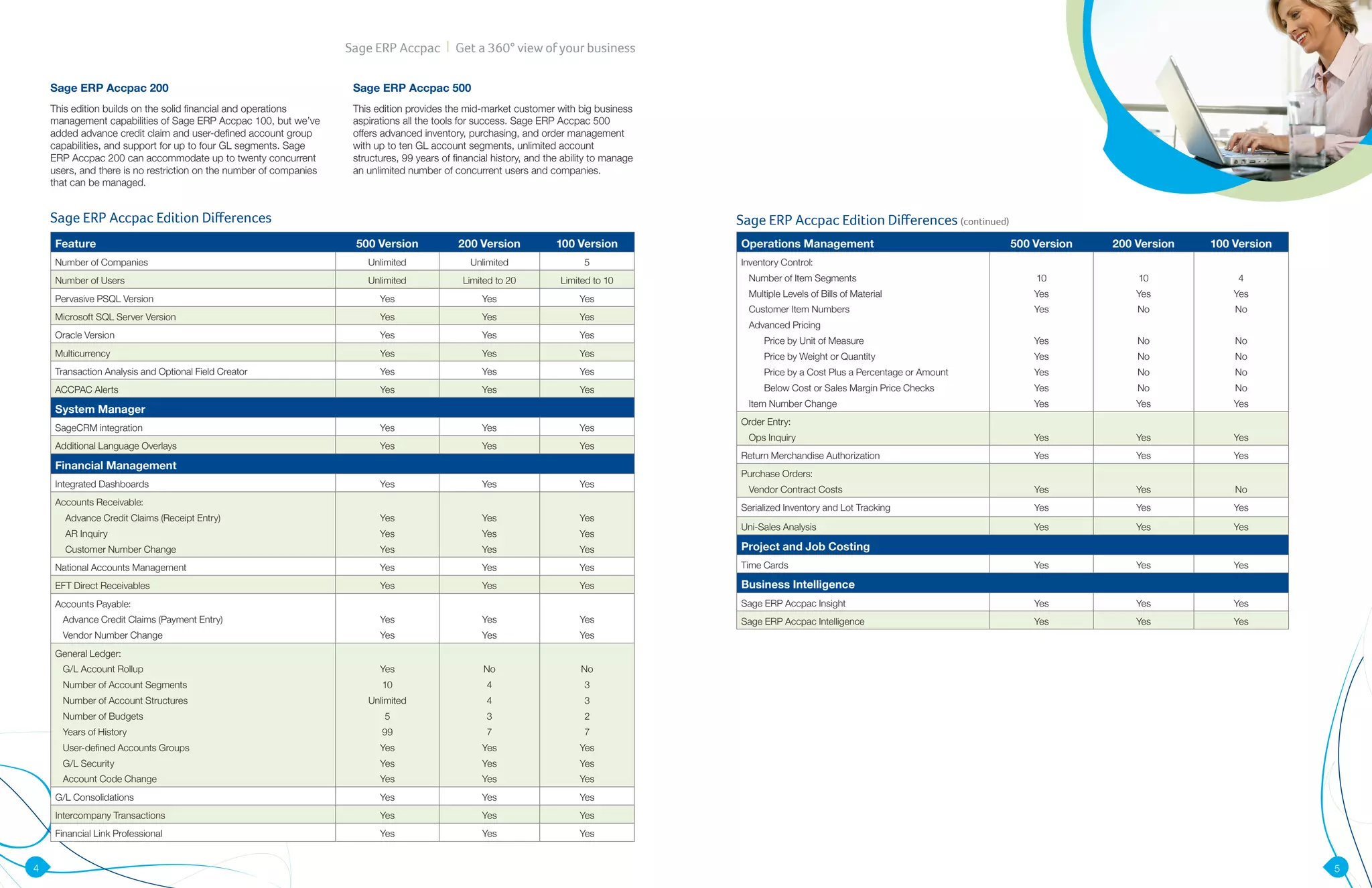
- General Ledger (GL): Supports an infinite number of years of history and a flexible account structure with up to 10 segments.
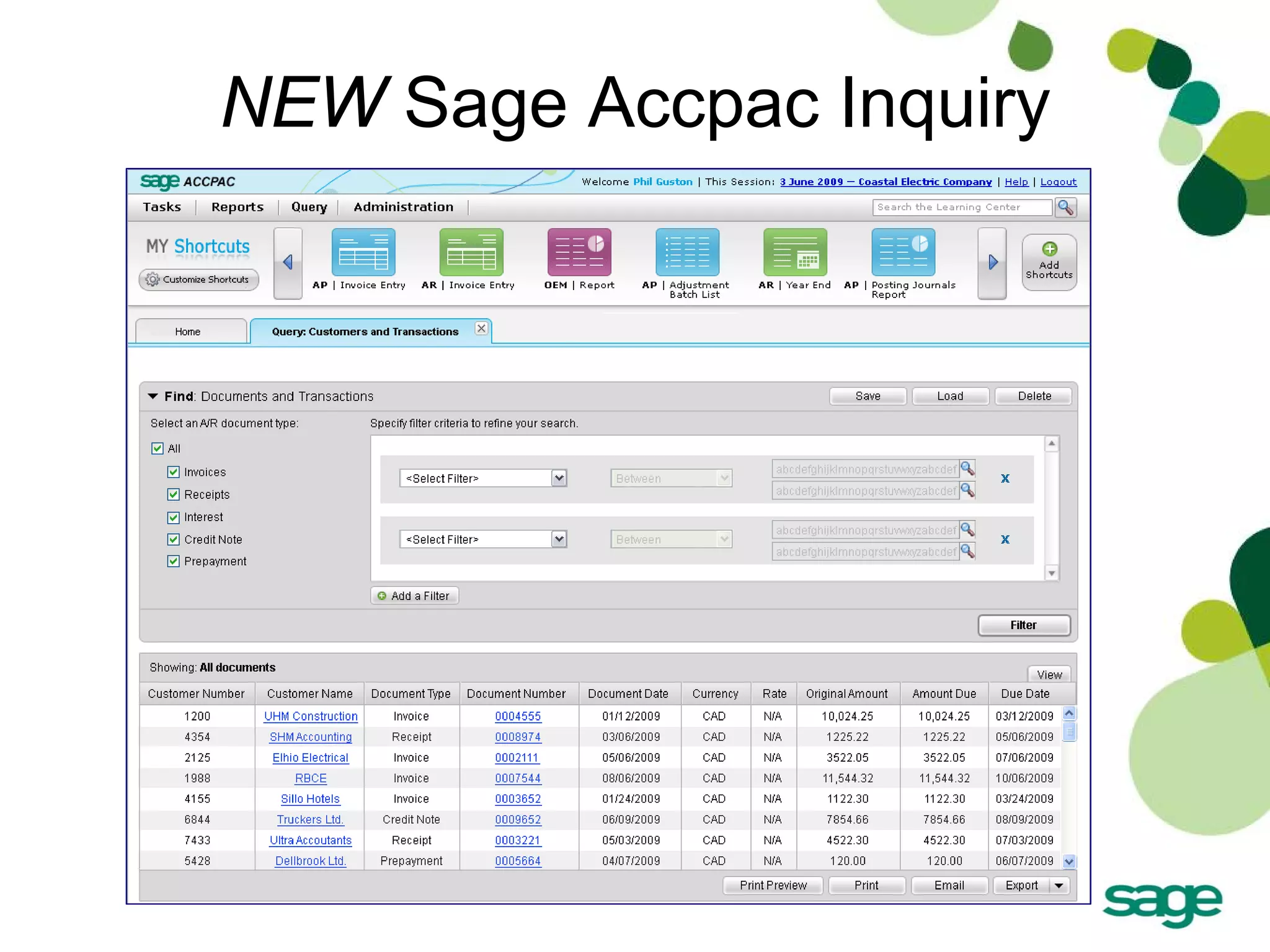
- Accounts Payable (AP) and Accounts Receivable (AR): Manages vendor and customer transactions, including complex terms, tax calculations, and electronic payments.
- Bank Services: Centralizes all cash management, bank reconciliations, and check printing.
- Tax Services: A centralized module that manages sales tax (GST/VAT) across all other modules, ensuring compliance with local tax authorities.
Operational Management
For businesses that deal with physical goods, the operational modules are essential.
- Inventory Control (IC): Provides multi-location tracking, various costing methods (FIFO, LIFO, Average, Standard), and kitting/item assemblies.
- Order Entry (OE): Manages the entire sales cycle from quote to shipment to invoice. It provides real-time visibility into stock levels during the sales process.
- Purchase Order (PO): Streamlines the procurement process, allowing for requisitions, multi-level approvals, and automated receipting against inventory.
Specialized Modules
- Project and Job Costing (PJC): Critical for construction and professional services, this module tracks costs and revenue at the project, phase, and category levels.
- Payroll: Sage 300 offers robust payroll processing for the U.S. and Canada, handling tax filings and direct deposits.
- Fixed Assets: Manages the lifecycle of corporate assets, including depreciation schedules and disposals.
Sage 300cloud vs. On-Premise Deployment
In 2026, the primary point of confusion for many buyers is the difference between "Sage 300" and "Sage 300cloud." It is important to clarify that Sage 300cloud is not a pure SaaS (Software as a Service) product like QuickBooks Online or Sage Intacct.
| Feature | Sage 300 (On-Premise) | Sage 300cloud (Hybrid) |
|---|---|---|
| Hosting | Local Server | Private Cloud or Local Server |
| Interface | Desktop Classic (Windows) | Web Screens + Desktop Classic |
| Licensing | Perpetual (Legacy) | Subscription |
| Updates | Manual | Subscription-entitled updates |
| Integrations | Local SDK / ODBC | Web API + Office 365 Integration |
Sage 300cloud is essentially the classic Accpac engine wrapped in a modern subscription model with added web-based features. Businesses can choose to host the data on their own servers or in a private cloud (such as Microsoft Azure or AWS). This hybrid approach is preferred by companies that require deep customization or have strict data sovereignty requirements but still want their team to access the system via a web browser.
Technical Requirements and Integration
For IT professionals and system administrators, Sage 300 is known for its predictable requirements. As of 2026, the system typically requires:
- Server Environment: Windows Server 2022 or newer.
- Database: Microsoft SQL Server 2019, 2022, or Azure SQL.
- Client Access: Windows 10/11 for the desktop client, or modern browsers (Chrome, Edge, Safari) for the web screens.
One of the most powerful aspects of the system is the Sage 300 SDK (Software Development Kit). Because the business logic is exposed, developers can write "third-party" modules that look and feel exactly like the core software. There is a massive ecosystem of "Endorsed Solutions" for Sage 300, including:
- Technosoft Service Manager: For field service and equipment maintenance.
- Orchid Systems: For streamlined inter-entity transactions and document management.
- AutoSimply: A full-featured Manufacturing Resource Planning (MRP) solution.
The Advantages of Using Sage 300 in 2026
Despite the rise of native cloud ERPs, Sage 300 maintains a loyal following for several distinct reasons.
1. Superior Data Integrity
The "batch processing" nature of Sage 300 is a favorite among traditional controllers. Instead of every transaction immediately hitting the General Ledger, transactions are organized into batches. This allows for a "Review and Post" workflow that significantly reduces errors in financial reporting.
2. Customization Without Compromise
Through the use of VBA (Visual Basic for Applications) and the ability to hide or rename fields without touching the source code, Sage 300 can be tailored to very specific industry workflows. These customizations typically survive version upgrades, which is a common pain point in other ERP systems.
3. Deep Reporting Capabilities
Sage 300 utilizes an "Unbound" reporting model. With tools like Sage Intelligence or Crystal Reports, users can pull data from any table in the database to create highly complex, formatted financial statements.
4. Scalability
A business can start with a single-user "Standard" edition and scale up to the "Advanced" or "Premium" editions (which support unlimited users and sophisticated features like multi-currency) without having to undergo a fresh implementation. The data migration is a simple "database load" from one version to the next.
Common Challenges and Troubleshooting
No software overview is complete without addressing potential drawbacks. For Sage 300, the challenges often stem from its age and the complexity of its configuration.
- Network Latency: The classic desktop client is sensitive to network speed. If running over a VPN, it can be prohibitively slow. Most experts recommend using Remote Desktop Services (RDS) or the Web Screens for remote access.
- User Interface Dichotomy: There is currently a split between the classic Windows screens and the newer Web screens. Not 100% of the functionality has been ported to the web yet, meaning "power users" often find themselves switching back to the desktop interface for complex tasks like Year-End processing.
- Consultant Dependency: Because the system is so robust, it is difficult to "self-implement." Most businesses will need to work with a Sage Authorized Partner to ensure the chart of accounts and sub-ledgers are configured correctly from the start.
Frequently Asked Questions
Is Accpac the same as Sage 300?
Yes. Accpac was the original name of the software before it was acquired by Sage in 2004. While the name has changed to Sage 300, the underlying architecture and many of the file naming conventions (like "ACCPAC.EXE") remain.
Does Sage 300 run in the cloud?
Sage 300cloud is a hybrid solution. While it offers web-based access via a browser, the software and database are typically hosted on a server (either on-premise or in a private cloud environment). It is not a multi-tenant SaaS product like Sage Intacct.
What industries use Sage 300 most?
Sage 300 is particularly popular in wholesale distribution, professional services, non-profit organizations, and multi-national companies that require sophisticated multi-currency and multi-entity consolidation features.
How much does Sage 300 cost in 2026?
Pricing is now almost exclusively subscription-based. Costs vary depending on the number of concurrent users and the specific modules required. A typical mid-market implementation can range from $3,000 to $15,000 per year in licensing, plus implementation and consulting fees.
Can Sage 300 integrate with Salesforce?
Yes, Sage 300 can integrate with Salesforce and other CRM platforms through the Sage CRM module or via third-party integration tools and APIs. This allows for a seamless flow of data between sales teams and the accounting department.
Final Recommendations for Potential Users
If your business has outgrown entry-level software like QuickBooks or Xero and requires a system that can handle complex international requirements, Sage 300 remains a formidable contender in 2026. Its greatest strength lies in its reliability and the depth of its financial logic.
Next Steps:
- Audit Your Requirements: Determine if you need specialized modules like Project and Job Costing or Manufacturing.
- Evaluate Hosting: Decide whether you have the infrastructure to host the system locally or if you should look for a Sage-certified hosting provider.
- Consult a Partner: Reach out to a Sage Business Partner for a demonstration tailored to your specific chart of accounts and workflow requirements.
- Consider the Long-term Path: While Sage 300 is highly stable, also ask your consultant about Sage's "Cloud First" roadmap to ensure your business is positioned for future technology shifts.