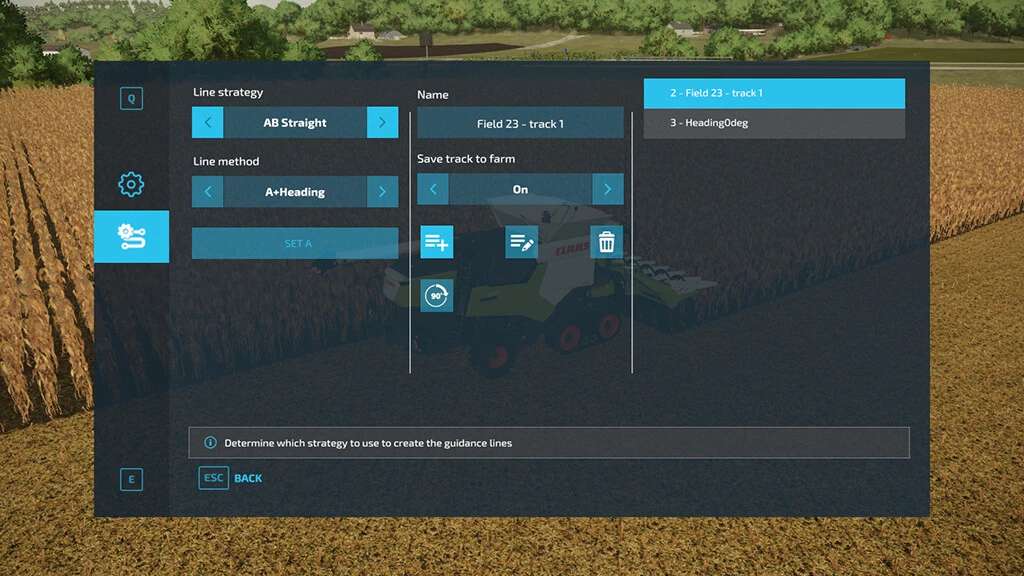
The FS22 GPS mod, specifically known as Guidance Steering, provides a level of precision, resource efficiency, and professional realism that the base Farming Simulator 22 AI workers cannot match. While the vanilla game offers basic AI automation, the mod allows players to maintain perfect lines, manage complex implement offsets, and significantly reduce operational costs through manual but guided control.
In the world of Farming Simulator 22 (FS22), even as we look back from the perspective of 2026, the debate between utilizing "Vanilla" in-game mechanics and community-developed modifications remains central to the player experience. GIANTS Software made significant strides with their AI Worker system, introducing "Go To" and "Job" functions that simplified logistics. However, for the serious virtual farmer, these built-in systems often fall short of the technical demands required for large-scale, efficient operations.
The Guidance Steering mod, developed primarily by Wopster, has remained a staple for the community. It bridges the gap between the chaotic, often-imperfect paths of the base game's AI and the rigid, laser-straight accuracy required in modern industrial agriculture. Below, we explore the five definitive reasons why the FS22 GPS mod is a superior choice for managing your virtual farm.
1. Unmatched Precision and Overlap Control
The primary frustration with base-game farming is the "human error" factor or the inefficiency of AI workers who often leave unworked gaps or create excessive overlaps. When driving manually in the vanilla game, maintaining a perfectly straight line over a 500-meter field is nearly impossible.
The Problem with Visual Guessing
In the base game, players rely on visual cues or the "tire track" method to line up their next pass. This inevitably leads to overlap—where you fertilize or seed the same strip twice—or missed spots that require a "clean-up" pass. Both scenarios result in wasted time and resources.
How Guidance Steering Solves It
The GPS mod introduces the A-B Line system. By setting a starting point (A) and a direction point (B), the mod generates a series of parallel lines across the entire field. The mod doesn't just show you where to go; it can take over the steering of the tractor (while you manage the speed), ensuring that every pass is exactly adjacent to the previous one with zero-millimeter deviation.
The mod allows for Auto-Width detection. When you attach a 12-meter wide seeder, the GPS calculates the track distance to exactly 12 meters. This ensures that you are utilizing the full working width of your expensive equipment, a feat that is incredibly difficult to achieve consistently without digital guidance.
2. Comprehensive Implement Offset and Track Configuration
One of the most significant technical advantages of the Guidance Steering mod over vanilla farming is its ability to handle implement offsets. In real-world farming, not every tool sits directly behind the center of the tractor. Some mowers, plows, and specialized harvesters are offset to the side.
The Limitation of Vanilla AI
The FS22 AI workers struggle with asymmetric tools. You may have noticed an AI worker missing an entire strip of a field because they cannot calculate the distance from the tractor’s center to the edge of an offset plow. If a player drives these tools manually without the mod, they must constantly perform mental math to figure out where the "center" of their next pass should be.
The GPS Mod Advantage
The Guidance Steering UI allows players to manually input an offset value (in meters) to the left or right. This shifts the guidance line so that the edge of the implement, rather than the center of the tractor, becomes the point of reference.
- Track Skipping: The mod allows you to skip tracks (e.g., doing tracks 1, 3, 5, then coming back for 2, 4, 6). This is a professional technique used to prevent tight turns that damage equipment or soil.
- Visual Guidance: The mod provides a "light bar" or a 3D line on the ground. Even if you choose not to use the "auto-steer" function, having a visual HUD (Heads-Up Display) ensures you are always on the right path.
3. Superior Headland Management and Turn Automation
"Headlands" are the areas at the end of a field where machinery turns around. In vanilla FS22, the AI workers often get "stuck" on trees, fences, or steep inclines during their turn sequence.
Managing Field Boundaries
The Guidance Steering mod includes a dedicated Headland Management suite. Players can set a specific distance (e.g., 24 meters) from the field edge where the GPS will trigger an alert or automatically stop the tractor. This allows the player to maintain a consistent "turning zone," which is essential for keeping the field looking professional and organized.
Turn Modes
While the base game's AI simply tries to do a U-turn (often unsuccessfully with large trailers), the GPS mod offers various turn strategies. You can configure how the guidance lines interact with the field boundary, ensuring that you don't start your next row too early or too late. This level of control prevents the "zigzag" edges often seen in AI-worked fields, which are a nightmare to fix during the harvesting stage.
4. Economic Efficiency and Resource Conservation
In Farming Simulator 22, profit margins are everything, especially when playing on "Hard" economic difficulty. The GPS mod is not just a convenience tool; it is a financial one.
Cost Analysis of Overlap
Consider a standard fertilization contract. If you are overlapping your passes by just 10% because you are driving manually without a guide, you are essentially throwing 10% of your liquid fertilizer or solid pellets into the trash. On a large 20-hectare field, this can equate to thousands of Euro/Dollars in wasted product.
| Feature | Vanilla Manual/AI | GPS Mod (Guidance Steering) | Economic Impact |
|---|---|---|---|
| Pass Accuracy | Estimated (Visual) | 99.9% (A-B Lines) | Reduces input waste by 5-15% |
| Working Width | Often underutilized | Optimized via Auto-Width | Saves fuel and engine hours |
| Turning | Erratic/Manual | Automated/Planned | Reduces soil compaction simulation impact |
| Implement Offset | Not supported | Fully adjustable | Prevents missed strips/re-work |
| Setup Cost | $0 | ~$15,000 (In-game) | High ROI via resource savings |
Engine Hours and Maintenance
By ensuring you take the most efficient path possible, you reduce the total distance traveled. This results in lower engine hours on your tractors. In FS22, higher engine hours lead to faster wear and tear, increasing repair costs and decreasing the resale value of your fleet. Using the GPS mod ensures your machines are only running for as long as they absolutely need to be.
5. Professional Realism and User Agency
For many players, Farming Simulator is about the "Simulation" aspect. Modern agriculture is a high-tech industry. It is rare to see a 300-horsepower tractor in 2026 without a sophisticated GPS and autonomous steering system.
Enhancing Immersion
The vanilla AI takes the "player" out of the driver's seat. You click a button, and the worker does the job. This can feel more like a management sim than a driving sim. The Guidance Steering mod keeps the player in the seat. You are still the operator, managing the speed, the implement height, and the turns, but you are using the tools a real professional would use.
The Modular Purchase System
The mod integrates into the game's shop system. You don't just "have" GPS on every tractor for free. You must go to the workshop and buy the "GPS Global Navigation Satellite System" for each vehicle (typically costing around $15,000 in-game). This adds a layer of progression. You start with older, "analog" equipment and eventually upgrade your fleet to be GPS-capable, mimicking the real-world modernization of a farm.
Technical Setup and Prerequisites
To utilize the Guidance Steering mod effectively in 2026, you must ensure your setup meets the necessary requirements. While the mod is highly optimized, it does interact with the game's core input system.
Installation and Configuration
- Download: Ensure you are downloading the latest version from the official GIANT's ModHub to avoid compatibility issues with other scripts.
- Purchase: Take your tractor to the in-game shop or workshop. Under the "Configurations" menu, you must select "Guidance Steering" and install it.
- Activation: Once in the vehicle, the default keybind is usually Alt + C to open the menu. You must turn the system "On" before you can set your A and B points.
Common Technical Terms
- Track Width: The width of your implement. Use the "Auto-width" function for the best results.
- Side Offset: Used for tools like the "Pottinger Novacat" mower that sits to the side.
- Angle Snap: Forces the A-B line to snap to specific degrees (e.g., 90°, 180°), which is perfect for perfectly square fields.
Troubleshooting and Common Mistakes
Even with its superior logic, the GPS mod can be frustrating if misconfigured. Here are the most common issues players encounter:
- Incorrect Width Calculation: If you have a folding implement, ensure it is fully unfolded before hitting the "Auto-width" button. If you calculate the width while it is folded, your lines will be far too narrow.
- GPS Not Engaging: The "Auto-steer" (default Alt + X) will not engage unless you have set a valid A-B line and are relatively close to the track.
- Drift on Slopes: On very steep hills, even with GPS, tractors may experience "side-slip." You may need to manually adjust your offset slightly to compensate for gravity pulling the implement downhill.
Frequently Asked Questions
Does the GPS mod work on consoles?
As of 2026, the advanced "Guidance Steering" mod remains a PC-only feature because it requires custom scripts that are not permitted on PlayStation or Xbox versions of FS22. Console players are limited to the base game's AI worker improvements.
Can I use the GPS mod and AI workers at the same time?
Generally, no. The Guidance Steering mod is designed for the player to drive. If you hire an AI worker, they will use their own internal pathfinding logic and ignore your GPS lines. However, some "AI replacement" mods like CP (Courseplay) can work in tandem with the logic of GPS paths.
Does the GPS mod work with articulated tractors?
Yes, but articulated tractors (like the Case IH Quadtrac) have a different steering pivot point. The mod handles this well, but you may notice the "auto-steer" is more aggressive as the tractor pivots in the middle to stay on the line.
Is the Guidance Steering mod free?
Yes, the mod is free to download via the ModHub. However, within the game's economy, you must pay for the GPS module as a vehicle upgrade at the shop.
Final Recommendation
If you play Farming Simulator 22 on PC, the Guidance Steering mod is an essential download. It transforms the gameplay from a struggle against imprecise controls into a high-efficiency management simulation. By reducing overlap, managing offsets, and providing professional-grade headland tools, it significantly outperforms the base game's built-in farming mechanics. To get started, head to the workshop, equip your favorite tractor with the GPS module, and experience the satisfaction of a perfectly straight furrow.